AI Test Case Generation: Scripts in 60 Seconds
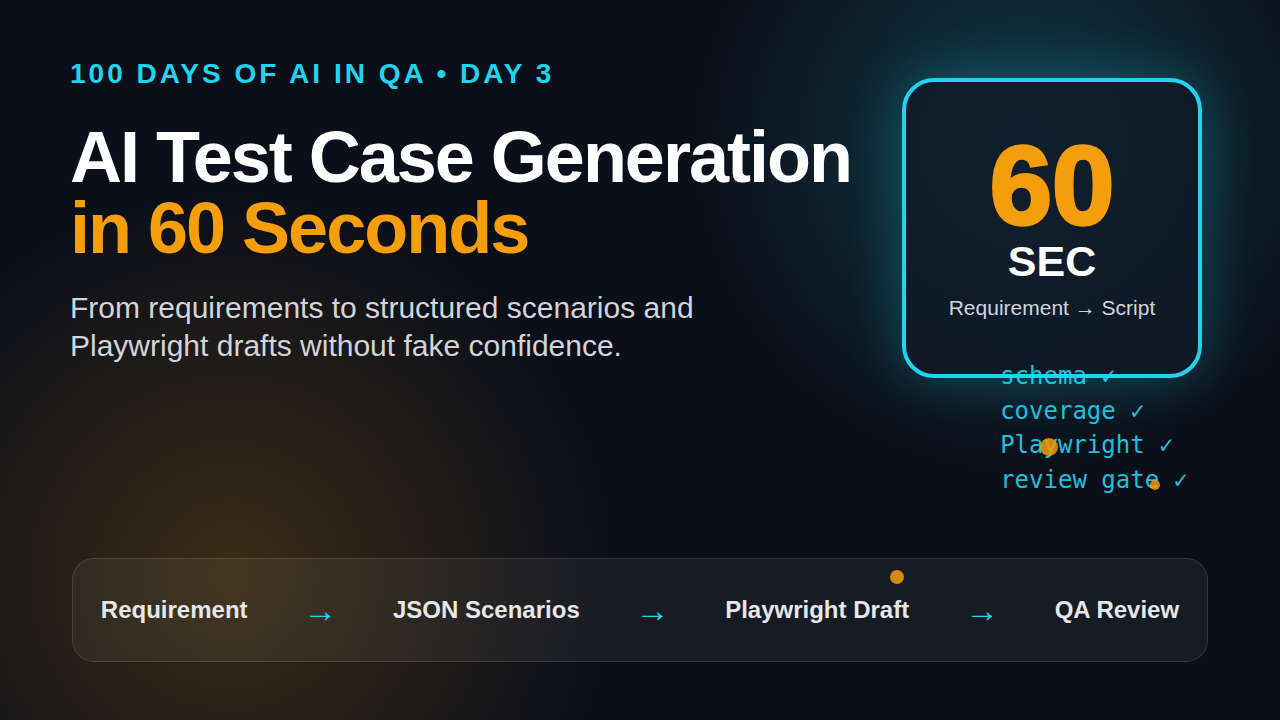
Table of Contents
🤖 Learning AI-powered testing? Go hands-on with LLM, RAG, and AI-agent testing in the AI-Powered Testing Mastery course at The Testing Academy.
- What AI Test Case Generation Means
- Why 60 Seconds Is Realistic
- The Input Format That Works
- Build the Generator Pipeline
- Turn Requirements Into Playwright Tests
- Validate AI Generated Test Cases
- Where Teams Go Wrong
- India Career Context
- Key Takeaways
- FAQ
AI test case generation sounds simple: paste a requirement, get test cases, ship faster. I like the idea, but I see many QA teams use it in the weakest possible way. They ask a model for “all test cases for login” and then trust the answer like a junior tester did perfect requirement analysis.
That is not how I use it. A better workflow is more boring and more useful: clean requirement in, structured scenarios out, Playwright scripts generated, then a validation gate checks coverage, selectors, assertions, and risk. If you set up that pipeline once, generating a first draft from requirements to executable scripts in 60 seconds is realistic for common flows like login, cart, search, profile update, password reset, and API CRUD screens.
This tutorial shows the practical version. No magic. No fake “AI replaced QA” story. Just a repeatable system a tester can run today.
Contents
What AI Test Case Generation Means
AI test case generation is the process of converting a product requirement, user story, API contract, or acceptance criteria into test scenarios and runnable automation assets with help from an LLM or agent. The important word is “help.” The model is not the test owner. The QA engineer is still responsible for risk, data, coverage, and release confidence.
What the model is good at
LLMs are useful when the input has enough context. They can quickly identify common paths, negative cases, boundary cases, and missing acceptance criteria. They can also create a clean first draft of Playwright, Cypress, Selenium, Postman, or REST Assured code.
For example, give an LLM this requirement:
Users can reset a password using a registered email. The reset link expires after 15 minutes. The new password must have at least 12 characters, one uppercase letter, one number, and one special character.
A decent generator should return more than the happy path. It should suggest tests for unknown email, expired link, reused token, weak password, already used link, rate limiting, email delivery, audit logging, and session invalidation.
What the model is bad at
The model does not know your production incidents, flaky areas, database rules, feature flags, tenant setup, or business risk unless you provide them. It may invent selectors. It may assume UI text that does not exist. It may write beautiful assertions that do not assert the real business outcome.
That is why the output must be treated as a draft. I use AI for speed, not final authority.
The minimum useful output
A good AI test case generation flow should produce four artifacts:
- Structured test scenarios with priority and risk notes.
- Test data requirements with valid and invalid values.
- Executable automation draft, preferably Playwright TypeScript for web flows.
- Review checklist that tells the tester what to verify manually before merge.
If your tool only gives a long text list, you still have manual work. If it gives structured JSON and runnable code, you can plug it into CI after review.
Why AI Test Case Generation in 60 Seconds Is Realistic
The “60 seconds” claim is not for a full enterprise test strategy. It is for first draft generation on a scoped requirement. That scope matters. A model can generate useful tests fast when the requirement is small, the output schema is strict, and the automation framework is already prepared.
The current tooling makes this possible
Playwright already provides a test generator that records browser actions and chooses locators. The official Playwright Test Generator documentation says it can generate tests as you perform actions in the browser and prioritizes role, text, and test id locators. That matters because AI generated scripts become less fragile when they follow the same locator discipline.
LangChain’s structured output documentation supports schema based responses. For QA, this is critical. You do not want a poetic answer. You want fields like scenario_id, priority, preconditions, steps, expected_result, and automation_candidate.
For evaluation, DeepEval documents local test runs using deepeval test run and LLM test cases. The DeepEval quickstart is a useful reference if you want to test the quality of model output instead of only testing the application.
Community signals are strong
Hard data also shows that these ecosystems are active. At the time of research for this article, the GitHub API reported about 90,699 stars for microsoft/playwright, 138,999 stars for langchain-ai/langchain, 16,086 stars for confident-ai/deepeval, and 22,094 stars for promptfoo/promptfoo. Stars are not quality guarantees, but they do show that the tooling is not niche anymore.
What must already exist
For a one minute flow, your team needs a few pieces ready before the prompt runs:
- A standard requirement template.
- A test scenario JSON schema.
- A Playwright project with fixtures, auth state, and base URLs configured.
- Stable selectors, ideally
data-testidor accessible roles. - A validation step that rejects weak output.
Without these, the model still helps, but the output lands in a messy manual review queue.
The Input Format That Works
The fastest way to improve AI test case generation is to stop pasting raw Jira text. Jira tickets often mix business goals, implementation notes, open questions, and old comments. The model needs a clean contract.
Use this requirement block
I use a compact template like this:
Feature: Password reset
User role: Registered user
Business risk: Account takeover and support tickets
Requirement:
  A user can request a reset link using a registered email.
  The link expires after 15 minutes.
  The link can be used only once.
  New password policy: 12 chars, uppercase, number, special char.
Acceptance criteria:
  1. Registered email receives reset link.
  2. Unknown email shows generic success message.
  3. Expired link shows invalid link message.
  4. Used link cannot be reused.
  5. Strong password updates account and invalidates old sessions.
Out of scope:
  Social login accounts
  Admin password reset
Test environment:
  Web app, Playwright TypeScript, seeded user available
Known selectors:
  email: [data-testid="forgot-email"]
  submit: [data-testid="forgot-submit"]
  password: [data-testid="new-password"]
  confirm: [data-testid="confirm-password"]
This is not fancy. It is clear. That is why it works.
Add risk, not only steps
Most generated test cases are weak because the prompt asks for steps only. QA value comes from risk thinking. Add the risk explicitly: money movement, privacy, compliance, data loss, security, customer trust, release blocker, or support load.
When I add “account takeover” to the password reset requirement, the generated tests change. The model starts suggesting token reuse, session invalidation, rate limiting, generic messages for unknown emails, and audit logs. That is better than five shallow UI tests.
Force the model into a schema
Use JSON for the first output. Markdown tables look nice, but they are annoying for automation. JSON can be linted, validated, stored, diffed, and passed to a code generator.
{
  "feature": "Password reset",
  "scenarios": [
    {
      "id": "PR-001",
      "title": "Registered user receives reset link",
      "type": "positive",
      "priority": "P0",
      "risk": "Account recovery failure",
      "preconditions": ["Seeded registered user exists"],
      "steps": ["Open forgot password", "Submit registered email"],
      "expected_result": "Generic success message is shown and email is queued",
      "automation_candidate": true
    }
  ]
}
Build the Generator Pipeline
I prefer a small pipeline instead of one giant prompt. A pipeline is easier to debug and safer for teams. If one step fails, you know where it failed.
The 5 step pipeline
- Normalize the requirement. Remove comments, duplicates, and unclear scope.
- Generate structured scenarios. Ask for positive, negative, boundary, security, and integration cases.
- Score coverage. Check if each acceptance criterion has at least one test.
- Generate Playwright drafts. Use the scenario JSON and known selectors.
- Run validation. Lint, type check, dry run, and review assertions.
This gives testers control. It also makes the system teachable to junior SDETs.
Prompt for scenario generation
Here is a practical prompt I would start with:
You are a senior SDET. Convert the requirement into test scenarios.
Return only valid JSON matching this schema:
feature: string
coverage_notes: string[]
scenarios: array of {
  id, title, type, priority, risk, preconditions, steps,
  expected_result, test_data, automation_candidate, tags
}
Rules:
- Cover every acceptance criterion.
- Include negative and boundary cases.
- Add security cases if risk mentions account, payment, privacy, or admin.
- Do not invent UI selectors.
- If information is missing, add it to coverage_notes.
Requirement:
{{REQUIREMENT_BLOCK}}
Simple Python orchestrator
This example uses a placeholder call_llm function because teams use different providers. The important part is the pipeline shape.
import json
from pathlib import Path
from jsonschema import validate

SCENARIO_SCHEMA = {
    "type": "object",
    "required": ["feature", "coverage_notes", "scenarios"],
    "properties": {
        "feature": {"type": "string"},
        "coverage_notes": {"type": "array", "items": {"type": "string"}},
        "scenarios": {"type": "array", "minItems": 3}
    }
}

def generate_scenarios(requirement_text: str) -> dict:
    prompt = Path("prompts/scenario-generator.txt").read_text()
    raw = call_llm(prompt.replace("{{REQUIREMENT_BLOCK}}", requirement_text))
    data = json.loads(raw)
    validate(instance=data, schema=SCENARIO_SCHEMA)
    return data

def save_scenarios(data: dict, output_file: str):
    Path(output_file).write_text(json.dumps(data, indent=2))

if __name__ == "__main__":
    req = Path("requirements/password-reset.md").read_text()
    scenarios = generate_scenarios(req)
    save_scenarios(scenarios, "generated/password-reset.scenarios.json")
If the JSON fails validation, the pipeline should stop. Do not let broken output reach your test repo.
Turn Requirements Into Playwright Tests
Once the scenario JSON is clean, code generation becomes easier. The generator should not guess your whole framework. It should fill a known template.
Use a stable Playwright template
Keep your auth, base URL, fixtures, and test data helpers outside the generated code. The model should create test bodies, not framework architecture. If you need a refresher on locator strategy, read ScrollTest’s Playwright locators and assertions tutorial. If your tests fail because the UI is not ready, review Playwright actions and auto-waiting before blaming AI.
import { test, expect } from '@playwright/test';
import { createRegisteredUser, getLastEmailLink } from '../support/test-data';

test.describe('Password reset', () => {
  test('PR-001 registered user receives reset link', async ({ page }) => {
    const user = await createRegisteredUser();

    await page.goto('/forgot-password');
    await page.getByTestId('forgot-email').fill(user.email);
    await page.getByTestId('forgot-submit').click();

    await expect(page.getByRole('status')).toContainText('If the email exists');

    const resetLink = await getLastEmailLink(user.email, 'Reset your password');
    expect(resetLink).toContain('/reset-password?token=');
  });

  test('PR-004 used reset link cannot be reused', async ({ page }) => {
    const user = await createRegisteredUser();
    const resetLink = await requestPasswordReset(user.email);

    await page.goto(resetLink);
    await page.getByTestId('new-password').fill('StrongPass#1234');
    await page.getByTestId('confirm-password').fill('StrongPass#1234');
    await page.getByRole('button', { name: 'Update password' }).click();
    await expect(page.getByRole('status')).toContainText('Password updated');

    await page.goto(resetLink);
    await expect(page.getByRole('alert')).toContainText('Invalid or expired link');
  });
});
Ask for assertions, not clicks
Weak generated automation has many clicks and few assertions. Good tests verify user visible outcomes and system side effects. For password reset, I want UI message, email queue, token state, login state, and old session invalidation where possible.
For API heavy workflows, pair this with ScrollTest’s API testing with AI agents. UI checks alone miss many contract and data bugs.
Generated code review checklist
- Does every test assert a business outcome?
- Are selectors stable and readable?
- Does the test create its own data?
- Can it run in parallel?
- Does it avoid fixed waits?
- Does it clean up data or use isolated fixtures?
- Is the test name linked to a requirement or scenario ID?
🚀 Build Real AI Testing Skills
Stop testing AI by guesswork. Learn DeepEval, RAG evaluation, and agent testing with guided projects.
Validate AI Generated Test Cases Before CI
The review step is where mature teams separate themselves from prompt tourists. AI test case generation should have gates. If a generated scenario misses a requirement, invents a selector, or creates a flaky test, the pipeline should reject it.
Coverage gate
Map acceptance criteria to scenario IDs. This can be a simple matrix:
AC-1 Registered email receives link: PR-001
AC-2 Unknown email uses generic message: PR-002
AC-3 Expired link rejected: PR-003
AC-4 Used link cannot be reused: PR-004
AC-5 Strong password updates account: PR-005, PR-006
If an acceptance criterion has no scenario, the generator failed. Ask for a revised output before writing automation.
Quality gate for LLM output
For teams building serious AI workflows, evaluate the generator itself. DeepEval and PromptFoo are popular options for checking whether model output follows a contract. You can create a small golden dataset of requirements and expected scenario qualities.
# Example checks for generated scenario JSON
python -m json.tool generated/password-reset.scenarios.json
npm run lint
npx playwright test tests/password-reset.generated.spec.ts --project=chromium
Start small. Ten golden requirements are enough to catch prompt regressions when someone changes the system prompt.
Human approval gate
Do not skip human review for P0 flows. A senior tester should check security, data, compliance, and business rules. AI can make the first draft fast. It cannot sign off risk for your release.
For workflow automation around test data and CI, ScrollTest’s n8n workflows for QA is a good companion read.
Where Teams Go Wrong With AI Test Case Generation
I see the same mistakes across teams. They are not model problems. They are process problems.
Mistake 1: Asking broad questions
“Write all test cases for ecommerce” is not a prompt. It is a wish. The model will produce generic scenarios because the input is generic. Scope it to checkout address validation, coupon stacking, failed payment retry, refund webhook, or inventory reservation.
Mistake 2: No selector strategy
If the app has unstable DOM structure and no accessible roles or test IDs, AI generated automation will be fragile. Fix the app testability first. A test generator cannot rescue a page that changes every deploy.
Mistake 3: Treating output as coverage proof
A list of 40 generated cases looks impressive. It may still miss the one edge case that causes a Sev1 incident. Coverage proof comes from mapping requirements, risks, production bugs, API contracts, and data states. Count is not coverage.
Mistake 4: Ignoring maintainability
Generated tests often repeat setup code. That is okay for a draft, not for main branch. Refactor common flows into fixtures and helpers. Keep generated code readable enough that a human can debug it at 2 AM.
India Career Context: Why SDETs Should Learn This Now
In India, the gap between an automation tester and an AI enabled SDET is becoming visible. Service company teams still need reliable Selenium, API testing, SQL, and CI basics. Product companies increasingly expect engineers to reduce feedback time, design better pipelines, and use AI tools without creating quality debt.
If you are targeting ₹25 to 40 LPA SDET roles, “I use ChatGPT for test cases” is not enough. A stronger answer in interviews is:
I built a small AI test case generation pipeline. It converts acceptance criteria to structured scenarios, checks coverage against requirements, generates Playwright drafts, and rejects output when JSON schema or lint checks fail.
That sentence shows engineering thinking. It tells the interviewer you understand AI, automation, and governance.
Skills to practice this month
- Prompt design with strict output schemas.
- Playwright TypeScript with fixtures and test data helpers.
- API contract testing for backend side effects.
- LLM evaluation basics with a small golden dataset.
- CI gates that block low quality generated code.
Manual testers can also use this workflow. Start by generating scenarios and reviewing them. Then slowly move to API and Playwright automation.
Key Takeaways
AI test case generation is useful when you treat it as a pipeline, not a magic prompt. The win is speed plus structure. The risk is false confidence.
- Use clean requirement blocks with risk, scope, acceptance criteria, and selectors.
- Force structured JSON before asking for code.
- Generate Playwright tests from templates, not from blank pages.
- Validate coverage, assertions, selectors, and lint before CI.
- Keep human approval for high risk flows.
My recommendation is simple: use AI to remove the blank page, then use QA judgment to protect the release.
FAQ
Can AI generate all test cases from requirements?
It can generate a strong first draft for scoped requirements. It cannot guarantee complete coverage without risk context, historical bug data, API contracts, and human review.
Which framework works best for AI generated automation?
For web UI, I prefer Playwright TypeScript because locators, fixtures, tracing, and parallel execution are clean. Selenium is still valid in many enterprises, but generated Selenium code often needs more framework cleanup.
Should generated tests be committed directly?
No. Run schema validation, linting, type checks, and human review first. For P0 flows, require senior QA approval before merge.
How many generated tests should I start with?
Start with one feature and 8 to 12 scenarios. Measure review time, flaky failures, coverage gaps, and useful defects found. Scale after the workflow proves itself.
Is this useful for manual testers?
Yes. Manual testers can use AI test case generation to improve scenario coverage, identify negative cases, and learn automation structure. The key is to review output instead of blindly copying it.
🎓 Become an AI-Powered QA Engineer
Join hundreds of SDETs mastering LLM, RAG, and agent testing. Lifetime access, hands-on labs, and a job-ready portfolio.