AI Browser Agent Testing: 3 Checks Before Trust
AI browser agent testing needs a harder acceptance bar than “the agent reached the page.” A browser agent can click, type, scroll, and summarize like a helpful intern, but QA still owns the question that matters: can we trust the run as evidence?
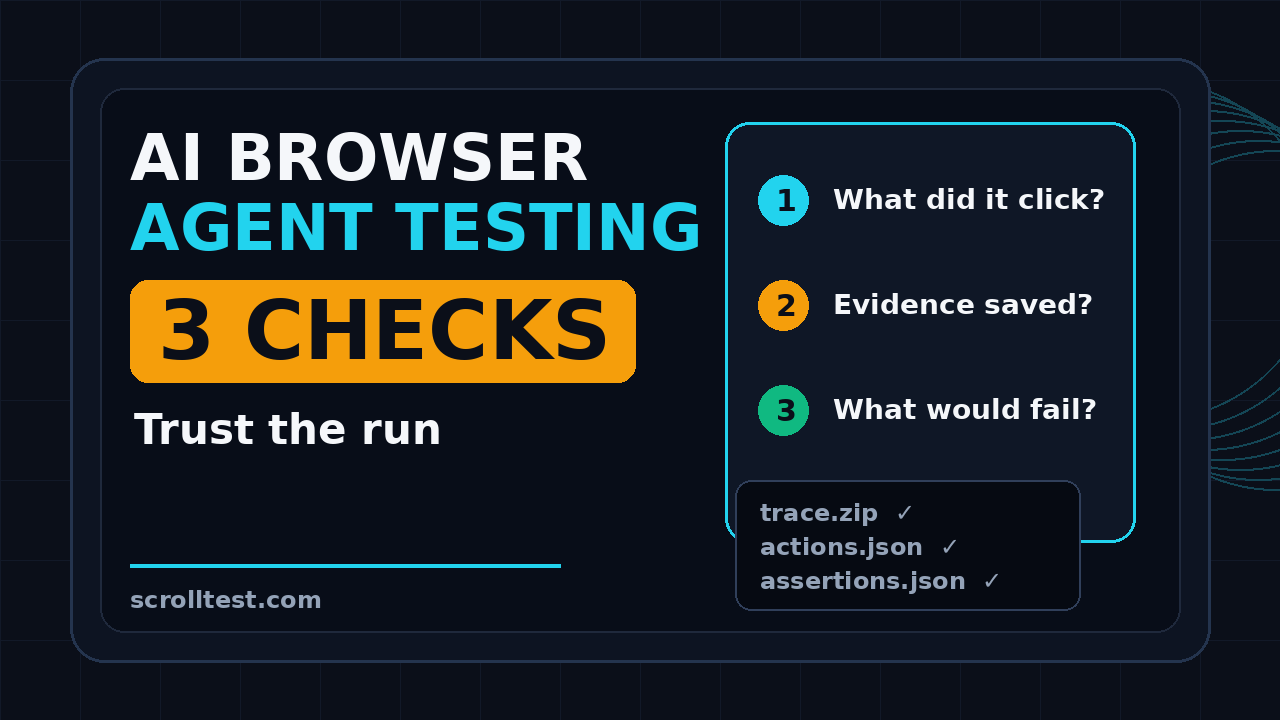
I see teams make the same mistake with every new browser agent demo. They watch one successful run, save a happy screenshot, and treat it like automation. That is not automation. That is a recording of a lucky path unless you can answer three questions: what did it click, what evidence did it save, and what would fail the test?
Table of Contents
- Why AI Browser Agent Testing Needs a Checklist
- Question 1: What Did the Agent Click?
- Question 2: What Evidence Did It Save?
- Question 3: What Would Fail the Test?
- A Practical Evidence Pack for QA Teams
- How to Wire This Into CI
- India Context: Skills That Matter for SDETs
- Common Traps I Would Avoid
- Key Takeaways
- FAQ
Contents
Why AI Browser Agent Testing Needs a Checklist
The browser agent space is moving fast. Browserbase describes Stagehand as “the SDK for browser agents,” and the public GitHub repository shows more than 23,000 stars at the time I checked the GitHub API. The Stagehand browse@0.9.0 release, published on 25 June 2026, even changed screenshot behavior so a bare browse screenshot command writes an image file by default instead of printing base64 to stdout.
That release note is small, but it points to a bigger testing truth. Evidence is becoming a first-class output of AI browser work. A screenshot file, a trace, a DOM snapshot, a prompt transcript, and a pass or fail reason matter more than a nice demo video.
Agents are not the same as deterministic scripts
A Playwright script fails because a selector is missing, a response is wrong, or an assertion does not match. A browser agent can fail for those reasons, plus prompt ambiguity, tool choice, model drift, page interpretation, hidden state, latency, or a hallucinated summary.
That means the old QA question, “did the test pass,” is incomplete. For AI browser agent testing, I want these details before I trust the answer:
- The user goal the agent received.
- The exact page or environment where it ran.
- The actions it chose, step by step.
- The selectors, coordinates, or DOM targets it touched.
- The evidence files created during the run.
- The rule that converted evidence into pass or fail.
Risk frameworks already push us in this direction
The NIST AI Risk Management Framework talks about governing, mapping, measuring, and managing AI risk. QA teams do not need to turn every test review into a policy meeting, but the principle applies. If an AI system makes decisions in the browser, the team needs measurement and control points.
OWASP also publishes guidance on agentic AI threats and mitigations. The language is security-focused, but QA engineers should read it too. Browser agents can take actions, call tools, follow external instructions, and touch data. A test run without guardrails is not just flaky. It can be unsafe.
The three-question rule
I use a simple rule when reviewing agentic browser automation. If the run cannot answer these three questions, it is not production evidence:
- What did it click? The action trail must be inspectable.
- What evidence did it save? The run must leave artifacts.
- What would fail the test? The oracle must be explicit.
This is the checklist behind the rest of the article. It is intentionally small. Small checklists get used by tired engineers during a release window.
Question 1: What Did the Agent Click?
The first failure mode in AI browser agent testing is invisible action. The agent says, “I added the product to the cart,” but the test report does not show which element it clicked, why it chose that element, or whether it ignored a better target nearby.
That is not enough for QA. When a manual tester files a bug, we expect steps to reproduce. When a Playwright test fails, we inspect the trace. A browser agent deserves the same standard.
Capture intent and action separately
Do not store only the final answer. Store the user intent and the agent action trail as separate fields. The intent is the goal. The action trail is the evidence of how the agent tried to reach it.
{
  "runId": "agent-cart-2026-07-02-001",
  "intent": "Add the cheapest wireless mouse to cart",
  "environment": "staging",
  "actions": [
    {
      "step": 1,
      "type": "navigate",
      "url": "https://staging.example.com/search?q=wireless+mouse"
    },
    {
      "step": 2,
      "type": "click",
      "targetText": "Sort by price",
      "selector": "button[aria-label='Sort by price']"
    },
    {
      "step": 3,
      "type": "click",
      "targetText": "Add to cart",
      "selector": "[data-testid='product-card-0'] button"
    }
  ]
}
This format is not fancy. That is the point. A lead SDET should be able to open the JSON and understand the run in 60 seconds.
Prefer stable targets over vague visual clicks
Coordinates are useful for debugging, but they are weak as the primary record. A click at x=871, y=449 tells me where the pointer moved. It does not tell me what product, button, or state the agent selected.
I prefer target records in this order:
data-testidor stable automation IDs.- Accessible role and name, such as
button[name="Add to cart"]. - Visible text plus a nearby parent container.
- CSS selector as a fallback.
- Coordinates only as supporting evidence.
If your agent framework cannot expose the selected element, add wrapper instrumentation. You can capture click events in the page, store the element role, text, selector candidate, and bounding box, then attach that to the run report.
Use traces when the run matters
The Playwright Trace Viewer documentation says traces help explore recorded test runs after execution and are useful for debugging failures in CI. That same idea applies to agents. A trace turns “the agent did something weird” into a reviewable timeline.
For high-value flows, I want:
- A Playwright trace zip when the agent runs through Playwright.
- A screenshot before and after risky actions.
- Console logs and failed network requests.
- Prompt and tool-call history with secrets redacted.
- A final state snapshot, such as cart contents or order ID.
If you need a starting point for evidence packaging, I already wrote about an AI testing evidence pack with trace, screenshot, and logs. The same structure works well for browser agents.
Question 2: What Evidence Did It Save?
The second question is where many agent demos collapse. A human watches the run live, says “looks good,” and moves on. Two hours later, the team cannot prove what happened. That is not a test result. That is a memory.
AI browser agent testing should leave evidence even when the run passes. Passing runs are the baseline you compare against when the next prompt, model, browser, or page release changes behavior.
Build a minimum evidence contract
Every agent run should produce a small evidence folder. I use this contract as a default:
agent-run-001/
  manifest.json
  prompt.txt
  actions.json
  assertions.json
  screenshots/
    01-start.png
    02-after-search.png
    03-cart.png
  network.log
  console.log
  trace.zip
  final-summary.md
The manifest is the index. It should tell a reviewer what was tested, which model or agent version ran, what environment was used, and where the artifacts live.
{
  "runId": "agent-run-001",
  "feature": "cart checkout",
  "agent": "stagehand-style-browser-agent",
  "model": "configured-in-ci-secret",
  "startedAt": "2026-07-02T03:30:00Z",
  "baseUrl": "https://staging.example.com",
  "result": "failed",
  "failureReason": "Cart total did not match selected product price",
  "artifacts": {
    "trace": "trace.zip",
    "actions": "actions.json",
    "screenshots": ["screenshots/01-start.png", "screenshots/03-cart.png"]
  }
}
Passing evidence matters more than teams think
QA teams are trained to save failure evidence. With agents, I also save passing evidence. The reason is simple: agent behavior can drift even when application code is unchanged.
A model update can interpret the same instruction differently. A small UI copy change can make the agent choose a different button. A cookie banner can consume a click. A test account with old data can make the agent take a detour. Passing evidence gives you a reference point.
Screenshot is not enough
The Stagehand browse@0.9.0 release making screenshots easier is useful, but a screenshot alone does not prove the path. It proves the final pixels at one moment.
Good evidence combines three layers:
- Visual: screenshots or video of key states.
- Structural: DOM target, accessibility name, selected data, URL, and storage state.
- Behavioral: action log, network requests, console logs, assertions, and trace.
This is also why a browser-agent report template helps. If your team needs one, start with this browser agent test report template for QA teams and adapt the fields to your product.
Question 3: What Would Fail the Test?
The third question is the most important one. If the team cannot explain what would fail the run, then the agent is not testing. It is exploring.
Exploration is useful. I use it for discovery, regression hunting, and quick smoke checks. But production QA needs an oracle. The oracle is the rule that decides pass or fail.
Separate agent goal from test oracle
“Buy a product” is a goal. “The cart contains product ID 123, quantity 1, and total ₹1,499 before payment” is an oracle. The first one guides the agent. The second one protects the business.
For agent tests, I like this pattern:
- Use the agent to reach a state.
- Use deterministic code to verify the state.
- Fail the run with a clear reason if the state is wrong.
Here is a small TypeScript example using Playwright-style assertions after an agent completes the journey:
import { test, expect } from "@playwright/test";

test("agent adds cheapest wireless mouse to cart", async ({ page }) => {
  await page.goto(process.env.STAGING_URL!);

  // Replace this with your agent call.
  await runBrowserAgent(page, {
    goal: "Find the cheapest wireless mouse and add exactly one to the cart",
    maxSteps: 12,
    evidenceDir: "./artifacts/agent-cart-001"
  });

  await expect(page.getByRole("heading", { name: /cart/i })).toBeVisible();

  const rows = page.getByTestId("cart-row");
  await expect(rows).toHaveCount(1);
  await expect(rows.first()).toContainText(/wireless mouse/i);
  await expect(rows.first().getByTestId("quantity")).toHaveText("1");

  const totalText = await page.getByTestId("cart-total").innerText();
  expect(parseRupee(totalText)).toBeGreaterThan(0);
});
The agent can be probabilistic. The assertion should be boring.
Write failure reasons for humans
Agent reports often fail with vague messages like “goal not achieved.” That does not help a release manager. The report should say what business rule failed.
Better failure reasons look like this:
- “Agent clicked sponsored product instead of cheapest organic result.”
- “Cart contained two items, expected exactly one.”
- “Checkout page loaded, but shipping address was not selected.”
- “The agent accepted a cookie banner during the payment step, which changed the path.”
- “Network call
/api/cartreturned 500 after Add to cart click.”
Good failure reasons shorten triage. They also stop teams from blaming “AI randomness” when the real issue is a missing test oracle.
Make non-negotiable stop conditions explicit
Browser agents need hard limits. Without them, an agent can keep retrying, click irrelevant elements, or walk into unsafe areas of the product.
I set these stop conditions for serious runs:
- Maximum step count.
- Allowed domains only.
- No payment submission in non-sandbox environments.
- No destructive actions unless the test data is isolated.
- Fail on unexpected modal, 5xx response, console error, or auth redirect.
- Fail if evidence files are missing.
This is where QA discipline beats demo energy.
A Practical Evidence Pack for QA Teams
If I were setting this up for a team today, I would not start with 40 fields and a custom dashboard. I would start with a folder, a manifest, and a short review checklist.
The evidence pack structure
Use one evidence pack per run. Keep the file names predictable so CI can upload them as artifacts.
artifacts/
  ai-browser-agent-testing/
    checkout-smoke/
      2026-07-02T033000Z/
        manifest.json
        actions.json
        assertions.json
        trace.zip
        screenshots/
        logs/
        review.md
The review.md file is for humans. It should answer the three questions in plain English:
# Agent Run Review

## What did it click?
- Search box: role=textbox, name=Search
- Product card: data-testid=product-card-0
- Add to cart: role=button, name=Add to cart

## What evidence did it save?
- trace.zip
- screenshots/01-start.png
- screenshots/04-cart.png
- actions.json
- network.log

## What would fail the test?
- Missing cart page heading
- More or fewer than one cart row
- Cart product name not matching wireless mouse
- Any 5xx response during cart API call
Use a reviewer checklist
I like checklists because they remove ego from reviews. A senior SDET and a junior QA can apply the same rule.
Before accepting an AI browser agent run, check:
- Does the run have a unique ID?
- Can I replay or inspect the action trail?
- Do screenshots show the important state changes?
- Is there at least one deterministic assertion?
- Are model, prompt, environment, and agent versions recorded?
- Are secrets redacted from prompts, logs, and traces?
- Does the failure reason help a developer act?
If the answer is no, the run is not release evidence yet.
Connect it with existing QA assets
You do not need to replace your automation framework. Add the agent as another executor in your existing QA system. The agent can handle flexible navigation, but Playwright, API checks, and database assertions can validate the result.
For related patterns, read AI agent testing: why one pass means nothing and AI browser bug evidence pack: trace, logs, prompt. Those pieces cover the same operating principle: agent output needs reproducible evidence.
How to Wire This Into CI
AI browser agent testing becomes useful when the evidence appears in the same place as the rest of your test artifacts. If engineers need to search Slack for screenshots, the process will die.
A simple CI pattern
Start with a dedicated job for agent smoke tests. Do not mix it with your stable deterministic suite on day one.
name: ai-browser-agent-smoke

on:
  workflow_dispatch:
  schedule:
    - cron: "30 3 * * *"

jobs:
  agent-smoke:
    runs-on: ubuntu-latest
    timeout-minutes: 20
    steps:
      - uses: actions/checkout@v4
      - uses: actions/setup-node@v4
        with:
          node-version: 22
      - run: npm ci
      - run: npx playwright install --with-deps chromium
      - run: npm run test:agent-smoke
        env:
          STAGING_URL: ${{ secrets.STAGING_URL }}
          AGENT_MODEL_KEY: ${{ secrets.AGENT_MODEL_KEY }}
      - uses: actions/upload-artifact@v4
        if: always()
        with:
          name: ai-browser-agent-evidence
          path: artifacts/ai-browser-agent-testing/
This gives you a clean experiment lane. Once the team trusts the evidence quality, move selected flows into release gates.
Define acceptance gates
I use three levels:
- Advisory: Agent run reports issues but does not block a build.
- Review required: A human must inspect evidence before release.
- Blocking: Deterministic assertions fail the build.
Do not jump to blocking on day one. Let the team collect 20 to 30 runs, inspect failure patterns, and tighten the oracle. After that, promote stable flows.
Measure useful signals
Track signals that help decisions, not vanity numbers.
- Runs with complete evidence packs.
- Runs where the action trail is reviewable.
- False pass count.
- False fail count.
- Average triage time with evidence.
- Number of defects found before manual regression.
If evidence completeness is below 95%, fix the harness before adding more agent flows.
India Context: Skills That Matter for SDETs
For QA engineers in India, this topic is career-relevant right now. Service company work still rewards execution at scale, but product companies increasingly reward engineers who can design systems, reduce release risk, and explain trade-offs clearly.
An SDET who can say, “I built an AI browser agent harness with trace capture, deterministic oracles, and CI artifacts,” sounds different from an engineer who says, “I tried an AI testing tool.”
What hiring managers will notice
In interviews, do not pitch AI browser agents as magic. Pitch them as a testing tool with controls.
Strong talking points:
- How you separate exploration from release gating.
- How you record actions and evidence.
- How you prevent unsafe clicks.
- How you combine agent navigation with deterministic assertions.
- How you measure false passes and false fails.
This is the difference between tool usage and engineering judgment. That difference matters when you are aiming for senior SDET, staff QA, or QA architect roles.
Common Traps I Would Avoid
Trap 1: Treating a summary as evidence
An agent summary is useful, but it is not evidence by itself. “The checkout worked” should link to screenshots, trace, request logs, and assertions. If it does not, the summary is just a claim.
Trap 2: Letting the agent judge itself
Do not ask the same agent to perform the task and decide whether the business state is correct. Use deterministic checks wherever possible. If an LLM must judge something subjective, record the rubric and keep examples of accepted and rejected outputs.
Trap 3: Ignoring data setup
Agents behave badly when test data is messy. A cart with stale items, a user with old permissions, or a staging environment with banners can create noise. Reset test data before the run or make cleanup part of the harness.
Trap 4: No rollback plan
If a prompt or model version creates noisy results, the team needs a rollback path. Pin versions where possible. Store prompts in source control. Treat prompt changes like code changes.
Trap 5: Running agents only in the happy path
Browser agents are useful for messy flows, but your oracle must still cover negative cases. Test out-of-stock products, validation messages, disabled buttons, expired sessions, and API errors. This is where real QA work begins.
Key Takeaways
AI browser agent testing is not about trusting a smart bot. It is about building enough evidence and control so a QA team can use the bot safely.
- Ask three questions before trusting a run: what did it click, what evidence did it save, and what would fail the test?
- Save passing evidence, not only failure screenshots.
- Use traces, screenshots, logs, action history, and deterministic assertions together.
- Keep the agent goal separate from the test oracle.
- Promote agent runs from advisory to blocking only after you measure false passes and false fails.
My practical advice: start with one low-risk flow, build the evidence pack, and review 20 runs before you add a release gate. That gives you data, not vibes.
FAQ
What is AI browser agent testing?
AI browser agent testing is the practice of using an AI-driven browser agent to navigate a web application while a QA harness records actions, evidence, and assertions. The agent can decide how to move through the UI, but the test should still define clear pass and fail rules.
Can AI browser agents replace Playwright tests?
No, not for stable release gates. I use agents for flexible navigation and exploration, then use Playwright-style assertions for deterministic validation. The best setup combines both.
What evidence should an AI browser agent save?
At minimum, save the prompt, action log, screenshots, assertion results, network logs, console logs, and a trace when possible. For important flows, also save a manifest with model, prompt, environment, and agent versions.
How do I reduce false passes in agent testing?
Write explicit oracles. Do not accept “task completed” from the agent as the final answer. Verify the business state with selectors, API checks, database checks, or structured page data.