AI Release Watcher for QA Teams: Day 28 Guide
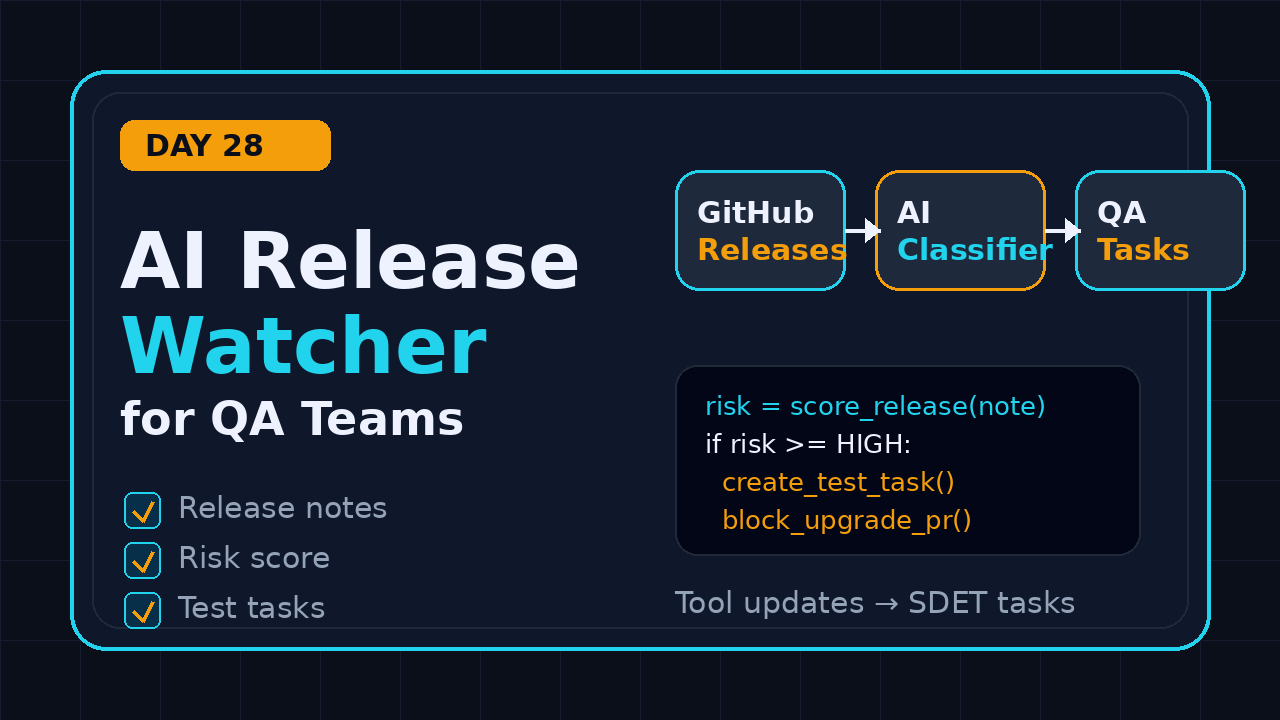
Day 28 of 100 Days of AI in QA & SDET. An AI release watcher for QA is a small agent workflow that reads Playwright, Selenium, PromptFoo, DeepEval, and CI tool updates, then converts the risky changes into test tasks your team can execute. I see many QA teams read release notes only after CI breaks. That is backwards.
The practical goal is simple: stop treating release notes as announcements and start treating them as test inputs. In this guide I show the workflow I use, the data sources worth monitoring, the prompts that turn updates into actionable QA work, and a clean implementation you can adapt for your own team.
Table of Contents
- Why Release Watching Matters for QA
- What an AI Release Watcher for QA Does
- Sources Your Watcher Should Monitor
- The Risk Scoring Model
- Implementation Playbook with Python
- Turn Release Notes into Test Tasks
- CI/CD Workflow for Release Intelligence
- India SDET Context
- Mistakes to Avoid
- Key Takeaways
- FAQ
Contents
Why Release Watching Matters for QA
Most test automation failures do not start inside the test file. They start when a browser, driver, test runner, assertion library, locator engine, Docker image, or AI evaluation package changes under the team. The symptoms appear later as flaky waits, screenshots that no longer match, retries that hide a regression, or a pipeline that passes locally but fails in CI.
That is why an AI release watcher for QA is useful. It gives the test team an early warning system. It does not replace engineering judgment. It compresses the boring reading work, highlights risk, and produces a first draft of the test checklist.
Release notes are not just developer reading
Playwright, Selenium, PromptFoo, DeepEval, Chrome, Node, Docker, GitHub Actions, and cloud browser vendors all publish frequent updates. A feature that looks minor to a developer can be high risk for QA. A browser context change can affect authentication reuse. A tracing improvement can change how you debug CI failures. A deprecation can break your framework two sprints later.
For example, the latest Playwright release visible from the GitHub API during this run is v1.61.1, published on 23 June 2026. Selenium’s latest GitHub release during this run is selenium-4.45.0, published on 16 June 2026. These dates matter because mature QA teams do not upgrade blind. They create a small upgrade test pack before dependency bumps hit production pipelines.
The volume is now too high for manual tracking
One or two tools are easy to watch manually. Ten tools are not. In a typical SDET stack I now see Playwright, Selenium, Appium, Postman, REST Assured, Docker, GitHub Actions, one visual testing tool, one LLM evaluation tool, and one internal framework layer. Every tool has releases, breaking changes, security notes, and changed defaults.
The download numbers show why this matters at scale. The npm downloads API reported 172,653,760 last-month downloads for @playwright/test for the measured period. It reported 8,332,872 last-month downloads for selenium-webdriver. PromptFoo also matters for AI testing teams, with the npm API reporting 1,500,598 last-month downloads for promptfoo. DeepEval matters on the Python side, with PyPI Stats showing 7,007,412 recent last-month downloads for deepeval during this run.
Those numbers do not prove quality. They prove adoption and change velocity. When widely used tooling changes, your automation framework becomes part of that blast radius.
What an AI Release Watcher for QA Does
An AI release watcher for QA has one job: read tool updates and translate them into QA decisions. The output should not be a summary paragraph. Summaries are easy to ignore. The output should be a short risk review with owners, test ideas, affected framework files, and a go or no-go recommendation.
The four outputs I expect
I normally want four artifacts from this workflow:
- Risk score: low, medium, high, or blocker.
- Affected areas: browser coverage, selectors, API clients, visual snapshots, CI images, test data, or LLM evals.
- Test tasks: concrete checks that can be added to Jira, GitHub Issues, or a sprint checklist.
- Upgrade advice: safe to upgrade now, test in a branch, or wait for a patch.
This keeps the agent honest. If it cannot map a release note to an affected area, it should say so. If it sees a breaking change, it should ask for a framework smoke run before the version bump lands.
Where the AI fits
The AI is not the source of truth. The source of truth is the official release note, registry metadata, changelog, or documentation page. The AI layer is a classifier and task writer. It reads source text, labels risk, and drafts the QA response.
This is the same principle I use in AI testing generally: keep the model close to a verifiable artifact. Do not ask, “What changed in Playwright this month?” Ask it to process the official release JSON, the release body, and your local framework map.
Why this belongs to QA, not only DevOps
DevOps can tell you when a package changed. QA should tell you what that package change can break. That is the gap this watcher closes. It turns version movement into test intent.
I have already written about upgrade checks in Playwright Upgrade Smoke Checklist for QA Teams and about release risk in Selenium Release Notes: QA Risk Review Playbook. This article connects those ideas into an AI-powered daily or weekly watcher.
Sources Your Watcher Should Monitor
A good release watcher starts with boring, reliable inputs. Do not scrape random blogs when official APIs exist. APIs are easier to validate, easier to cache, and easier to cite in an audit.
Primary sources first
Start with these source types:
- GitHub releases: official release notes for Playwright, Selenium, PromptFoo, DeepEval, and internal tools.
- npm registry metadata: latest package version and dist tags for JavaScript tools.
- PyPI metadata and PyPI Stats: package versions and adoption signals for Python tools.
- Official docs: migration notes, deprecation pages, and configuration docs.
- Your own framework files: package.json, requirements.txt, Dockerfile, GitHub Actions YAML, and shared test utilities.
For ScrollTest readers, the high-signal tools are usually Playwright, Selenium, API testing libraries, CI actions, and AI evaluation tools. If you are building AI-assisted browser tests, also track tools from QASkills. The QASkills directory is useful for discovering agent skills that can be adapted for QA workflows.
Source list example
Here is a simple source list I would put in version control:
{
  "sources": [
    {
      "name": "Playwright",
      "type": "github_release",
      "url": "https://api.github.com/repos/microsoft/playwright/releases/latest",
      "areas": ["browser", "locators", "tracing", "fixtures"]
    },
    {
      "name": "Selenium",
      "type": "github_release",
      "url": "https://api.github.com/repos/SeleniumHQ/selenium/releases/latest",
      "areas": ["webdriver", "grid", "browser_compatibility"]
    },
    {
      "name": "PromptFoo",
      "type": "npm_package",
      "url": "https://registry.npmjs.org/promptfoo/latest",
      "areas": ["prompt_regression", "evals", "ci"]
    },
    {
      "name": "DeepEval",
      "type": "github_release",
      "url": "https://api.github.com/repos/confident-ai/deepeval/releases/latest",
      "areas": ["llm_evals", "metrics", "python_ci"]
    }
  ]
}
The Risk Scoring Model
The risk model should be simple enough that your team understands it. If the scoring rules are vague, nobody will trust the watcher. I use a 0 to 10 score and then map it to low, medium, high, or blocker.
Signals that increase risk
These signals usually raise the score:
- The release contains words like breaking, deprecated, removed, migration, security, timeout, retry, browser, driver, auth, or config.
- The changed component touches a critical flow in your team context.
- The release updates a tool used in CI rather than a local-only utility.
- The package has a major version bump.
- The release affects trace, screenshot, video, network, locator, or assertion behavior.
- The tool is part of an AI evaluation chain that blocks deployment.
Example scoring rules
Keep the first version deterministic. You can add embeddings and historical failure learning later.
RISK_WORDS = {
    "breaking": 4,
    "deprecated": 3,
    "removed": 4,
    "security": 4,
    "timeout": 2,
    "retry": 2,
    "browser": 3,
    "driver": 3,
    "auth": 3,
    "config": 2,
    "migration": 4,
}

CRITICAL_AREAS = {"login", "checkout", "auth", "payment", "ci", "browser"}

def score_release(text: str, affected_areas: list[str]) -> int:
    text_lower = text.lower()
    score = 0

    for word, weight in RISK_WORDS.items():
        if word in text_lower:
            score += weight

    if any(area in CRITICAL_AREAS for area in affected_areas):
        score += 2

    return min(score, 10)

def risk_label(score: int) -> str:
    if score >= 8:
        return "blocker"
    if score >= 5:
        return "high"
    if score >= 3:
        return "medium"
    return "low"
Implementation Playbook with Python
Here is a minimal implementation. It fetches release data, scores it, and writes a task draft. In production I would store previous versions in SQLite or a small JSON file so the watcher reports only new changes.
Fetch official release data
import requests

HEADERS = {"User-Agent": "ScrollTest-Release-Watcher/1.0"}

def get_latest_github_release(owner: str, repo: str) -> dict:
    url = f"https://api.github.com/repos/{owner}/{repo}/releases/latest"
    response = requests.get(url, headers=HEADERS, timeout=20)
    response.raise_for_status()
    data = response.json()
    return {
        "name": repo,
        "version": data.get("tag_name"),
        "published_at": data.get("published_at"),
        "url": data.get("html_url"),
        "body": data.get("body") or "",
    }

release = get_latest_github_release("microsoft", "playwright")
print(release["version"], release["published_at"])
Compare against your locked version
Your watcher becomes useful when it compares latest available versions with your actual project version.
import json
from pathlib import Path


def read_package_version(package_json_path: str, package_name: str) -> str | None:
    data = json.loads(Path(package_json_path).read_text())
    deps = {}
    deps.update(data.get("dependencies", {}))
    deps.update(data.get("devDependencies", {}))
    return deps.get(package_name)

current = read_package_version("package.json", "@playwright/test")
latest = release["version"]

if current and latest and current.strip("^~") != latest.lstrip("v"):
    print(f"Upgrade candidate: @playwright/test {current} -> {latest}")
Generate a task draft
def build_task(tool: str, version: str, risk: str, url: str) -> str:
    return f"""
Title: Review {tool} {version} upgrade risk
Risk: {risk}
Source: {url}
Checklist:
1. Run smoke tests for login, checkout, and admin permissions.
2. Run browser matrix on Chromium and Firefox.
3. Capture trace/video for one passing and one failing scenario.
4. Compare visual snapshots on the top 5 business-critical pages.
5. Approve dependency bump only after CI passes twice.
""".strip()

print(build_task("Playwright", release["version"], "medium", release["url"]))
This is not fancy. That is the point. The best QA agents start as small boring scripts that produce useful work every week.
Turn Release Notes into Test Tasks
The biggest mistake I see is stopping at the summary. A summary is not a QA artifact. A task is. Your release watcher should create issues that a tester or SDET can execute without asking five follow-up questions.
Task template
Use this issue format:
Title: Validate [tool] [version] upgrade for [framework]
Source: [official release URL]
Risk: [low/medium/high/blocker]
Why it matters: [1-2 lines]
Affected areas: [browser/auth/ci/evals/visual/api]
Test scope:
- [specific smoke test]
- [specific regression subset]
- [specific CI job]
Exit criteria:
- CI green twice
- No new flaky tests above retry threshold
- Trace and screenshot available for failed checks
Owner: [SDET name]
Due: [date]
Example output for Playwright
If Playwright changes tracing, browser behavior, or test runner defaults, the task should not say “check Playwright.” It should say:
- Run login, checkout, and PDF download smoke tests in Chromium and Firefox.
- Open one trace from CI and verify network, console, screenshot, and video evidence are present.
- Run the selector health suite against the top 20 pages.
- Compare the new run against the last stable dependency version.
That is the difference between an AI summary and an AI-assisted SDET workflow.
Example output for AI evaluation tools
PromptFoo and DeepEval changes should trigger a different checklist. They can affect scoring, model providers, assertion syntax, or CI exit behavior. If you already run prompt regression checks, connect this article with Prompt Regression Testing for QA: Day 25 Guide.
- Run the last 20 golden prompts before upgrading.
- Compare pass/fail counts across old and new versions.
- Check provider authentication in CI secrets.
- Review any changed metric names or assertion defaults.
- Store the evaluation report as a build artifact.
CI/CD Workflow for Release Intelligence
An AI release watcher for QA should run where the team already works. For many teams that means GitHub Actions, Slack, Jira, or a daily Markdown report in the repository. I prefer starting with a scheduled GitHub Action because it is visible and version controlled.
GitHub Actions schedule
name: QA Release Watcher

on:
  schedule:
    - cron: "30 3 * * 1-5" # 9:00 AM IST, weekdays
  workflow_dispatch:

jobs:
  watch-releases:
    runs-on: ubuntu-latest
    steps:
      - uses: actions/checkout@v4
      - uses: actions/setup-python@v5
        with:
          python-version: "3.11"
      - name: Install dependencies
        run: pip install requests
      - name: Run watcher
        run: python tools/release_watcher.py
      - name: Upload report
        uses: actions/upload-artifact@v4
        with:
          name: qa-release-watch-report
          path: reports/release-watch.md
Daily report format
The report should fit in two minutes of reading:
# QA Release Watch Report
Date: 2026-07-05

## High Risk
- Selenium 4.45.0: review Grid/WebDriver compatibility before upgrade.

## Medium Risk
- Playwright 1.61.1: run browser smoke pack and trace validation.
- PromptFoo 0.121.17: run prompt regression suite before CI bump.

## No Action
- No relevant changes found in visual test tooling.

## Suggested Tasks
1. Create dependency bump branch.
2. Run smoke pack in CI twice.
3. Attach trace and eval reports to upgrade PR.
When to block the pipeline
I would not block every build because a new release exists. That creates alert fatigue. Block only when:
- Your repo already opened an upgrade PR.
- The release contains breaking or security-related changes.
- The affected tool is part of production deployment checks.
- Your smoke pack fails on the upgrade branch.
For normal updates, a Slack or Jira notification is enough.
India SDET Context
In India, many QA engineers still talk about automation as Selenium scripts plus manual regression. Product companies now expect more. A strong SDET is expected to understand frameworks, CI, observability, test data, and increasingly AI-assisted workflows.
Why this skill helps careers
If you are moving from service companies like TCS, Infosys, Wipro, or Cognizant into product companies, this type of work gives you stronger interview stories. You can say, “I built a release watcher that reads official tool updates, scores risk, and creates QA tasks before dependency bumps.” That sounds better than “I executed regression test cases.”
For mid-level SDETs aiming for ₹25-40 LPA roles, the signal is ownership. Hiring managers want people who prevent failures, not only people who report them. A release watcher is a small but visible ownership project.
How to explain it in an interview
Use this structure:
- Problem: dependency upgrades caused flaky automation and delayed releases.
- Action: built a watcher for official release sources and team context.
- Result: created upgrade checklists before CI failures appeared.
- Learning: not every update needs action, so risk scoring reduced noise.
Do not claim fake metrics. If you do not have before and after numbers, say the workflow improved visibility and review discipline. That is still valuable.
Mistakes to Avoid
This workflow can become noisy fast. Keep the first version narrow and measurable.
Do not monitor everything on day one
Start with three tools: one browser automation tool, one CI dependency, and one AI evaluation tool. For example: Playwright, GitHub Actions, and PromptFoo. Add Selenium, DeepEval, Docker, and browser release channels after the team trusts the report.
Do not let AI invent risk
The model should quote or point to the source line that caused the risk label. If it cannot, mark the result as low confidence. This is especially important for AI testing tools where release notes can be marketing-heavy.
Do not create tickets nobody owns
A release watcher that creates 20 unowned Jira tickets per week will be ignored. Assign owners only for high-risk items. Keep low-risk items in a weekly report.
Do not ignore internal links and learning
Use each release as a learning moment. If a Playwright upgrade affects tracing, send juniors to a focused guide like Playwright Video Recording: Configuration and Failure Debugging. If a release affects upgrade discipline, point them to Playwright Upgrade Checklist: 3 Checks Before CI.
Key Takeaways
An AI release watcher for QA is not a shiny side project. It is a practical SDET workflow that turns tool change into test action.
- Use official APIs and release pages as sources of truth.
- Score risk before sending anything to an LLM.
- Make the AI produce tasks, not vague summaries.
- Connect release notes to your actual framework files and critical flows.
- Run the watcher in CI or a scheduled job so the team sees it.
- Start with Playwright, Selenium, PromptFoo, or DeepEval before expanding.
My recommendation for Day 28: build a tiny watcher this week. Pick one tool your team upgrades often. Track the latest release, compare it with your locked version, and create one human-readable QA task. That is enough to prove the value.
FAQ
What is an AI release watcher for QA?
It is an agent or script that monitors official tool releases, checks them against your QA stack, scores risk, and creates test tasks for the team. The best version uses AI for classification and task writing, not as the source of truth.
Should this replace dependency update bots?
No. Renovate and Dependabot are good at opening upgrade PRs. A QA release watcher explains what to test before or after that PR. Use both together.
Which tools should I monitor first?
Start with your highest-impact automation tool. For most ScrollTest readers that means Playwright or Selenium. If your team tests AI features, add PromptFoo or DeepEval next.
Can manual testers use this workflow?
Yes. Manual testers can own the risk review and checklist even if an SDET builds the script. This is a strong bridge from manual QA into automation and AI-assisted testing.
How often should the watcher run?
Weekly is enough for most teams. Run it daily only if your team upgrades dependencies frequently or maintains a platform used by multiple squads.