AI Agent Test Plan: 7-Minute QA Checklist
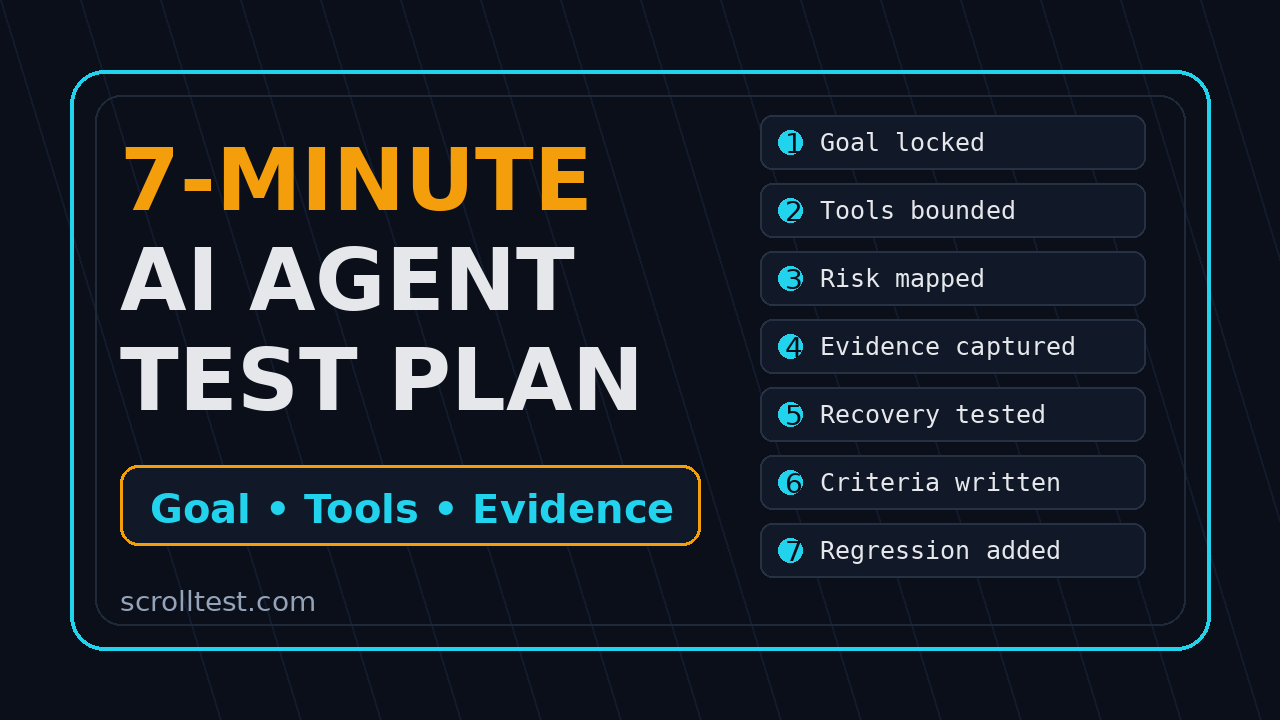
An AI agent test plan should be short enough to use before a release and strict enough to catch real product risk. I use this 7-minute version when a team says, “The agent passed my happy path,” but cannot show the goal, tools, evidence, recovery path, or acceptance criteria behind that pass.
🤖 Learning AI-powered testing? Go hands-on with LLM, RAG, and AI-agent testing in the AI-Powered Testing Mastery course at The Testing Academy.
Agent testing is different from normal UI automation because the system can decide steps at runtime. A button test follows a fixed path. An agent feature may search, call tools, inspect state, retry, summarize, and then act. That makes the test plan more important, not less.
Table of Contents
- Why an AI Agent Test Plan Needs a Different Shape
- The 7-Minute AI Agent Test Plan Checklist
- Minute 1: Lock the Goal and Scope
- Minute 2: Review Tools and Permissions
- Minute 3: Find the Risky Steps
- Minute 4: Demand an Evidence Pack
- Minute 5: Test the Recovery Path
- Minute 6: Write Acceptance Criteria That Survive Demos
- Minute 7: Turn the Plan Into a Repeatable Test
- India QA Team Context
- Key Takeaways
- FAQ
Contents
Why an AI Agent Test Plan Needs a Different Shape
I see a common mistake in agent projects: teams test the screen, not the behavior. They click the entry point, watch the agent perform one clean task, and call it tested. That is weak coverage because the interesting part of an agent is not the button. It is the decision chain.
Anthropic’s engineering guide on building effective agents makes a useful distinction between workflows and agents. Workflows follow predefined code paths. Agents dynamically direct their own tool use. That distinction matters for QA because a workflow can be checked step by step, while an agent needs checks around goals, tool boundaries, observations, and final outcomes.
Normal test plans assume predictable paths
A checkout test usually has a stable shape: add item, open cart, pay, verify order. If one selector changes, the test fails in a familiar way. You can debug it with a trace and update the locator.
An agent can take a different path on the second run. It may choose another tool, produce a different query, or stop early because it thinks the task is complete. That does not make testing impossible. It means the plan must focus on invariants: the goal, the allowed tools, the evidence trail, the prohibited actions, and the acceptance criteria.
Agent failures are often silent
The worst agent failures do not always look like crashes. The agent may produce a confident summary with missing evidence. It may skip a permission check. It may claim it updated a record when the backend state did not change. It may pass a demo because the data was friendly.
This is why I like a 7-minute plan. It forces the team to slow down just enough before release. You are not writing a 40-page document. You are making seven decisions that decide whether the agent is safe to ship.
Evaluation tools help, but they do not replace QA thinking
DeepEval’s quickstart shows how to create a test case, choose a metric, and run deepeval test run for LLM evaluation. OpenAI’s evals guide also frames evaluation as a way to measure model and agent behavior against examples. These tools are useful, but they still need good test design behind them.
If your dataset has only clean requests, your evals will pass clean requests. If your assertions check only final text, you may miss a dangerous tool call. The test plan below tells you what to include before you automate.
The 7-Minute AI Agent Test Plan Checklist
Here is the complete checklist before we break it down. Print it, add it to your pull request template, or paste it into your QA sign-off note.
- Goal: What exact user outcome should the agent achieve?
- Tools: Which tools, APIs, files, browsers, or databases can it touch?
- Risky steps: Which steps can damage data, leak information, or mislead users?
- Evidence: What proof must every run produce?
- Recovery: What should happen when a tool fails or data is missing?
- Acceptance criteria: What does pass or fail mean in business terms?
- Repeatability: Which part becomes an automated regression check?
Use the checklist in a real review
Connect it to existing ScrollTest testing habits
If you already read ScrollTest’s AI Testing Evidence Pack, this checklist is the upstream step. The evidence pack says what to capture. This plan says what evidence matters and why. The two work together.
For teams using browser agents, also read AI Agent Testing: Why One Pass Means Nothing. A single successful run is a weak signal for an agent. You need variation, negative cases, and proof that the agent respected its boundaries.
Minute 1: Lock the Goal and Scope
The first minute of an AI agent test plan is not about prompts. It is about the user goal. If the goal is fuzzy, every later test becomes fuzzy too.
Write the goal in one sentence:
The agent should create a release test plan from a GitHub release note and save it as a draft, without publishing or changing production settings.
That sentence gives QA three things: the input, the expected output, and a boundary. It is much better than “test the release note agent.”
Good goals name the object and the outcome
A useful goal should include:
- The user role, such as QA lead, support agent, recruiter, or admin.
- The object being changed, such as a test plan, ticket, order, profile, or report.
- The expected final state, such as draft created, message summarized, or risk list generated.
- The forbidden state, such as no production update, no email sent, or no record deleted.
Scope decides your test data
Once the goal is clear, choose test data that proves the scope. For a release-note-to-test-plan agent, I would use three fixtures:
- A small release note with one feature and one bug fix.
- A messy release note with breaking changes, dependency updates, and missing context.
- A hostile release note that includes irrelevant text or prompt-like instructions.
The hostile fixture is not paranoia. Agents read text and act on it. If your product ingests user-controlled content, the test plan must include at least one case where the content tries to pull the agent away from the task.
Minute 2: Review Tools and Permissions
The second minute is where many teams find their biggest bug. The agent has more access than the feature actually needs. That is not a testing detail. That is a release blocker.
Create a simple tool table. It should say what the agent can call, why it needs it, and what the test will verify.
Tool / Permission        Needed for                 Test check
Read GitHub release      Pull release details        Source URL stored in evidence
Create Jira draft        Save proposed test plan     Status is Draft, not Published
Read test cases          Reuse existing coverage     Only project key QA is queried
Send Slack message       Not needed for v1           Tool disabled in test config
Delete records           Never needed                Tool unavailable
Least privilege is testable
- The Slack tool is not present in the tool registry for this task.
- The Jira token can create drafts but cannot close issues.
- The browser context starts with a test account, not a real admin account.
- The database connection points to a seeded test schema.
Log every tool call
Your test should capture tool name, input, output status, and timestamp. If a run fails, you need to know whether the model made a bad decision or the tool returned bad data. Without tool-call logs, the team ends up arguing from screenshots.
This is also where a platform like BrowsingBee or a Playwright trace helps. Browser evidence gives you the DOM state, screenshot, console messages, and exact instruction that led to the action. That is stronger than a green tick in a demo sheet.
Minute 3: Find the Risky Steps
The third minute asks one question: where can this agent hurt the user, the business, or the team’s credibility?
Risk is not limited to money movement. For QA teams, risky steps often include:
- Publishing a report that looks authoritative but misses a critical caveat.
- Updating a ticket status without enough evidence.
- Reading data from the wrong project or tenant.
- Retrying an operation and creating duplicate records.
- Masking a real failure with a polite final message.
Mark risk by impact, not by technical complexity
A simple API call can be high risk if it changes customer data. A complex reasoning chain can be low risk if it only produces a draft. Do not let implementation complexity distract the review.
I use three labels:
- Low: Read-only action, no customer-visible result.
- Medium: Draft or recommendation that a human reviews.
- High: External message, production update, payment, deletion, permission change, or customer-visible decision.
Any high-risk step needs a guardrail and a negative test. If the feature cannot support that yet, ship a lower-risk version first.
Test one bad path per risky step
Minute 4: Demand an Evidence Pack
An AI agent test plan without evidence is just a story. The fourth minute defines what proof the agent must leave behind.
At minimum, I want five items for any agent run:
- The original user instruction.
- The input data or source link used by the agent.
- The tool-call log with status and key outputs.
- The final answer or changed state.
- A screenshot, trace, or API response proving the state.
DeepEval’s documentation describes local evals with test cases and metrics, then points to tracing for agents and internal components. That framing is useful: final output checks are one layer, while traces and intermediate steps explain why the output happened.
Evidence should answer the reviewer’s first question
When a product owner asks “why did the agent do that?”, the evidence pack should answer without rerunning the test. If the answer requires the engineer to reproduce the whole demo, the evidence is weak.
For a browser agent, capture:
- Initial URL and authenticated user.
- Instruction sent to the agent.
- Important DOM snapshots or screenshots.
- Console errors and failed network requests.
- Trace file or video when available.
For an API or backend agent, capture request IDs, tool payloads, response codes, and final database or API state. Make it boring to audit.
Do not accept “the model said it passed”
The model’s final message is not proof. It is one piece of output. Your proof must come from the system under test. If the agent says it created a draft, the test must verify the draft exists. If it says it sent no message, the test must verify the message log or mock server.
This is where teams moving from manual QA to AI testing need a mindset shift. You are not judging the model’s confidence. You are checking observable behavior.
🚀 Build Real AI Testing Skills
Stop testing AI by guesswork. Learn DeepEval, RAG evaluation, and agent testing with guided projects.
Minute 5: Test the Recovery Path
The fifth minute separates toy agents from production features. A real agent must know what to do when a tool fails, data is missing, or the goal is impossible.
Good recovery behavior is specific. “Try again later” is not enough when the user trusted the agent with a business task.
Define recovery for common failures
Write expected behavior for these cases:
- Tool timeout: Retry once with backoff, then explain the failed step and save no changes.
- Permission denied: Stop, show the missing permission, and do not switch to another unsafe path.
- Missing data: Ask for the exact missing input or create a partial draft marked incomplete.
- Conflicting data: show both sources and require human confirmation.
- Validation error: keep the draft local and show the validation message.
Example Playwright recovery test
Here is a minimal TypeScript pattern for a browser agent feature where the backend tool returns a failure. The exact UI will differ, but the structure is what matters.
import { test, expect } from '@playwright/test';

test('agent stops safely when draft creation fails', async ({ page }) => {
  await page.route('**/api/jira/drafts', async route => {
    await route.fulfill({
      status: 503,
      contentType: 'application/json',
      body: JSON.stringify({ error: 'Jira unavailable' })
    });
  });

  await page.goto('/agents/release-test-plan');
  await page.getByLabel('Release note URL').fill('https://example.test/release-1');
  await page.getByRole('button', { name: 'Generate plan' }).click();

  await expect(page.getByText('Jira unavailable')).toBeVisible();
  await expect(page.getByText('No draft was published')).toBeVisible();

  const calls = await page.request.get('/api/test/tool-calls');
  const log = await calls.json();
  expect(log.some((c: any) => c.tool === 'sendSlackMessage')).toBe(false);
});
Notice the last assertion. The test checks that the agent did not compensate by calling an unrelated tool. That is the kind of thing a normal UI test may miss.
Minute 6: Write Acceptance Criteria That Survive Demos
The sixth minute turns the review into pass or fail language. Acceptance criteria should not depend on mood, confidence, or whether the demo looked smooth.
Use this format:
Scenario: Agent creates a draft release test plan
Given a release note with 2 features, 1 bug fix, and 1 breaking change
When the QA lead asks the agent to create a test plan
Then the agent creates exactly one draft plan
And the plan includes risk tags for the breaking change
And the source release URL is attached as evidence
And no production workflow is triggered
And the final message includes the draft link and known gaps
Criteria must include evidence and boundaries
Most weak acceptance criteria check only the happy output. Strong criteria check output, evidence, and boundaries. For agent features, I want at least one line that says what must not happen.
Examples:
- No customer email is sent during draft generation.
- No issue status changes from Open to Closed.
- No tool call reads outside the configured project key.
- No final answer hides a failed tool call.
Use evals for flexible output, not vague output
LLM output may vary. That is fine. But flexible output still needs rules. OpenAI’s evals guide focuses on creating evaluation tasks for model behavior. In QA language, that means you need examples, expected properties, and clear grading logic.
If the final summary can use different words, assert the required facts instead of exact text. If the agent must classify risk, use a small labeled dataset. If safety is involved, use explicit prohibited actions. Do not hide weak requirements behind “AI is probabilistic.”
Promptfoo’s introduction describes it as a CLI and library for evaluating and red-teaming LLM apps. That is a good fit when your agent test plan needs repeatable prompt cases, risk reports, and CI checks instead of manual demo notes.
Minute 7: Turn the Plan Into a Repeatable Test
The seventh minute decides what goes into regression. Not every checklist item needs full automation on day one. But at least one repeatable check should run before every release.
Pick the highest-risk path with the cheapest reliable signal. For many teams, that is one seeded scenario with tool logs and final state verification.
A simple JSON test case format
I like starting with a plain JSON fixture because QA, product, and developers can read it.
{
  "id": "release-agent-draft-001",
  "goal": "Create a draft test plan from a release note",
  "input": {
    "releaseNoteUrl": "https://example.test/releases/1.8.0"
  },
  "allowedTools": ["readReleaseNote", "searchExistingTests", "createJiraDraft"],
  "blockedTools": ["publishPlan", "sendSlackMessage", "deleteIssue"],
  "expected": {
    "draftCreated": true,
    "riskTags": ["breaking-change", "regression"],
    "evidenceRequired": ["source-url", "tool-log", "draft-link"],
    "productionChange": false
  }
}
Starter Python check for API-based agents
Here is a small pytest-style check for an API agent. It assumes your test environment exposes tool-call logs for the run ID.
def test_release_agent_creates_safe_draft(api_client):
    payload = {
        "releaseNoteUrl": "https://example.test/releases/1.8.0",
        "mode": "draft"
    }

    run = api_client.post("/agent/release-plan", json=payload).json()
    assert run["status"] == "completed"
    assert run["draftId"]
    assert run["published"] is False

    draft = api_client.get(f"/drafts/{run['draftId']}").json()
    assert "breaking-change" in draft["riskTags"]
    assert payload["releaseNoteUrl"] in draft["evidence"]["sources"]

    tools = api_client.get(f"/agent-runs/{run['id']}/tool-calls").json()
    tool_names = {call["tool"] for call in tools}
    assert "publishPlan" not in tool_names
    assert "sendSlackMessage" not in tool_names
This test is not fancy. It is useful because it checks final state and forbidden behavior. That is the minimum bar for agent regression.
India QA Team Context
For Indian QA teams, the AI agent test plan is also a career filter. I see many SDETs learning prompt writing, but fewer learning how to prove agent behavior. The second skill is more valuable in product companies.
In service companies like TCS, Infosys, Wipro, and Accenture, many teams still need structured documentation and review gates. A 7-minute plan fits that environment because it is lightweight but auditable. In product companies, the same plan helps SDETs speak the language of risk, guardrails, and release confidence.
What hiring managers will notice
If you are interviewing for AI testing or SDET roles, do not say “I tested ChatGPT output.” Say this instead:
- I defined tool boundaries for the agent.
- I tested one happy path and one recovery path.
- I captured trace, tool-call logs, and final state.
- I converted the agent scenario into a repeatable regression test.
- I used evals for flexible output and Playwright or API checks for state.
That sounds like engineering. It also separates you from people who only know how to write a prompt.
Where this fits with existing automation
You do not need to throw away Selenium, Playwright, or API automation. Agent testing sits on top of them. Playwright can verify browser state. API tests can verify tool effects. DeepEval or similar tools can grade flexible text. Your test plan decides which layer owns which check.
If you are building your SDET roadmap, connect this with From Manual Tester to SDET in 30 Days. The future role is not “manual tester versus automation tester.” It is tester who can reason about systems, data, tools, and AI behavior.
Key Takeaways
The AI agent test plan in this article is intentionally small. Small plans get used. Big templates get ignored until an incident happens.
- An AI agent test plan must define the goal, tools, risky steps, evidence, recovery path, acceptance criteria, and one repeatable regression check.
- Agent testing should verify behavior, not model confidence. The final answer is not proof.
- Tool boundaries are release criteria. If a tool is not needed, remove it from the test configuration.
- Every high-risk step needs one negative test and one recovery expectation.
- For QA careers, evidence-based agent testing is a stronger skill than prompt writing alone.
My practical rule is simple: if the team cannot show the evidence pack, the agent is not ready. A clean demo is a starting point. A tested agent needs proof.
FAQ
What is an AI agent test plan?
An AI agent test plan is a short QA document that defines the agent’s goal, allowed tools, risky steps, required evidence, recovery behavior, and acceptance criteria. It focuses on behavior and proof, not just final text output.
How is agent testing different from chatbot testing?
Chatbot testing often checks response quality. Agent testing checks actions. If the system can call tools, update data, browse pages, or create records, the test must verify tool calls, state changes, permissions, and recovery paths.
Can I automate this 7-minute plan?
Yes. Start with one JSON fixture and one regression test for the highest-risk scenario. Use Playwright for browser state, API tests for backend state, and eval tools for flexible language checks. Do not automate vague requirements.
Which tools should QA teams use for AI agent testing?
Use the tools that match the risk. Playwright is strong for browser evidence. API tests are strong for state verification. DeepEval and OpenAI evals are useful for output and behavior evaluation. The test plan should decide the checks before the tool is chosen.
What is the most common mistake in AI agent testing?
The most common mistake is accepting a successful final message as proof. A real test verifies the source data, tool calls, final state, and forbidden actions. If the agent claims it created a draft, check the draft exists.
🎓 Become an AI-Powered QA Engineer
Join hundreds of SDETs mastering LLM, RAG, and agent testing. Lifetime access, hands-on labs, and a job-ready portfolio.