QA Skills Directory for AI Agents: Practical Guide
AI agents can write Playwright tests, API checks, and bug reports, but most of them still need better testing context. A QA skills directory gives those agents repeatable testing playbooks instead of one-off prompts that disappear after a chat session.
🤖 Learning AI-powered testing? Go hands-on with LLM, RAG, and AI-agent testing in the AI-Powered Testing Mastery course at The Testing Academy.
I see a clear pattern with QA teams adopting Cursor, Claude Code, Copilot, and similar tools. The first week feels magical. The second week exposes the gap: the agent knows JavaScript, but it does not automatically know your testing standards, selector rules, defect evidence format, or CI expectations. QASkills.sh tries to close that gap by packaging QA knowledge as installable skills for AI coding agents.
Table of Contents
- What Is QASkills.sh?
- Why a QA Skills Directory Matters for AI Agents
- How to Install a QA Skill in Your Agent
- Practical Workflows QA Teams Can Use
- The Quality Bar: What Makes a Good QA Skill?
- How I Would Roll This Out in a QA Team
- India Context: Why This Matters for SDETs
- Mistakes to Avoid
- Key Takeaways
- FAQ
Contents
What Is QASkills.sh?
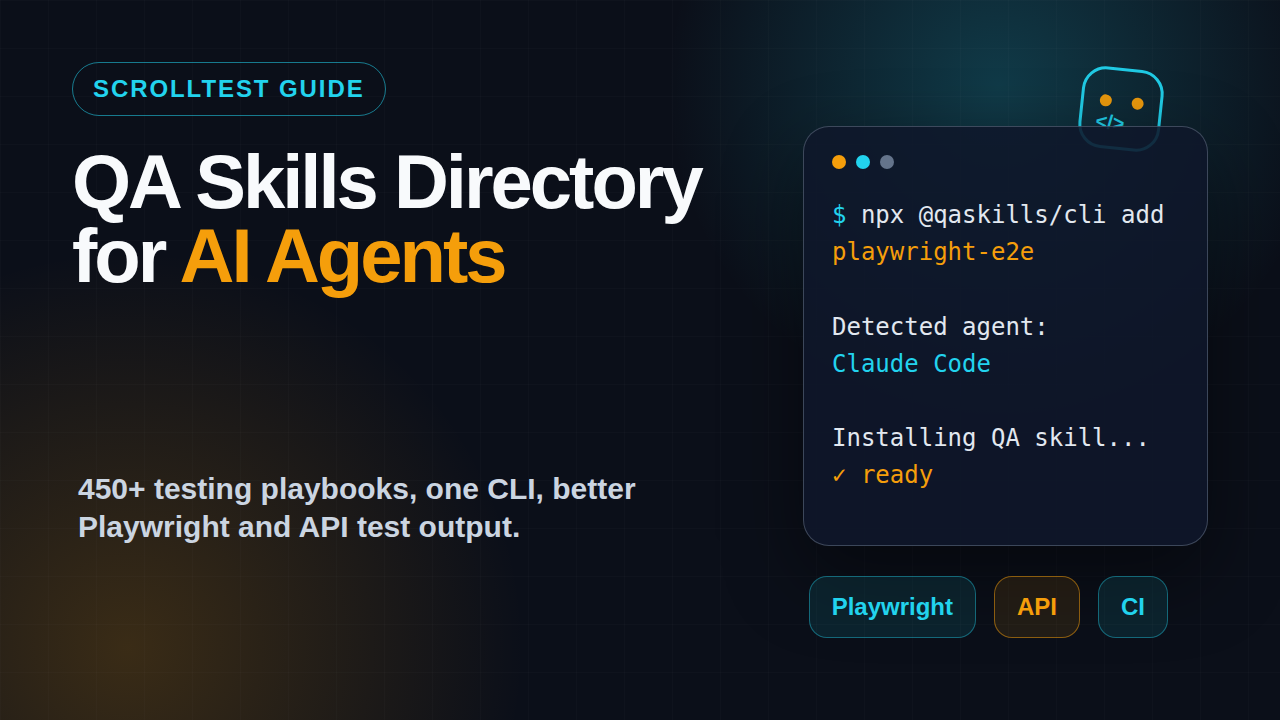
QASkills.sh is a QA skills directory for AI coding agents. The homepage describes it as open source and built for agents such as Claude Code, Cursor, Copilot, and other developer tools. The site shows a command-first workflow: install a skill with npx @qaskills/cli add, then let the coding agent use that skill while generating or reviewing test work.
The public skills page lists hundreds of QA-focused skills. At the time I checked it, the page showed 393 skills available for 30+ AI coding agents, with categories such as Playwright, Selenium, API testing, visual regression, accessibility, performance, contract testing, mobile testing, and test data. The homepage positions the directory as 450+ open-source skills, so the catalog is clearly moving fast.
What a skill actually means
A skill is not just a short prompt. A useful QA skill is a packaged instruction set that tells an agent how to perform a testing job in a specific way. For example, a Playwright E2E skill can include expectations for locators, fixtures, Page Object Model structure, retries, trace capture, assertions, and CI output.
That matters because the default agent behavior is broad. If you ask a generic agent to “write a Playwright test,” it may produce a test that works once but fails in CI because the selector is brittle or the wait strategy is wrong. A skill narrows the task and gives the agent a standard.
The CLI layer
The npm registry entry for @qaskills/cli describes it as a CLI tool to install, search, and manage QA testing skills for AI coding agents. The npm downloads API reported 1,037 downloads for @qaskills/cli during the 2026-05-25 to 2026-06-23 window, and the registry listed version 0.2.0 as the latest release when I checked. That is early traction, not a mature ecosystem signal yet, but it shows real usage beyond a static landing page.
# Install a QA skill into your agent workspace
npx @qaskills/cli add playwright-e2e

# Example intent after installation
# Ask your agent:
# "Use the Playwright E2E skill and create a checkout smoke test
# with stable locators, fixtures, and trace-friendly assertions."
How this fits the wider agent trend
Agent customization is becoming normal. Anthropic’s Claude Code documentation has a dedicated section on extending Claude with skills. GitHub’s Copilot documentation explains how teams can extend Copilot Chat with Model Context Protocol servers. Teams no longer want one generic assistant. They want agents with tool access, domain context, and repeatable operating procedures.
A QA skills directory is the testing version of that shift. It gives QA engineers a place to start instead of writing the same prompts from scratch every week.
Why a QA Skills Directory Matters for AI Agents
Most teams do not fail with AI testing because the model is weak. They fail because the workflow is vague. One engineer asks for “good tests,” another asks for “automation coverage,” and a third asks the agent to “fix flaky tests.” The output changes every time because the instruction changes every time.
A QA skills directory solves that by turning repeated QA work into reusable instructions. It gives the agent a known pattern for a known job.
Prompt memory is not process
I do not trust chat history as a testing process. It is too easy to lose context, too hard to review, and almost impossible to standardize across a team of 10 or 20 engineers. If your best Playwright prompt lives in one senior SDET’s chat window, your team does not have a process. It has tribal knowledge with a nicer UI.
Skills convert that tribal knowledge into something closer to source-controlled practice. A team can discuss the skill, improve it, install it, and use it repeatedly.
QA work has domain-specific rules
Testing has rules that generic code agents often miss:
- Use user-facing locators before CSS chains.
- Assert behavior, not implementation details.
- Attach trace, screenshot, console logs, and network clues for failures.
- Keep API tests independent from UI timing.
- Prefer deterministic test data over shared mutable accounts.
- Separate smoke, regression, and flaky quarantine suites.
These are not abstract “best practices.” They directly affect CI time, false failures, and developer trust. A good skill puts these rules in front of the agent before the agent writes code.
It reduces review fatigue
Without skills, senior SDETs spend time correcting the same AI mistakes:
- The agent adds
waitForTimeout(5000). - The agent uses a generated CSS selector that breaks after one UI refactor.
- The agent creates a test that depends on test execution order.
- The agent writes a bug report with no reproducible assertion.
- The agent skips negative cases because the happy path was easier.
With skills, the first draft improves. Review does not disappear, but it shifts from “please do basic QA” to “does this match our product risk?” That is a better use of senior time.
How to Install a QA Skill in Your Agent
The QASkills workflow is intentionally simple: pick the testing job, install the skill, then ask the agent to use it. The exact files created can vary by agent and setup, so I treat the flow as a workspace-level setup step rather than a one-time prompt trick.
Step 1: Pick one testing problem
Do not start by installing every skill that looks interesting. Start with one painful, repeated problem. My default choices are:
- Playwright E2E test generation
- API test suite generation
- Flaky test root cause analysis
- Release note to test plan conversion
- Accessibility smoke testing
- Bug report evidence packaging
For a team that already uses Playwright, start with a Playwright skill. If your pain is weak regression planning after releases, start with a release-note skill. If your team is moving from Selenium, read the Selenium to Playwright migration planning guide first and then use a skill to enforce the new patterns.
Step 2: Install the skill
# From your test automation repository
npx @qaskills/cli add playwright-e2e

# For an API-heavy team, a skill like this is a better first target
npx @qaskills/cli add api-test-suite-generator
After installation, commit only the files that your team intentionally wants to share. If the CLI writes local agent configuration, review it before committing. Treat agent instructions with the same care as CI config because they affect what code gets generated.
Step 3: Ask with a concrete task
A skill is not a replacement for clear intent. Bad instruction still creates bad output. I prefer prompts that include the target, risk, and acceptance criteria.
Use the Playwright E2E skill.
Create a smoke test for guest checkout.
Risk: payment button enabled before address validation.
Acceptance criteria:
- Use getByRole and getByLabel locators where possible.
- No waitForTimeout.
- Add assertions after each major user action.
- Keep test data isolated.
- Include trace-friendly failure messages.
Step 4: Review the diff like a tester
Do not merge agent output just because it compiles. Review the generated test against your testing standard. The skill should raise the baseline, not remove human judgment.
I use this review checklist:
- Does the test prove a user-visible behavior?
- Can it run independently in CI?
- Does it fail with useful evidence?
- Are selectors stable and readable?
- Is test data created, reused, or cleaned up intentionally?
- Does the test belong in smoke, regression, or a lower-level suite?
If you want a related pattern for agent workflows, read the Playwright MCP for QA engineers guide. MCP gives agents tool access. Skills give agents operating instructions. Strong teams use both carefully.
Practical Workflows QA Teams Can Use
The best way to evaluate QASkills is not by browsing the catalog. Pick three workflows and run them against real code. If the first draft saves review time, keep going. If it only creates pretty but useless code, adjust the skill or drop it.
Workflow 1: Generate a Playwright smoke test
For Playwright teams, the obvious starting point is smoke coverage. Smoke tests are constrained enough for agents to help and important enough to justify quality review.
import { test, expect } from '@playwright/test';

test('guest can see checkout validation before payment', async ({ page }) => {
  await page.goto('/cart');
  await page.getByRole('button', { name: 'Checkout' }).click();

  await expect(page.getByRole('heading', { name: 'Checkout' }))
    .toBeVisible();

  await page.getByRole('button', { name: 'Pay now' }).click();

  await expect(page.getByText('Shipping address is required'))
    .toBeVisible();
  await expect(page.getByRole('button', { name: 'Pay now' }))
    .toBeDisabled();
});
The skill should push the agent toward stable locators, visible assertions, and a focused scenario. If it produces a 200-line script with random waits, the skill or the prompt needs work.
Workflow 2: Convert a release note into a test plan
Release notes are a goldmine for QA, but they often get read too late. A release-note skill can ask the agent to extract changed surfaces, impacted user flows, regression risks, and upgrade checks.
Use the release-note-to-test-plan skill.
Input: Playwright release notes for our current upgrade.
Output:
1. Breaking changes relevant to our framework.
2. New features worth testing.
3. Three smoke tests to run before merge.
4. One rollback risk.
5. Links to affected files in our repo if found.
This pairs well with the ScrollTest article on Playwright 1.61 release notes for QA teams. Release notes are not reading material for later. They are test planning input.
Workflow 3: Package better bug evidence
AI browser agents often fail in messy ways. A skill can force the agent to attach the evidence developers need:
- Exact instruction given to the agent
- Final URL and environment
- Screenshot at failure
- Console errors
- Network request that failed or looked suspicious
- Expected behavior and observed behavior
- Smallest reproducible assertion
This is boring, and that is why it is valuable. Boring evidence reduces back-and-forth in defect triage.
Workflow 4: Add eval checks for AI testing prompts
When QA teams start using prompts as part of their automation workflow, those prompts need regression tests too. A skill can help create PromptFoo or similar eval checks so you know when a prompt starts producing weaker output.
If you work with LLM evals, the DeepEval 4.x QA skill stack for SDETs is a useful next read. The principle is the same: if a workflow matters, test it repeatedly.
The Quality Bar: What Makes a Good QA Skill?
Not every skill deserves a place in your repo. A weak skill is just a long prompt with confidence. A strong skill encodes decisions that your team already agrees with.
Good skills are narrow
“Write better tests” is too broad. “Generate Playwright smoke tests using role-based locators and no hard waits” is useful. The narrower skill wins because it reduces ambiguity.
Strong examples look like this:
- API contract test generator for OpenAPI specs
- Playwright trace reviewer for flaky failures
- Accessibility smoke checklist for critical pages
- Mobile Appium locator review skill
- Release note to regression test plan skill
Good skills include anti-patterns
Agents need “do this” and “do not do this.” In testing, the second part is critical. A Playwright skill should explicitly ban hard waits unless a human approves them. An API skill should avoid tests that depend on shared production-like data. A bug report skill should reject vague lines such as “it failed sometimes.”
Good skills produce reviewable output
I want output that is easy to review in a pull request. That means small files, clear naming, comments only when useful, and no hidden magic. If a skill encourages the agent to modify 25 files for a simple smoke test, I do not use it in a production repo.
Good skills match your CI reality
Your skill should know whether the team runs tests in GitHub Actions, Jenkins, GitLab CI, Azure DevOps, or a local Docker runner. It should understand trace retention, retry policy, sharding, and report output. A beautiful test that cannot run reliably in CI is decoration.
🚀 Build Real AI Testing Skills
Stop testing AI by guesswork. Learn DeepEval, RAG evaluation, and agent testing with guided projects.
How I Would Roll This Out in a QA Team
I would not announce “we are adopting AI skills” and ask everyone to experiment randomly. That creates noise. I would roll it out like a testing framework change.
Week 1: Select one workflow
Pick one workflow with measurable pain. For example, flaky Playwright triage or API test generation from a spec. Define a baseline: how long does the task take today, and what mistakes repeat?
Week 2: Install and test one skill
Install one QASkills skill in a sandbox branch. Run it against three real tasks. Track the output quality using a simple scorecard:
- Correctness: does the output work?
- Maintainability: would the team accept this style?
- Evidence: does failure output help debugging?
- Diff size: is the change reviewable?
- Time saved: did it reduce manual work?
Week 3: Customize the instruction
No public skill will match your repo perfectly. Add team-specific details: naming conventions, folder structure, fixtures, test tags, CI command, and bug evidence format. This is where SDET leadership matters. The skill should represent your engineering standard, not someone else’s defaults.
Week 4: Add it to onboarding
Once one workflow proves useful, add it to onboarding. New SDETs should learn the manual standard and the agent-assisted standard. The goal is not to skip fundamentals. The goal is to make fundamentals repeatable.
# Example team workflow
npm ci
npx @qaskills/cli add playwright-e2e
npm run test:smoke
npm run test:report
For teams with 15+ QA engineers, this is where the compounding starts. If every engineer saves 30 minutes per week on repetitive test scaffolding, that is not a small experiment anymore. It becomes a process improvement.
India Context: Why This Matters for SDETs
In India, the SDET career gap is widening. Service-company roles still ask for Selenium, Java, API testing, and SQL. Product companies increasingly expect Playwright, TypeScript, CI ownership, observability, and now AI-assisted engineering. The difference shows up in interviews and salary bands.
For mid-level QA engineers targeting product companies, the practical question is simple: can you use AI tools to produce better engineering output, not just faster text?
What hiring managers will notice
A candidate who says “I use ChatGPT for test cases” sounds average now. A candidate who says “I maintain agent skills for Playwright smoke tests, release-note regression planning, and flaky test triage” sounds different. That shows process thinking.
In ₹25-40 LPA SDET interviews, the stronger signal is not tool name dropping. It is ownership. Can you explain why a generated test is stable? Can you reject a bad agent suggestion? Can you create a repeatable workflow for the team?
Manual testers can use this too
Manual testers should not ignore skills because they do not write full frameworks yet. A skill can help convert exploratory notes into structured test cases, create risk-based checklists from release notes, and turn bug observations into better defect reports. That is a practical bridge from manual QA to automation thinking.
My advice: learn Playwright basics, API testing basics, Git basics, and then use a QA skills directory to standardize how you ask agents for help. Do not let the agent become a crutch. Use it as a strict junior who follows your checklist.
Mistakes to Avoid
QASkills is useful, but it will not fix a weak testing culture by itself. If your team accepts flaky tests today, an agent can generate flaky tests faster. The process still needs discipline.
Mistake 1: Installing too many skills
More skills do not mean better output. Start with one high-value workflow. Prove it. Then add another. A messy agent setup becomes another maintenance problem.
Mistake 2: Treating skills as truth
Skills are instructions, not guarantees. Review every generated change. If the skill produces a bad pattern, fix the skill or stop using it. Do not blame “AI” when the instruction was incomplete.
Mistake 3: Ignoring repo context
A public Playwright skill does not know your fixtures, test data, environments, or CI rules unless you provide that context. The best results come when public skills meet local standards.
Mistake 4: Measuring only speed
Speed is the easiest metric and often the least useful. Measure escaped bugs, flaky failures, review comments, CI pass rate, and time to debug. A skill that saves 10 minutes but adds two flaky failures is a bad trade.
Key Takeaways
A QA skills directory is useful because AI agents need testing standards, not just coding ability. QASkills.sh gives QA teams a practical starting point for packaging those standards into reusable skills.
- QASkills.sh lists hundreds of QA skills for AI coding agents, with the skills page showing 393 available skills when checked.
- The
@qaskills/clipackage is the command-line entry point for installing and managing skills. - Skills work best when they are narrow, reviewable, and tied to real QA workflows.
- Good first use cases are Playwright smoke tests, API test generation, release-note test planning, and bug evidence packaging.
- For SDETs in India, agent skills can become a career signal when paired with strong fundamentals and CI ownership.
My opinion is simple: do not ask agents to “do QA.” Teach them your QA standard. A directory like QASkills.sh makes that teaching process easier to repeat.
FAQ
Is QASkills.sh only for automation engineers?
No. Automation engineers will get the fastest value because many skills target code generation and review. Manual testers can still use skills for release-note analysis, test case structuring, exploratory testing notes, and bug report evidence.
Does a QA skills directory replace prompt engineering?
No. It reduces repeated prompt writing. You still need clear task instructions, acceptance criteria, and review. Think of a skill as a reusable operating procedure, not a magic command.
Which skill should a Playwright team try first?
Start with a Playwright E2E or smoke testing skill. Use it on a small workflow such as login, checkout, or user settings. Review selector quality, assertions, test data, and CI behavior before scaling it.
Can QASkills work with Claude Code, Cursor, and Copilot?
The QASkills homepage says it is built for Claude Code, Cursor, Copilot, and many other agents. The actual setup depends on your local agent tool and repository, so install one skill in a test branch before rolling it out to a team.
What is the biggest risk?
The biggest risk is trusting generated output without review. Skills improve the first draft, but they do not remove engineering judgment. Senior QA engineers still need to own the standard.
Sources: QASkills.sh homepage and skills catalog, npm registry and downloads API for @qaskills/cli, Anthropic Claude Code skills documentation, and GitHub Copilot MCP documentation.
🎓 Become an AI-Powered QA Engineer
Join hundreds of SDETs mastering LLM, RAG, and agent testing. Lifetime access, hands-on labs, and a job-ready portfolio.