Release Note Test Plan: QASkills Workflow for QA
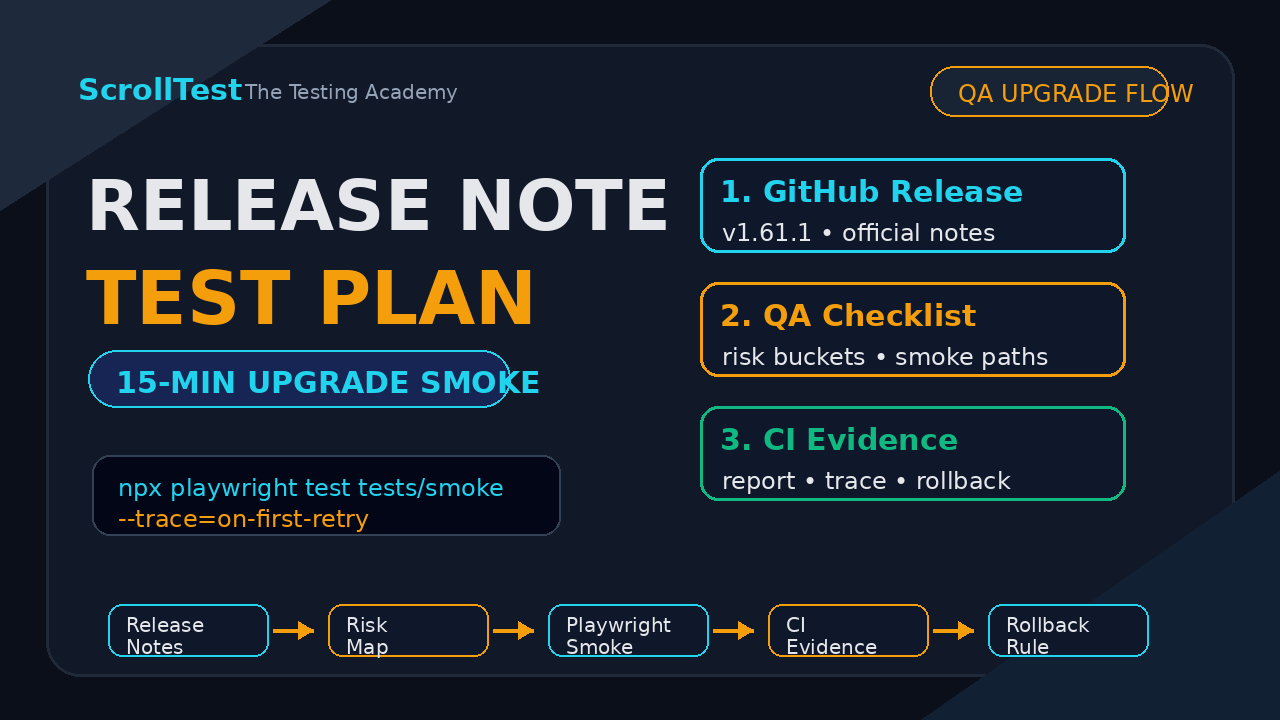
If your team reads release notes only after a pipeline breaks, you are paying interest on every upgrade. A release note test plan turns a vendor changelog into a small, focused smoke suite before the new package reaches production CI. That is the workflow QASkills should make boring: capture the release, classify the risk, produce the tests, and leave evidence behind.
🤖 Learning AI-powered testing? Go hands-on with LLM, RAG, and AI-agent testing in the AI-Powered Testing Mastery course at The Testing Academy.
Table of Contents
- Why Release Notes Need Tests
- What QASkills Adds to a Release Note Test Plan
- Release Note Test Plan Workflow
- Use GitHub Release Data Without Guesswork
- A Playwright Upgrade Smoke Test Example
- CI Evidence That Makes Upgrade Decisions Easier
- India Context: Why SDETs Should Learn This
- Common Traps I See in Upgrade Testing
- Key Takeaways
- FAQ
Contents
Why Release Notes Need Tests
Release notes look harmless. They are markdown pages with bullet points, bug fixes, and version numbers. But for a QA team, every item in a release note is a question: does this affect our browser, our selector strategy, our CI image, our API mocks, or our user flows?
I see teams treat release notes as reading material. That is a mistake. A release note should become a test artifact. If a vendor says a browser engine changed, a fixture changed, or a timeout behavior changed, I want a test plan before I update the lockfile.
Upgrade risk is not theoretical
Playwright, Selenium, and Cypress are active projects. The GitHub API reported Playwright v1.61.1 published on 23 June 2026, Selenium 4.45.0 published on 16 June 2026, and Cypress v15.18.0 published on 23 June 2026. That pace is healthy. It also means your automation stack can change underneath you several times in a single quarter.
The npm downloads API showed @playwright/test at 165,464,635 downloads for the 30-day window ending 27 June 2026. Cypress showed 28,997,048 downloads, and selenium-webdriver showed 8,216,811 downloads for the same window. These are not niche tools. If your framework depends on them, upgrade testing deserves a real checklist.
The most expensive upgrade failure is not the one that fails immediately. It is the one that passes a tiny happy path suite and then flakes for 2 weeks. You lose time in triage, pull request review, reruns, and blame games.
A release note test plan reduces that risk. It turns vague upgrade anxiety into a small test matrix:
- Which release note items touch our framework?
- Which flows should we smoke test first?
- Which failures are expected because the vendor fixed behavior?
- Which screenshots, traces, logs, and videos prove the upgrade is safe?
What QASkills Adds to a Release Note Test Plan
QASkills is a skill directory for QA engineers who use AI coding agents. Its public API returned 20 skills during this run, including Playwright E2E Testing, Playwright CLI Browser Automation, and Playwright API Testing. The @qaskills/cli npm package currently lists version 0.2.0 as the latest release, modified on 12 June 2026, with 1,021 npm downloads in the 30-day window ending 27 June 2026.
That matters because release-note-to-test-plan is a perfect skill shape. It is not a chat prompt. It is a repeatable QA workflow with inputs, rules, outputs, and verification.
Inputs the skill should accept
A useful QASkills release-note-to-test-plan skill should accept at least 5 inputs:
- A release URL, such as a GitHub release page.
- The current package version and target package version.
- The test framework, for example Playwright with TypeScript.
- A list of business-critical journeys.
- The CI environment, including OS, Node version, browser channel, and Docker image.
Without those inputs, an AI agent will produce generic advice. With those inputs, it can produce a concrete release note test plan that a senior SDET can review in 10 minutes.
Outputs I expect from the workflow
The output should be practical, not pretty. I want a markdown file or pull request comment with:
- A risk summary grouped by browser, API, reporter, fixtures, and CI.
- A test matrix with owner, command, expected evidence, and pass criteria.
- New or modified Playwright specs.
- Rollback criteria if the upgrade fails.
- Links to the exact release notes used as sources.
This is the same reason I like evidence-first QA content like AI Browser Bug Reports: Evidence Pack for Day 20. A result without evidence is just a claim.
Release Note Test Plan Workflow
A release note test plan should be small enough to run on every upgrade and specific enough to catch real breakage. The goal is not to retest the whole product. The goal is to test the change surface of the release.
Step 1: Pull the release notes from a trusted source
Start with the official release artifact. GitHub documents REST endpoints to list releases, get the latest release, and get a release by tag name. If your dependency publishes GitHub releases, use the API instead of scraping a web page.
curl -s \
  -H "Accept: application/vnd.github+json" \
  -H "X-GitHub-Api-Version: 2022-11-28" \
  https://api.github.com/repos/microsoft/playwright/releases/tags/v1.61.1
The response gives you the tag, URL, author, publish time, prerelease flag, assets, and release body. That is enough for a deterministic first pass.
Step 2: Classify each release note item
I split release notes into 7 buckets:
- Runtime behavior: browser, driver, or protocol changes.
- Test API: assertions, locators, fixtures, retries, hooks.
- Reporter and trace: HTML report, screenshots, video, traces.
- Install and dependency: Node version, browser binaries, Docker images.
- Network and API: routing, request context, proxy, headers.
- Accessibility and visual: snapshots, ARIA, screenshot diffs.
- Known bugs: fixes that may reveal a workaround in your code.
This classification prevents random smoke testing. If a release touches tracing, I test trace capture. If it touches browser install, I test the CI image. If it touches locators, I test the pages with the highest selector churn.
Step 3: Convert buckets into smoke tests
The smoke test plan should use verbs a QA engineer can execute. Not “validate stability.” Say “run checkout.spec.ts on Chromium and WebKit with trace on first retry.” Not “check API behavior.” Say “run auth-api.spec.ts against staging with the same storage state used by UI tests.”
For Playwright teams, I usually want 4 commands:
npm ci
npx playwright install --with-deps
npx playwright test tests/smoke --project=chromium --trace=on-first-retry
npx playwright test tests/critical --project=webkit --reporter=html
If those 4 commands are too slow, the test suite is not upgrade-friendly yet. Fix the suite before you automate the release review.
Use GitHub Release Data Without Guesswork
GitHub is a strong source for release-note-to-test-plan automation because release data is structured. The official webhook documentation says a release event occurs when there is activity relating to releases, with actions such as published, released, prereleased, edited, deleted, and unpublished. That is useful for teams that want upgrade checks to start automatically when a vendor publishes a new version.
Minimal TypeScript release fetcher
Here is a small TypeScript script that fetches a release and prints the fields an AI agent needs before it writes a plan.
type GitHubRelease = {
  tag_name: string;
  html_url: string;
  published_at: string;
  prerelease: boolean;
  body: string | null;
};

async function getRelease(owner: string, repo: string, tag: string) {
  const response = await fetch(
    `https://api.github.com/repos/${owner}/${repo}/releases/tags/${tag}`,
    {
      headers: {
        Accept: 'application/vnd.github+json',
        'X-GitHub-Api-Version': '2022-11-28',
      },
    }
  );

  if (!response.ok) {
    throw new Error(`GitHub release fetch failed: ${response.status}`);
  }

  const release = (await response.json()) as GitHubRelease;
  return {
    tag: release.tag_name,
    url: release.html_url,
    publishedAt: release.published_at,
    prerelease: release.prerelease,
    notes: release.body ?? '',
  };
}

getRelease('microsoft', 'playwright', 'v1.61.1')
  .then((release) => console.log(JSON.stringify(release, null, 2)))
  .catch((error) => {
    console.error(error);
    process.exit(1);
  });
Prompt the agent with constraints
Do not ask an agent to “make a test plan.” Give it a contract. A QASkills workflow can wrap that contract so every engineer uses the same input shape.
You are writing a release note test plan for a Playwright upgrade.
Current version: 1.60.0
Target version: 1.61.1
Critical journeys: login, checkout, invoice download, user invite
CI: Ubuntu, Node 22, Chromium, WebKit, HTML reporter, trace on retry
Output:
1. Risk classification table
2. Smoke tests with commands
3. Required evidence
4. Rollback criteria
Use only the release notes below as the source of change claims.
The last line matters. It stops the agent from mixing old release behavior, blog posts, and guesses into the plan.
A Playwright Upgrade Smoke Test Example
Let us make this concrete. Suppose a team updates Playwright from one minor version to the next. The release note test plan should not say “run all E2E tests.” That is lazy. It should identify the highest risk areas and run the smallest set that proves those areas still work.
Example test matrix
| Risk area | Smoke test | Command | Evidence |
|---|---|---|---|
| Browser install | Install browsers in CI image | npx playwright install --with-deps | CI log |
| Locators | Login and checkout paths | npx playwright test tests/critical | HTML report |
| Trace | Forced retry on known fixture | --trace=on-first-retry | Trace zip |
| WebKit | Invoice download journey | --project=webkit | Video or screenshot |
This is close to the process I recommend in Playwright Upgrade Checklist: 3 Checks Before CI and Playwright Release Notes: QA Checklist for 2026. The QASkills version should package that thinking into an agent-ready skill.
A real Playwright spec for upgrade smoke
This example checks 3 things: the app loads, the critical selector strategy still works, and the report captures a screenshot on failure. Replace the routes with your own app routes.
import { test, expect } from '@playwright/test';

test.describe('upgrade smoke: critical journeys', () => {
  test('login page exposes stable user-facing selectors', async ({ page }) => {
    await page.goto('/login');
    await expect(page.getByRole('heading', { name: /sign in/i })).toBeVisible();
    await expect(page.getByLabel(/email/i)).toBeEditable();
    await expect(page.getByRole('button', { name: /continue/i })).toBeEnabled();
  });

  test('checkout route can reach payment review', async ({ page }) => {
    await page.goto('/products/test-plan-pro');
    await page.getByRole('button', { name: /add to cart/i }).click();
    await page.getByRole('link', { name: /checkout/i }).click();
    await expect(page.getByTestId('payment-review')).toBeVisible();
  });
});
I prefer role locators in upgrade smoke tests because they catch user-facing regressions and accessibility drift at the same time. If your smoke suite uses only CSS selectors, you may miss a broken label that a real user sees immediately.
🚀 Build Real AI Testing Skills
Stop testing AI by guesswork. Learn DeepEval, RAG evaluation, and agent testing with guided projects.
CI Evidence That Makes Upgrade Decisions Easier
A release note test plan without evidence is incomplete. The whole point is to let a team decide: ship the upgrade, hold it, or roll it back. That decision needs artifacts.
Evidence bundle
For a small automation framework, I want this bundle attached to the pull request:
- Release URL and target version.
- Package lock diff.
- CI run URL.
- HTML report URL or artifact.
- Trace file for every failed retry.
- Screenshot or video for at least 1 critical browser path.
- Rollback command, usually a lockfile revert.
If you are testing AI browser agents, this evidence habit becomes even more important. The article AI Agent Test Plan: 7-Minute QA Checklist covers the same principle from the agent side: do not trust a result that cannot be replayed.
CI gate example
A GitHub Actions job for upgrade smoke does not need to be complex. It needs to be boring and repeatable.
name: upgrade-smoke
on:
  pull_request:
    paths:
      - 'package.json'
      - 'package-lock.json'
      - 'playwright.config.ts'

jobs:
  playwright-upgrade-smoke:
    runs-on: ubuntu-latest
    steps:
      - uses: actions/checkout@v4
      - uses: actions/setup-node@v4
        with:
          node-version: 22
          cache: npm
      - run: npm ci
      - run: npx playwright install --with-deps
      - run: npx playwright test tests/smoke --trace=on-first-retry
      - uses: actions/upload-artifact@v4
        if: always()
        with:
          name: playwright-upgrade-evidence
          path: |
            playwright-report
            test-results
This is the type of file a QASkills workflow should generate or update. It gives the team a visible gate instead of a hidden senior-engineer checklist.
India Context: Why SDETs Should Learn This
In India, many QA engineers are trying to move from manual testing or maintenance automation into stronger SDET roles. The skill gap is not only Playwright syntax. The bigger gap is judgment: knowing what to test, when to block a release, and how to explain risk to engineering managers.
Why this matters in interviews
For ₹25-40 LPA SDET roles in Bengaluru, Hyderabad, Pune, and remote product teams, I expect candidates to discuss CI, release gates, flaky test triage, and upgrade risk. A candidate who can show a release note test plan has a better story than someone who only says “I know Playwright.”
Here is the interview answer I like:
“When a vendor releases a new Playwright version, I fetch the official GitHub release, classify the notes into risk buckets, run a targeted smoke suite across Chromium and WebKit, attach trace evidence, and keep rollback criteria in the pull request.”
That answer is specific. It includes a source, a classification method, browser coverage, evidence, and rollback. It sounds like an engineer who has shipped upgrades, not just watched tutorials.
How to practice this week
Pick one dependency from your framework. It can be Playwright, Selenium, Cypress, Allure, Axios, or a reporting library. Then do this:
- Fetch the latest release notes from the official source.
- Write 5 risk bullets.
- Create 3 smoke tests or commands.
- Run them in CI or locally with a saved report.
- Write a 10-line upgrade decision: ship, hold, or rollback.
This exercise takes less than 2 hours and gives you a portfolio artifact. Add it to GitHub. Link it in your resume. Discuss it in interviews.
Common Traps I See in Upgrade Testing
Upgrade testing fails when teams confuse effort with coverage. Running 900 tests is not automatically better than running 30 well-chosen tests. The right tests are the ones tied to the release note risk.
I also see teams skip the boring metadata. They do not record the old version, new version, Node version, Docker image, browser channel, or feature flags. Then a failure appears 5 days later and nobody can reproduce the exact upgrade context. A release note test plan should write those values at the top of the pull request. That small habit makes debugging faster because the next engineer does not need to reconstruct history from CI logs.
Another trap is treating patch releases as risk-free. Patch releases are usually safer than major releases, but they can still change timing, browser binaries, reporter output, and dependency resolution. I do not block every patch release. I do run the same 15-minute smoke plan and attach evidence before I merge it.
Trap 1: Testing only Chrome
Many teams run Chromium locally and call the upgrade safe. Then WebKit or Firefox breaks in CI. If your customer base or product policy supports multiple browsers, include at least 1 non-Chromium smoke path.
Trap 2: Ignoring reporters and traces
Reporter changes rarely block a customer flow, but they can break your debugging loop. If the HTML report, trace viewer, screenshot path, or artifact upload changes, the team loses visibility during the next failure.
Trap 3: Blind trust in AI output
An AI agent can summarize release notes quickly, but it can also miss a subtle breaking change. The QASkills workflow should force citations and ask for the exact release note line behind each test. If the agent cannot point to a source, the claim should be cut or labeled as experience-based risk.
Trap 4: No rollback rule
A release note test plan needs a stop condition. Example: “If any critical journey fails in Chromium or WebKit and the trace points to framework behavior, hold the upgrade and revert the lockfile.” That sentence saves hours during a hot CI failure.
Key Takeaways
A release note test plan is not extra documentation. It is the missing bridge between vendor change logs and production-safe automation upgrades.
- Use official release sources such as GitHub releases and vendor release pages.
- Classify release notes into risk buckets before choosing tests.
- Keep the smoke suite small, specific, and tied to real user journeys.
- Attach evidence: CI logs, HTML reports, traces, screenshots, and rollback criteria.
- Use QASkills to turn this workflow into a repeatable agent skill instead of a one-off prompt.
If you want to try the QA agent skill approach, start with QASkills.sh and install the CLI. Then apply the same pattern to the next Playwright, Selenium, Cypress, or API testing library upgrade in your stack.
FAQ
What is a release note test plan?
A release note test plan is a focused QA checklist created from official release notes. It maps each relevant change to a smoke test, command, owner, evidence artifact, and rollback rule.
Can AI write the whole upgrade test plan?
AI can draft the first version if you give it the release URL, current version, target version, framework details, critical journeys, and CI constraints. A senior QA engineer should still review the risk classification and evidence requirements.
How many tests should an upgrade smoke suite include?
For most product teams, 10 to 30 focused tests are better than hundreds of random regression tests. The number depends on the release note risk, supported browsers, and how much evidence the team needs before merging.
Is this only for Playwright?
No. The same workflow works for Selenium, Cypress, API clients, visual regression tools, accessibility libraries, and CI actions. Playwright is a strong example because browser, trace, reporter, and locator behavior all matter.
Where does QASkills fit?
QASkills fits as the reusable workflow layer. Instead of pasting a loose prompt into an AI agent, the team installs a skill that defines inputs, rules, output format, source citations, test generation, and verification steps.
🎓 Become an AI-Powered QA Engineer
Join hundreds of SDETs mastering LLM, RAG, and agent testing. Lifetime access, hands-on labs, and a job-ready portfolio.