Browser-Agent Trust Report: Stagehand 0.9 QA Guide
I do not trust a browser agent because it says “done”. A browser-agent trust report is the evidence pack that proves what the agent clicked, what the page showed, what changed in the DOM, and where a human approved the risky step. The Stagehand browse@0.9.0 release, published on 25 June 2026, is a small release note with a big QA signal: screenshots are becoming first-class artifacts, not afterthoughts.
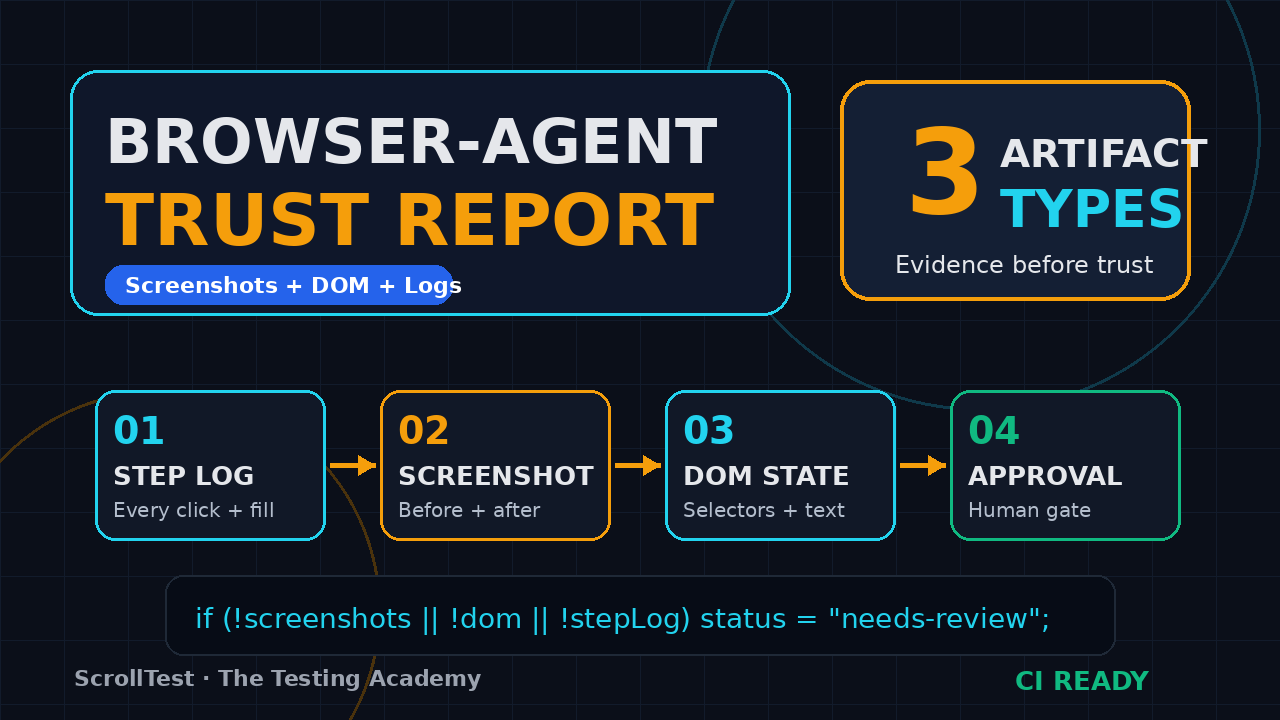
My recommended pass condition is strict: a run is trustworthy only when at least 3 artifact types exist for the critical path. For example, a login-to-checkout flow should have screenshots, DOM snapshots, and a step log before anyone calls it green. If the run includes a high-risk action such as payment, invite, delete, or production configuration, the report also needs an approval record tied to the exact step number.
Table of Contents
- Why a browser-agent trust report matters now
- What changed in Stagehand browse@0.9.0
- The evidence model QA teams should demand
- Reference implementation in TypeScript
- Human approval gates for AI browser actions
- CI template for release teams
- India context: what this means for SDETs
- Common mistakes I see in AI browser testing
- Key takeaways
- FAQ
Contents
Why a browser-agent trust report matters now
Agents are moving from demos to release paths
Browser agents are no longer only conference toys. Teams are using Stagehand, browser-use, Playwright scripts, and internal agents to fill forms, check pages, capture screenshots, and triage bugs. The problem is not whether an agent can open a browser. The problem is whether QA can explain the run after it fails at 2:13 AM in CI.
The adoption signal is easy to see. The Browserbase Stagehand GitHub API showed 23,368 stars when I checked this run, and the repo describes itself as “The SDK For Browser Agents.” The browser-use GitHub API showed 102,950 stars. The Microsoft Playwright GitHub API showed 92,269 stars, which matters because most serious browser-agent work still sits on top of deterministic browser automation ideas.
The weak point is evidence, not intelligence
Most failed agent experiments I review have the same missing file: evidence. A product manager sees a green status. A QA engineer asks for the screenshot. The developer asks for the DOM. The security reviewer asks who approved the submit button. Nobody has a clean answer.
That is why I like the phrase browser-agent trust report. It moves the discussion away from vague AI confidence and into testable artifacts. A useful report answers four questions:
- What was the agent asked to do?
- Which browser actions did it actually take?
- What visual and DOM evidence did it capture?
- Where did a human approve, reject, or modify the next action?
QA needs a stricter bar than product demos
A demo can end with “it worked on my laptop.” A release workflow cannot. If an agent changes customer data, buys a plan, sends a message, or edits a production-like record, a QA team needs replayable proof.
I have written about this pattern before in AI Browser Agent Testing: 3 Checks Before Trust and AI Browser Agent Evidence Checklist for QA Teams. The short version is simple: no trace, no screenshot, no DOM snapshot, no trust.
What changed in Stagehand browse@0.9.0
The screenshot command now saves files by default
The Stagehand browse@0.9.0 release says browse screenshot now writes a file by default instead of printing base64 to stdout. Bare invocations save to a filename like screenshot-<yyyymmdd-hhmmss>.<type> in the current directory. The command prints JSON with a saved path, and it avoids overwriting by using a collision counter.
That sounds small. It is not small for QA. A saved file can be attached to a CI job, linked in a Slack alert, uploaded into a defect, or bundled into a release report. Base64 in stdout is useful for scripts, but it is invisible to most people who review builds.
The old stdout contract still exists
The same release note says teams that parsed base64 output can pass --base64 to keep the old behavior. That matters because agent infrastructure often starts as a few scripts. If a CLI silently breaks stdout, you get false failures. Stagehand keeps an explicit compatibility path.
For QA, I would document the migration in one line inside the report generator:
# Stagehand browse@0.9.0 screenshot behavior
# Default: writes a file and prints { "saved": "<path>" }
# Legacy: pass --base64 when a parser still expects stdout base64
browse screenshot --path artifacts/home-page.png
browse screenshot --base64
Windows skill installation got safer
The patch section also fixes browse skills add on Windows. The release note calls out paths such as C:\Program Files\nodejs\npx.cmd and user directories with spaces. It also adds a 180 second deadline for the npx skills add child process, plus 10 second abort timeouts for catalog and skill-file fetches.
That detail matters in India and enterprise QA teams because Windows machines are still common in service-company environments. If an installer hangs forever on a Windows laptop, the tool loses trust before the team writes the first useful test.
The evidence model QA teams should demand
A trust report is not one screenshot
A screenshot is useful, but a browser-agent trust report needs more than one PNG. Screenshots show what the human eye sees. DOM snapshots show what selectors and accessibility names exposed to the agent. Network logs show whether the app called the right API. Approval logs show whether the agent acted alone or waited for a person.
For a production-grade report, I want these seven artifacts in every run:
- Prompt and task intent: the exact instruction sent to the agent.
- Step log: every click, fill, navigation, and wait.
- Screenshots: before, after, and failure-state images.
- DOM state: selected HTML, accessibility tree, or stable selector map.
- Network summary: key requests, response codes, and failed calls.
- Trace: a Playwright-style artifact where available.
- Human approval trail: who approved the action and when.
The report must separate observation from decision
This is the line I see teams blur. Observation is evidence: “button text was Submit,” “response status was 200,” “screenshot file exists.” Decision is judgment: “the checkout is safe,” “the agent completed the task,” “the bug is fixed.” A reliable report keeps those two layers separate.
That distinction protects QA when an LLM is confident but wrong. If the agent says the page is correct, the report should show the source artifacts. If the artifacts disagree, the status should be “needs review,” not “passed.”
Use the same evidence language across tools
Stagehand, browser-use, and Playwright all have different APIs. QA teams should still standardize the output contract. My preferred artifact folder looks like this:
artifacts/
  run.json
  steps.jsonl
  screenshots/
    001-before-login.png
    002-after-login.png
    003-before-submit.png
  dom/
    001-before-login.html
    002-after-login.html
  network/
    summary.json
  approvals/
    approvals.jsonl
  report.html
This structure also connects cleanly with the evidence-pack idea in AI Testing Evidence Pack: Trace, Screenshot, Logs. The folder becomes the unit of review.
Reference implementation in TypeScript
Start with a strict evidence type
Do not start with a beautiful dashboard. Start with a boring JSON contract. Boring contracts survive CI, Slack uploads, defect tools, and audit reviews. Here is a minimal TypeScript model I would use for a browser-agent trust report.
type AgentStep = {
  index: number;
  action: "navigate" | "click" | "fill" | "observe" | "screenshot" | "approve";
  target?: string;
  valuePreview?: string;
  timestamp: string;
  screenshotPath?: string;
  domPath?: string;
  approvedBy?: string;
  notes?: string;
};

type TrustReport = {
  runId: string;
  tool: "stagehand" | "browser-use" | "playwright" | "custom-agent";
  task: string;
  appUrl: string;
  startedAt: string;
  completedAt?: string;
  status: "passed" | "failed" | "needs-review";
  steps: AgentStep[];
  sourceLinks: string[];
};
Capture screenshot paths as data, not console noise
Stagehand browse@0.9.0 makes this cleaner because the screenshot command now prints a saved path. That path should flow into the report JSON immediately. If your runner still treats screenshots as console text, the report is already fragile.
import { execFile } from "node:child_process";
import { promisify } from "node:util";

const exec = promisify(execFile);

async function stagehandScreenshot(name: string) {
  const { stdout } = await exec("browse", ["screenshot", "--path", `artifacts/screenshots/${name}.png`]);
  const parsed = JSON.parse(stdout);
  return parsed.saved ?? `artifacts/screenshots/${name}.png`;
}

async function addScreenshotStep(steps: AgentStep[], name: string) {
  const path = await stagehandScreenshot(name);
  steps.push({
    index: steps.length + 1,
    action: "screenshot",
    timestamp: new Date().toISOString(),
    screenshotPath: path
  });
}
Render a reviewable HTML report
A JSON file helps machines. A small HTML report helps humans. I like a single page with the task, status, timestamps, external sources, and thumbnails. It should be ugly before it is missing.
function renderReport(report: TrustReport) {
  const rows = report.steps.map(step => `
    <tr>
      <td>${step.index}</td>
      <td>${step.action}</td>
      <td>${step.target ?? ""}</td>
      <td>${step.screenshotPath ? `<img src="${step.screenshotPath}" width="220" />` : ""}</td>
      <td>${step.approvedBy ?? ""}</td>
    </tr>`).join("\n");

  return `<main>
    <h1>Browser-Agent Trust Report</h1>
    <p><strong>Task:</strong> ${report.task}</p>
    <p><strong>Status:</strong> ${report.status}</p>
    <table><tbody>${rows}</tbody></table>
  </main>`;
}
If you already use Playwright traces, keep them. The Playwright project is still the base layer many teams trust for browser automation. The trust report does not replace traces. It gives non-specialists a shorter review surface.
Human approval gates for AI browser actions
Not every click needs approval
A browser agent does not need a human for every navigation. That would destroy the point of automation. But a release workflow needs approval before actions that can mutate important data, send external messages, trigger payments, update configuration, or delete records.
I use a simple risk table:
- Low risk: read-only navigation, search, screenshot, page summarization.
- Medium risk: form fill on staging, draft creation, non-destructive configuration checks.
- High risk: submit, delete, purchase, invite, export, email, payment, production data edit.
Approval must be captured as an artifact
A Slack message that says “approved” is not enough if the report cannot connect it to a specific action. The approval record should include the run ID, step index, proposed action, reviewer, timestamp, and decision. In regulated teams, this is not paperwork. It is the difference between a usable audit trail and a story nobody can prove.
{
  "runId": "bb-2026-07-06-001",
  "stepIndex": 7,
  "proposedAction": "click button[name='Submit order']",
  "risk": "high",
  "decision": "approved",
  "approvedBy": "qa.lead@example.com",
  "timestamp": "2026-07-06T03:30:00Z"
}
Human-in-the-loop is a release control
Many teams sell human-in-the-loop as a UX feature. I see it as a release control. If an AI browser action can affect money, messages, or customer records, approval is part of the test design.
This is where a product like BrowsingBee can be useful. Position it as an evidence layer around AI browser actions: steps, screenshots, DOM state, and human approval. The promise is not magic. The promise is accountability.
CI template for release teams
Make the report a build artifact
The report should be stored even when the run passes. Teams usually save artifacts only on failure, then regret it when a production bug appears three days later. Save the report for every release candidate. Retention can be shorter for green builds, but the artifact should exist.
A minimal CI gate can use these checks:
- Run the browser-agent scenario against staging.
- Capture screenshots before and after every risky action.
- Write
run.json,steps.jsonl, andreport.html. - Fail the build if a high-risk step has no approval record.
- Upload the artifact folder to CI storage.
- Post the report URL in the release channel.
Use release notes as triggers
The Stagehand release is a good example of why release notes matter to QA. A screenshot output contract changed. Windows installation behavior changed. Installer timeouts changed. Those are not only developer details. They affect how test evidence is captured on laptops, in CI, and in onboarding scripts.
If your team upgrades browser-agent tooling weekly, pair it with the idea in Playwright Upgrade Smoke Checklist for QA Teams. Every upgrade should answer: what changed, what evidence can break, and which smoke flow proves the new version works?
A starter GitHub Actions shape
name: browser-agent-trust-report
on:
  workflow_dispatch:
  pull_request:

jobs:
  evidence:
    runs-on: ubuntu-latest
    steps:
      - uses: actions/checkout@v4
      - uses: actions/setup-node@v4
        with:
          node-version: 22
      - run: npm ci
      - run: npm run agent:staging
      - name: Upload browser-agent trust report
        uses: actions/upload-artifact@v4
        with:
          name: browser-agent-trust-report
          path: artifacts/
The YAML is not the hard part. The hard part is deciding that an AI browser run without artifacts is not a valid release signal.
India context: what this means for SDETs
The job is shifting from clicking to judging evidence
For Indian QA engineers, this shift is practical. Service-company teams at TCS, Infosys, Wipro, Cognizant, and similar organizations still maintain large manual and Selenium-heavy portfolios. Product companies in Bengaluru, Hyderabad, Pune, and Gurugram increasingly expect QA engineers to understand automation, CI, and now AI-assisted workflows.
I do not tell a manual tester to become an AI researcher. I tell them to become the person who can judge whether an AI browser run is trustworthy. That means reading JSON, writing Playwright or TypeScript basics, understanding artifacts, and asking better release questions.
Salary upside follows ownership
I avoid fake salary promises. Still, the pattern is visible in hiring conversations: engineers who own automation architecture, CI evidence, and release quality usually compete for better roles than engineers who only execute scripts. In India, that often means moving from low single-digit LPA testing roles toward SDET roles in the ₹15-35 LPA band, depending on city, company, communication, and system-design depth.
A browser-agent trust report is a portfolio artifact. If you are applying for an SDET role, build one for a public demo app. Show the prompt, the screenshots, the DOM snapshot, the approval gate, and the CI artifact. That tells a hiring manager more than a resume line saying “AI testing.”
What to learn this month
- Playwright TypeScript basics: locators, traces, fixtures, screenshots.
- One browser-agent tool: Stagehand, browser-use, or a small custom wrapper.
- Artifact design: JSONL logs, screenshot naming, HTML reports.
- CI upload flow: GitHub Actions artifacts or your company CI equivalent.
- Approval design: risk levels and reviewer decisions.
Common mistakes I see in AI browser testing
Mistake 1: trusting a final answer
An LLM final answer is not a test result. It is a claim. QA needs the artifacts behind the claim. If the agent says “checkout succeeded,” I want the order confirmation screenshot, the relevant DOM text, and the network status.
Mistake 2: hiding flaky steps inside natural language
Natural language prompts are helpful, but they can hide ambiguity. “Complete checkout” is not a test step. It is a goal. A report should expose the actual actions: filled email, selected shipping, clicked pay, waited for confirmation, captured screenshot.
Mistake 3: saving screenshots with random names only
A timestamp is useful, but the filename should also carry meaning. Prefer 003-before-submit-order.png over screenshot-20260706-033000.png when the report is built for humans. Keep the timestamp in metadata.
Mistake 4: treating Windows as an edge case
Stagehand browse@0.9.0 fixed Windows command quoting and installer timeouts for a reason. Many QA teams still run tools on Windows laptops. If your agent stack only works on one MacBook, it is not ready for team adoption.
Mistake 5: no upgrade smoke test
Browser-agent tools are moving fast. The npm downloads API reported 4,683,506 last-month downloads for @browserbasehq/stagehand for the 5 June to 4 July 2026 window when I checked. Fast-moving packages need boring upgrade checks. Screenshot output, installer behavior, and CLI JSON contracts should be tested before the team upgrades.
Key takeaways: browser-agent trust report
A browser-agent trust report gives QA teams a concrete way to review AI browser actions without trusting vague model confidence. My take is simple: if the agent touches a release path, it must produce evidence.
- Stagehand browse@0.9.0 makes screenshots easier to treat as files, not hidden stdout data.
- A trust report should include prompt, step log, screenshots, DOM state, network summary, trace, and approvals.
- Human approval belongs before high-risk actions such as submit, delete, purchase, invite, export, and production edits.
- CI should upload the complete artifact folder for every release candidate, not only failures.
- For SDETs in India, the career skill is shifting toward evidence ownership and release judgment.
FAQ
What is a browser-agent trust report?
A browser-agent trust report is a structured evidence pack for an AI browser run. It records the task, actions, screenshots, DOM state, network signals, trace links, approvals, and final status so QA can review the run without relying on the agent’s final answer.
Is Stagehand required to build this?
No. Stagehand is one strong option because it is designed for browser agents and the browse@0.9.0 release improves screenshot file handling. You can build the same report contract around browser-use, Playwright, Selenium, or an internal agent wrapper.
How many screenshots should a report capture?
Capture at least one screenshot before and after every risky action. For a five-step read-only flow, three screenshots may be enough. For a checkout or admin update flow, I would capture 8-12 screenshots plus DOM snapshots around each submit or save action.
Should AI browser agents run in production?
Only with strict controls. Read-only monitoring is lower risk. Any action that writes data, sends messages, changes configuration, or moves money needs environment isolation, approval gates, and a clear rollback plan. Start in staging.
Where does BrowsingBee fit?
BrowsingBee can sit as the evidence capture layer for browser-agent runs. The useful product promise is direct: record the steps, screenshots, DOM state, and human approvals so QA teams can decide whether the AI browser action deserves trust.