Playwright Upgrade Checklist for QA Teams
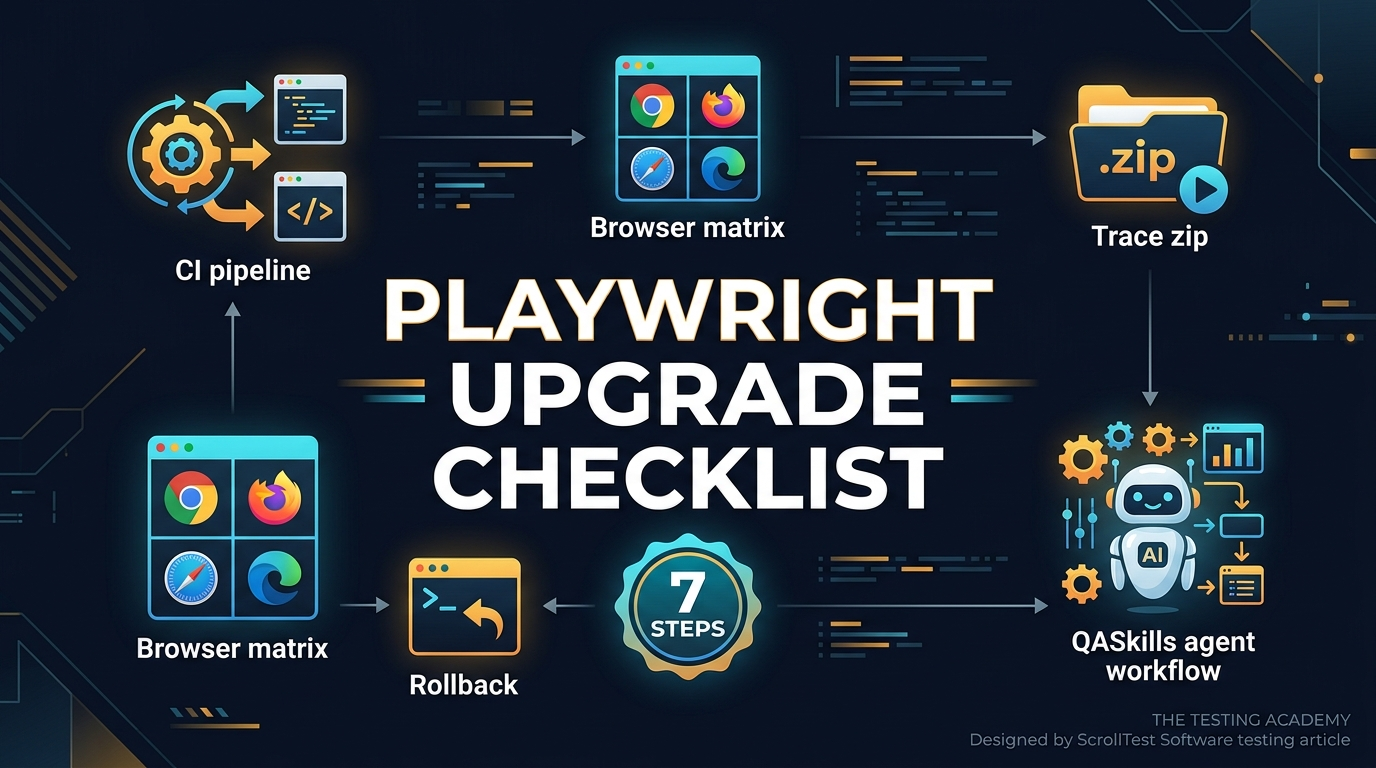
Every Playwright upgrade checklist looks simple until one product team loses a day to browser binaries, one Selenium team breaks the Grid image, and one CI pipeline starts passing locally but failing on Ubuntu. This guide gives QA leads a reusable Playwright upgrade checklist that works across Playwright and Selenium teams, with QASkills as the repeatable workflow layer.
Use it when you own more than one automation repository, more than one browser, or more than one team. The point is not to upgrade faster. The point is to upgrade with evidence.
Table of Contents
- Why Browser Automation Upgrades Break Teams
- The Playwright Upgrade Checklist
- Add a Selenium Upgrade Lane
- How QASkills Turns the Checklist Into a Workflow
- Build an Upgrade Evidence Pack
- CI Rollout Plan for QA Managers
- India Context: What This Means for SDETs
- FAQ
Contents
Why Browser Automation Upgrades Break Teams
Playwright and Selenium are not tiny utility libraries anymore. They sit between your product, your browser versions, your CI image, your test data, and your release gate. That is why an upgrade needs a checklist, not a Slack message saying, “bump the package and run regression.”
Browser automation is now release infrastructure
The numbers prove it. The npm downloads API reports 163,181,703 downloads for @playwright/test from 2026-05-30 to 2026-06-28. The same API reports 8,000,239 downloads for selenium-webdriver for the same period. These packages are no longer niche choices for side projects. They are part of how modern teams decide whether a release is safe.
That scale creates a boring but important problem. A minor upgrade can change test runner behavior, browser protocol usage, trace output, dependency requirements, and CI caching. If a team upgrades without evidence, the test suite becomes a debate. If a team upgrades with evidence, the test suite stays a release signal.
Latest versions bring real change
At the time of this run, the npm registry lists @playwright/test as 1.61.1 and selenium-webdriver as 4.45.0. Playwright 1.61.0 added virtual authenticator support for WebAuthn passkeys, and Playwright 1.60.0 added HAR recording directly on tracing, according to Microsoft’s GitHub release notes. Selenium 4.45.0 was published on GitHub on 2026-06-16.
That matters because QA teams often read release notes too late. They look at package versions after a failure. I prefer the opposite: read the release notes first, turn them into test risks, then upgrade.
The common failure pattern
I see the same upgrade mistake in teams that use Playwright, Selenium, Cypress, and mixed stacks:
- One engineer opens a dependency PR.
- CI runs the default regression suite.
- Green status is treated as approval.
- No one checks browser binary changes, trace changes, Grid compatibility, or flaky test movement.
- Two days later, product engineers stop trusting automation again.
The checklist below prevents that. It forces an upgrade to produce artifacts: commands, reports, traces, failure lists, and rollback notes.
The Playwright Upgrade Checklist
The Playwright upgrade checklist starts before you touch package.json. Your job is to compare the old automation system with the new one under controlled conditions. I use a 7-step flow.
1. Capture the current baseline
Run the current suite before changing the version. Do not skip this. If the baseline is already flaky, the upgrade will get blamed for old problems.
node --version
npx playwright --version
npm ls @playwright/test
npx playwright test --reporter=list,json --output=test-results/baseline
Save these artifacts:
- Node version
- Current Playwright version
- Operating system and CI image tag
- Browser project list from
playwright.config.ts - Failed tests and retries
- HTML report or JSON report
If you run a mature suite, also capture duration by project. A Chromium-only suite that grows from 12 minutes to 19 minutes after an upgrade needs attention even if it stays green.
2. Read the release notes like a tester
Do not read release notes like a library consumer. Read them like a risk analyst. For Playwright, the official GitHub releases are the practical source. The Playwright 1.61.0 release mentions WebAuthn passkey support through browserContext.credentials. The Playwright 1.60.0 release mentions tracing.startHar() and tracing.stopHar().
Turn every relevant line into a testing question:
- Does this change touch auth, browser context, tracing, routing, locators, or fixtures?
- Does this change affect one browser or all browsers?
- Does this require a new Node version?
- Does this change produce new artifacts that CI should store?
- Does this fix a bug that our current workaround can now remove?
3. Upgrade in a branch and pin the browser install
Playwright upgrades are not only npm package upgrades. Browser binaries matter. Your PR must show both the package bump and the browser install command.
git checkout -b chore/playwright-upgrade-1-61
npm install -D @playwright/test@1.61.1
npx playwright install --with-deps
npx playwright --version
For teams using Docker, the image tag must be part of the review. A package upgrade without a CI image check is half an upgrade.
4. Run a thin smoke suite first
Do not start with the 900-test regression pack. Start with a small, named suite that covers login, navigation, one critical API call, one file upload or download if your product uses it, and one visual or trace-heavy path.
npx playwright test --grep @upgrade-smoke --project=chromium
npx playwright test --grep @upgrade-smoke --project=firefox
npx playwright test --grep @upgrade-smoke --project=webkit
This gives fast feedback. It also tells you whether the upgrade problem is browser-specific or framework-wide.
5. Compare traces, screenshots, videos, and HAR files
The boring artifacts are where the truth lives. Playwright’s trace viewer, screenshots, videos, and HAR files often show whether a failure is an app issue, a timing issue, or a test design issue. If you adopt the 1.60 HAR tracing API, keep the artifact naming predictable so the team can compare before and after runs.
import { test, expect } from '@playwright/test';

test('upgrade smoke: checkout creates an order', async ({ page, context }) => {
  await context.tracing.start({ screenshots: true, snapshots: true });

  await page.goto('/login');
  await page.getByLabel('Email').fill('qa-upgrade@example.com');
  await page.getByLabel('Password').fill(process.env.TEST_PASSWORD!);
  await page.getByRole('button', { name: 'Sign in' }).click();

  await page.getByRole('link', { name: 'Checkout' }).click();
  await expect(page.getByTestId('checkout-summary')).toBeVisible();

  await context.tracing.stop({ path: 'test-results/upgrade-checkout-trace.zip' });
});
This is the kind of code I want in an upgrade PR. It is not clever. It is inspectable.
6. Track failures by cause, not by noise
A failure list is not enough. Label each failure with one cause:
- Real product bug: app behavior changed or broke.
- Test bug: selector, assertion, fixture, or data issue.
- Environment issue: missing browser dependency, CI image, secret, proxy, or network rule.
- Framework change: behavior changed after the upgrade and needs a test adjustment.
- Existing flake: failed in baseline and upgraded run.
This classification stops emotional upgrade reviews. A QA lead can approve an upgrade with 4 known test fixes. A QA lead should block an upgrade with 4 unexplained checkout failures.
7. Write the rollback note before merging
Every upgrade PR needs a rollback command. Keep it simple:
npm install -D @playwright/test@1.60.0
npx playwright install --with-deps
npm test -- --grep @upgrade-smoke
If the rollback needs a Docker image, write that too. If the rollback needs a lockfile revert, say so.
Add a Selenium Upgrade Lane
Many real companies do not run one clean tool stack. They run Playwright for new work, Selenium for legacy flows, Appium for mobile, and Postman or REST Assured for APIs. That is normal. Your Playwright upgrade checklist should have a Selenium lane if Selenium still protects revenue flows.
Check language bindings separately
Selenium upgrades are spread across language bindings. Java, Python, JavaScript, Ruby, and .NET teams can hit different problems. Selenium 4.45.0 links to detailed changelogs by component in the Selenium GitHub release. That is the right place to start.
For JavaScript teams, the npm registry currently shows selenium-webdriver 4.45.0 with a Node engine requirement of >= 20.0.0. That is not a footnote. If your CI image runs Node 18, the upgrade plan must include a Node plan.
Run Grid and local drivers as different checks
Do not treat local ChromeDriver success as Selenium Grid success. They are different systems. Your Selenium lane should test both:
node --version
npm ls selenium-webdriver
npm install selenium-webdriver@4.45.0
npm test -- --grep upgrade-smoke-local
SELENIUM_REMOTE_URL=http://grid:4444 npm test -- --grep upgrade-smoke-grid
Grid failures often come from container versions, browser images, networking, or capability negotiation. Local failures usually point to bindings, selectors, waits, or driver behavior. Keep those signals separate.
Retire workarounds when releases fix them
Upgrade reviews should not only ask, “What broke?” They should ask, “What workaround can we delete?” Old waits, custom retry wrappers, and brittle driver setup code often remain long after the library fixes the original issue. Removing 30 lines of workaround code is a real upgrade win.
How QASkills Turns the Checklist Into a Workflow
QASkills exists for this exact kind of repeatable QA work. The site currently describes itself as a QA skills directory for AI coding agents, with 450+ skills, 29 supported agents, and an install command that starts with npx @qaskills/cli add. The npm registry lists @qaskills/cli 0.2.0, and the npm downloads API reports 1,028 downloads in the last month.
Why a skill beats a wiki page
A wiki page is passive. A skill can guide an agent through the exact repository checks: inspect package files, read Playwright config, identify CI workflows, propose a smoke tag, generate a PR checklist, and ask for evidence files. That matters because upgrade work is procedural.
A strong QASkills upgrade workflow should produce these outputs:
UPGRADE_NOTES.mdwith old version, new version, release links, and risks.- A changed dependency file and lockfile.
- A smoke command for each browser project.
- A CI diff showing browser install or image changes.
- A failure classification table.
- A rollback command.
Example QASkills prompt for an agent
Here is the kind of instruction I want a coding agent to follow inside a repo:
You are upgrading Playwright in this repository.
1. Detect current @playwright/test version and Node version.
2. Read playwright.config.ts and list browser projects.
3. Upgrade @playwright/test to 1.61.1.
4. Add or verify the browser install command in CI.
5. Run @upgrade-smoke tests first, then the full suite.
6. Create UPGRADE_NOTES.md with release links, failures, artifact paths, and rollback commands.
Do not hide flaky tests. Classify every failure.
That is not magic. It is a standard operating procedure packaged in a way an AI agent can execute repeatedly.
Where ScrollTest readers can go deeper
If you are building the team skills around this, pair the checklist with existing ScrollTest guides. Start with custom matchers in Playwright with expect.extend because better assertions make upgrade failures easier to read. Then read the manual tester to SDET transition blueprint if you are training juniors to own automation tasks. For career-level context, the QA-to-SDET career roadmap explains why automation ownership is more than writing scripts.
Build an Upgrade Evidence Pack
The upgrade is not done when CI turns green. It is done when the evidence pack is clear enough for a second team to trust it. This is where QA leadership earns respect.
Minimum evidence pack
For a Playwright or Selenium upgrade, I want these files attached to the PR or CI run:
- Baseline run summary before the upgrade.
- Upgraded run summary after the package bump.
- Smoke suite result for Chromium, Firefox, and WebKit if Playwright is used.
- Grid run result if Selenium Grid is used.
- Trace, screenshot, video, or HAR artifacts for every new failure.
- Release note links for the exact versions.
- Rollback command.
A failure table that managers can read
Use a small table. Do not paste 300 log lines into the PR description.
| Test | Browser | Status | Cause | Evidence | Owner |
|---|---|---|---|---|---|
| checkout creates order | chromium | failed | test data | trace.zip | QA |
| passkey login | webkit | failed | framework change | screenshot.png | SDET |
| grid login smoke | chrome-grid | failed | environment | grid.log | DevOps |
This table changes the review. Product managers see risk. Developers see owner. SDETs see next action.
Source links belong in the PR
Every upgrade note should link to the exact release. For this article, the source set is simple: Microsoft Playwright releases, SeleniumHQ releases, npm registry metadata, npm downloads API, and QASkills. In a company repo, use the same discipline. If a claim does not have a link, call it an observation, not a fact.
Keep a decision log
I also like a tiny decision log at the bottom of the upgrade note. It should answer four questions in plain English: why are we upgrading now, what changed in the tool, what evidence says the suite is safe, and what command rolls the change back? This takes 10 minutes, but it saves hours when the same issue appears in another repository. A decision log also helps new team members understand the automation history without reading 40 merged PRs.
Here is the exact shape I use:
Decision: upgrade @playwright/test from 1.60.0 to 1.61.1
Reason: WebAuthn passkey tests and bug fixes are relevant to auth flows
Evidence: smoke passed on Chromium, Firefox, WebKit; full suite had 2 existing flakes
Rollback: npm install -D @playwright/test@1.60.0 && npx playwright install --with-deps
CI Rollout Plan for QA Managers
A good Playwright upgrade checklist also explains how the change moves through CI. I do not want one big-bang migration across 12 repositories. I want a staged rollout with visible gates.
Stage 1: one repository, one smoke suite
Pick a repository with active owners and a small but meaningful smoke suite. Run the old and new versions on the same day. Keep the diff small. Do not combine the framework upgrade with a folder restructure, lint migration, or reporting rewrite.
Stage 2: one full regression suite
After smoke passes, run the full suite. Track duration, retries, and failure count. If full regression has 600 tests and 18 known flaky tests, write that down before the upgrade. Otherwise you will spend the review arguing about old debt.
Stage 3: CI image and cache validation
For Playwright, check browser installation and caching. For Selenium, check Grid image and language runtime. For both, check Node because the current JavaScript Selenium package requires Node 20 or higher, while Playwright 1.61.1 lists Node 18 or higher in npm metadata.
Stage 4: team rollout
Once one repository passes, create a reusable PR template. Include the commands, evidence pack, release links, and rollback note. This is where QASkills helps: the same skill can guide each team through the same shape of review.
India Context: What This Means for SDETs
In India, the gap between “automation engineer” and “SDET who owns test infrastructure” is visible in interviews. Service-company projects often reward script count. Product companies care more about reliability, CI ownership, debugging skill, and release confidence.
Upgrade work is interview material
If you are targeting ₹25-40 LPA SDET roles, do not say, “I know Playwright.” Say, “I upgraded our Playwright suite from one minor version to another, compared baseline and upgraded runs, fixed 7 selector issues, and added trace artifacts to CI.” That sentence has ownership.
Interviewers remember upgrade stories because they reveal judgment. Anyone can run npm install. Fewer engineers can explain why a Node runtime, browser binary, trace artifact, and rollback command belong in the same PR.
Managers should assign upgrades deliberately
Do not give every framework upgrade to the same senior engineer. Pair one senior SDET with one mid-level QA. The mid-level engineer learns release-note reading, CI inspection, failure classification, and stakeholder communication. That is better training than another generic automation assignment.
Conclusion: Make Upgrades Boring Again
A Playwright upgrade checklist is not paperwork. It is how QA teams keep automation credible while tools move fast. Playwright 1.61.1, Selenium 4.45.0, and QASkills all point to the same reality: automation is now a system, not a pile of scripts.
Key takeaways:
- Capture the baseline before changing any dependency.
- Read release notes as test risks, not marketing notes.
- Run upgrade smoke tests before full regression.
- Attach traces, HAR files, screenshots, and failure classifications.
- Use QASkills to make the workflow repeatable across teams.
My rule is simple: no evidence, no upgrade approval. Once teams accept that rule, upgrades become boring. Boring is good. Boring means the release signal still works.
FAQ
How often should a QA team upgrade Playwright?
For active products, I prefer a monthly review and a planned upgrade when the release notes contain relevant fixes or features. Waiting 12 months creates a bigger migration and more unknowns.
Should Selenium teams follow the same checklist?
Yes, with one extra lane for Grid and language bindings. Selenium teams must check local driver behavior, remote Grid behavior, container images, and runtime requirements separately.
What is the minimum smoke suite for an upgrade?
Use 5 to 10 tests: login, one critical user journey, one API-backed flow, one file or auth edge case if relevant, and one test that generates trace or screenshot evidence.
Where does QASkills fit?
QASkills turns the checklist into an agent-executable workflow. It helps standardize the same upgrade review across Claude Code, Cursor, Codex, and other AI coding agents.
What should block an upgrade PR?
Block the PR if failures are unexplained, rollback is missing, CI image changes are unclear, release links are absent, or the upgrade removes trust from a critical release gate.