Playwright Upgrade Checklist: Don’t Ship on Friday
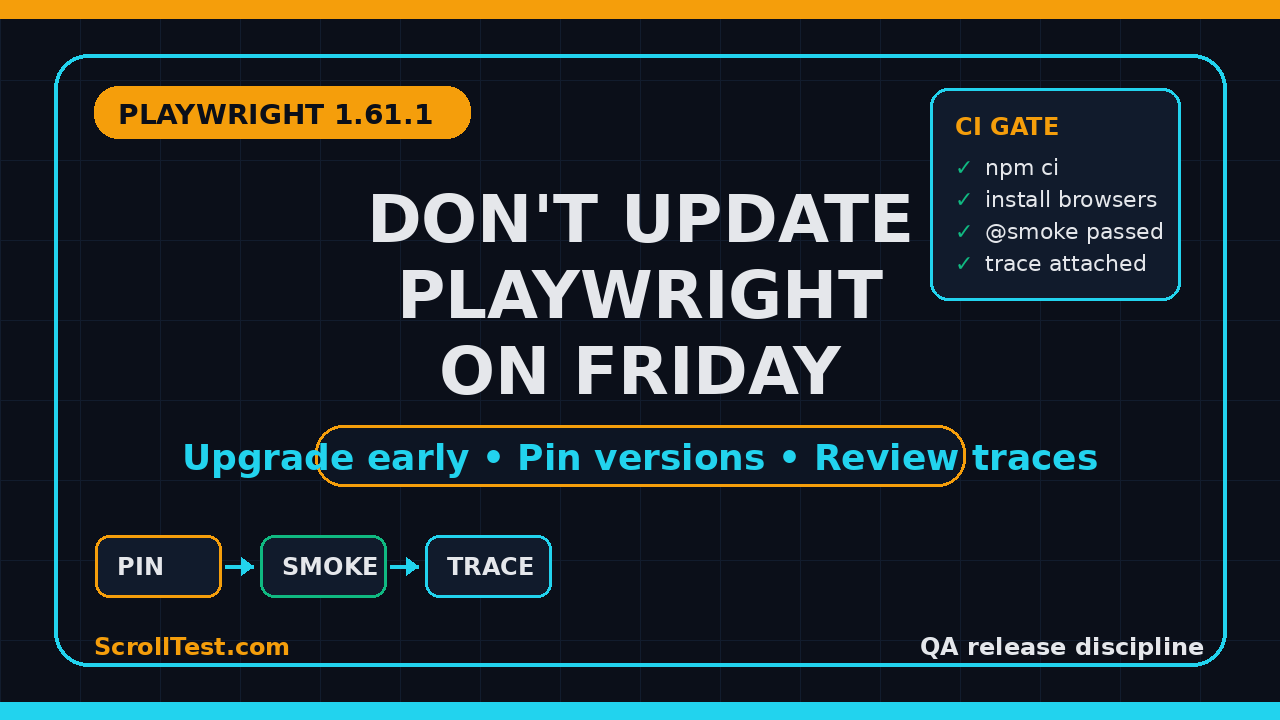
Playwright upgrade checklist is not a fancy release process. It is the boring safety rail that stops a browser update from breaking checkout, login, file uploads, or your CI pipeline at 5:30 PM on Friday.
I like Playwright, but I do not like surprise upgrades. Microsoft published Playwright v1.61.1 on June 23, 2026, and even a small patch release included fixes around custom expect matchers, API request reporting in UI mode, WebSocket timing in Trace Viewer, Node 22.15 sync loader behavior, and pnpm workspace resolution. That is exactly why test leads need an upgrade routine, not a heroic weekend rollback.
Table of Contents
- Why Friday Playwright Upgrades Fail
- What Changed in Playwright 1.61.1
- Playwright Upgrade Checklist Before You Touch package.json
- Safe Upgrade Workflow for QA Teams
- Smoke Suite After the Upgrade
- Trace Review and Debugging Signals
- CI/CD Release Gates That Catch Bad Upgrades
- India SDET Context: Who Owns This?
- Key Takeaways
- FAQ
Contents
Why Friday Playwright Upgrades Fail
The tool is stable, but your ecosystem is not
Playwright itself is mature. The GitHub API showed 92,538 stars for the microsoft/playwright repository when I checked this article, and npm reported 183,530,610 downloads for @playwright/test between June 9 and July 8, 2026. Those numbers tell me the tool is mainstream, not experimental.
The risk sits in the system around Playwright. Your tests run with Node, npm or pnpm, Docker images, browser binaries, CI agents, secrets, proxies, network mocks, and reporter plugins. A one-line version bump touches more than one package.
Friday upgrades fail because teams treat browser automation like a library upgrade. It is closer to a mini release. You are changing the test runner, browser engines, traces, snapshots, fixtures, reporters, and sometimes the Docker layer at the same time.
A failed build is visible. The hidden cost is the debate after the failed build. Is the login test broken because of the product? Was the selector already flaky? Did Chrome change behavior? Did the trace viewer report a different timestamp? Did a fixture run in a different order?
That debate consumes the best hours of senior engineers. If this happens late on Friday, the team either rolls back blindly or merges with weak confidence. Both are bad choices.
A Playwright upgrade checklist gives the team a third option: upgrade early in the week, pin versions, run a known smoke suite, review traces, and merge only when the evidence is clean.
One concrete rule
My rule is simple: do not upgrade Playwright on Friday unless the change fixes a production-blocking test issue. For normal release hygiene, Monday to Wednesday is the window. Thursday is only for low-risk patch upgrades. Friday is for observation, not toolchain churn.
I also separate dependency upgrades from release-day validation. If the product release is planned for Friday, the Playwright upgrade should already be merged earlier in the week. Otherwise the team mixes two risks: product change and test infrastructure change. When a smoke test fails, nobody knows which change deserves attention first.
The practical calendar is simple. Monday: read release notes and create the branch. Tuesday: run local and CI smoke. Wednesday: review traces and merge. Thursday: watch nightly reports. Friday: ship product work with stable test tooling. This rhythm sounds strict, but it protects the team from noisy failures when everyone is tired.
What Changed in Playwright 1.61.1
Small patch, real signals
The official GitHub release for Playwright v1.61.1 lists bug fixes, not a shiny feature drop. That is still important. Patch releases tell you where real users found edge cases.
The v1.61.1 notes mention fixes for an expect.extend matcher conflict, API request context byte reporting in UI mode, WebSocket message times in Trace Viewer, a Node 22.15 sync loader regression, and sync ESM loader resolution across pnpm workspace symlinks.
If your team uses custom matchers, API testing, WebSocket flows, Node 22, or a monorepo with pnpm, this release is not just a version number. It intersects with how your tests actually run.
Version data I verified
The npm registry showed @playwright/test latest version as 1.61.1 at the time of writing. The release API showed the v1.61.1 tag published on June 23, 2026. That matters because many teams still trust package-lock drift instead of checking the upstream release date.
I also checked the ScrollTest archive and found related posts that are useful companions: Playwright Release Radar: QA Upgrade Checklist, Playwright 1.61.1 Smoke Checklist for QA Teams, Playwright Docker: Day 13 Tutorial, and AI Testing Evidence Pack: Trace, Screenshot, Logs.
Do not read release notes like a changelog robot
Read release notes like a test lead. Ask these questions:
- Does the fix touch our Node version?
- Does it mention our package manager?
- Does it affect trace, UI mode, retries, or reporters?
- Does it touch API testing or WebSockets?
- Does it change how a custom matcher behaves?
If the answer is yes, the upgrade needs a branch, a smoke run, and trace review before merge.
Playwright Upgrade Checklist Before You Touch package.json
Start with ownership
A Playwright upgrade checklist starts before package.json. First decide who owns the upgrade. In a serious QA team, this is not random work for whoever sees Dependabot first.
Pick one owner and one reviewer. The owner does the branch, local run, browser install, CI run, trace review, and final notes. The reviewer checks risk areas and approves the evidence.
For a team of 8 to 12 QA engineers, I like a weekly rotation. It builds toolchain ownership across the team instead of creating one “Playwright person” who becomes a bottleneck.
Record the current baseline
Before changing anything, capture the current state. This is your rollback map.
node --version
npm --version
npx playwright --version
npm ls @playwright/test
npx playwright install --dry-run || true
Commit nothing yet. Save the output in the PR description or an upgrade note. If CI breaks later, this gives you a clean comparison.
Check the current browser contract
Playwright installs browser binaries that match its supported versions. The official Playwright browser documentation explains how browser installation works across Chromium, Firefox, and WebKit. This is one reason I do not like casual upgrades on shared CI images.
If your Dockerfile already installs browsers, the Playwright package bump may not be enough. Your CI image may need a rebuild. If you use the official Playwright Docker image, check the matching tag and rebuild intentionally.
Create the pre-upgrade checklist
Use this before editing the dependency:
- Confirm the target Playwright version and release date.
- Read release notes for test runner, browser, trace, and fixture changes.
- Check Node version support in your local and CI environments.
- Check package manager behavior: npm, pnpm, or yarn.
- Identify top 10 smoke tests that represent critical user journeys.
- Confirm trace collection is enabled on retry or failure.
- Confirm rollback command and previous lockfile state.
This list looks boring. That is the point. Boring upgrade work beats dramatic outage debugging.
Safe Upgrade Workflow for QA Teams
Use a branch and pin the version
Do not use a loose range for Playwright in a production test framework. Pin the version, update the lockfile, and make the upgrade visible in one PR.
git checkout -b chore/playwright-1-61-1
npm install -D @playwright/test@1.61.1
npx playwright install --with-deps
npx playwright --version
For pnpm:
git checkout -b chore/playwright-1-61-1
pnpm add -D @playwright/test@1.61.1
pnpm exec playwright install --with-deps
pnpm exec playwright --version
The release notes for v1.61.1 mention a pnpm workspace symlink scenario. If your repo uses pnpm workspaces, run at least one workspace-level command, not only a package-level test.
Update browsers on purpose
Do not assume npm install means browsers are correct. Run the install command explicitly in local and CI. If your CI cache stores browser binaries, clear or version the cache key.
# GitHub Actions example
- name: Install dependencies
  run: npm ci

- name: Install Playwright browsers
  run: npx playwright install --with-deps

- name: Run smoke suite
  run: npx playwright test --grep @smoke --project=chromium
The official Playwright CI documentation covers CI setup patterns. I still see teams skip the browser install step because it worked once on a warm runner. Warm runners hide bad process.
Keep the PR small
A Playwright upgrade PR should not include selector rewrites, page object refactors, or test data changes. If you mix them, you lose the ability to identify root cause.
My preferred PR shape:
package.jsonversion change- Lockfile change
- Docker image or CI image change if needed
- One short upgrade note in markdown
- No product test logic changes unless required by the upgrade
If a test must be fixed, write that as a separate commit with a clear reason. The reviewer should be able to separate tool upgrade risk from test maintenance debt.
Smoke Suite After the Upgrade
A safe Playwright upgrade depends on a small but meaningful smoke suite. If your only option is running 2,000 tests, you will delay upgrades until they become risky. If your smoke suite has 8 to 15 tests, you can run it early and often.
Tag critical flows explicitly:
import { test, expect } from '@playwright/test';

test('@smoke login works for active user', async ({ page }) => {
  await page.goto('/login');
  await page.getByLabel('Email').fill(process.env.SMOKE_USER_EMAIL!);
  await page.getByLabel('Password').fill(process.env.SMOKE_USER_PASSWORD!);
  await page.getByRole('button', { name: 'Sign in' }).click();
  await expect(page.getByRole('heading', { name: 'Dashboard' })).toBeVisible();
});

test('@smoke checkout creates an order', async ({ page }) => {
  await page.goto('/pricing');
  await page.getByRole('button', { name: 'Start trial' }).click();
  await expect(page.getByText('Trial started')).toBeVisible();
});
Then run the smoke suite in one command:
npx playwright test --grep @smoke --project=chromium --reporter=line,html
Pick flows that represent business risk
Do not choose smoke tests because they are easy. Choose them because they represent customer pain. For most SaaS teams, the list is predictable: login, signup, password reset, checkout or subscription, core dashboard, file upload, API-backed form submit, and one permission-sensitive flow.
If you test a QA platform, include one browser automation flow and one trace-producing failure path. For AI testing products, include one deterministic prompt evaluation or fixture-based regression check.
Run across browsers only where it matters
Playwright supports Chromium, Firefox, and WebKit. That does not mean every upgrade smoke run must test every browser for every app. Decide based on your production support matrix.
For a B2B internal admin app, Chromium-only smoke plus nightly cross-browser may be enough. For a consumer-facing funnel, I want Chromium and WebKit in the upgrade PR because Safari-like behavior can break forms and payments differently.
Trace Review and Debugging Signals
Trace is your upgrade evidence
Playwright’s Trace Viewer documentation shows how traces capture actions, DOM snapshots, network calls, console logs, and screenshots. In upgrade work, trace is not a nice extra. It is the artifact that tells you whether failure is product behavior, test behavior, or environment behavior.
Enable traces on retry or failure:
import { defineConfig } from '@playwright/test';

export default defineConfig({
  retries: process.env.CI ? 1 : 0,
  use: {
    trace: 'on-first-retry',
    screenshot: 'only-on-failure',
    video: 'retain-on-failure'
  },
  reporter: [['html'], ['line']]
});
The official Playwright retries documentation explains retry behavior. For upgrade PRs, I keep retries low. Too many retries can hide a real compatibility issue.
Review traces before merging
I want the upgrade owner to open at least one passing trace and every failing trace. Passing traces matter because they reveal slow selectors, unexpected redirects, and silent console errors that may not fail the test yet.
Use this review checklist:
- Are the actions aligned with the test intent?
- Did any page load take much longer than usual?
- Are there new console errors?
- Did network calls return different status codes?
- Did the trace show retries around a selector?
- Did screenshots shift because of a browser rendering change?
If you see noisy selectors, fix them after the upgrade PR unless they block the merge. Keep the upgrade PR clean.
Watch API and WebSocket tests
The v1.61.1 release notes mention API request context reporting in UI mode and WebSocket message timing in Trace Viewer. If your suite validates real-time chat, notifications, collaboration, or streaming events, include one WebSocket path in the upgrade smoke run.
For API tests, include one authenticated request and one negative case. Browser upgrades often reveal hidden assumptions in fixtures, tokens, and base URLs.
CI/CD Release Gates That Catch Bad Upgrades
Make the upgrade job visible
A Playwright upgrade should have a named CI job. Do not bury it under a generic “test” label. Name it so release managers understand the signal.
name: Playwright Upgrade Smoke

on:
  pull_request:
    paths:
      - 'package.json'
      - 'package-lock.json'
      - 'playwright.config.ts'
      - '.github/workflows/playwright.yml'

jobs:
  upgrade-smoke:
    runs-on: ubuntu-latest
    steps:
      - uses: actions/checkout@v4
      - uses: actions/setup-node@v4
        with:
          node-version: 22
          cache: 'npm'
      - run: npm ci
      - run: npx playwright install --with-deps
      - run: npx playwright test --grep @smoke --project=chromium
      - uses: actions/upload-artifact@v4
        if: always()
        with:
          name: playwright-report
          path: playwright-report/
This path filter is not perfect, but it catches the files that usually matter. Add Dockerfile paths if your team uses containerized execution.
Use a release gate, not a Slack debate
Define the merge rule before the upgrade. My minimum gate is:
- Dependency install passes from a clean lockfile.
- Browser install passes without hidden cache assumptions.
- Smoke suite passes in CI.
- At least one trace artifact is attached or linked.
- No new console error appears in critical flows.
- Rollback command is documented.
If any item fails, the PR stays open. This is not bureaucracy. This is how you avoid Friday evening guesswork.
Keep rollback boring
Rollback should be one revert, not a detective story. If the upgrade PR is small, rollback is easy:
git revert <upgrade_commit_sha>
npm ci
npx playwright install --with-deps
npx playwright test --grep @smoke
If the PR also changed selectors, fixtures, and test data, rollback becomes risky. That is why I keep upgrade PRs narrow.
India SDET Context: Who Owns This?
This is senior SDET work
In India, many teams still split QA work into manual testing, automation scripting, and release support. Playwright upgrades cut across all three. The person who owns this should understand test architecture, CI, Docker, Node, and product risk.
For SDET interviews, this is a strong story. I would rather hear a candidate explain how they upgraded Playwright safely than listen to another generic framework answer. A good answer includes version pinning, smoke tags, trace artifacts, CI gates, and rollback.
Career signal for ₹25-40 LPA roles
For mid to senior SDET roles in product companies, toolchain ownership is a career signal. The ₹25-40 LPA bracket is not about writing more locators. It is about reducing release risk for a team.
If you work in a service company and want to move toward product engineering QA, volunteer for this kind of work. Own one Playwright release, document the checklist, and present the before and after to your lead. That is better than adding 30 shallow tests nobody trusts.
Managers should not outsource the decision
Test leads and engineering managers need a simple calendar rule. Upgrade Playwright early in the week. Do not approve dependency updates on Friday unless there is a clear incident reason. Ask for the smoke result and trace artifact before merge.
This is the same mindset I use for production deploys. Test infrastructure is production infrastructure for confidence. Treat it with the same discipline.
Key Takeaways
The Playwright upgrade checklist is simple, but it changes team behavior.
- Do not update Playwright on Friday unless it fixes an urgent blocker.
- Pin
@playwright/testversions and update the lockfile in one focused PR. - Run a tagged smoke suite with 8 to 15 business-critical tests.
- Attach traces, screenshots, and the HTML report as upgrade evidence.
- Use CI gates so the merge decision is based on facts, not Slack pressure.
Playwright 1.61.1 is a good reminder. Even a patch release can touch API reporting, trace timing, Node loader behavior, and pnpm workspaces. That is not scary if your process is ready. It is painful only when your team upgrades casually and debugs blindly.
If you want a companion checklist, read the Playwright Release Radar checklist and the Playwright 1.61.1 smoke checklist next.
FAQ
How often should QA teams upgrade Playwright?
For active automation teams, I prefer checking releases weekly and upgrading on a planned cadence. Patch releases can often move faster, but every upgrade still needs a smoke run, browser install check, and trace review.
Should we upgrade Playwright and Node together?
Not unless you have a clear reason. Change one major variable at a time. If you upgrade Node and Playwright together, a failure becomes harder to debug. Playwright v1.61.1 included a Node 22.15-related fix, which is a good example of why Node version needs explicit attention.
Is it safe to rely on Dependabot for Playwright upgrades?
Dependabot is useful for creating the PR. It should not be the process. Your team still needs release-note review, version pinning, browser installation, smoke execution, and trace artifacts.
Do we need cross-browser smoke tests for every upgrade?
It depends on your support matrix. If Safari-like behavior matters to revenue, include WebKit. If your product is internal and Chromium-only, run Chromium in the PR and schedule broader coverage in nightly CI.
What is the smallest useful Playwright upgrade checklist?
Use five items: read release notes, pin the version, install browsers, run tagged smoke tests, and review traces. That is enough to catch most upgrade surprises before they hit a release branch.