Playwright Upgrade Radar: QA Release Checklist
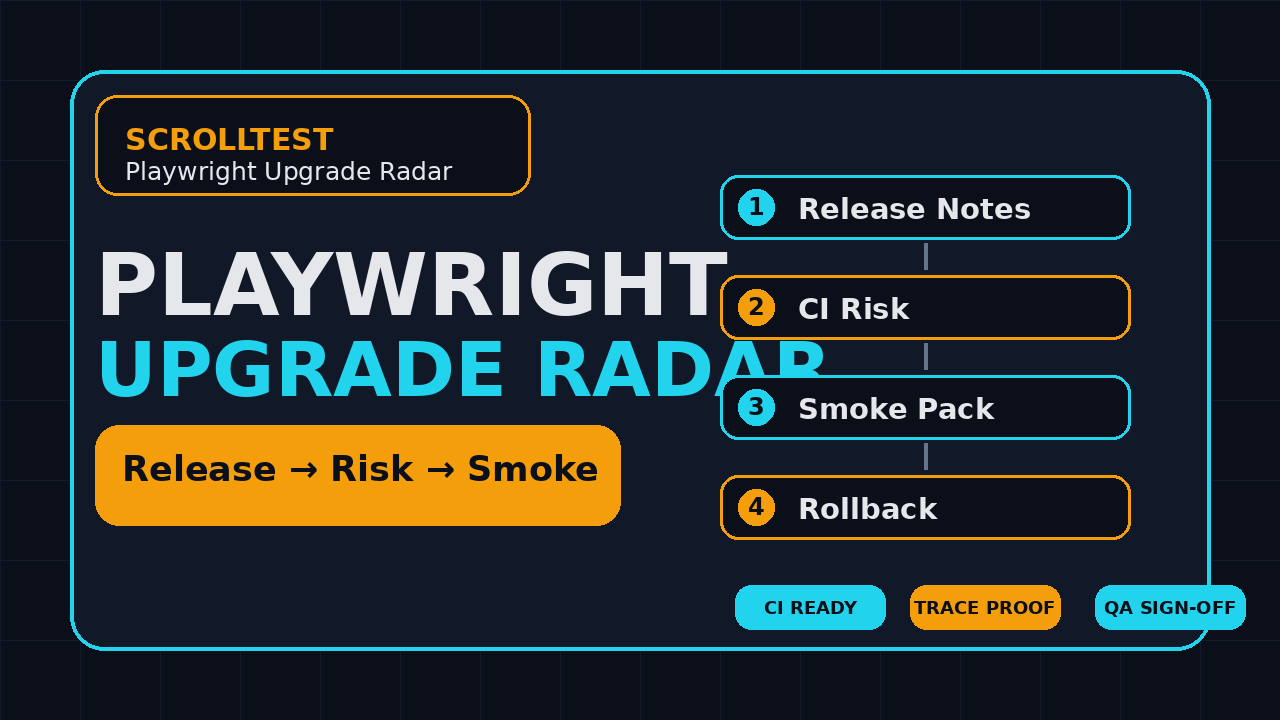
Playwright upgrade radar is the small habit I want every QA team to build before the next browser automation bump lands in the sprint. A release note should not become a panic thread on Friday evening. It should become a short risk review, a smoke run, and a clear go or no-go decision.
ScrollTest is adding a recurring Playwright Upgrade Radar for QA leads, SDETs, and engineering managers who need release awareness without reading every commit. The goal is simple: convert each Playwright release into test impact, CI impact, browser impact, and rollback advice that a team can use during planning.
Table of Contents
- Why Playwright upgrades need a radar
- What ScrollTest will track in the radar
- Playwright upgrade radar workflow
- Release note signals QA teams should read first
- CI and browser risk checklist
- Smoke tests and code examples
- India team context for SDETs and test leads
- Adoption plan for the next release
- Key takeaways
- FAQ
Contents
Why Playwright upgrades need a radar
Playwright moves fast because browser automation moves fast. That is good for teams that want better locators, stronger traces, reliable browser binaries, and newer browser engine support. It is also a risk when the test stack is owned by nobody and updated only when a CI image breaks.
The current public signal is not small. The GitHub repository API showed 92,608 stars when I checked it for this post, and the npm downloads API reported 183,530,610 downloads for @playwright/test over the last measured month. Those numbers do not mean every project is healthy. They mean a lot of teams depend on the same release train, so release discipline matters.
Release awareness is not dependency ownership
I often see the same pattern inside QA teams. One engineer notices a new version. Another engineer says, “we should update.” A third person asks whether it will break CI. Nobody has the evidence. The upgrade sits in a branch for two weeks, then someone merges it with a generic “update dependencies” message.
That is not ownership. Ownership means a named person can answer these questions before the merge:
- Which Playwright version are we running today?
- Which browser binaries changed?
- Which critical flows were smoked after the update?
- Which flaky tests changed behavior?
- What command rolls the project back?
The release train touches more than test syntax
A Playwright upgrade can affect the test runner, browser binaries, reporters, traces, Docker images, GitHub Actions cache strategy, accessibility checks, API tests, and screenshot baselines. Even when the release is safe, the upgrade can expose hidden assumptions in the suite. A brittle calendar test, a stale data-testid, or a hard-coded browser path can suddenly become visible.
That is why ScrollTest will treat releases as operating signals, not just changelog links. The radar exists to help teams say, “this release is low risk for us,” or “we need one focused validation window before we merge.”
Why now
The latest GitHub release API returned Playwright v1.61.1, published on 23 June 2026, at the time of this article. Selenium also keeps moving, with the Selenium API showing Selenium 4.46.0 published on 11 July 2026. Browser automation is not a “set once and forget” layer anymore. It is a living dependency.
What ScrollTest will track in the radar
The ScrollTest Playwright Upgrade Radar will not repeat the official release notes line by line. The official docs already do that well. The radar will translate the release into decisions a QA lead can take to standup, sprint planning, or a release-readiness review.
1. Version and release status
Every radar entry will start with the version, release date, and source link. The source will be the official GitHub release, the Playwright release notes, or another primary Playwright page. No anonymous screenshots. No second-hand claims.
The version block will answer:
- What is the new version?
- Is it a patch, minor, or major change?
- Was the release published recently enough to wait one sprint?
- Is there a linked issue or warning that touches our suite?
2. Test impact
Test impact is the most important section. I care less about the marketing line and more about what changes in day-to-day automation work. The radar will mark impact areas such as locators, assertions, trace viewer, reporters, API testing, component testing, browser downloads, and configuration.
For example, a locator improvement may be low risk but high value. A browser binary change may be low code risk but medium CI risk. A reporter change may be low suite risk but high dashboard risk if your team parses test output for quality gates.
3. CI and infrastructure notes
Most Playwright upgrade pain appears in CI first. Local runs pass because the engineer has cached browsers. CI fails because the Docker image, package cache, Node version, or browser install command is not aligned. The radar will call out those operational risks clearly.
4. Suggested smoke coverage
Every radar entry will include a suggested smoke set. I do not want teams running a full overnight regression just to check whether a patch release is safe. I want a targeted smoke suite that covers the failure modes most likely to change.
A practical smoke set might include:
- Login with saved auth state
- One critical purchase or booking flow
- One date picker or calendar flow
- One file upload or download flow
- One API setup and UI validation flow
- One trace capture from a failing test
If your suite has calendar-heavy flows, read Testing Date Pickers and Calendars in Playwright and include one of those flows in the upgrade smoke pack.
5. Upgrade recommendation
The radar will end with a plain recommendation. It may say “update this week,” “wait for one sprint,” “test in a branch only,” or “skip unless you need the specific fix.” That recommendation will not replace your own context, but it gives test leads a starting point.
Playwright upgrade radar workflow
A Playwright upgrade radar only works if it becomes a repeatable workflow. A nice post is not enough. The team needs a five-step habit that can survive sprint pressure.
Step 1: Freeze the current baseline
Before changing anything, record the current state. This includes package versions, browser versions, CI image tags, and current failure rate. Without a baseline, every failure after the upgrade becomes a debate.
Use commands like these:
node --version
npm ls @playwright/test
npx playwright --version
npx playwright install --dry-run || true
git rev-parse --short HEAD
Store the output in the pull request description or as a small artifact in CI. I prefer evidence in the PR because reviewers see it before approval.
Step 2: Read only the relevant release notes first
Do not scan release notes like a news feed. Read them against your suite architecture. If your project uses API setup, browser contexts, trace viewer, custom reporters, Docker, and visual snapshots, those are the sections you care about first.
The official Playwright release notes are still the source of truth. The radar will point to them, then extract the QA decision layer.
Step 3: Upgrade in a branch with a named owner
One owner should create the branch, update the lockfile, run the smoke pack, attach traces, and write the decision note. This does not need a large ceremony. It needs one accountable person.
git checkout -b chore/playwright-upgrade-1-61-1
npm install -D @playwright/test@1.61.1
npx playwright install --with-deps
npm run test:smoke
For teams using pnpm or yarn, the same principle applies. Update the dependency and lockfile together. Do not push a package.json change without the lockfile.
Step 4: Compare failures against the baseline
A failed test after an upgrade is not automatically a Playwright bug. It may be a product bug, test data issue, timing assumption, changed browser behavior, or a genuine framework regression. The owner should classify failures before asking the team to react.
I use four buckets:
- Product issue: the app behavior is actually wrong.
- Test issue: the test relied on timing, order, or weak selectors.
- Environment issue: CI image, browser install, cache, or network failed.
- Upgrade issue: the new version changed behavior relevant to the suite.
Step 5: Merge with rollback instructions
The PR should include a rollback command. That one line saves time when a pipeline starts failing after merge. A good rollback instruction is specific:
npm install -D @playwright/test@1.60.0
npx playwright install --with-deps
npm run test:smoke
Generic rollback notes are useless. Give the exact previous version and the smoke command.
Release note signals QA teams should read first
Not every line in a changelog deserves the same attention. A test lead should scan releases using risk categories. This keeps the conversation focused and prevents the team from overreacting to harmless changes.
Locator and assertion changes
Locator changes can improve reliability, but they can also expose weak selectors. If a release touches locator behavior, run flows that use role selectors, text selectors, frames, and shadow DOM. If your suite still depends heavily on CSS paths, use the upgrade window to replace the worst ones.
Browser binary updates
Playwright manages browser binaries, and that is one reason teams like it. The same feature creates risk when CI images are not updated cleanly. A browser binary change can affect screenshots, rendering, download behavior, permissions, and web platform APIs.
Visual regression teams should be careful here. Do not approve a browser bump based only on functional green checks. Run a small visual baseline review if screenshots are part of your release gate.
Reporter and trace changes
Traces are not decoration. They are debugging evidence. If a release touches trace viewer, attachments, reporters, or output structure, validate your failure triage workflow. A green suite is not enough if the next failure becomes harder to debug.
ScrollTest has already covered the habit of upgrade proof in Playwright Upgrade Checklist: Don’t Ship on Friday. The radar builds on the same idea, but makes it recurring.
Experimental features
Experimental features are useful, but they should not silently enter a critical path. If a release adds a shiny feature, put it behind a separate proof-of-concept branch. Do not mix “upgrade the test runner” and “rewrite the suite architecture” in the same PR.
CI and browser risk checklist
CI is where good upgrade intent often fails. A developer sees a green local run and assumes the update is safe. Then the pipeline fails because the browser cache is stale or the Docker image does not have the right libraries.
The minimum CI checklist
Use this checklist before merging any Playwright upgrade:
- Node version documented and supported
- Package manager lockfile updated
- Browser install command executed in CI
- Docker image tag reviewed
- Cache key includes Playwright version
- Smoke suite runs on the same runner type as production CI
- Trace artifact uploaded for at least one failed retry
- Rollback command present in the PR
Cache keys deserve attention
Many teams cache node_modules or browser folders to save minutes. That is fine until the cache hides an upgrade problem. Add the Playwright version to cache keys when possible. If a browser binary changes, the cache should not pretend nothing changed.
- name: Cache Playwright browsers
  uses: actions/cache@v4
  with:
    path: ~/.cache/ms-playwright
    key: playwright-${{ runner.os }}-${{ hashFiles('package-lock.json') }}
Docker images and system dependencies
If you use the official Playwright image, align the image tag with the package version strategy. If you use a custom image, test browser installation in a clean container. Dirty CI workers hide missing libraries.
The Playwright docs include a dedicated CI guide. Use it as a baseline, then add your company-specific rules around secrets, test data, and artifact retention.
Smoke tests and code examples
A Playwright upgrade radar should ship with runnable examples, not only advice. Here is the smoke pattern I like for upgrade validation. It is small enough to run quickly and broad enough to catch the most expensive breakages.
Example smoke spec
import { test, expect } from '@playwright/test';

test.describe('upgrade smoke', () => {
  test('homepage, login link, and docs route stay usable', async ({ page }) => {
    await page.goto(process.env.BASE_URL ?? 'https://scrolltest.com');
    await expect(page).toHaveTitle(/ScrollTest/i);
    await expect(page.getByRole('link', { name: /Testing|Blog|ScrollTest/i }).first()).toBeVisible();
  });

  test('critical API dependency returns a healthy response', async ({ request }) => {
    const response = await request.get(process.env.HEALTH_URL ?? 'https://scrolltest.com/wp-json/wp/v2/posts?per_page=1');
    expect(response.ok()).toBeTruthy();
  });
});
Replace the routes with your own critical flows. The important part is not this exact test. The important part is a stable smoke suite that runs before and after the upgrade.
Trace capture command
When you validate an upgrade, keep trace capture on for failures. The trace is the fastest way to separate test bug from framework behavior.
npx playwright test tests/smoke --trace=retain-on-failure --reporter=html,lineAttach the trace artifact to the PR or CI job. If a reviewer cannot inspect the failure, the PR is not ready.
Upgrade decision note template
Copy this into the pull request description:
## Playwright upgrade decision

Current version: 1.60.0
Target version: 1.61.1
Source release notes: https://github.com/microsoft/playwright/releases/tag/v1.61.1

Smoke result:
- Local: pass
- CI: pass
- Trace artifact: attached

Failures reviewed:
- None / listed here

Rollback:
- npm install -D @playwright/test@1.60.0
- npx playwright install --with-deps
This is boring. Boring is good. Boring upgrade notes prevent surprise firefighting.
India team context for SDETs and test leads
In India, I see two very different automation cultures. Service teams often wait for a client-approved dependency window. Product companies expect SDETs to own the test platform like engineers own backend services. The same Playwright upgrade can be treated as a ticket in one company and as platform hygiene in another.
What hiring managers notice
For SDETs targeting ₹25-40 LPA product roles, “I wrote Playwright tests” is no longer enough. Hiring managers want to know whether you can own a suite, keep CI stable, debug flakes, and make upgrade decisions with evidence. A Playwright upgrade radar gives you practical stories for interviews.
A strong interview answer sounds like this: “I owned the Playwright 1.61.1 upgrade. I checked release notes, updated the lockfile, ran a six-test smoke pack, fixed two weak selectors, attached traces, and documented rollback.” That is better than saying, “I used Playwright in my project.”
How leads can assign ownership
Do not make upgrade ownership a side quest for the busiest engineer. Rotate it monthly. One SDET owns Playwright upgrades. Another owns Selenium or mobile automation dependencies. Another owns CI image hygiene. This builds depth across the team.
For teams that still run Selenium and Playwright together, the same operating model applies. ScrollTest has a recent Selenium 4.45 upgrade checklist for QA teams that you can pair with this radar.
What managers should measure
Measure upgrade health using operational signals, not vanity counts:
- Average days from release to decision
- Percentage of upgrade PRs with rollback notes
- Smoke suite runtime
- CI failures caused by missing browser dependencies
- Flaky tests fixed during upgrade review
These numbers reveal whether your automation platform is being managed or merely surviving.
Adoption plan for the next release
You do not need a new tool to start. You need a small operating rhythm. Here is the plan I would use with a QA team this week.
Day 1: Create the upgrade owner role
Pick one owner for the next Playwright release. Add a calendar reminder to check official releases once a week. The owner is not responsible for fixing every test. The owner is responsible for evidence and communication.
Day 2: Build the smoke pack
Create a small smoke suite with five to eight tests. Keep it stable. Include one authentication flow, one UI flow, one API check, one browser-specific behavior, and one trace capture path. If it takes more than ten minutes, it is too big for upgrade review.
Day 3: Add the PR template
Add the upgrade decision note template to your repository. Make rollback instructions mandatory for dependency updates touching Playwright, browsers, CI images, or reporters.
Day 4: Run a dry upgrade
Even if you are already on the latest version, run a dry review. Capture the current baseline, run the smoke pack, and document the command. The first cycle will be clumsy. The second one will be faster.
Day 5: Turn it into a release habit
Discuss the radar during sprint planning or QA sync. Keep the conversation short:
- New version available?
- Relevant risk areas?
- Owner assigned?
- Smoke result?
- Decision: update, wait, or skip?
Key takeaways
Playwright upgrade radar is a simple way to turn fast-moving browser automation releases into controlled QA decisions. It keeps teams out of vague “should we update?” debates and moves them toward evidence.
- Playwright is a high-adoption dependency, with 92,608 GitHub stars and 183,530,610 recent monthly npm downloads recorded during this research.
- Release notes matter, but QA teams need translation into test impact, CI impact, smoke coverage, and rollback steps.
- Every upgrade PR should include current version, target version, smoke results, trace evidence, and rollback commands.
- CI cache keys, browser binaries, Docker images, and reporter output deserve as much attention as test syntax.
- For SDETs in India, upgrade ownership is a strong career signal because it shows platform thinking, not only script writing.
ScrollTest will use this radar format for recurring Playwright release updates. Save the checklist, adapt the smoke pack, and make the next upgrade boring.
FAQ
How often should a team update Playwright?
For most active teams, review releases weekly and upgrade on a planned cadence. Patch releases can move faster if the smoke pack is clean. Minor releases deserve a branch, CI run, and short review. If your product has strict release windows, decide once per sprint instead of reacting randomly.
Should we update Playwright immediately after every release?
No. Immediate updates are useful when the release fixes a bug that affects you or adds support you need. Otherwise, wait for a small validation window. The radar recommendation will help teams decide whether to update now, wait one sprint, or skip.
What is the minimum smoke suite for a Playwright upgrade?
Use five to eight stable tests. Cover login, one critical user journey, one API dependency, one browser-specific behavior such as download or file upload, and one trace capture path. Keep the suite fast enough that engineers actually run it.
Can the same radar model work for Selenium?
Yes. Selenium upgrades need a similar approach, but the risk areas shift toward language bindings, driver compatibility, grid behavior, and browser-driver matching. Teams running both frameworks should use the same evidence habit across both stacks.
What should I do if the upgrade exposes flaky tests?
Do not blame the upgrade too quickly. Classify the failure. If the test uses weak selectors, fixed waits, shared state, or unstable data, fix the test. If the failure appears only with the new version and the app behavior is correct, isolate a minimal reproduction before raising an issue upstream.