AI Browser Bug Reports: Evidence Pack for Day 20
Day 20 of 100 Days of AI in QA & SDET
🤖 Learning AI-powered testing? Go hands-on with LLM, RAG, and AI-agent testing in the AI-Powered Testing Mastery course at The Testing Academy.
AI browser bug reports are becoming the new daily artifact for QA teams that use agents, MCP tools, Playwright helpers, and AI test generators. I do not trust a bug report because an agent says “failed.” I trust it when the report carries enough evidence for a human SDET to reproduce, debug, and convert it into a regression check.
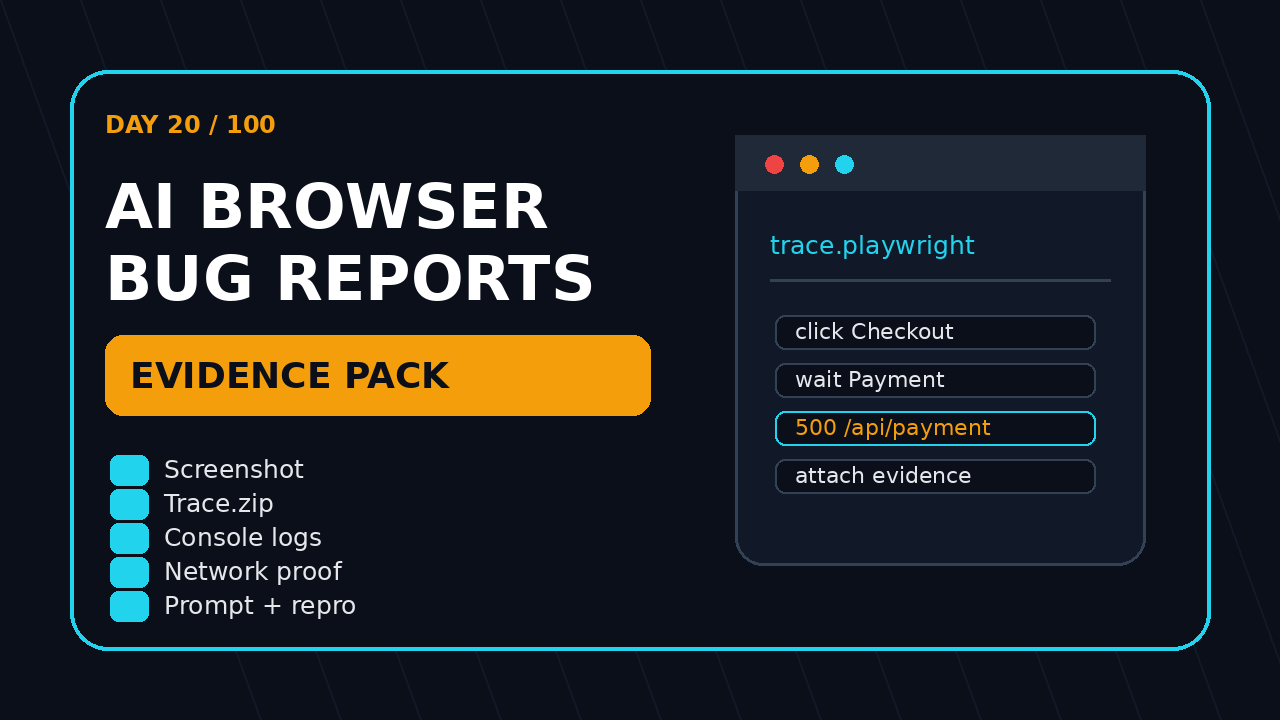
This guide gives you the exact evidence pack I expect from AI-assisted browser testing: screenshot, trace, console output, network proof, the prompt, the model response, environment data, and a small reproducible test. Keep this format simple and it becomes useful in Jira, GitHub Issues, Slack, and CI.
Table of Contents
- Why AI Browser Bug Reports Need Evidence
- The Minimum Evidence Pack
- Capture Playwright Traces, Screenshots, and Videos
- Add Console and Network Proof
- Save the Agent Prompt and Decision Log
- Turn the Bug Report Into a Regression Test
- India Context for SDETs and QA Leads
- Common Mistakes I See in AI Bug Reports
- Key Takeaways
- FAQ
Contents
Why AI Browser Bug Reports Need Evidence
An AI agent can click faster than a human, but that does not make its bug report reliable. Browser agents can misread UI state, click a stale element, stop early, or call a failure because the page needed two more seconds. The problem is not AI. The problem is weak evidence.
Playwright’s own documentation describes Trace Viewer as a GUI tool for exploring recorded traces after a script runs, and it calls traces useful for debugging failed tests in CI. That is the standard I want for AI work too. If a bot claims a checkout failed, I want the trace, not a paragraph of confidence.
The same idea applies to LLM evaluation. PromptFoo describes itself as an LLM evaluation and testing toolkit, and the npm registry currently shows promptfoo version 0.121.17. DeepEval’s PyPI package summary calls it “The LLM Evaluation Framework” and currently shows version 4.0.7. These tools exist because output needs checks, not vibes.
GitHub API data also shows why this space is serious. At the time of this run, Playwright has more than 91,000 stars, PromptFoo has more than 22,000 stars, and DeepEval has more than 16,000 stars. That does not prove quality by itself, but it proves many engineering teams are investing attention in browser automation and AI evaluation.
I covered a similar principle in AI Testing Evidence Pack: Trace, Screenshot, Logs. Today’s Day 20 version is more specific: how to make AI browser bug reports useful enough for an SDET, developer, and engineering manager.
What changes when AI writes the report?
When a human tester writes a bug, the team can ask follow-up questions. When an AI agent files ten bugs at 2 AM from CI, nobody remembers the browser state. The evidence must travel with the report.
- What did the agent try to do?
- What did it see before it clicked?
- Which selector or role did it use?
- What console errors appeared?
- Which API call failed or returned unexpected data?
- Can I replay the path without guessing?
If the answer is no, the report should not be marked as a product bug. It should be marked as “needs evidence.”
The cost of weak AI bugs
Weak AI bugs create a new form of flaky work. The developer says “not reproducible,” QA says “agent found it,” and the manager loses trust in the automation program. I see teams adopt AI tools quickly, then slow down because their output is not auditable.
A good report prevents that. It turns an AI claim into a debugging artifact. It gives the developer a shortcut to the failing state. It gives the QA lead a way to separate real product bugs from agent mistakes.
The Minimum Evidence Pack for AI Browser Bug Reports
The minimum evidence pack has eight items. I do not ask for all of them because I like process. I ask because each item answers one failure mode.
- Objective: the user goal the agent attempted.
- Prompt: the exact instruction sent to the agent or tool.
- Environment: browser, viewport, base URL, test data, build number, and region.
- Screenshot: the page state at failure time.
- Trace: the replayable Playwright trace or equivalent browser timeline.
- Console logs: errors, warnings, and relevant info logs.
- Network proof: failed requests, status codes, payload clues, and correlation IDs.
- Repro check: a small script or manual step list that proves the issue again.
That list is enough for most web app bugs. Add video when the UI motion matters. Add database evidence only when your team has permission and the bug depends on persisted state.
A practical issue template
Use a template like this in Jira or GitHub Issues. Keep it boring. Boring templates get filled. Fancy templates get ignored.
## AI Browser Bug Report

### Objective
What user goal did the agent attempt?

### Exact agent prompt
Paste the full prompt or task instruction.

### Environment
- App URL:
- Build / commit:
- Browser:
- Viewport:
- Test account / role:
- Region:

### Failure summary
Expected:
Actual:

### Evidence
- Screenshot:
- Playwright trace:
- Video:
- Console log file:
- Network HAR or request summary:

### Reproduction
1.
2.
3.

### Regression candidate
Can this become a Playwright test? Yes / No
Owner:
This format also helps when you use AI Agent Testing: Why One Pass Means Nothing as a review checklist. One pass is a signal. A reproducible evidence pack is a bug.
Capture Playwright Traces, Screenshots, and Videos
For browser-based AI testing, Playwright is my default evidence engine. Selenium is still important in many enterprises, but Playwright makes trace collection feel natural. The trace shows actions, snapshots, console messages, network requests, and timing data in one place.
Here is a basic configuration I use when I want AI-generated or AI-triggered tests to produce useful artifacts.
// playwright.config.ts
import { defineConfig } from '@playwright/test';

export default defineConfig({
  use: {
    baseURL: process.env.BASE_URL ?? 'https://example.com',
    screenshot: 'only-on-failure',
    video: 'retain-on-failure',
    trace: 'retain-on-failure',
  },
  reporter: [
    ['html'],
    ['json', { outputFile: 'test-results/results.json' }]
  ],
});
The important setting is not just trace. The important setting is consistency. If every AI browser run saves traces and screenshots the same way, your team can build one review workflow instead of hunting through random folders.
Capture at the moment of failure
Many AI bug reports include a screenshot after the agent already navigated away or retried. That screenshot is almost useless. Capture the state when the assertion fails or when the agent decides it cannot continue.
import { test, expect } from '@playwright/test';

async function attachFailureEvidence(page, testInfo, label: string) {
  const screenshot = await page.screenshot({ fullPage: true });
  await testInfo.attach(`${label}-screenshot`, {
    body: screenshot,
    contentType: 'image/png',
  });

  const html = await page.content();
  await testInfo.attach(`${label}-dom.html`, {
    body: Buffer.from(html),
    contentType: 'text/html',
  });
}

test('agent can complete checkout smoke', async ({ page }, testInfo) => {
  await page.goto('/cart');
  await page.getByRole('button', { name: 'Checkout' }).click();

  try {
    await expect(page.getByRole('heading', { name: 'Payment' })).toBeVisible();
  } catch (error) {
    await attachFailureEvidence(page, testInfo, 'checkout-payment');
    throw error;
  }
});
This does not replace the trace. It gives the reviewer a quick view before they open the trace. That matters when a QA lead triages 20 AI reports in the morning.
Name artifacts like a human will read them
Do not name files failure-1.png and trace.zip. Use names with the feature, scenario, browser, and timestamp. The difference feels small until you debug failures across multiple CI shards.
checkout-payment-chromium-2026-06-27T09-30-00.png
checkout-payment-chromium-2026-06-27T09-30-00-trace.zip
checkout-payment-chromium-2026-06-27T09-30-00-console.json
checkout-payment-chromium-2026-06-27T09-30-00-network.json
This naming also helps if you later connect the workflow to BrowsingBee, AgentQA, or a custom evidence dashboard.
Add Console and Network Proof
Screenshots show symptoms. Console and network logs show causes. An AI browser bug report without these logs usually creates rework for developers.
For example, a checkout button may look broken, but the root cause might be a 500 from /api/payment-intents, a 401 from a session endpoint, or a JavaScript exception after a feature flag loads. A screenshot alone cannot tell you that.
Capture browser console messages
import { test } from '@playwright/test';

test('capture console evidence for AI browser run', async ({ page }, testInfo) => {
  const consoleMessages: Array<{ type: string; text: string; location: unknown }> = [];

  page.on('console', message => {
    consoleMessages.push({
      type: message.type(),
      text: message.text(),
      location: message.location(),
    });
  });

  await page.goto('/dashboard');
  await page.getByRole('button', { name: 'Generate report' }).click();

  await testInfo.attach('console-messages.json', {
    body: Buffer.from(JSON.stringify(consoleMessages, null, 2)),
    contentType: 'application/json',
  });
});
I prefer JSON over pasted text because JSON can be searched, filtered, and attached to CI artifacts. If your team uses Datadog, New Relic, Grafana, or a custom log platform, add a correlation ID to the report too.
Capture failed network calls
import { test } from '@playwright/test';

test('capture failed network calls', async ({ page }, testInfo) => {
  const failedResponses: Array<{ url: string; status: number; method: string }> = [];

  page.on('response', response => {
    const status = response.status();
    if (status >= 400) {
      failedResponses.push({
        url: response.url(),
        status,
        method: response.request().method(),
      });
    }
  });

  await page.goto('/billing');
  await page.getByRole('button', { name: 'Update plan' }).click();

  await testInfo.attach('failed-network-calls.json', {
    body: Buffer.from(JSON.stringify(failedResponses, null, 2)),
    contentType: 'application/json',
  });
});
Do not attach tokens, passwords, raw cookies, or full PII payloads. Redact them before upload. A useful bug report should not become a security incident.
Save the Agent Prompt and Decision Log
The agent prompt is part of the test input. If you do not save it, you cannot explain why the agent clicked a specific button or ignored a visible error. This is where AI testing differs from classic automation.
For classic Playwright tests, the code is the source of truth. For AI-assisted runs, the prompt, tool instructions, model version, and decision log are also source material. A future reviewer needs to know whether the agent was asked to “find any bug,” “complete checkout,” or “verify the tax calculation.” Those are different tests.
What to store from the AI layer
- Original task prompt.
- System or tool instructions that shaped behavior.
- Model name and version when available.
- Tool calls made by the agent.
- Final agent conclusion.
- Confidence or uncertainty signals if your system exposes them.
- Any evaluator output from PromptFoo, DeepEval, or internal checks.
If you are building an AI QA workflow, treat this as audit data. I also recommend adding a simple “agent mistake possible” field. Sometimes the right answer is not a product bug. Sometimes the agent misunderstood the app.
A small JSON shape for agent evidence
{
  "runId": "ai-browser-2026-06-27-0930",
  "objective": "Complete checkout as a returning user",
  "prompt": "Login, add the first available product to cart, complete checkout, and report blockers.",
  "model": "company-approved-browser-agent",
  "tools": ["browser.click", "browser.type", "browser.screenshot"],
  "decisionLog": [
    "Opened cart page",
    "Clicked Checkout button",
    "Payment heading did not appear within timeout",
    "Detected 500 response from /api/payment-intents"
  ],
  "agentConclusion": "Checkout is blocked before payment step",
  "humanReviewRequired": true
}
This is intentionally simple. You can expand it later. Start with a shape that your QA team will actually fill and read.
🚀 Build Real AI Testing Skills
Stop testing AI by guesswork. Learn DeepEval, RAG evaluation, and agent testing with guided projects.
Turn the Bug Report Into a Regression Test
The best AI browser bug reports do not end at triage. They become regression tests. If a bug is real and important, the final question is obvious: what automated check prevents this from escaping again?
I use this three-step path:
- Stabilize the repro: remove the AI agent and reproduce with deterministic Playwright steps.
- Add one assertion: check the business outcome, not every visual detail.
- Attach evidence on failure: keep traces, screenshots, console logs, and network logs.
Here is a regression candidate for the checkout example.
import { test, expect } from '@playwright/test';

test('returning user can reach payment step from cart', async ({ page }) => {
  await page.goto('/login');
  await page.getByLabel('Email').fill(process.env.TEST_USER_EMAIL!);
  await page.getByLabel('Password').fill(process.env.TEST_USER_PASSWORD!);
  await page.getByRole('button', { name: 'Sign in' }).click();

  await page.goto('/cart');
  await page.getByRole('button', { name: 'Checkout' }).click();

  await expect(page.getByRole('heading', { name: 'Payment' })).toBeVisible();
  await expect(page.getByText('Order summary')).toBeVisible();
});
This is not an AI test anymore. It is a normal regression test created from AI evidence. That is the point. AI helps find the issue, but deterministic automation protects the release.
Where PromptFoo and DeepEval fit
PromptFoo and DeepEval are more useful when the bug includes an LLM output. For example, if an AI support widget gives the wrong refund policy, you need browser evidence plus output evaluation. Use the browser trace to prove the user path and an evaluator to check the response quality.
I explained a starter workflow in LLM Regression Testing with PromptFoo: Day 10. The short version: do not test LLM output only by reading one response. Use a small dataset, assertions, and repeatable scoring criteria.
India Context for SDETs and QA Leads
In India, many QA teams sit between service-company delivery pressure and product-company release speed. TCS, Infosys, Wipro, and Cognizant style projects often have heavy documentation. Product companies often want faster signal and fewer meetings. AI bug reports can help both groups, but only if they reduce noise.
For a manual tester moving into automation, this evidence pack is a career shortcut. You do not need to become an ML engineer on day one. Start by learning how to collect browser artifacts, read traces, and convert a vague AI finding into a clean bug.
For an SDET aiming at ₹25-40 LPA product roles, this skill matters more than writing prompts alone. Hiring managers are not impressed by “I used AI to test.” They are impressed when you say: “I built an evidence workflow where every AI browser run attaches trace, screenshot, console logs, failed API calls, and a regression candidate.”
What I would put on a resume
- Built Playwright evidence capture for AI-assisted browser testing.
- Reduced non-reproducible AI bug reports by requiring trace, screenshot, console, and network artifacts.
- Converted agent-discovered issues into deterministic regression tests.
- Added LLM output checks using PromptFoo or DeepEval for AI features.
Notice the wording. It is specific. It does not claim magic. It shows engineering judgment.
Common Mistakes I See in AI Bug Reports
The first mistake is treating the agent’s final message as proof. A final message is a summary, not evidence. Store it, but do not stop there.
The second mistake is missing the exact prompt. If the prompt says “try anything to find a bug,” the result is exploratory. If the prompt says “complete checkout with a returning user,” the result is closer to a scenario test. Reviewers need that difference.
The third mistake is attaching screenshots without traces. Screenshots help, but traces show the path. If your team uses Playwright, use trace collection as a default for failure triage. I also recommend reading Playwright Release Notes: QA Checklist for 2026 when you upgrade tooling, because evidence settings should be checked after major automation changes.
The fourth mistake is exposing secrets. AI tools can capture more than you expect. Redact auth headers, cookies, customer names, emails, and payment data before storing artifacts in a shared place.
The fifth mistake is never closing the loop. A valid AI bug should become one of three things: a product fix with a regression test, a test-environment issue with an owner, or an agent false positive with a prompt/tooling fix.
Key Takeaways for AI Browser Bug Reports
- AI browser bug reports need evidence, not just confident agent summaries.
- The minimum pack is prompt, environment, screenshot, trace, console logs, network proof, and a reproducible check.
- Playwright traces are one of the fastest ways to debug failed AI browser runs in CI.
- Save the agent prompt and decision log because they are part of the test input.
- Real bugs should become deterministic regression tests after human review.
My practical rule is simple: if I cannot replay it, inspect it, or turn it into a check, I do not treat it as a finished bug report. AI can speed up QA, but only when the output is auditable.
FAQ
Should every AI browser bug report include a Playwright trace?
If your team uses Playwright, yes for failures that come from browser automation. A trace gives reviewers the action timeline, page snapshots, console messages, and network activity in one place. For lightweight exploratory sessions, at least capture screenshots, logs, and steps.
Can AI file bugs directly into Jira?
Yes, but I recommend a review gate first. Let AI draft the issue with evidence. A human SDET or QA lead should confirm severity, reproducibility, and whether sensitive data is redacted.
What is the difference between an AI bug and a flaky test?
An AI bug is a product or experience issue found during an AI-assisted run. A flaky test is an unreliable check. The evidence pack helps you separate the two by showing whether the product failed, the environment failed, or the agent made a bad decision.
Where do LLM evaluation tools fit?
Use tools like PromptFoo or DeepEval when the browser flow includes generated text, recommendations, summaries, chatbot answers, or AI decisions. Browser evidence proves the journey. Evaluation checks prove whether the AI output met the expected criteria.
What should I implement first?
Start with screenshots, traces, console logs, and failed network calls on every AI browser failure. Then add prompt logging and a small issue template. This gives the team value in one sprint.
External sources checked: Playwright Trace Viewer docs, PromptFoo npm package, DeepEval PyPI package, Playwright GitHub repository, PromptFoo GitHub repository.
🎓 Become an AI-Powered QA Engineer
Join hundreds of SDETs mastering LLM, RAG, and agent testing. Lifetime access, hands-on labs, and a job-ready portfolio.