PromptFoo Release Card: QA Evidence for LLM Evals
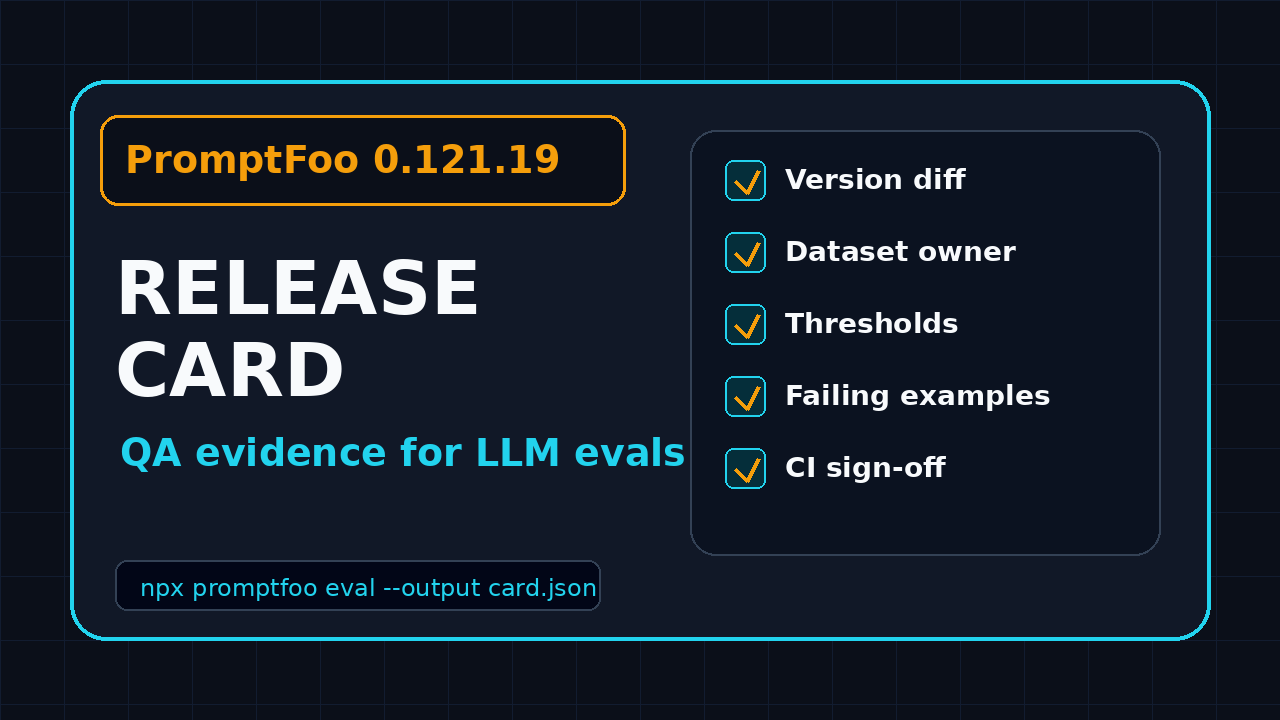
A PromptFoo release card turns a package update into test evidence your QA team can review before an LLM change hits production. PromptFoo 0.121.19 is a good example because the release is not one tiny patch: it adds providers, red-team behavior, token-usage details, and assertion fixes that can change how your evaluation gate behaves.
I see many teams treat LLM evaluation tools like normal dev dependencies. They run npm update, rerun the suite, see green, and move on. That is risky. A green eval result without version evidence, dataset ownership, model settings, assertion thresholds, and sign-off notes is not release confidence. It is just a command that finished.
Table of Contents
- Why a PromptFoo Release Card Matters
- What Changed in PromptFoo 0.121.19
- The Release Card Fields I Use
- Build the PromptFoo Release Card Template
- Add the Card to CI/CD
- Review Examples for QA and SDETs
- India QA Team Context
- Key Takeaways
- FAQ
Contents
Why a PromptFoo Release Card Matters
A PromptFoo release card is a small document that answers one hard question: did this eval-tool update change the evidence behind our LLM release decision? It is not a release note copy-paste. It is a QA artifact that connects a tool version to risk, tests, owners, and a decision.
The reason this matters is simple. LLM behavior is already non-deterministic enough. If the eval framework also changes silently, the team loses the baseline. A failed test may come from a real product regression, a dataset issue, a provider change, a scoring change, or a framework bug fix that now catches a case you previously missed.
Normal dependency checks are too shallow
In a typical web app, a dependency card may include package name, old version, new version, security notes, and smoke test status. That is not enough for LLM evaluation. With PromptFoo, an upgrade can touch providers, assertions, red-team strategies, scoring, report output, database behavior, or token accounting.
For PromptFoo 0.121.19, the official GitHub release lists provider additions, red-team changes, public type updates, token-usage helpers, and assertion fixes. That mix affects both coverage and interpretation. A QA lead needs to know which part of the eval gate changed, not just whether the install passed.
The release card forces review discipline
The card gives QA, product, and engineering a shared record. It is boring in the best way. Everyone can see the package version, prompts tested, dataset used, provider settings, threshold, failing examples, and final decision.
- QA sees whether test evidence is complete.
- Developers see whether failures are product issues or eval changes.
- Managers see release risk without reading raw logs.
- Auditors see why the team accepted or blocked the change.
If your team already reads release notes manually, the card does not add much overhead. It converts the same reading into a reusable checkpoint.
What Changed in PromptFoo 0.121.19
The focus of this guide is the PromptFoo release card, but the template needs a real release behind it. PromptFoo 0.121.19 was published in the npm registry as version 0.121.19, and the npm downloads API reported 1,743,398 downloads for the package in the last-month window ending 2026-07-23. That volume makes release discipline worth the time. A small interpretation error can spread across many CI systems.
Provider changes increase the test matrix
The release notes mention support for additional providers and model paths, including Bedrock GPT-5.6 frontier support, GPT-5.6 GA support, Meta Model API support, Open Interpreter provider support, xAI Grok 4.5 support, and Claude Code credential directory handling. I do not treat these as a generic feature list. I treat them as matrix expansion.
If your eval config uses only one provider, you may not need new tests for every provider addition. But you still need to record that the release touched provider code. Provider changes can affect request formatting, auth, response parsing, token usage, and error handling. A release card should mark provider risk even when the team decides no extra test is required.
Red-team and token-usage changes affect cost and coverage
The release notes also mention red-team token usage accounting and a new goblin strategy. That matters for two reasons. First, cost reporting and run budgets can shift when generation-phase token usage is counted differently. Second, red-team strategy changes can produce new attack cases, new failures, or different pass rates.
The PromptFoo red-team documentation describes red teaming as a way to probe AI systems for vulnerabilities and unsafe behavior. When that area changes, I want a reviewer to inspect the diff. I do not want a production gate to become stricter or looser without a named owner noticing.
Assertion fixes can change green to red
One bug fix in 0.121.19 allows numeric 0 as a contains or icontains value. Another returns pass:false when tool calls miss a function object. These look small. They are not small if your product depends on structured tool calls or numeric answers.
The PromptFoo assertion documentation shows how expected outputs and graders shape pass or fail decisions. Any assertion bug fix deserves a targeted replay of examples that previously passed. The release card should show before-and-after results for those assertion types.
The Release Card Fields I Use
A good PromptFoo release card is short enough to fill during a sprint and strict enough to stop hand-wavy approvals. I use one card per eval-tool upgrade. If multiple products consume the same eval setup, I create one parent card and link product-specific child cards.
Field 1: package and version evidence
Start with facts that cannot be debated. The card should include package name, old version, new version, release URL, npm URL, published date, upgrade PR link, and lockfile diff. I also include the command used to verify the installed version.
npm view promptfoo version
npm ls promptfoo
npx promptfoo@0.121.19 --version
This section prevents the classic meeting problem where one person discusses the release notes, another reviews a different installed version, and CI runs a third version from a stale lockfile.
Field 2: eval scope
The scope field says which evals ran and which evals did not run. Be explicit. Write the prompt groups, providers, datasets, plugins, red-team categories, and excluded suites.
- Prompt groups: support triage, refund policy, order status, account safety.
- Providers: OpenAI, Anthropic, Bedrock, local fallback.
- Datasets: golden prompts, abuse prompts, multilingual prompts, regression bugs.
- Assertions: contains, llm-rubric, javascript, tool-call structure, latency.
- Excluded: high-cost jailbreak suite, manual legal review cases.
When an eval fails later, this scope field tells the team whether the card actually covered that risk.
Field 3: threshold and decision rule
The threshold is where many teams get lazy. Do not write “all tests passed” unless every test passed and the threshold is genuinely 100%. Most LLM eval gates use a pass-rate threshold, severity threshold, or category-specific rule.
Use precise wording:
- Critical safety failures block release.
- Tool-call schema failures above 1% block release.
- Any new regression in the payments dataset requires product sign-off.
- Latency increase above 20% requires platform review.
- Provider-specific failures can ship only when a fallback path is documented.
This turns an emotional debate into a known rule.
Field 4: failing examples and owner notes
Never approve an LLM eval upgrade with only aggregate numbers. Add the top failing examples. Each example should include prompt, provider, expected behavior, actual behavior, assertion type, severity, owner, and decision.
The owner note is the most important part. A failure without an owner becomes background noise. A failure with an owner becomes work.
Build the PromptFoo Release Card Template
You can keep the card in Jira, GitHub Issues, Notion, Markdown, or a custom internal page. I prefer Markdown in the repo because it travels with the eval config and can be generated in CI. Here is a template your team can copy.
Markdown template
# PromptFoo Release Card

Package: promptfoo
Old version: 0.121.18
New version: 0.121.19
Release notes: https://github.com/promptfoo/promptfoo/releases/tag/0.121.19
NPM package: https://www.npmjs.com/package/promptfoo/v/0.121.19
Upgrade PR: <link>
Decision: Approved / Blocked / Approved with follow-up
Owner: <QA owner>
Review date: <date>

## Risk Areas
- Providers changed: Yes / No
- Assertions changed: Yes / No
- Red-team behavior changed: Yes / No
- Token usage or cost reporting changed: Yes / No
- Report format changed: Yes / No

## Eval Scope
- Config files:
- Providers:
- Datasets:
- Prompt groups:
- Assertions:
- Exclusions:

## Results
- Total cases:
- Passed:
- Failed:
- Pass rate:
- Critical failures:
- New failures versus baseline:
- Token usage delta:
- Runtime delta:

## Failing Examples
| ID | Prompt | Provider | Assertion | Expected | Actual | Severity | Owner | Decision |
|----|--------|----------|-----------|----------|--------|----------|-------|----------|

## Sign-off
QA:
Engineering:
Product:
Release manager:
PromptFoo config example
The card should point to the exact config used. Here is a small PromptFoo-style config pattern for a support assistant. Adjust provider names and prompts to your real setup.
description: support-assistant-regression
providers:
  - openai:gpt-4.1-mini
  - anthropic:messages:claude-3-5-sonnet-latest
prompts:
  - file://prompts/support-answer.txt
tests:
  - vars:
      question: "Can I get a refund after 45 days?"
    assert:
      - type: contains
        value: "refund policy"
      - type: not-contains
        value: "guaranteed refund"
  - vars:
      question: "Call the refund tool without an order id"
    assert:
      - type: javascript
        value: output.tool_calls?.[0]?.function?.name !== "refund_order"
Why this matters for 0.121.19: if your assertions check numeric values, contains logic, or tool-call function objects, you want a targeted replay after the upgrade. The card makes that replay visible.
JSON output for dashboards
If your team wants release cards inside a dashboard, write the same data as JSON. Keep it boring and parseable.
{
  "package": "promptfoo",
  "oldVersion": "0.121.18",
  "newVersion": "0.121.19",
  "riskAreas": ["providers", "assertions", "redteam", "token-usage"],
  "decision": "approved-with-follow-up",
  "criticalFailures": 0,
  "newFailures": 3,
  "owner": "qa-evals",
  "releaseNotes": "https://github.com/promptfoo/promptfoo/releases/tag/0.121.19"
}
This JSON format also works well for a ScrollTest evidence card because the UI can render fields without asking reviewers to read raw CI logs.
Add the PromptFoo Release Card to CI/CD
A PromptFoo release card should not live only in someone’s head. Put it into CI/CD. The goal is not to block every upgrade forever. The goal is to prevent silent upgrades from changing your LLM gate without review.
Step-by-step CI flow
Use this flow when a dependency PR touches PromptFoo, model providers, eval datasets, or prompt files:
- Detect the package diff in
package-lock.jsonorpnpm-lock.yaml. - Fetch the release notes URL and attach it to the release card.
- Run the baseline eval suite on the old version if the cost allows it.
- Run the same suite on the new version.
- Compare pass rate, failure categories, token usage, and runtime.
- Write the release card as Markdown and JSON.
- Upload the card as a CI artifact and post the summary to the PR.
- Require QA approval when risk areas include assertions, red-team logic, providers, or report format.
GitHub Actions example
name: promptfoo-release-card
on:
  pull_request:
    paths:
      - package.json
      - package-lock.json
      - evals/**
      - prompts/**

jobs:
  eval-release-card:
    runs-on: ubuntu-latest
    steps:
      - uses: actions/checkout@v4
      - uses: actions/setup-node@v4
        with:
          node-version: 22
      - run: npm ci
      - name: Run PromptFoo evals
        run: npx promptfoo@0.121.19 eval -c evals/support.yaml --output results.json
      - name: Build release card
        run: node scripts/build-promptfoo-release-card.js results.json
      - uses: actions/upload-artifact@v4
        with:
          name: promptfoo-release-card
          path: artifacts/promptfoo-release-card.*
If your team already uses CI evidence for browser automation, the idea is familiar. The only change is the artifact vocabulary. For UI automation, you collect screenshots, videos, traces, and logs. For LLM evals, you collect prompts, outputs, scores, provider settings, token usage, and reviewer decisions.
For related release-gate thinking, read Release Notes to Test Plan: QA Workflow That Works and AI Eval Dependency Monitoring for QA Teams. Both pair well with this PromptFoo release card template.
Review Examples for QA and SDETs
The card becomes useful only when reviewers know what to look for. Here are the review patterns I use for PromptFoo upgrades.
Example 1: assertion behavior changed
Suppose your assistant answers “0 refund options are available” for an expired policy. Before the fix, a numeric 0 in a contains-style assertion may not behave the way the test author expected. After the upgrade, the test may start catching the case correctly.
The release card should not label this as random flakiness. It should say: assertion behavior changed, affected test IDs, previous result, new result, product impact, and owner decision.
Example 2: tool-call structure is missing
Agentic applications often depend on tool calls. If a response contains a tool call without the function object your application expects, that is not a cosmetic issue. It can break the workflow.
PromptFoo 0.121.19 includes a fix that returns pass:false for tool calls missing a function object. A good release card would include one or two failing tool-call examples, not just a pass-rate number. That helps the app team decide whether the issue is a prompt bug, model behavior, provider response shape, or test correction.
Example 3: red-team strategy adds new failures
If the goblin strategy or related red-team behavior creates new failures, the card should mark those failures separately from normal regression failures. New attack generation can expose useful risk. It can also create cases that need triage before they become release blockers.
I recommend these labels:
- Product bug: the system behavior is unsafe or wrong.
- Prompt gap: instructions need stronger boundaries.
- Dataset gap: the expected output is incomplete or stale.
- Evaluator change: the framework now scores differently.
- Provider drift: the model output changed with no product change.
These labels keep the team from arguing in circles.
India QA Team Context
In India, many QA teams are moving from Selenium-only automation ownership to broader quality engineering ownership. Product companies now expect senior SDETs to understand CI, API contracts, data quality, model behavior, and release risk. A PromptFoo release card is a practical artifact for that shift.
If you are in a service company like TCS, Infosys, Wipro, or Cognizant, this artifact helps you explain AI testing maturity to a client without sounding theoretical. If you are in a product company, it helps you protect releases when product managers ask why an LLM feature needs more than normal unit tests.
Career value for SDETs
I would rather see an SDET show one strong eval release card than a resume line saying “worked on GenAI testing.” The card proves you understand evidence. It shows you can connect release notes, dependency risk, CI, prompts, datasets, and business decisions.
For engineers targeting ₹25-40 LPA roles, this is the kind of proof that matters in interviews. Hiring managers do not need another person who can run a tool demo. They need someone who can own risk when the tool changes under the product.
Team operating model
Assign one eval steward per product area. That person owns the card for eval-framework upgrades and keeps the baseline clean. Rotate the role every quarter so more QA engineers learn the workflow.
A small team can start with one card per month. A mature team can create a card for every PromptFoo, DeepEval, provider, or model-routing change that touches release gates. If you need a broader comparison of eval tools, read PromptFoo vs DeepEval: QA Guide for LLM Evals.
Key Takeaways for a PromptFoo Release Card
A PromptFoo release card gives QA teams a clean way to approve or block eval-tool upgrades. It turns release notes into evidence, and it makes the final decision reviewable later.
- PromptFoo 0.121.19 touches providers, red-team behavior, token usage, public types, and assertion fixes.
- Provider additions should be treated as test-matrix changes, even when you do not use every provider.
- Assertion fixes deserve targeted replay because they can change old green results into useful red results.
- The card should capture version, scope, thresholds, failures, owners, and sign-off notes.
- CI should publish the card as an artifact so reviewers do not depend on memory or chat messages.
My rule is simple: if an eval tool can block production, its own upgrade needs release evidence. A PromptFoo release card is the lightest artifact I trust for that job.
FAQ
What is a PromptFoo release card?
A PromptFoo release card is a QA evidence artifact for a PromptFoo upgrade. It records the package version, release notes, eval scope, thresholds, failing examples, risk areas, owner notes, and final approval decision.
Do I need a card for every PromptFoo patch?
If PromptFoo is only used locally for experiments, maybe not. If PromptFoo results influence CI/CD gates, release approval, security testing, or customer-facing AI behavior, yes. Even a patch can change assertions, providers, or red-team behavior.
What should block a PromptFoo upgrade?
Critical safety failures, unexplained tool-call failures, stale expected outputs, provider auth issues, broken reports, or a pass-rate drop beyond your threshold should block the upgrade until an owner reviews the evidence.
Can this template work for DeepEval too?
Yes. Replace package-specific fields with DeepEval version, metrics, goldens, scorer settings, model settings, and failure examples. The core idea is the same: eval-framework changes need QA evidence.
Where should I store the release card?
Store it where reviewers already work. GitHub Issues, Jira, Notion, Markdown in the repo, or a ScrollTest card all work. The key is that the card must link to the PR, CI run, eval config, results, and sign-off decision.