n8n QA Automation Workflows: What Breaks in 2.33.0
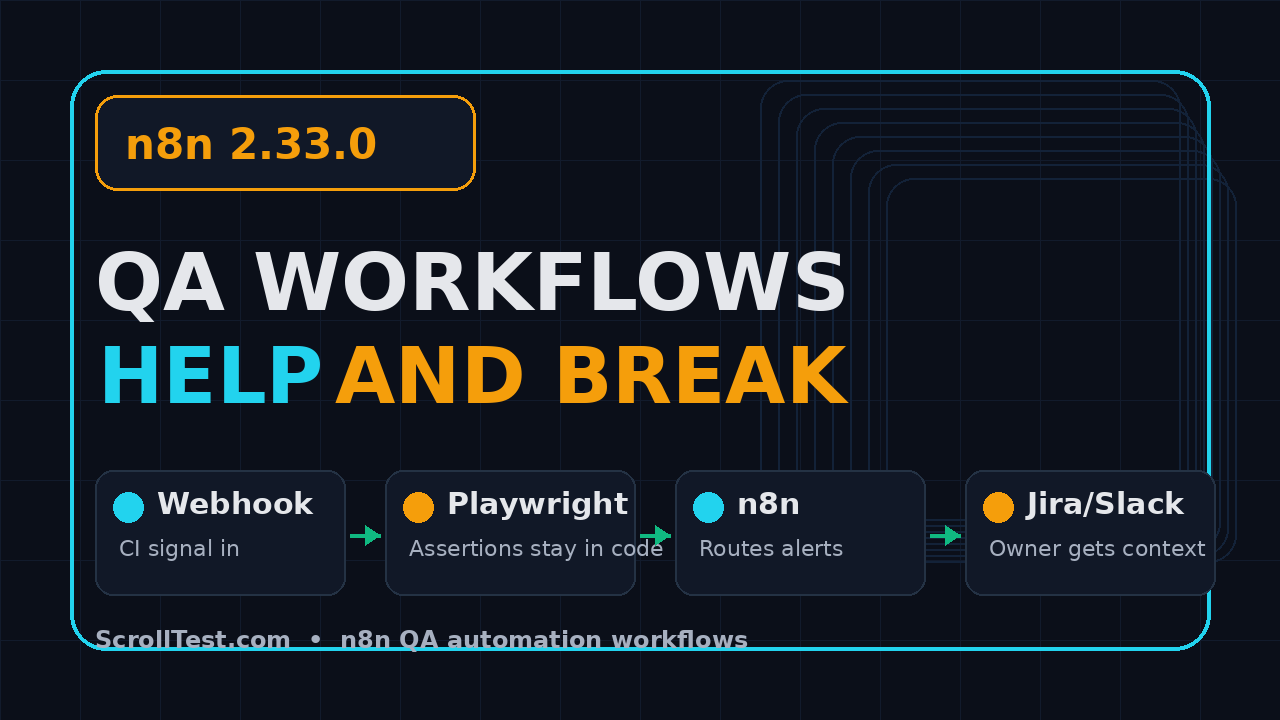
n8n QA automation workflows are useful when they glue testing signals together: a failed Playwright run, a flaky API check, a Jira bug, a Slack alert, or an LLM evaluation report. But n8n is not a replacement for a test framework. The 2.33.0 release, published on 28 July 2026, is a good reminder that workflow automation helps QA teams most when we keep it close to orchestration and far away from assertion logic.
I like n8n for the same reason I like small shell scripts: it makes repetitive engineering work visible. I do not like it when teams turn a workflow canvas into a second test suite with hidden business rules, weak version control, and no clean failure contract.
Table of Contents
- What changed in n8n 2.33.0?
- Where n8n QA automation workflows fit
- Where n8n breaks for serious QA work
- Three workflows worth building this week
- TypeScript example: trigger n8n from Playwright
- Security, reliability, and CI/CD guardrails
- India QA career context
- My decision framework
- Key takeaways
- FAQ
Contents
What changed in n8n 2.33.0?
The official n8n 2.33.0 GitHub release lists a large set of fixes across AI Builder, core scheduling, credentials audits, MCP responses, chat model routing, trigger nodes, and integrations such as Airtable, AMQP, Baserow, Linear, Telegram, and Slack. That matters for QA because many teams now use n8n as the glue layer around test automation, not just as a marketing or sales ops tool.
Two release notes stand out for testers. First, n8n core now accepts 5-field cron expressions in the schedule trigger. Second, the AI Builder area received multiple reliability fixes, including MCP connection failures becoming non-blocking for agents and workflow verification stopping correctly at send-and-wait gates on loops.
Why this release is relevant to QA
Most QA teams do not need every n8n feature. They need a small set of predictable workflow primitives: schedule a run, call an API, transform JSON, branch on status, notify the right channel, and store an audit trail. A release that touches schedule triggers, MCP failures, AI Builder gates, and credential audits touches exactly those primitives.
n8n has serious adoption behind it. The GitHub repository API showed 198,992 stars and 59,844 forks during this run. The npm downloads API reported 342,520 downloads for the package in the last-month window ending 31 July 2026. I do not treat stars or downloads as quality proof, but they are useful signals when a QA manager asks whether the tool is likely to disappear next quarter.
The honest positioning
n8n is a workflow automation platform with native AI capabilities and more than 400 integrations according to the project description returned by GitHub. That is a strong fit for notification, triage, release gate orchestration, test data refreshes, and reporting. It is a weak fit for deep browser assertions, test isolation, fixture lifecycle, contract schemas, and flaky-test analysis that needs deterministic replay.
So the right question is not “Can n8n replace Playwright?” The right question is “Which boring QA tasks should stop living in a human checklist?”
Where n8n QA automation workflows fit
n8n QA automation workflows work best when the workflow is a coordinator. The test framework still owns the test. n8n owns the handoff between systems.
Use n8n for orchestration, not assertions
I use this split with teams:
- Playwright, Selenium, Pytest, REST Assured: execute tests and make assertions.
- n8n: trigger runs, collect results, route alerts, enrich bugs, and update dashboards.
- CI/CD: enforce gates, store artifacts, and protect merges.
- Jira, Linear, Slack, Teams: receive clean, actionable updates.
This split avoids a common trap. If your pass or fail decision lives inside a visual workflow, developers will struggle to reproduce failures locally. If the decision lives inside a TypeScript test and n8n only routes the result, the failure remains debuggable.
Use it for cross-tool glue
QA work often crosses tools. A nightly suite may run in GitHub Actions, export a JUnit file, upload a Playwright trace, post a Slack summary, create a Jira bug for a repeat failure, and notify the release manager if the same service failed twice in 24 hours. You can write all of that in code, but many teams already have ops people and QA leads who can safely maintain this glue in a workflow UI.
That is where n8n earns its place. It reduces the “who will update the Slack script?” problem. It also gives non-developers a readable map of the release support process.
Keep the workflow small
My rule: one workflow should explain one operational decision in under 30 seconds. If a workflow has 40 nodes, 8 nested branches, and 5 different owners, it has become a product. Treat it like code or split it.
If you are already building Playwright pipelines, read ScrollTest’s Feature Flag Testing in Playwright and A/B Test Variant Verification with Playwright. Those are the kinds of test signals n8n can route cleanly after the test run finishes.
Where n8n breaks for serious QA work
Low-code tools break in boring ways. The canvas looks clean on day 1. By day 90, the team has secrets in the wrong place, one Slack node nobody owns, and three “temporary” branches that control release approval.
If the rule is “block release when payment API p95 is above 800 ms and checkout smoke test fails twice,” write that rule in a versioned repo first. n8n can call it. Do not hide it behind 6 If nodes and a Function node nobody reviews.
Hidden rules create audit pain. When a production release is blocked, an engineering manager should be able to see the exact rule, commit, test result, and artifact. A workflow screenshot is not enough.
Break point 2: weak local reproducibility
Playwright gives you traces, videos, screenshots, and a command to rerun a spec. n8n gives you execution logs for a workflow run. Those are useful, but they are not a replacement for test-level debugging. If a test fails, the developer still needs a local command like:
npx playwright test tests/checkout.spec.ts --project=chromium --trace=onn8n should attach the trace URL, not become the debugging environment.
Break point 3: credentials and blast radius
The n8n documentation has dedicated pages for environment variables and Docker-based hosting. QA teams should read those before connecting Jira, Slack, GitHub, test environments, and internal staging APIs. A workflow engine with broad credentials can create bugs faster than a flaky test if access boundaries are loose.
For regulated teams, I recommend a separate n8n instance or project scope for QA automation workflows. Do not share the same instance that production ops uses for customer data workflows unless your security model is clear.
Three workflows worth building this week
Do not start by automating everything. Start with three workflows that remove real manual work and create a clean audit trail.
Workflow 1: nightly smoke report
Trigger this after your CI run completes. The workflow reads the latest test summary, fetches artifact links, formats a short Slack message, and tags the owner if failure count crosses a threshold.
- GitHub Actions finishes the nightly suite.
- CI uploads JUnit XML, HTML report, and Playwright trace zip.
- n8n receives a webhook with the run ID and branch.
- n8n calls the GitHub API and pulls conclusion, duration, and artifact URLs.
- n8n posts one message: pass/fail, failed specs, owner, artifact link, and next action.
Keep the message short. A release manager should understand it on mobile in 10 seconds.
Workflow 2: flaky test quarantine request
This is useful when your suite has enough history to detect repeat offenders. n8n can read a failure summary, check whether the same test failed in the previous 3 runs, and open a Jira or Linear issue with evidence. The workflow should never quarantine tests silently. It should create a request for a human to approve.
That one approval step prevents abuse. I have seen teams hide real product failures by marking them flaky too quickly. Automation should reduce noise, not hide risk.
Workflow 3: test data refresh
Many manual testers still lose 20 minutes every morning creating users, resetting carts, or cleaning stale records. n8n can run a scheduled test data refresh against safe staging APIs, then send a status message with the IDs created. Use the HTTP Request node documentation when you build this because pagination, headers, authentication, and response handling matter.
Do not let this workflow touch production. Use environment-scoped credentials and a clear naming convention such as qa-staging-seed-users.
TypeScript example: trigger n8n from Playwright
The simplest integration is a webhook. Playwright runs the test. n8n receives a structured summary and handles notification, enrichment, or ticket creation.
Playwright reporter hook
This example sends a compact JSON payload at the end of a test run. In real teams, I put the webhook URL in a CI secret and send only metadata, not customer data.
// reporters/n8n-reporter.ts
import type { Reporter, FullResult, Suite } from '@playwright/test/reporter';

type Payload = {
  status: string;
  totalTests: number;
  failed: number;
  commit: string;
  runUrl: string;
};

export default class N8nReporter implements Reporter {
  private totalTests = 0;
  private failed = 0;

  onBegin(_config: unknown, suite: Suite) {
    this.totalTests = suite.allTests().length;
  }

  onTestEnd(_test: unknown, result: { status: string }) {
    if (result.status !== 'passed') this.failed += 1;
  }

  async onEnd(result: FullResult) {
    const webhook = process.env.N8N_QA_WEBHOOK_URL;
    if (!webhook) return;

    const payload: Payload = {
      status: result.status,
      totalTests: this.totalTests,
      failed: this.failed,
      commit: process.env.GITHUB_SHA ?? 'local',
      runUrl: process.env.GITHUB_SERVER_URL && process.env.GITHUB_REPOSITORY && process.env.GITHUB_RUN_ID
        ? `${process.env.GITHUB_SERVER_URL}/${process.env.GITHUB_REPOSITORY}/actions/runs/${process.env.GITHUB_RUN_ID}`
        : 'local-run'
    };

    await fetch(webhook, {
      method: 'POST',
      headers: { 'content-type': 'application/json' },
      body: JSON.stringify(payload)
    });
  }
}
playwright.config.ts
import { defineConfig } from '@playwright/test';

export default defineConfig({
  reporter: [
    ['html'],
    ['./reporters/n8n-reporter.ts']
  ],
  retries: process.env.CI ? 1 : 0,
  use: {
    trace: 'retain-on-failure',
    screenshot: 'only-on-failure'
  }
});
Now the n8n workflow can branch on failed > 0, attach the HTML report URL, and notify the right channel. The assertion still lives in Playwright. The orchestration lives in n8n.
n8n side of the flow
On the n8n side, use a Webhook trigger, an If node, an HTTP Request node for artifact lookup, and a Slack or Microsoft Teams node for notification. If your workflow needs pagination, use the official n8n pagination cookbook rather than building brittle loops by hand.
Security, reliability, and CI/CD guardrails
n8n QA automation workflows become risky when teams treat them like harmless diagrams. They are executable systems. They call APIs, hold credentials, make decisions, and sometimes write into project-management tools.
Guardrail 1: version important workflows
Export workflow JSON for critical release gates. Store it in Git. Review changes the same way you review a test helper. If a workflow controls release communication, someone should approve changes before they run in production release channels.
Guardrail 2: separate signals from decisions
Send raw signals from CI: status, failed count, suite duration, artifact URL, commit SHA, branch, environment, and test owner. Make decisions in a small, readable function or service. n8n can call that decision endpoint and route the result.
Guardrail 3: fail safe
If n8n is down, your CI pipeline should still show test results. If Slack is down, your release gate should not lose the failure. If Jira is down, store a retry event. This is why CI remains the source of truth for pass/fail and n8n remains the communication layer.
For CI/CD thinking around test automation, pair this article with ScrollTest’s Microservices Test Automation Strategy. The same principle applies: the closer a check is to a release decision, the more deterministic it must be.
Guardrail 4: do not execute arbitrary commands casually
n8n has an Execute Command node. That can be powerful on a self-hosted instance, but it is also a sharp knife. In QA automation, prefer API calls and CI jobs over arbitrary shell commands inside a workflow engine. If you must use it, isolate the runner and document the exact command.
What I would measure after launch
Do not judge the workflow by whether it looks clean. Measure whether it changes team behavior. I track 5 numbers for the first 2 weeks: failed-run acknowledgement time, duplicate bug count, missing artifact count, manual report time, and false alarm count. If the nightly report cuts manual reporting from 20 minutes to 2 minutes but creates 10 false alarms, it is not done.
The best workflow is almost boring. It tells the right person what failed, links to the exact trace or API response, and stays quiet when nothing needs action. That is the standard I use before I let a workflow touch a release channel.
India QA career context
For Indian QA engineers, n8n is not the main skill. The main skill is test automation ownership. n8n is a multiplier when you already understand CI, APIs, Playwright, GitHub Actions, and release risk.
What hiring managers care about
In service companies, many testers still spend time preparing reports, chasing build status, or manually creating test data. In product companies, SDETs are expected to own pipelines and quality signals. The jump from manual QA to SDET is not “learn one tool.” It is learning how quality flows from code commit to production signal.
That is why I place n8n after Playwright and API testing, not before. A QA engineer who can write a stable Playwright spec and then wire its results into a release workflow is more useful than someone who can only drag nodes on a canvas.
Salary signal, not salary promise
In India, I commonly see stronger compensation bands for SDETs who can own automation architecture, CI/CD, and cross-team quality reporting. A practical target for mid-to-senior QA engineers is the ₹25-40 LPA skill band, but that number depends on company type, city, interview performance, and proof of shipped work. Treat n8n as one portfolio project inside that story, not the story itself.
A portfolio project that works
Build a public sample: Playwright tests for a demo app, GitHub Actions pipeline, n8n webhook workflow, Slack-style markdown output, and a README that explains the failure contract. That is better than a certificate screenshot because it proves you can connect tools.
If you are planning this transition, also read The 90-Day Roadmap: From Manual Tester to AI Engineer. n8n fits the automation-systems part of that roadmap.
My decision framework
Use this checklist before you add n8n to a QA process.
Use n8n when the answer is yes
- The workflow connects 2 or more external systems.
- The failure decision already exists in code or CI.
- The workflow output is a notification, ticket, report, or data refresh.
- The owner can explain the flow in less than 30 seconds.
- The credentials are scoped to staging or to least privilege.
Do not use n8n when the answer is yes
- The workflow contains core test assertions.
- The only owner is “the QA team” with no named maintainer.
- The workflow can block releases but is not reviewed.
- The flow needs complex loops, retries, and replay semantics.
- The tool needs broad production credentials to work.
A 7-day rollout plan
- Day 1: Pick one noisy manual task, such as nightly smoke reporting.
- Day 2: Define the payload contract from CI in JSON.
- Day 3: Build the n8n webhook workflow with a fake payload first.
- Day 4: Connect GitHub Actions or your CI tool.
- Day 5: Add owner routing and artifact links.
- Day 6: Add retry behavior and safe failure messages.
- Day 7: Export the workflow JSON, document it, and review it with dev leads.
This plan is intentionally small. If it does not reduce noise in 7 days, either the workflow is solving the wrong problem or the team is not ready to maintain it.
Key takeaways
n8n QA automation workflows are worth learning, but only with discipline. The 2.33.0 release shows active work around AI Builder, schedule triggers, MCP behavior, credentials audits, and integration reliability. Those are useful signals for QA teams building workflow glue around test automation.
- Use n8n to coordinate QA systems, not to replace Playwright, Selenium, Pytest, or REST Assured.
- Keep assertions in code and route results through n8n.
- Start with nightly smoke reports, flaky-test requests, or test-data refreshes.
- Protect credentials, export critical workflow JSON, and keep CI as the source of truth.
- For Indian SDETs, n8n is a portfolio multiplier when paired with Playwright, API testing, and CI/CD.
My practical recommendation: build one workflow this week. Make it boring. Make it auditable. If it saves 30 minutes every day without hiding failures, keep it. If it becomes a second test framework, delete it and move the logic back to code.
FAQ
Is n8n good for QA automation?
Yes, when it coordinates tools around QA automation. Use it for triggers, notifications, ticket creation, test data refreshes, and report routing. Do not use it as the place where important assertions live.
Can n8n replace Jenkins or GitHub Actions?
Not for most engineering teams. CI tools should remain the source of truth for build and test status. n8n can sit next to CI and improve communication, enrichment, and cross-tool automation.
What changed in n8n 2.33.0 for QA teams?
The 2.33.0 release includes fixes around schedule triggers, AI Builder behavior, MCP failures, credential audit behavior, and multiple integrations. QA teams should care because those areas often sit inside test reporting and release support workflows.
Should manual testers learn n8n before Playwright?
No. Learn API basics, Playwright basics, Git, and CI first. Then use n8n to connect those skills into a practical workflow automation project.
What is the safest first n8n workflow for a QA team?
A nightly smoke-test report is the safest first workflow. It reads CI results, posts a short summary, and links to artifacts. It does not decide whether the product is correct. Your test suite and CI gate still do that.