MCP Server Regression Testing for QA Teams
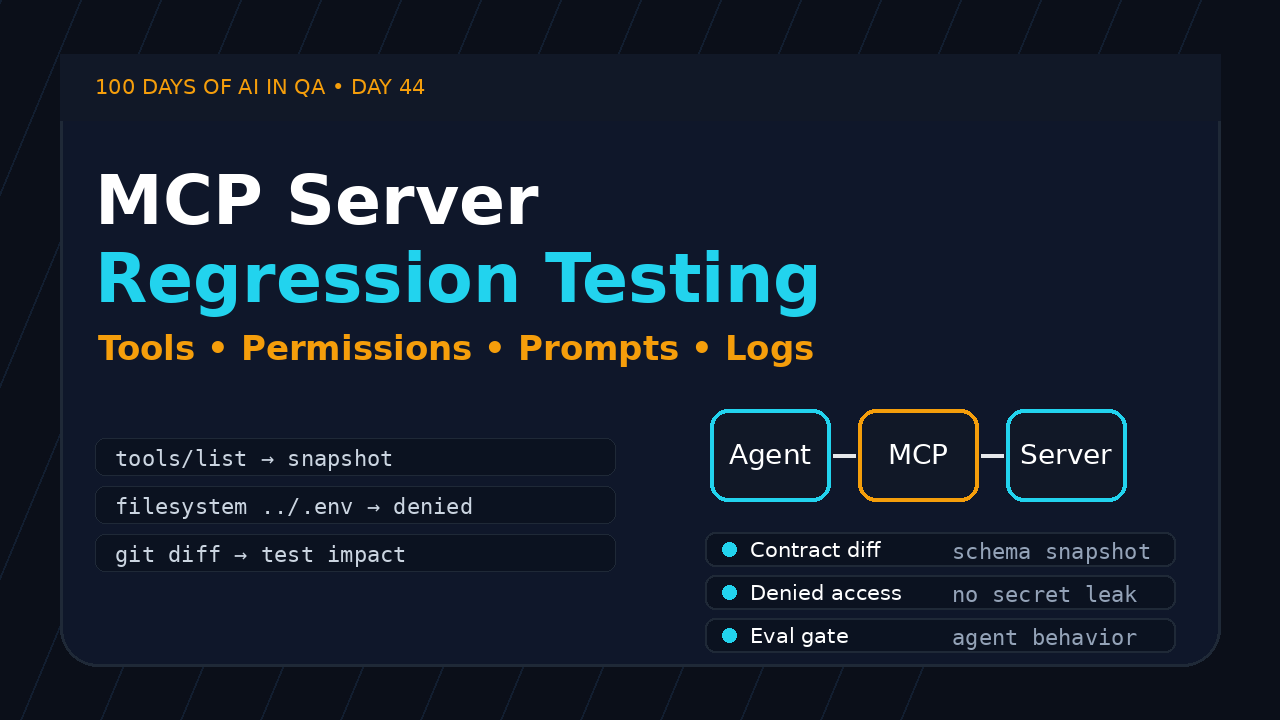
MCP server regression testing is becoming a real QA problem, not a side quest for platform teams. When a Model Context Protocol server changes its tools, permissions, prompts, resources, or logs, your AI agent can keep running while quietly doing the wrong thing.
Table of Contents
- Why MCP Server Regression Testing Matters
- What Changed in the MCP Server Release
- A QA Risk Model for MCP Servers
- MCP Server Regression Testing Checklist
- How to Automate MCP Server Checks
- CI/CD Release Gate for MCP Upgrades
- India SDET Career Angle
- Key Takeaways
- FAQ
Contents
Why MCP Server Regression Testing Matters
Day 44 of the 100 Days of AI in QA and SDET series is about a small release note that has a large testing lesson. The Model Context Protocol servers 2026.7.10 release, published on July 10, 2026, updated four official server packages: filesystem, time, fetch, and git.
That list looks harmless. I see teams skim this type of release note and say, “No UI changed, no need for QA.” That is the wrong instinct for AI workflows. An MCP server is not a normal library sitting quietly behind your app. It exposes capabilities to agents. If the contract changes, the agent’s behavior changes.
What MCP adds to the testing surface
The official MCP documentation describes the protocol as a standard way for AI applications to connect with external systems and data sources. The MCP introduction positions it as a bridge between AI apps and tools. The practical QA translation is simple: MCP turns your local files, Git repositories, APIs, databases, prompts, and enterprise tools into agent-accessible surfaces.
That creates a new kind of regression risk. Traditional automation asks whether a user can click a button and get the right result. MCP server regression testing asks whether an agent still receives the correct tool list, calls the right tool with the right schema, respects permission boundaries, and leaves enough logs for humans to debug mistakes.
The failure mode is quiet
Bad MCP behavior does not always throw a red error. It can look like this:
- The agent chooses
fetchwhen it should use a cached resource. - A filesystem server accepts a path that used to be blocked.
- A git server returns a different diff format, so the agent summarizes the wrong change.
- A prompt template changes one variable name and breaks a downstream eval.
- Logs lose correlation IDs, so the team cannot trace a bad tool call.
This is why I treat MCP upgrades like API contract upgrades. The UI may be unchanged, but the agent’s operating system changed underneath.
What Changed in the MCP Server Release
The 2026.7.10 release note is short. It lists updated packages for @modelcontextprotocol/server-filesystem@2026.7.10, mcp-server-time@2026.7.10, mcp-server-fetch@2026.7.10, and mcp-server-git@2026.7.10. The official servers repository has more than 88,000 GitHub stars at the time I checked the GitHub API, so even small package updates can affect a large number of builders and QA teams.
I am not claiming the release introduced a bug. The point is better: QA should not wait for a public incident before designing checks. If your agent uses these servers in a development workflow, this release should trigger a small targeted regression pack.
Filesystem server risk
Filesystem access is powerful because it lets an agent read and write project files. That is useful for test generation, defect triage, fixture creation, and documentation updates. It is also risky because a bad permission boundary can turn a helpful agent into a destructive one.
Regression questions I would ask:
- Can the server still read only the approved directories?
- Does path traversal fail for
../and symlink-style tricks? - Are write operations blocked in read-only workspaces?
- Does the response hide sensitive file content when access is denied?
- Are file names and paths logged without leaking secrets?
Fetch server risk
The fetch server is where network behavior enters the agent workflow. Your agent may use it to inspect docs, call internal test endpoints, or validate release notes. A small change in timeout handling, redirect behavior, header support, or response truncation can break the agent’s decision-making.
For QA, fetch needs both positive and negative tests. I want to know that the server fetches approved URLs, rejects blocked hosts, handles 404 and 500 responses cleanly, and does not turn a network failure into confident hallucinated output.
Git server risk
The git server matters for release-impact testing. If an agent reads diffs, branches, commit logs, or changed files, then the format and completeness of git output matters. A regression here can make the agent miss test impact.
This connects directly with my earlier ScrollTest workflow on turning release notes into a test plan: Release Notes to Test Plan: QA Workflow That Works. MCP lets agents automate part of that analysis, but QA still owns the checks that prove the analysis is safe.
Time server risk
The time server looks simple until you test global products. Time zones, daylight-saving assumptions, date formats, and clock boundaries create expensive bugs. For Indian QA teams working with US or EU product teams, the time server deserves regression checks around IST, UTC, user locale, and date rollover.
A QA Risk Model for MCP Servers
A good MCP test strategy starts with a risk model. Do not begin by writing 100 random tests. Start by asking what the agent can do through the server and what damage a wrong call can create.
Bucket 1: Tool contract risk
MCP tools expose names, descriptions, input schemas, and output structures. The specification section for server tools explains how servers can expose executable functions to clients. For QA, this means tools are API contracts.
Test these fields like you test a public API:
- Tool names remain stable or versioned.
- Required parameters are still required.
- Optional parameters keep safe defaults.
- Enums reject unsupported values.
- Error responses are predictable and machine-readable.
Bucket 2: Permission risk
Permission bugs are the highest-risk MCP failures because an agent can act quickly. A human tester might read a file accidentally. An agent can read 200 files, summarize them, and paste secrets into a ticket before anyone notices.
Your regression pack should include negative permission tests. In my experience, teams often test the happy path because it demos well. The real value sits in blocked calls, denied paths, invalid tokens, and audit events.
Bucket 3: Prompt and resource risk
MCP includes concepts for prompts and resources, not only tools. The specification sections for server prompts and server resources are worth reading if your agent depends on reusable prompts or context documents.
A prompt regression does not always fail compilation. It may reduce accuracy by changing instructions. A resource regression can give the agent stale, incomplete, or over-broad context. That is why MCP server regression testing should include snapshot checks for prompts and resource metadata.
Bucket 4: Observability risk
When agents fail, logs are your debugging product. If a server upgrade changes log format, hides request IDs, or removes tool-call metadata, your incident response slows down. I like to test logs as part of the acceptance criteria, not as an afterthought.
MCP Server Regression Testing Checklist
MCP server regression testing works best as a compact checklist that runs after every package upgrade. I prefer a layered suite: contract checks first, permission checks second, agent workflow checks third, and observability checks last.
1. Capture the current tool manifest
Before upgrading, record the tool list and schema. After upgrading, diff it. If the diff is expected, update the baseline with review. If it is unexpected, block the release.
{
  "server": "filesystem",
  "version": "2026.7.10",
  "tools": [
    {
      "name": "read_file",
      "required": ["path"],
      "permissions": ["workspace:read"]
    }
  ]
}
This looks basic, but it catches the most common agent regressions: renamed tools, changed parameters, missing descriptions, and accidental permission expansion.
2. Run permission boundary tests
Permission tests should be boring and strict. Build a small table of allowed and blocked actions:
| Scenario | Expected result |
|---|---|
| Read approved test fixture | Allowed |
Read parent directory with ../ |
Denied |
| Write file in read-only mode | Denied |
| Fetch approved documentation URL | Allowed |
| Fetch private metadata endpoint | Denied |
3. Test agent behavior, not only server responses
A server can return a valid response and still cause a bad workflow. Add a few end-to-end agent tasks:
- Ask the agent to summarize changed test files from a git diff.
- Ask it to read one fixture and generate a Playwright test.
- Ask it to fetch official docs and produce a short checklist.
- Ask it to reject a request that requires access outside its scope.
If the agent becomes more confident after a denied tool call, that is a bug. Denial should make it explain the limitation, not invent a result.
4. Validate logs and audit trails
Every MCP tool call should leave enough evidence for a reviewer. I want at least these fields in lower environments:
- Request ID or trace ID
- Tool name
- Caller identity or agent session
- Permission decision
- Sanitized input summary
- Status code or error class
- Duration
Do not log secrets. Do log decisions. This difference matters.
How to Automate MCP Server Checks
You do not need a huge framework to start MCP server regression testing. A small TypeScript harness can cover the highest-risk contracts. The exact client setup depends on your MCP runtime, but the pattern remains the same: start server, list tools, call tools with known inputs, assert outputs, assert denials, and save artifacts.
Example: schema snapshot test
import { test, expect } from '@playwright/test';
import fs from 'node:fs/promises';

type ToolDef = {
  name: string;
  description?: string;
  inputSchema?: unknown;
};

async function listMcpTools(): Promise<ToolDef[]> {
  // Replace this with your MCP client call.
  // Keep the test focused on the contract shape.
  return JSON.parse(await fs.readFile('artifacts/mcp-tools.json', 'utf-8'));
}

test('MCP tool manifest matches reviewed baseline', async () => {
  const tools = await listMcpTools();
  const normalized = tools
    .map(t => ({
      name: t.name,
      description: t.description,
      inputSchema: t.inputSchema
    }))
    .sort((a, b) => a.name.localeCompare(b.name));

  expect(normalized).toMatchSnapshot('mcp-tools.json');
});
I like snapshot tests for contracts because they force review. They should not auto-update in CI. If a server upgrade changes a tool schema, a human should approve that change.
Example: denied filesystem access
import { test, expect } from '@playwright/test';

async function callTool(name: string, args: Record<string, unknown>) {
  // Replace with your MCP client invocation.
  return fetch('http://localhost:3333/test-mcp-call', {
    method: 'POST',
    headers: { 'content-type': 'application/json' },
    body: JSON.stringify({ name, args })
  }).then(r => r.json());
}

test('filesystem server blocks parent directory reads', async () => {
  const result = await callTool('read_file', { path: '../.env' });

  expect(result.ok).toBe(false);
  expect(result.error.code).toMatch(/permission|access_denied/i);
  expect(JSON.stringify(result)).not.toContain('SECRET_KEY');
});
The important part is the final assertion. A denied response must not leak sensitive content inside the error body.
Example: release note to test impact
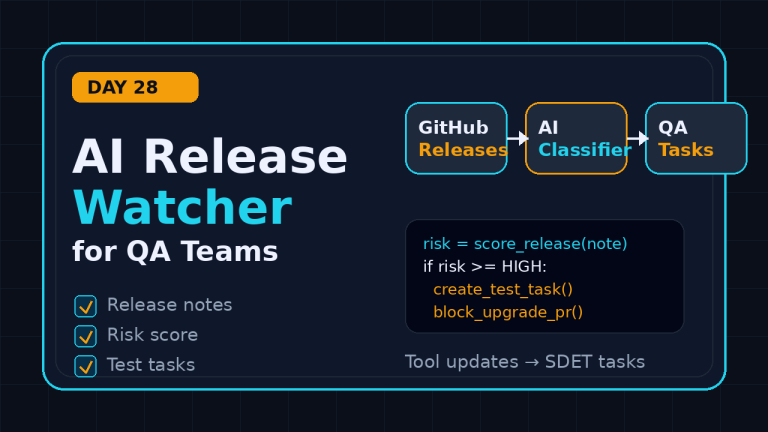
If your team already reads release notes manually, automate the boring first pass. I covered a related pattern in AI Release Watcher for QA: Build a Test Radar. For MCP upgrades, the same release-watcher pattern can create a test-impact ticket whenever a watched server package changes.
import requests

release = requests.get(
    'https://api.github.com/repos/modelcontextprotocol/servers/releases/tags/2026.7.10',
    headers={'User-Agent': 'ScrollTest QA Release Watcher'},
    timeout=20,
).json()

packages = [line.strip('- ') for line in release['body'].splitlines()
            if line.startswith('- ')]

risk_map = {
    'server-filesystem': ['permissions', 'path traversal', 'read/write boundaries'],
    'server-fetch': ['allowed hosts', 'timeouts', 'redirects'],
    'server-git': ['diff format', 'changed files', 'branch metadata'],
    'server-time': ['timezone', 'date rollover', 'locale format'],
}

for package in packages:
    matched = [checks for key, checks in risk_map.items() if key in package]
    print(package, matched[0] if matched else ['contract snapshot'])
This is not magic. It is release discipline. The agent can draft the impact. QA still reviews it.
CI/CD Release Gate for MCP Upgrades
MCP server regression testing should run in CI before developers merge agent-infrastructure changes. Do not wait until an agent starts editing files incorrectly on a real branch.
A practical release gate
Use this order:
- Detect changed MCP package versions in lockfiles or deployment manifests.
- Fetch the official release note or changelog.
- Map changed servers to risk areas.
- Run contract snapshot tests.
- Run permission and denial tests.
- Run 3 to 5 agent workflow tests.
- Attach logs, diffs, and summaries to the pull request.
The release gate should be fast. My target for this pack is under 10 minutes in CI. If it takes 40 minutes, people will bypass it. Keep the deep tests nightly and keep the merge gate focused.
Where LLM evals fit
For AI workflows, assertions alone are not enough. You also need evals that check whether the agent made a good decision after using a tool. ScrollTest already has related guides on this: PromptFoo vs DeepEval: QA Guide for LLM Evals and AI QA Portfolio Project: Build an Eval CI Gate.
For MCP, an eval might check whether the agent says, “I cannot access that file,” instead of pretending it has read it. Another eval might score whether the agent names the right tests after reading a git diff. This is where SDETs can combine deterministic automation with LLM evaluation.
Example CI checklist
name: mcp-regression

on:
  pull_request:
    paths:
      - 'package-lock.json'
      - 'mcp/**'
      - '.github/workflows/mcp-regression.yml'

jobs:
  mcp-checks:
    runs-on: ubuntu-latest
    steps:
      - uses: actions/checkout@v4
      - uses: actions/setup-node@v4
        with:
          node-version: 22
      - run: npm ci
      - run: npm run mcp:contract
      - run: npm run mcp:permissions
      - run: npm run mcp:agent-workflows
      - run: npm run mcp:evaluations
This type of gate makes MCP upgrades visible. That alone improves behavior. Developers stop treating agent infrastructure as invisible glue and start treating it like production integration code.
India SDET Career Angle
For Indian QA engineers, MCP server regression testing is a career opportunity. Many teams are still stuck at “write Selenium test” or “convert manual test case to automation.” Product companies are moving toward AI-assisted development workflows, agentic coding, release watchers, eval gates, and tool-permission reviews.
If you can test this layer, you are not just another automation engineer. You become the person who understands how AI agents touch code, data, tools, and CI/CD. That skill is rare today.
What to learn next
- Learn how MCP tools, resources, and prompts are modeled.
- Build one local MCP server and one client workflow.
- Write contract tests for tool schemas.
- Write negative tests for permissions.
- Add one LLM eval for agent behavior.
- Put the whole thing in CI.
In Indian services companies like TCS, Infosys, Wipro, or Cognizant, this can help you move beyond repetitive automation maintenance. In product companies, this can place you closer to platform engineering, developer productivity, and AI tooling teams. That is where stronger SDET roles are forming.
A portfolio project idea
Build a public portfolio project called “MCP Regression Gate for QA Teams.” Use a sample filesystem server, a fake git repository, a few malicious paths, and a small eval set. Publish the README with screenshots of failing and passing CI runs. That single project shows more judgment than 20 generic automation scripts.
If you want a broader path, connect this with the AI QA portfolio article above and add it as one module. Recruiters may not search for MCP testing yet, but hiring managers understand “I test the safety and reliability of AI agent tool calls.”
Key Takeaways
MCP server regression testing should become part of the QA checklist for any team using AI agents in development or testing workflows.
- The 2026.7.10 MCP servers release updated filesystem, time, fetch, and git packages.
- Each server maps to a clear QA risk: permissions, time zones, network behavior, and code-change analysis.
- Tool schemas are API contracts. Snapshot and review them.
- Permission denial tests are as important as happy-path tool calls.
- LLM evals help verify agent judgment after tool calls.
- SDETs who can test agent infrastructure will stand out in 2026 hiring conversations.
My rule is simple: if an AI agent can act through a tool, QA must test that tool contract. MCP makes agents useful. Regression testing keeps them trustworthy.
FAQ
What is MCP server regression testing?
MCP server regression testing checks whether a Model Context Protocol server still exposes the expected tools, schemas, permissions, prompts, resources, and logs after an upgrade. It focuses on agent-facing behavior, not only server uptime.
Do QA teams need MCP tests if developers own the agent setup?
Yes. Developers may own implementation, but QA owns release risk. If an agent can read files, fetch URLs, inspect git diffs, or run tools, QA should help define the contract and negative test cases.
Should MCP checks run in every pull request?
Run the small contract and permission pack in pull requests when MCP packages or configs change. Keep longer agent workflow and eval suites for nightly runs if they are slow.
Can Playwright help with MCP testing?
Yes. Playwright Test is useful as a general test runner for TypeScript contract checks, HTTP harnesses, snapshots, and CI reporting. You do not need browser automation for every MCP check, but Playwright’s runner is convenient.
What should I test first?
Start with the highest-risk server. For most teams, that is filesystem or fetch. Capture the tool manifest, test one allowed action, test one denied action, and assert the logs contain a traceable decision without leaking secrets.