AI Agent Testing: 5 Proofs Before CI Goes Green
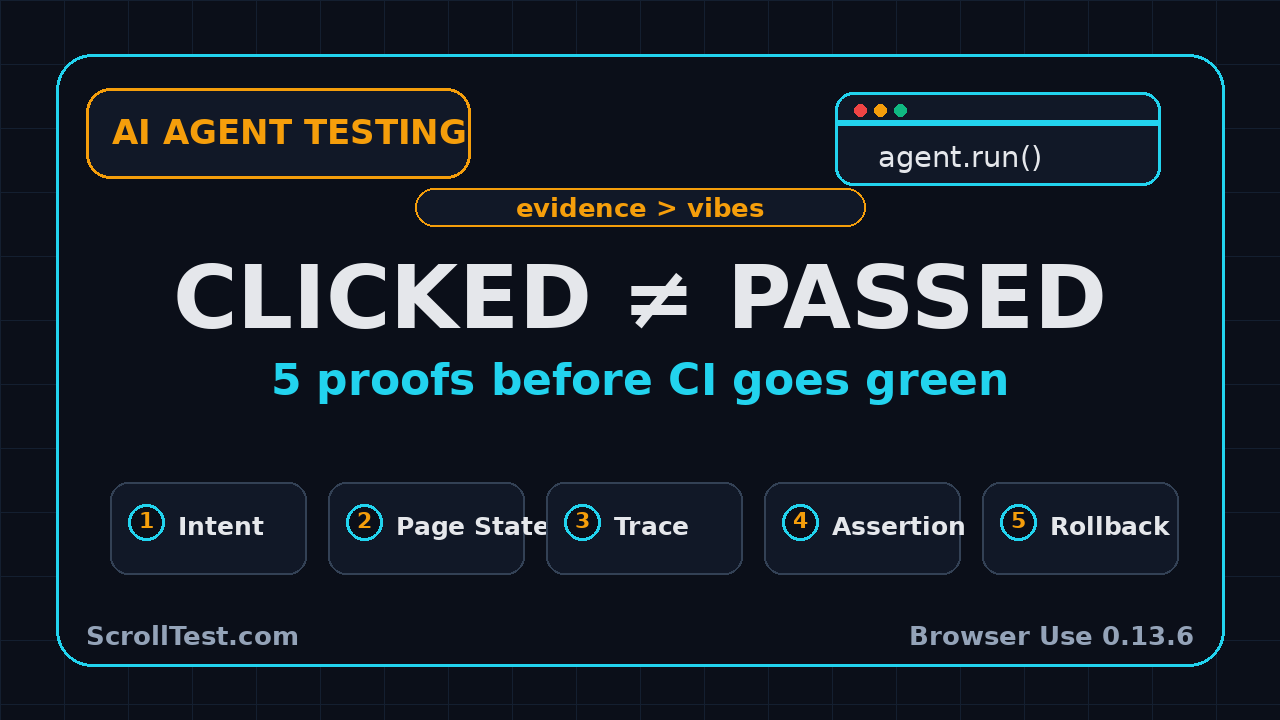
AI agent testing has a simple trap: the agent clicked a button, the browser moved, and the demo looked successful. That is not proof. If you want browser-agent tests to survive CI, product releases, and angry users, capture intent, page state, action trace, assertion, and rollback path every time.
I am using Browser Use 0.13.6 as the trigger for this post because the release is small but important. The official GitHub release shipped on 17 July 2026, pins Browser Harness 0.1.6, and adds recordings and video workflow guidance. That is exactly the direction QA teams need: less faith in agent output, more evidence.
Table of Contents
- Why a click is not proof in AI agent testing
- The five-part evidence model
- What Browser Use 0.13.6 changes for QA
- How to capture intent and assertions
- Page state and action trace examples
- Rollback path and negative testing
- CI release gate for browser agents
- India SDET context
- Key takeaways
- FAQ
Contents
Why a click is not proof in AI agent testing
The browser can change without the workflow passing
In AI agent testing, a visible browser action is only the first signal. A button click can open the wrong modal, submit stale data, hit a cached route, or trigger a validation path that the agent never reads. I see teams record the video, watch the click, and mark the scenario green. That is a demo habit, not a test habit.
A test needs an observable contract. For a checkout flow, the contract is not “clicked Pay”. The contract is “payment request sent once, order ID persisted, confirmation page shows the same amount, and the cart is empty after refresh”. A browser agent can perform the click, but QA must still define the proof.
Agent success messages are not QA evidence
Most browser agents return a natural-language summary. It may say “task completed successfully”. That sentence is not enough for a release gate. The output should be treated like a witness statement. Useful, but not final.
The final verdict should come from assertions. A Playwright assertion, an API verification, a database check, or a deterministic DOM check carries more weight than the agent’s summary. If the agent says the booking was created, the test should still assert the booking ID exists and belongs to the current user.
This is why a 7-day AI agent testing sprint should start with evidence design, not prompt writing. A better prompt without a better oracle still gives you weak automation.
The release-note signal matters
Browser Use 0.13.6 is not a huge feature release. The GitHub API release record shows one main change: release 0.13.6 with Browser Harness 0.1.6. The linked pull request adds 62 lines and removes 2 lines across 3 changed files, based on the GitHub pull request API.
The five-part evidence model for AI agent testing
1. Intent
Intent is the task the agent was asked to complete. It should be explicit, versioned, and short enough to review. If the intent is vague, the rest of the test becomes vague.
A good intent says: “Create a new support ticket for user qa-agent@example.com with priority High and verify it appears in the ticket list.” A weak intent says: “Test support ticket creation.” The difference is massive when you debug a failure at 2 AM.
2. Page state
Page state captures what the browser knew before and after the action. At minimum, I want the URL, page title, important DOM text, selected user role, feature flags, viewport, and relevant local storage keys.
For AI agent testing, page state matters because agents are sensitive to context. A banner, cookie wall, experiment flag, or empty account can change the path. When a failure happens, page state tells you whether the product failed or the setup was wrong.
3. Action trace
The action trace is the ordered list of steps the agent took. It should include step number, action type, target, selector or description, timestamp, and result. Video alone is not enough because video is hard to diff and hard to query.
Playwright already treats traces as first-class debugging artifacts. The Playwright Trace Viewer docs describe traces as a GUI tool for exploring recorded runs after the script has executed. Browser-agent teams should copy that mindset: a run without a trace is a weak run.
4. Assertion
The assertion is the contract. It should be deterministic. It should not depend on the agent’s opinion. If an LLM writes the assertion, a human or a static rule should still review it before the test enters CI.
Assertions can live at multiple layers:
- UI: confirmation message, row count, disabled state, visible order number.
- API: status code, response schema, created entity ID.
- Database or event stream: one record created, no duplicate event emitted.
- Visual: screenshot comparison for high-risk layout changes.
5. Rollback path
Rollback is the cleanup and recovery plan. If the agent creates data, the test should delete it or isolate it. If the agent triggers a payment sandbox, the test should void it. If the agent changes settings, the test should restore them.
Without rollback, AI agent tests become expensive. They pollute staging, break the next run, and create false failures. The best agent tests leave the environment as clean as they found it.
Browser Use 0.13.6 and why QA should care
The release pins Browser Harness 0.1.6
The Browser Use repository describes itself as a way to make websites accessible for AI agents. As of my research run on 26 July 2026, the GitHub repository API reports 106,777 stars and 11,736 forks. That is not a niche toy anymore. QA leaders should treat it like a real tool category.
The 0.13.6 release pins browser-harness==0.1.6. A pinned harness matters because reproducibility matters. If your local agent run uses one harness version and CI uses another, your evidence becomes noisy.
Recordings and video are helpful, but not enough
The PR summary mentions recordings and video workflow guidance. I like this because video catches what logs miss: overlays, popups, spinners, scroll position, and visual confusion. But a video still needs structure.
For a QA team, the recording should answer these 5 questions:
- What was the exact user goal?
- What page state did the agent start from?
- Which actions did the agent take?
- Which assertions proved the result?
- How did the run clean up after itself?
If the video cannot answer those questions, it is a debugging aid, not release evidence.
Downloads show the category is moving fast
The PyPI project page for browser-use reports the current version as 0.13.6. PyPIStats reports 70,839,362 downloads in the last month for the package via its recent downloads API. Download counters are imperfect because CI, mirrors, and automated installs can inflate them, but the signal is still clear: many teams are installing this category of tool.
That creates a QA responsibility. If developers can spin up browser agents quickly, SDETs must define the guardrails quickly. Otherwise every squad invents its own proof standard.
Capture intent and assertions before the agent runs
Use a run contract
I prefer a small run contract file for AI agent testing. It keeps the prompt, the expected proof, and the cleanup rule in one place. It is boring. That is why it works.
type BrowserAgentRunContract = {
  id: string;
  intent: string;
  startUrl: string;
  actor: "guest" | "user" | "admin";
  requiredAssertions: string[];
  cleanup: string[];
  evidence: Array<"trace" | "video" | "screenshot" | "api-check">;
};

export const supportTicketContract: BrowserAgentRunContract = {
  id: "support-ticket-create-high-priority",
  intent: "Create a high priority support ticket and verify it appears in the list",
  startUrl: "https://staging.example.com/support",
  actor: "user",
  requiredAssertions: [
    "ticket id is visible on confirmation page",
    "ticket appears in My Tickets list after reload",
    "GET /api/tickets returns the same id for current user"
  ],
  cleanup: ["delete created ticket by id"],
  evidence: ["trace", "video", "api-check"]
};
This contract is not a replacement for the agent. It is the wrapper that prevents the agent from becoming a magic box.
Separate task completion from business proof
The agent’s job is to interact. The test’s job is to prove. Keep those roles separate. If the agent chooses the path and judges the outcome, you have one system grading itself.
For example, an agent may say it changed the shipping address. The business proof is different:
- The address form shows the new value after refresh.
- The profile API returns the same value.
- The order preview uses the updated address.
- An audit event records who changed it and when.
That proof can be automated with Playwright, API checks, and logs. The LLM does not need to decide whether the workflow passed.
Add assertion reviews to pull requests
If your team reviews selectors but not assertions, your AI agent tests will rot. I recommend a simple pull request rule: any new browser-agent test must show its intent, assertion list, and rollback path in the PR description.
This connects well with LLM evaluation score reviews. Whether you test a chatbot or a browser agent, the question is the same: what evidence makes the result trustworthy?
Page state and action trace examples
Record the state that changes the decision
Do not record everything blindly. Record the state that explains the agent’s decision. For browser workflows, I start with URL, title, viewport, user role, visible heading, selected feature flags, and a small DOM summary.
import { test, expect, Page } from "@playwright/test";

async function capturePageState(page: Page) {
  return {
    url: page.url(),
    title: await page.title(),
    viewport: page.viewportSize(),
    h1: await page.locator("h1").first().textContent().catch(() => null),
    alerts: await page.locator("[role='alert']").allTextContents(),
    buttons: await page.locator("button").evaluateAll(nodes =>
      nodes.slice(0, 10).map(n => n.textContent?.trim()).filter(Boolean)
    )
  };
}

test("agent state snapshot is useful", async ({ page }) => {
  await page.goto("/support");
  const before = await capturePageState(page);
  expect(before.url).toContain("/support");
});
This snapshot is small enough to attach to a CI report. It gives a reviewer enough context to understand why the agent clicked something.
Make the trace machine-readable
A useful trace is not just a movie. It is a list of actions. Store it as JSON lines so CI can parse it, filter it, and compare it across runs.
type AgentAction = {
  step: number;
  action: "click" | "fill" | "select" | "wait" | "assert";
  target: string;
  reasoning?: string;
  status: "passed" | "failed" | "skipped";
  timestamp: string;
};

const trace: AgentAction[] = [];

function recordAction(action: Omit<AgentAction, "timestamp">) {
  trace.push({ ...action, timestamp: new Date().toISOString() });
}
When a test fails, you can ask a direct question: which step changed between the last green run and this red run? That is better than replaying 9 minutes of video.
Use Playwright traces for deterministic debugging
Playwright’s trace tooling is mature and widely used in test automation. If your browser-agent workflow already drives a real browser, attach Playwright traces when possible. Keep the agent trace and Playwright trace together.
A practical artifact bundle looks like this:
intent.jsonfor the task and expected proof.agent-actions.jsonlfor the agent’s step history.state-before.jsonandstate-after.jsonfor page state.trace.zipfor Playwright trace viewing.video.webmfor human review.assertions.jsonfor final pass and fail evidence.
Rollback path and negative testing
Every created object needs an owner and cleanup rule
AI agent testing often creates real data. That is fine if the data is tagged and cleaned. It is a disaster if staging fills with fake orders, fake tickets, and fake users that nobody can trace.
Use a naming convention. Add a run ID. Store the created IDs. Clean them after the assertion. If cleanup fails, raise a separate warning so the team can fix the environment before tomorrow’s run.
const runId = `agent-${Date.now()}`;

async function cleanupTicket(request, ticketId: string) {
  const response = await request.delete(`/api/test-data/tickets/${ticketId}`);
  expect(response.status(), `cleanup failed for ${ticketId}`).toBe(204);
}
Negative paths catch agent overconfidence
Browser agents are often good at happy paths. QA earns its money on negative paths. Test what happens when the save button is disabled, the API returns 409, the session expires, or the page shows two similar CTAs.
For each critical workflow, add at least 3 negative cases:
- Missing required input.
- Duplicate entity or conflict response.
- Expired session or changed permission.
If the agent keeps forcing the happy path, your tests will miss the bugs users actually hit.
Rollback proves environment discipline
A rollback path is not only cleanup. It is also proof that the test did not leave hidden damage. In finance, healthcare, ecommerce, and internal admin tools, this matters. A test that passes but leaves a bad record behind is not a good test.
For teams using CI/CD, I like a simple rule: no rollback path, no release-gate status. You can still run the agent test as exploratory automation, but it should not block or approve a release until cleanup is deterministic.
A CI release gate for browser-agent tests
Use a strict evidence checklist
CI needs binary rules. A browser-agent run should not pass because the video looked okay. It should pass because the evidence checklist is complete.
Here is a release-gate checklist I use:
- Intent exists and matches the scenario name.
- Start URL and actor are recorded.
- State before and after are attached.
- Action trace has no unknown or skipped critical step.
- At least one deterministic assertion passed.
- Rollback completed or the data is isolated by run ID.
- Video or trace exists for human debugging.
This checklist turns AI agent testing from a demo into a repeatable engineering workflow.
Fail closed when evidence is missing
If the assertion passes but the trace is missing, mark the run incomplete. If the trace exists but cleanup fails, mark it unstable. If the agent summary says success but API verification fails, mark it failed.
This sounds strict because it is strict. Release gates should be boring. The agent can be flexible. The gate should not be.
Connect the gate to existing automation
You do not need a separate universe for browser agents. Use the tools your team already trusts. Playwright can run the deterministic checks. Your CI system can upload artifacts. Your test report can link to trace files. Your API test layer can verify the backend state.
If your team is already improving Playwright reliability, read this Playwright smoke test matrix guide. The same release-note discipline applies to AI browser agents: version changed, harness changed, proof standard updated.
India SDET context: what this means for careers
AI agent testing is becoming a senior QA skill
In India, many QA engineers are being told to “learn AI” without a concrete path. I think AI agent testing is one of the clearest paths because it connects to skills SDETs already have: browsers, selectors, APIs, CI, data setup, and assertions.
A manual tester can start by reviewing videos and writing evidence checklists. An automation engineer can add Playwright assertions and cleanup scripts. A senior SDET can design the full release gate. That progression is realistic.
For salary growth, the market still rewards proof of ownership. A resume bullet that says “used AI tools” is weak. A bullet that says “built browser-agent CI gate with intent files, traces, API assertions, and rollback cleanup across 12 checkout workflows” is much stronger.
Service company and product company expectations differ
In a service company, clients may ask for AI testing because they hear the phrase in every vendor call. Your job is to convert that demand into a safe pilot: 3 workflows, 5 evidence fields, 1 CI report, and zero production data risk.
In a product company, the bar is higher. The test must fit the release process. It must be debuggable by the developer who broke the flow. It must run without a QA engineer babysitting the browser.
That is where the 5-part model helps. It gives both teams a shared language: intent, state, trace, assertion, rollback.
The interview angle
If I interview an SDET for AI automation in 2026, I will not ask only prompt questions. I will ask evidence questions:
- How do you prove an agent completed the right workflow?
- What artifacts do you attach to CI?
- How do you stop the agent from hiding product bugs?
- How do you clean test data created by an autonomous run?
Prepare answers with code. Prepare one demo repo. Prepare a failure case. That is how you stand out from candidates who only show a flashy agent video.
Key takeaways for AI agent testing
Use the 5-field proof standard
AI agent testing should prove more than a click. Use this minimum standard for every serious browser-agent run:
- Intent: what the agent was asked to do.
- Page state: what the browser showed before and after.
- Action trace: which steps the agent took.
- Assertion: which deterministic checks proved the result.
- Rollback path: how the environment returned to a safe state.
Browser Use 0.13.6 is a useful reminder because its release notes point toward recordings and video workflow guidance. The ecosystem is adding artifacts. QA teams must turn those artifacts into rules.
Do not confuse exploration with release evidence
Exploration can be flexible. Release evidence must be strict. Let agents explore, recover, and try alternate paths in a sandbox. But when the result affects a release, fail closed if evidence is missing.
That is the main shift. AI does not remove QA discipline. It raises the price of sloppy discipline because a confident agent can hide a weak test behind a smooth video.
FAQ
Is AI agent testing ready for CI?
Yes, but only for scoped workflows with deterministic assertions. Start with low-risk flows like search, support ticket creation, profile updates, or internal admin checks. Do not begin with payments or irreversible production actions.
Should I trust the agent’s final summary?
No. Treat it as supporting context. The pass or fail decision should come from assertions, API checks, traces, and cleanup status.
What changed in Browser Use 0.13.6?
The official release says Browser Use 0.13.6 shipped with Browser Harness 0.1.6. The linked PR says it synced skill docs, added recordings and video workflow guidance, and verified package metadata. That makes it relevant for QA evidence design.
Do I need Playwright for AI agent testing?
You do not always need Playwright, but it is a strong companion. Playwright gives you deterministic assertions, traces, API checks, screenshots, and CI-friendly reporting. That fills the evidence gap that many agent-only demos leave open.
What should I learn first as an SDET?
Learn to write a run contract, capture page state, attach a trace, write API assertions, and clean created data. Those 5 skills make you useful in AI browser automation immediately.