Playwright 1.56 Upgrade Checklist for QA Teams
Playwright 1.56 upgrade checklist is not a version bump task. It is a release-risk task: test agents, new diagnostic APIs, reporter changes, browser engine updates, and one deprecation can change how your QA team writes, reviews, and debugs automation.
I see teams upgrade Playwright like they upgrade a lint package: change the version, run CI once, merge. That works until a browser roll exposes a flaky locator, the reporter output changes under a release gate, or an AI-generated test lands without the same review rules as human-written code. This checklist gives QA leads, SDETs, and release managers a practical path to upgrade Playwright 1.56 without turning the sprint into a firefight.
Table of Contents
- Why Playwright 1.56 Matters
- Pre-Upgrade Baseline
- Playwright 1.56 Upgrade Checklist for Test Agents
- Use the New Diagnostic APIs
- Reporter and UI Mode Changes
- Breaking Change Risk
- CI Rollout Plan
- India Team Context
- Final Playwright 1.56 Upgrade Checklist
- FAQ
Contents
Why Playwright 1.56 Matters
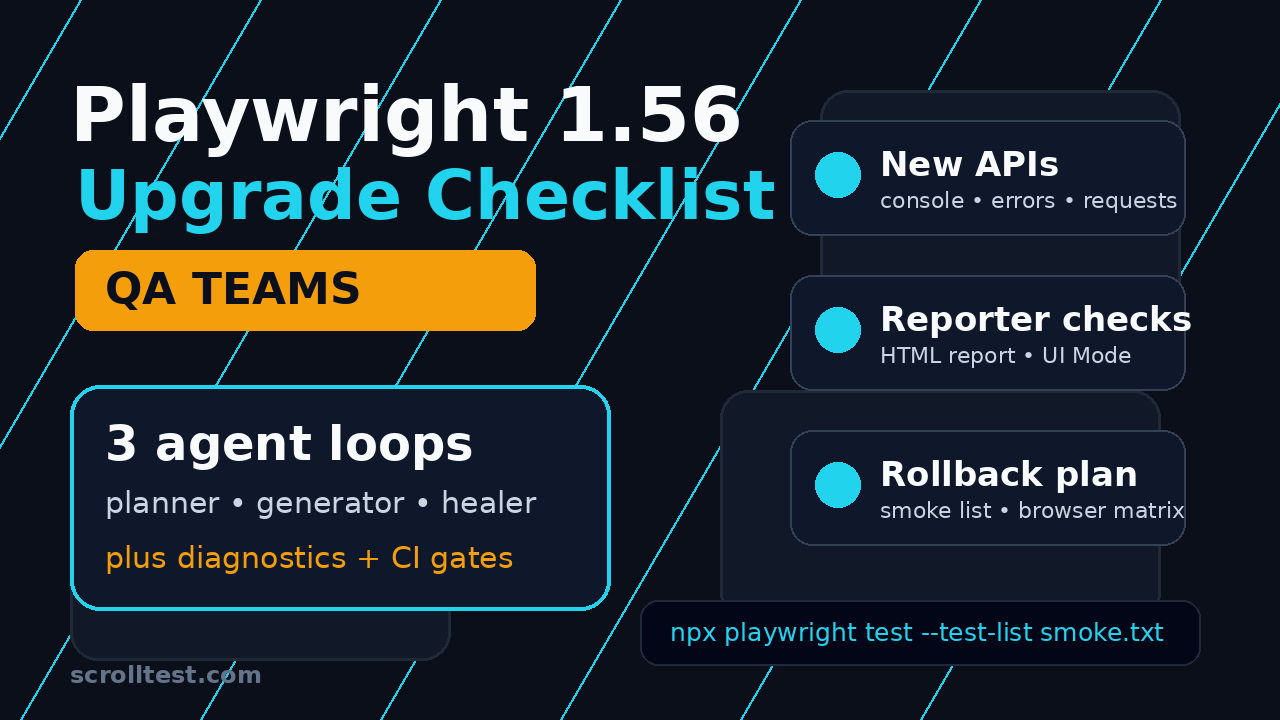
Playwright 1.56 is important because it moves automation closer to an agent-assisted workflow. The official Playwright 1.56 release notes introduce Playwright Test Agents: planner, generator, and healer definitions that guide LLMs through test planning, test generation, and test repair. That is not a small feature for QA teams. It changes who can create tests, how tests get reviewed, and what evidence a team should keep when generated code changes a suite.
The release also adds APIs that are useful for failure triage: page.consoleMessages(), page.pageErrors(), and page.requests(). These APIs let you pull recent browser console messages, page errors, and network requests directly from the page object. For teams already attaching traces and screenshots, this is a clean way to add a compact diagnostic bundle to failed tests.
The upgrade matters because Playwright is no longer niche. The GitHub repository had more than 92,000 stars when I checked the GitHub repository API, and @playwright/test reported more than 183 million monthly downloads through the npm downloads API. With that footprint, small upgrade mistakes repeat across thousands of pipelines.
What changed in plain English
Here is the short version I would send to a QA manager:
- Playwright 1.56 adds agent definitions for LLM-assisted test creation and healing.
- It adds direct APIs to inspect recent console messages, page errors, and requests.
- It improves HTML reporter and UI Mode controls.
- It deprecates the
browserContext.on('backgroundpage')event. - It updates bundled browser versions to Chromium 141, Firefox 142.0.1, and WebKit 26.0.
If your team only runs basic end-to-end flows, the upgrade can be simple. If your team has custom reporters, Chrome extension tests, trace processing, release gates, or AI-generated tests, treat this as a structured change.
Who should own the upgrade?
Do not give this upgrade to the newest automation engineer and call it a dependency chore. A senior SDET or framework owner should own it because the risks are spread across test authoring, browser behavior, CI output, and debugging workflows.
I like this ownership model:
- Framework owner upgrades packages, browsers, config, and reporters.
- Feature SDETs run smoke tests on high-value product journeys.
- DevOps owner checks cache keys, Docker images, CI artifacts, and release gates.
- QA lead signs off on rollout criteria and rollback triggers.
If your suite blocks production deploys, the upgrade needs the same discipline as a release dependency. It is not optional housekeeping.
Pre-Upgrade Baseline
Before touching package.json, capture a baseline. Most Playwright upgrade pain comes from teams trying to debug a changed suite without knowing how the old suite behaved. You need numbers, not feelings.
Record the current package and browser state
Start with a small evidence file in your repository. I usually call it upgrade-notes/playwright-1-56-baseline.md. Add the current Playwright version, the current browser versions, the CI image name, and the last stable build link.
node -v
npm ls @playwright/test
npx playwright --version
npx playwright install --dry-run
Then record the most recent test metrics:
- Total tests collected
- Pass, fail, flaky, and skipped count
- Median CI runtime
- Slowest 10 spec files
- Top 10 failure signatures from the last week
- Browser matrix actually used in CI
This is boring work, but it saves hours. When a team says, “The upgrade made tests slow,” I ask for the old median runtime. Usually nobody has it. Do not be that team.
Pin the upgrade target
The topic here is Playwright 1.56, but the package ecosystem keeps moving. The npm registry may show a newer latest version by the time you read this. That is fine. The discipline stays the same: choose one upgrade target, document it, and do not combine it with unrelated refactors.
{
  "devDependencies": {
    "@playwright/test": "1.56.0"
  }
}
Use exact versions during the upgrade branch. After the suite is stable, you can revisit your dependency policy. During validation, exact versions keep the conversation clean.
Separate upgrade failures from product failures
Create a short test list for high-value flows. Playwright 1.56 adds --test-list and --test-list-invert, which help when you want to run a curated list from a file. That is useful for upgrade validation because it gives you a repeatable slice of the suite.
tests/auth/login.spec.ts:12
tests/checkout/payment.spec.ts:34
tests/account/profile.spec.ts:18
tests/search/filter.spec.ts:22
npx playwright test --test-list upgrade-critical-tests.txt
Keep the list small. Ten to thirty tests are enough for the first pass. You are not replacing the full regression suite. You are creating a fast signal that tells you whether the upgrade is safe enough to continue.
Playwright 1.56 Upgrade Checklist for Test Agents
The biggest headline in this release is Playwright Test Agents. The official docs describe three agent definitions: planner, generator, and healer. The planner explores an app and produces a Markdown test plan. The generator turns that plan into Playwright Test files. The healer runs the suite and repairs failing tests.
This is useful, but it is also dangerous if a team treats generated tests as automatically trusted code. A generated test can assert the wrong thing, hide a real bug, or “heal” a selector by choosing a weaker locator. Your Playwright 1.56 upgrade checklist must include governance for agents, not just installation commands.
Generate agents in a sandbox first
Do not run agent initialization directly inside your production framework branch. Create a sandbox branch or a scratch repository and inspect the generated definitions first.
git checkout -b chore/playwright-156-agent-sandbox
npx playwright init-agents --loop=vscode
npx playwright init-agents --loop=claude
npx playwright init-agents --loop=opencode
Pick the loop your team actually uses. If your team uses Claude Code, generate that. If your team uses VS Code agent workflows, generate that. Do not commit three sets of files just because the command supports them.
Set review rules for generated tests
For agent-generated tests, I use a simple rule: the author is accountable, not the model. The pull request should show:
- The human-readable test plan
- The generated spec file
- The reason each assertion matters
- The trace or video from at least one passing run
- Any selector healing performed by the agent
If the healer changes a locator from getByRole('button', { name: 'Pay now' }) to locator('button').nth(3), that is not healing. That is technical debt in disguise. Reject it.
Use agents for the right work
I would not start by asking an agent to create your entire regression suite. Start with constrained tasks:
- Generate a draft smoke test from an existing test plan.
- Convert a manual checklist into a Playwright skeleton.
- Suggest missing assertions for an existing spec.
- Repair a broken locator, then require human review.
- Create a negative test variation for an already-covered journey.
For a broader view of how Playwright fits against other automation tools, link your team to ScrollTest’s Playwright vs Selenium vs Cypress decision guide. It helps non-framework stakeholders understand why teams are moving more test creation into Playwright.
Use the New Diagnostic APIs
The new diagnostic APIs are the most practical part of Playwright 1.56 for day-to-day QA work. When a test fails, you usually need three things: browser logs, page errors, and network context. Playwright already gives traces, screenshots, and videos. The new APIs make it easier to attach compact failure data to the test output.
Add console and page error evidence
Here is a minimal TypeScript fixture pattern. It attaches recent console messages and page errors when a test fails. Keep the payload small. A noisy attachment that nobody reads is not useful.
import { test as base } from '@playwright/test';

export const test = base.extend({
  page: async ({ page }, use, testInfo) => {
    await use(page);

    if (testInfo.status !== testInfo.expectedStatus) {
      const consoleMessages = await page.consoleMessages();
      const pageErrors = await page.pageErrors();

      await testInfo.attach('console-messages.json', {
        body: JSON.stringify(
          consoleMessages.slice(-20).map(message => ({
            type: message.type(),
            text: message.text(),
            location: message.location()
          })),
          null,
          2
        ),
        contentType: 'application/json'
      });

      await testInfo.attach('page-errors.json', {
        body: JSON.stringify(pageErrors.slice(-10).map(error => ({
          message: error.message,
          stack: error.stack
        })), null, 2),
        contentType: 'application/json'
      });
    }
  }
});
This is the kind of change that pays back quickly. A developer looking at a failed checkout test can see a JavaScript exception or console error without opening the full trace first.
Capture network request context
page.requests() is helpful when your failures are API-shaped but appear in the UI. For example, a test may fail because the cart page never shows a total, but the real cause is a 500 from /api/cart/summary. Attach recent failed requests with URL, method, status, and timing where available.
import { test } from './fixtures';

async function attachRecentRequests(page, testInfo) {
  const requests = await page.requests();

  const compact = await Promise.all(
    requests.slice(-30).map(async request => {
      const response = await request.response().catch(() => null);
      return {
        method: request.method(),
        url: request.url(),
        status: response?.status() ?? null,
        failure: request.failure()?.errorText ?? null
      };
    })
  );

  await testInfo.attach('recent-requests.json', {
    body: JSON.stringify(compact, null, 2),
    contentType: 'application/json'
  });
}
Be careful with sensitive data. Do not attach authorization headers, payment tokens, customer emails, or production identifiers. Redact URLs if your route contains personal data.
Connect diagnostics to release gates
Diagnostics should not live only in a local report. In CI, attach them to the job artifact and make them easy to inspect. If your team already follows evidence-based release gates, this fits naturally. ScrollTest has a related guide on AI test evidence in CI/CD release gates that maps well to this idea: a release gate should capture why a suite passed or failed, not just show a red or green icon.
Reporter and UI Mode Changes
Playwright 1.56 changes the HTML reporter and UI Mode in ways that matter for framework owners. The release notes mention an option to disable the “Copy prompt” button, a merged file view that collapses test and describe blocks into a unified list, UI Mode support for snapshot update options, and an option to run only a single worker at a time.
The “Copy prompt” button can be useful if your team uses AI-assisted debugging. It can also be a problem if reports include sensitive error text, internal URLs, customer data, or payload snippets. Treat this as a security and workflow decision.
Ask three questions before enabling prompt-copy workflows:
- Can the report contain customer or production data?
- Where will engineers paste the prompt?
- Do company rules allow that data to leave the approved environment?
If the answer is unclear, disable the prompt button until you have a policy. QA teams should not accidentally create a data-sharing channel through a test report.
Use merged file view for large suites
The merged reporter view can help teams with deeply nested describe blocks. Many older suites have a structure like product, module, role, device, and scenario. That looks organized in code but noisy in reports. A unified list often makes triage faster.
Run a before-and-after check with your top failure-heavy spec files. If the merged view reduces clicks for triage, enable it. If your team depends on the nested structure for ownership, keep the old view.
Validate snapshot workflows
If your team uses visual snapshots, UI Mode support for snapshot update options is worth checking. Do not let snapshot updates become a blind acceptance flow. I recommend a two-person rule for large snapshot changes: one engineer updates, another reviews the diff.
For more Playwright visual testing context, see ScrollTest’s guide to testing canvas and chart elements in Playwright. It is a good reminder that visual output often needs domain-specific assertions, not only pixel diffs.
Breaking Change Risk
The official breaking change in Playwright 1.56 is specific: browserContext.on('backgroundpage') is deprecated and will not be emitted. browserContext.backgroundPages() returns an empty list. Many teams will not notice this. Teams testing Chrome extensions, background pages, or old extension-like behavior need to check it carefully.
Search your framework before upgrading
Run a repository search before the version bump. Do not wait for CI to tell you.
grep -R "backgroundpage" tests playwright.config.ts packages || true
grep -R "backgroundPages" tests playwright.config.ts packages || true
If your terminal environment blocks grep, use your IDE search. The point is simple: find the dependency before it becomes a runtime mystery. If you find usage, add a pull request note that explains the old behavior, why it changed, and what replaced it.
Check browser-specific failures
Browser engine updates can expose issues that were already present in your app. In 1.56, the browser versions listed in the release notes are Chromium 141.0.7390.37, Firefox 142.0.1, and WebKit 26.0. Run your smoke list across the browsers you actually support. Do not waste time on a browser matrix that nobody owns, but do not skip WebKit if you support Safari users.
CI Rollout Plan
A safe Playwright 1.56 upgrade has a rollout plan. The plan does not need to be heavy. It needs to be explicit. I prefer a four-stage rollout: local validation, branch CI, nightly full run, then production gate.
Stage 1: local validation
On the upgrade branch, run installation and a small smoke list locally.
npm ci
npx playwright install --with-deps
npx playwright test --test-list upgrade-critical-tests.txt --project=chromium
If local validation fails, do not push ten commits guessing. Fix one failure class at a time: install issue, config issue, browser issue, test issue, reporter issue.
Stage 2: branch CI
In CI, run the smoke list across the supported project matrix. Also publish the HTML report, trace artifacts, console messages, page errors, and recent network requests. Make the branch pipeline richer than normal for this upgrade. You can remove extra verbosity later.
name: playwright-upgrade-check
on:
  pull_request:
    paths:
      - 'package.json'
      - 'package-lock.json'
      - 'playwright.config.ts'
      - 'tests/**'

jobs:
  smoke:
    runs-on: ubuntu-latest
    steps:
      - uses: actions/checkout@v4
      - uses: actions/setup-node@v4
        with:
          node-version: 22
          cache: npm
      - run: npm ci
      - run: npx playwright install --with-deps
      - run: npx playwright test --test-list upgrade-critical-tests.txt
      - uses: actions/upload-artifact@v4
        if: always()
        with:
          name: playwright-report
          path: playwright-report
Stage 3: nightly full run
After branch CI passes, schedule a full nightly run on the upgrade branch. Compare it against the baseline. You are looking for broad patterns:
- Does runtime increase by more than your agreed threshold?
- Do failures cluster in one browser?
- Do failures cluster in one product area?
- Did skipped tests change unexpectedly?
- Did reporters or artifacts stop uploading?
If you already have a large suite, do not demand zero differences on the first full run. Demand explained differences. That is a better engineering standard.
Stage 4: production release gate
Only after the nightly run is clean should the upgrade become part of the main release gate. Keep a rollback command in the pull request description. It sounds basic, but it reduces panic when a release manager asks, “How do we revert this in five minutes?”
git revert <merge_commit_sha>
npm ci
npx playwright install --with-deps
If your team maintains Docker images for automation, pin the old image for one release cycle. Dependency rollback is easier when the previous image still exists.
India Team Context
For Indian QA teams, this upgrade also has a career angle. Product companies are asking SDETs to own more than test scripts. They expect framework design, CI ownership, flaky test reduction, and now AI-assisted test workflows. A Playwright 1.56 upgrade is a practical way to show that skill.
What hiring managers will notice
If you are aiming for senior SDET roles in Bengaluru, Pune, Hyderabad, Chennai, or remote product teams, do not describe this as “upgraded Playwright version.” Describe the engineering outcome:
- Built a Playwright upgrade validation checklist for 600+ tests.
- Added console, page error, and network evidence to CI artifacts.
- Introduced review rules for agent-generated Playwright specs.
- Created rollback criteria for browser engine upgrades.
That is a stronger interview story. For engineers moving from service companies like TCS, Infosys, Wipro, or Cognizant into product companies, it proves you can protect a release pipeline, not just write locators. If you are building your automation roadmap, ScrollTest’s Playwright learning roadmap pairs well with this article.
Final Playwright 1.56 Upgrade Checklist
Here is the checklist I would use with a real QA team. Copy it into your pull request and tick items honestly.
Planning and baseline
- Upgrade owner, target version, Node version, and CI image documented.
- Current Playwright version and last stable build link recorded.
- Current pass, fail, flaky, skipped, and runtime baseline recorded.
- Top failure signatures and critical smoke test list captured.
- Rollback command written in the pull request.
Playwright 1.56 feature checks
- Agent definitions reviewed in a sandbox branch.
- Generated test review rules documented.
- Healer output requires human approval.
page.consoleMessages()evaluated for failure artifacts.page.pageErrors()evaluated for failure artifacts.page.requests()evaluated for network diagnostics.--test-listtested for upgrade smoke runs.- HTML reporter options reviewed.
- UI Mode snapshot workflow checked.
Breaking change and browser checks
- Repository searched for
backgroundpage. - Repository searched for
backgroundPages(). - Chrome extension or background-page tests reviewed.
- Chromium smoke run completed.
- Firefox smoke run completed if supported.
- WebKit smoke run completed if supported.
- Browser-specific failures triaged before merge.
CI and release gate
- Branch CI passes with the critical smoke list.
- Full nightly run completed.
- HTML report uploads correctly.
- Trace artifacts upload correctly.
- Diagnostic JSON attachments are redacted.
- Release gate owners reviewed the change.
- Previous Docker image or lockfile state is recoverable.
The conclusion is simple: a Playwright 1.56 upgrade checklist protects your release pipeline from hidden change. It also gives QA teams a clean way to introduce agent-assisted testing without letting generated code bypass engineering standards. Treat the upgrade as a small release project. Baseline first, test the new diagnostics, govern the agents, check the breaking change, and roll out through CI with evidence.
FAQ
Is Playwright 1.56 safe to upgrade to?
Yes, for most teams, but safe does not mean automatic. The official breaking change is narrow, but browser updates, reporter changes, and agent workflows still need validation. Run a critical smoke list before the full suite.
Should QA teams use Playwright Test Agents immediately?
Use them in a sandbox first. They are promising for planning, generating, and healing tests, but every generated test should go through normal code review. Do not let an agent weaken selectors or add shallow assertions just to make a test pass.
What is the most useful Playwright 1.56 API for debugging?
For me, the best practical additions are page.consoleMessages(), page.pageErrors(), and page.requests(). Together they give a compact view of browser logs, JavaScript errors, and network activity around a failure.
Do I need to update all browsers after upgrading?
Yes. Playwright versions are tied to supported browser builds. Run npx playwright install --with-deps in CI and validate the browser matrix your product actually supports.