Playwright Release Radar Checklist for QA Teams
A Playwright release radar checklist is a simple operating system for teams that update browser automation without turning the sprint into a fire drill. I use it to convert every release note into three things QA leads can act on: what changed, what risk to smoke test, and what evidence to keep before merging the upgrade.
The timing matters. Microsoft published Playwright 1.61.1 on June 23, 2026, and the release was mostly bug fixes, but even a patch release can touch loaders, traces, API request reporting, and UI mode behavior. That is enough surface area to break a serious CI suite if the team upgrades casually.
Table of Contents
- Why a Playwright release radar checklist matters
- The signals I track before touching package.json
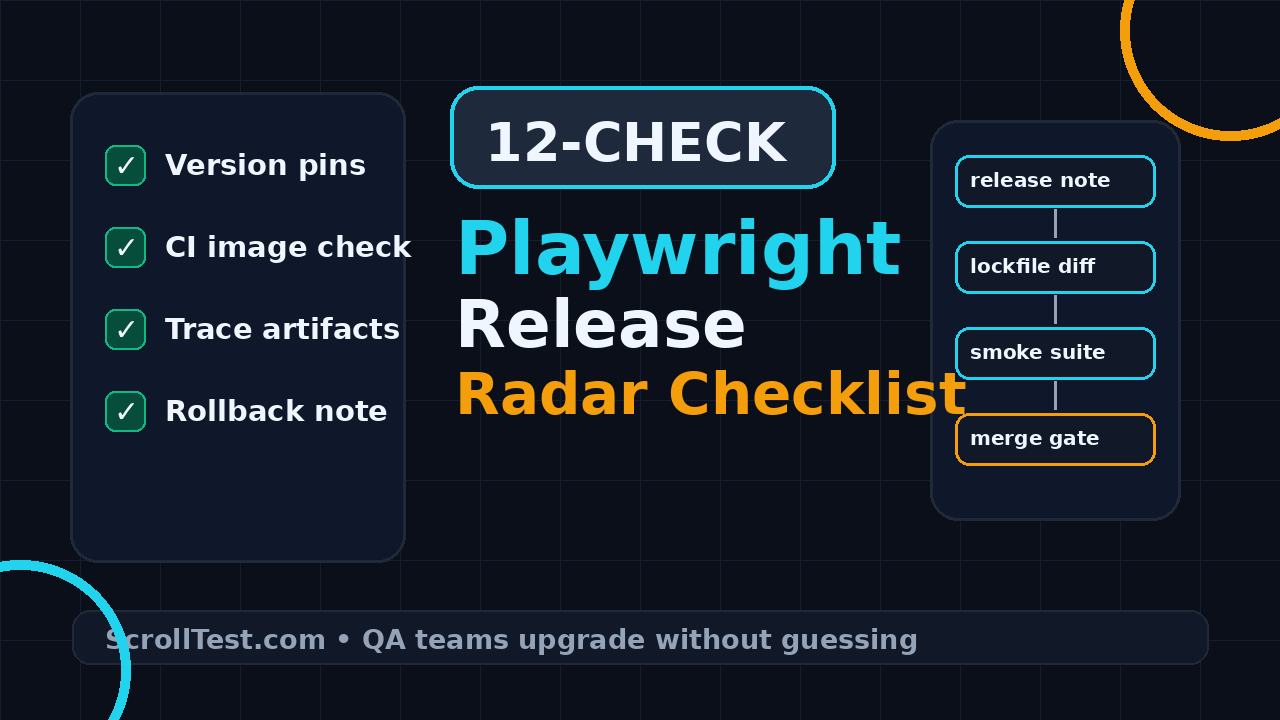
- Playwright release radar checklist: the 12 checks
- CI and browser image checks
- Trace-first smoke testing
- Create a release risk register
- India QA team context
- TypeScript automation example
- Key takeaways
- FAQ
Contents
Why a Playwright release radar checklist matters
Most flaky upgrade stories start with a harmless pull request. Someone runs npm update, the lockfile changes, the smoke suite passes once on a laptop, and the team merges. Two days later, a pipeline fails on a Linux runner, trace viewer shows odd timing, or a Node version in CI behaves differently from the local shell.
That is why I treat Playwright upgrades as release management, not package maintenance. Playwright drives Chromium, Firefox, WebKit, assertions, workers, reporters, fixtures, screenshots, videos, traces, API testing, and browser downloads. One version bump can touch test code, the runner, the browser binary, and the CI image at the same time.
The public numbers explain why this deserves process. The GitHub API showed the Microsoft Playwright repository at 92,538 stars and 6,065 forks when I researched this post. The npm downloads API reported 275,212,392 monthly downloads for the playwright package and 183,530,610 monthly downloads for @playwright/test for the period ending July 8, 2026. This is a mainstream dependency, not a niche helper library.
Patch release does not mean zero risk
Playwright 1.61.1 is a good example. The official GitHub release lists bug fixes for a custom expect matcher overriding a default matcher, UI mode API request reporting, trace viewer websocket timing, and Node 22.15 loader regressions. None of those items sounds like a new feature. All of them can affect real test suites.
If your framework uses custom matchers, the first fix is relevant. If your team debugs flaky websocket tests with trace viewer, the timing fix matters. If your CI moved to Node 22 while developers still use Node 20, the loader regression can become the reason the same test passes locally and fails in CI.
Release radar is a habit, not a spreadsheet museum
I do not want a giant governance document that nobody opens. I want a small checklist that sits near the pull request. The output should be readable in five minutes by an SDET, a developer, and an engineering manager.
- One release note link.
- One dependency diff.
- One CI image diff.
- One smoke-test report with traces.
- One rollback command.
- One owner who signs off.
That is the whole philosophy. Keep the radar small enough to use every month and strict enough to catch expensive mistakes.
The signals I track before touching package.json
Before I update a Playwright version, I collect signals. This takes less than 15 minutes, and it prevents blind upgrades. I want facts from official sources, not a random social post saying the new version is safe.
1. Official release note
Start with the official Playwright 1.61.1 GitHub release. Read every bullet and label each item as framework risk, CI risk, debugging risk, or low risk. For 1.61.1, I would flag custom matchers, UI mode API request reporting, trace viewer websocket timing, and Node 22 loader behavior.
This classification is more useful than copying the release note into Slack. It converts upstream language into QA language.
2. Documentation surfaces touched by the release
Then I check the official Playwright docs for the areas connected to the release. The Playwright release notes page gives the product-level history. The CI documentation helps validate runner setup, browsers, dependencies, and container expectations. The trace viewer documentation reminds the team how to collect and inspect traces when an upgrade changes failure evidence.
I do this even when the release note looks tiny. Documentation pages reveal assumptions: which browsers are installed, how traces are opened, how CI dependencies are managed, and which commands the team should use after the version bump.
3. Community volume and dependency importance
Package volume is not a quality metric, but it tells me whether a dependency deserves a proper upgrade lane. With more than 275 million monthly downloads reported by the npm downloads API for playwright during the researched period, I do not want casual edits to the lockfile. I want the same evidence standard that I use for a database driver or CI base image.
For internal teams, I also check how many repositories import @playwright/test, how many pipelines run browser tests, and how many product areas depend on the shared fixtures. If five teams share one wrapper package, the release radar should happen in the wrapper repository first.
4. Internal failure history
Your previous failures are the best predictors. Search old incident notes, flaky-test tickets, and pull requests. If the last upgrade broke login storage state, browser downloads, or screenshots on Ubuntu, add those exact checks to the new radar. Do not rely on memory.
I also link relevant ScrollTest references for the team. If the upgrade touches Docker, read Playwright Docker: Day 13 Tutorial. If the team needs stronger evidence habits, connect the upgrade to AI Testing Evidence Pack: Trace, Screenshot, Logs because the same discipline applies to browser automation.
Playwright release radar checklist: the 12 checks
Here is the checklist I use. It is intentionally boring. Boring is good when a release touches CI. You can paste this into a pull request template, a Jira task, or a GitHub issue.
- Record the current Playwright, @playwright/test, Node, npm or pnpm, and browser versions.
- Read the official release note and classify every item by risk area.
- Update only Playwright-related packages in a dedicated branch.
- Run npm install or pnpm install once and commit the lockfile diff.
- Run browser installation explicitly with the project command, not a manual cache hack.
- Run the local smoke suite in headed and headless mode where relevant.
- Run the CI smoke suite on the same image used by merge pipelines.
- Collect traces, screenshots, videos, and HTML report artifacts for failures.
- Compare flaky-test history before and after the upgrade.
- Run at least one test that covers login, API mocking, file upload or download, and network interception if your framework supports them.
- Write a rollback command and keep the previous lockfile hash.
- Ask one framework owner and one product-suite owner to sign off.
Use a dedicated upgrade branch
Do not combine a Playwright bump with selector cleanup, fixture refactoring, and product test changes. If the pull request fails, nobody can tell whether the new browser caused the issue or your refactor did. A dedicated branch gives you a clean rollback and a clean blame path.
The branch name should make the intent obvious: upgrade/playwright-1-61-1 or qa/playwright-release-radar-2026-06. Add the official release link in the first line of the pull request description.
Read the lockfile like a test artifact
A lockfile diff is not noise. It is the evidence of what actually changed. For npm, check package-lock.json. For pnpm, check pnpm-lock.yaml. For Yarn, check yarn.lock. I look for Playwright packages, transitive dependencies, and any unexpected mass update.
If a pull request changes 200 unrelated packages, reject it. That is not a Playwright upgrade. That is a dependency migration disguised as a patch bump.
Separate framework risk from product risk
When a smoke test fails after the bump, classify the failure before fixing it. Framework risk means runner behavior, browser binaries, reporters, traces, fixtures, or assertion behavior changed. Product risk means the application changed or the test was already brittle. Mixed risk means the upgrade exposed an existing weakness.
This classification keeps the discussion clean. Developers stop saying “Playwright is flaky” for every red build, and QA stops hiding product issues behind tool upgrades.
CI and browser image checks
CI is where Playwright upgrades become expensive. Local machines often have cached browsers, different Node versions, and extra system packages. CI has the truth. If the upgrade only passes locally, you have not completed the radar.
Pin and print the Node version
The Playwright 1.61.1 release note mentions Node 22.15 loader regressions. That makes Node version visibility non-negotiable. Print node –version and npm –version in the CI job that runs the smoke suite. If developers use Node 20 but CI uses Node 22, write that down.
node --version
npm --version
npx playwright --version
npx playwright install --with-deps chromium firefox webkit
The command output belongs in the CI log. It also belongs in the pull request if the team is debugging a version-specific failure.
Do not trust stale browser binaries
Playwright manages browser binaries. CI caches can help performance, but they can also hide bad upgrades. When testing a new release, run one build with a clean browser cache or an explicit install step. If your container image already contains browsers, verify the image tag and the Playwright version match your expectation.
This is where a small Docker smoke job helps. The ScrollTest Playwright Docker guide is a useful companion if your team still runs browser tests on hand-built CI images.
Use a small matrix, not the whole regression suite
Trace-first smoke testing
Trace-first testing means every smoke test in the upgrade job either records a trace on failure or records a trace for the first run of the new version. Do not wait until a red build has already been deleted by CI retention.
Why trace matters for release upgrades
The trace viewer is one of Playwright’s strongest debugging tools. It captures actions, snapshots, network activity, console messages, and timing in a way that plain screenshots cannot. Since Playwright 1.61.1 includes a trace viewer websocket timing fix, I want at least one websocket or network-heavy smoke test in the radar when the product has that behavior.
Use the official trace viewer docs as the source of truth for opening and sharing traces. Store trace.zip files as CI artifacts so the framework owner can inspect failures without rerunning the job locally.
The smoke suite shape I prefer
- One login test with storage state creation.
- One role-based navigation test.
- One API request or API mocking test.
- One file upload or download flow if the app uses files.
- One websocket or polling-heavy page if the app has live updates.
- One visual screenshot check if your baseline policy allows it.
This is not product coverage. This is framework coverage. The suite tells you whether the test harness survived the upgrade.
Keep the HTML report
The HTML report is part of the evidence pack. Store it with traces, screenshots, and videos. If the merge build fails tomorrow, the team can compare old and new reports instead of guessing from a Slack thread.
This habit also improves interview readiness for SDETs. When a candidate can explain how they captured evidence for an automation upgrade, I trust them more than someone who only says “I fixed flaky tests.”
Create a release risk register
A release risk register sounds formal, but the version I use is small. It is a table in the pull request description. It lists the risk, the check, the result, and the owner. That is enough for real accountability.
Sample risk table
| Risk | Check | Evidence | Owner |
|---|---|---|---|
| Node 22 loader regression | Run CI smoke on Node 22 image | CI log and trace artifact | Framework owner |
| Trace viewer websocket timing | Run live updates smoke test | trace.zip and HTML report | Product SDET |
| Custom expect matcher conflict | Run matcher unit tests | Unit test report | Framework owner |
| API request reporting difference | Run API context smoke test | HTML report and logs | API test owner |
This table prevents vague sign-off. If nobody owns a risk, it is not managed. If there is no evidence, it is only optimism.
Write the rollback note before you need it
Rollback is not failure. Rollback is a planned safety valve. I write the command before merging the upgrade because panic creates bad commands.
git checkout main
npm ci
npm install -D @playwright/test@1.60.0 playwright@1.60.0
npx playwright install --with-deps
git checkout -b rollback/playwright-1-61-1
Use the exact previous version from your repository. The example above is only a pattern. The real rollback should point to your last known good lockfile or tag.
When I delay an upgrade
I delay a Playwright upgrade when the team cannot produce CI evidence, when the release touches an area we cannot smoke test, or when the product is inside a launch freeze. I also delay when the framework owner is unavailable. Tool upgrades need ownership.
But delay does not mean ignore. Create a date, a ticket, and a smoke plan. Stale browser automation becomes debt quickly because browser engines, Node versions, and CI images keep moving even when your tests do not.
India QA team context
In India, many QA teams sit between service-company delivery habits and product-company reliability expectations. In a TCS or Infosys style project, the upgrade may be treated as a support task. In a product company, the same upgrade can block release confidence for a web platform used by millions. The checklist has to work in both contexts.
This is a career signal for SDETs
A strong SDET does not only write locators. A strong SDET protects release confidence. If you can run a Playwright release radar, explain CI image risk, collect traces, and defend a rollback decision, you sound like an engineer who owns quality systems.
That is the skill gap I see in ₹25-40 LPA SDET roles. Hiring managers expect automation, but they reward people who understand infrastructure, risk, and communication. A release radar gives you a practical story for interviews: “I owned the Playwright upgrade process across three squads and cut upgrade failures by making CI evidence mandatory.” Only claim numbers if you measured them, but the operating model itself is valuable.
Manager view: make upgrades visible
If you lead QA, do not hide dependency upgrades under maintenance. Put them on the sprint board with a clear definition of done. The work protects delivery. It deserves visibility.
- Definition of done includes official release link.
- Definition of done includes CI smoke report.
- Definition of done includes trace artifacts for failures.
- Definition of done includes rollback plan.
- Definition of done includes owner sign-off.
This makes the work easy to defend during planning. It also prevents the Friday evening upgrade merge that ruins the weekend.
TypeScript automation example
Here is a small TypeScript example you can add to a tools folder. It prints the Playwright version, checks the package version in package.json, and reminds the team to attach release evidence. Keep it simple. The goal is to make missing information obvious in CI logs.
import { execSync } from "node:child_process";
import { readFileSync } from "node:fs";

type PackageJson = {
  devDependencies?: Record<string, string>;
  dependencies?: Record<string, string>;
};

function run(command: string): string {
  return execSync(command, { encoding: "utf-8" }).trim();
}

const pkg = JSON.parse(readFileSync("package.json", "utf-8")) as PackageJson;
const declared =
  pkg.devDependencies?.["@playwright/test"] ??
  pkg.dependencies?.["@playwright/test"] ??
  "not declared";

console.log("Node:", run("node --version"));
console.log("npm:", run("npm --version"));
console.log("Declared @playwright/test:", declared);
console.log("Runtime Playwright:", run("npx playwright --version"));

if (declared === "not declared") {
  process.exitCode = 1;
  console.error("@playwright/test is not declared in package.json");
}

console.log("Attach: release note URL, CI report, trace artifact, rollback note");
GitHub Actions smoke job
A minimal CI job can run the radar smoke suite and upload artifacts. Adapt paths to your repository. Do not copy this blindly into a monorepo without checking workspace commands.
name: playwright-upgrade-radar
on:
  pull_request:
    paths:
      - "package.json"
      - "package-lock.json"
      - "playwright.config.ts"
      - "tests/**"

jobs:
  smoke:
    runs-on: ubuntu-latest
    steps:
      - uses: actions/checkout@v4
      - uses: actions/setup-node@v4
        with:
          node-version: 22
          cache: npm
      - run: npm ci
      - run: npx playwright install --with-deps
      - run: node tools/print-playwright-radar.js
      - run: npx playwright test --project=chromium --grep @radar --trace=on
      - uses: actions/upload-artifact@v4
        if: always()
        with:
          name: playwright-radar-report
          path: |
            playwright-report
            test-results
The important part is not GitHub Actions. The important part is evidence. Jenkins, GitLab CI, Azure Pipelines, and Buildkite can all do the same job if the team agrees on artifacts and sign-off.
Tag radar tests explicitly
Tag the smoke tests with @radar or a similar marker. That makes the upgrade lane fast and predictable. If a test is too slow for every dependency upgrade, it probably belongs in nightly regression, not the release radar.
import { test, expect } from "@playwright/test";

test("@radar login and dashboard load", async ({ page }) => {
  await page.goto("/login");
  await page.getByLabel("Email").fill(process.env.TEST_USER_EMAIL!);
  await page.getByLabel("Password").fill(process.env.TEST_USER_PASSWORD!);
  await page.getByRole("button", { name: "Sign in" }).click();
  await expect(page.getByRole("heading", { name: /dashboard/i })).toBeVisible();
});
Key takeaways for your Playwright release radar checklist
A Playwright release radar checklist keeps browser automation upgrades boring, visible, and reversible. That is the point. You are not trying to prove that every release is dangerous. You are proving that the team can update a critical testing dependency without guessing.
- Read the official release note before changing the lockfile.
- Classify risks by framework, CI, debugging, and product-suite impact.
- Run a small trace-heavy smoke matrix before full regression.
- Print Node, npm, Playwright, browser, and CI image details in logs.
- Store traces, screenshots, HTML reports, and rollback notes as upgrade evidence.
If you remember one thing, remember this: the Playwright release radar checklist is not bureaucracy. It is a lightweight safety rail for teams that depend on browser tests to ship with confidence.
FAQ
How often should QA teams update Playwright?
For most active product teams, a monthly review is practical. You do not have to merge every release immediately, but you should read the release notes, check CI image drift, and decide whether the upgrade is safe now or scheduled later.
Do patch releases need the full checklist?
Use a lighter version, not zero process. Playwright 1.61.1 shows why. A patch release can still affect custom matchers, trace viewer behavior, API request reporting, or Node loader behavior. Run the focused smoke suite and keep artifacts.
Should I run the full regression suite before merging?
Run the radar smoke suite first. If it passes and the release risk is low, a normal merge pipeline plus nightly regression may be enough. If the release touches browsers, fixtures, trace behavior, or CI dependencies heavily, run broader regression before merging.
Who should own the release radar?
One framework owner should drive it, but at least one product-suite SDET should sign off. Framework owners know the tool. Product SDETs know whether the smoke evidence covers real release risk.
What is the fastest way to start?
Create a pull request template section with six fields: release note, version diff, CI image, smoke command, artifacts, and rollback command. Use it for the next Playwright bump. Improve it after the first real failure.