Playwright Suite Lying? 3 Signs Your Tests Pass Wrong
Your Playwright suite lying is not a dramatic phrase. It is what happens when a green CI run hides weak assertions, fake data, and missing error-state coverage. Playwright 1.62.1 shipped on July 30, 2026, and the tool is mature enough that most false confidence now comes from how teams write tests, not from the framework itself.
I like Playwright. The @playwright/test 1.62.1 npm registry record describes itself as a high-level API to automate web browsers, and the package crossed 204,135,164 npm downloads in the last month for the period ending August 9, 2026. The Microsoft Playwright GitHub repository also shows 94,316 stars and 6,262 forks at the time I checked it. That adoption is a signal: teams trust the tool. But trust in a tool is not the same thing as trust in your test design.
Table of Contents
- Why Green Playwright Tests Still Lie
- Sign 1: Weak Assertions Create Fake Confidence
- Sign 2: Over-Mocking Removes the Real Product
- Sign 3: Missing Network and Error-State Coverage
- A 30-Minute Audit for a Playwright Suite Lying to You
- Turn the Audit Into a CI Release Gate
- India Context: What SDETs Get Judged On
- FAQ
Contents
Why Green Playwright Tests Still Lie
A green build means only one thing: the executed checks passed under the conditions you gave them. It does not prove the user journey works, the backend contract is stable, or the failure state is usable. This distinction matters because Playwright makes it easy to write fast tests that look clean in code review.
Playwright is not the problem
The official Playwright assertions documentation gives auto-retrying assertions such as toBeVisible(), toHaveText(), toHaveURL(), and toHaveCount(). These are strong primitives. The problem starts when a suite uses those primitives to check only that something exists, without checking whether the right business outcome happened.
I see this pattern often in login, checkout, analytics, and onboarding flows. The test clicks through the happy path, asserts that a button is visible, and exits. A product bug can still ship because the assertion is too far away from the risk.
False confidence is expensive
False confidence wastes more time than a red build. A red build blocks the team quickly. A fake green build waits until staging, production, or a customer support ticket. By then, the SDET team is not debugging one test. They are debugging trust.
That is why I prefer to ask one blunt question during test review: if this assertion passes, what user or business risk did we actually reduce? If nobody can answer in 10 seconds, the test is probably checking implementation noise.
The 3 signs are easy to spot
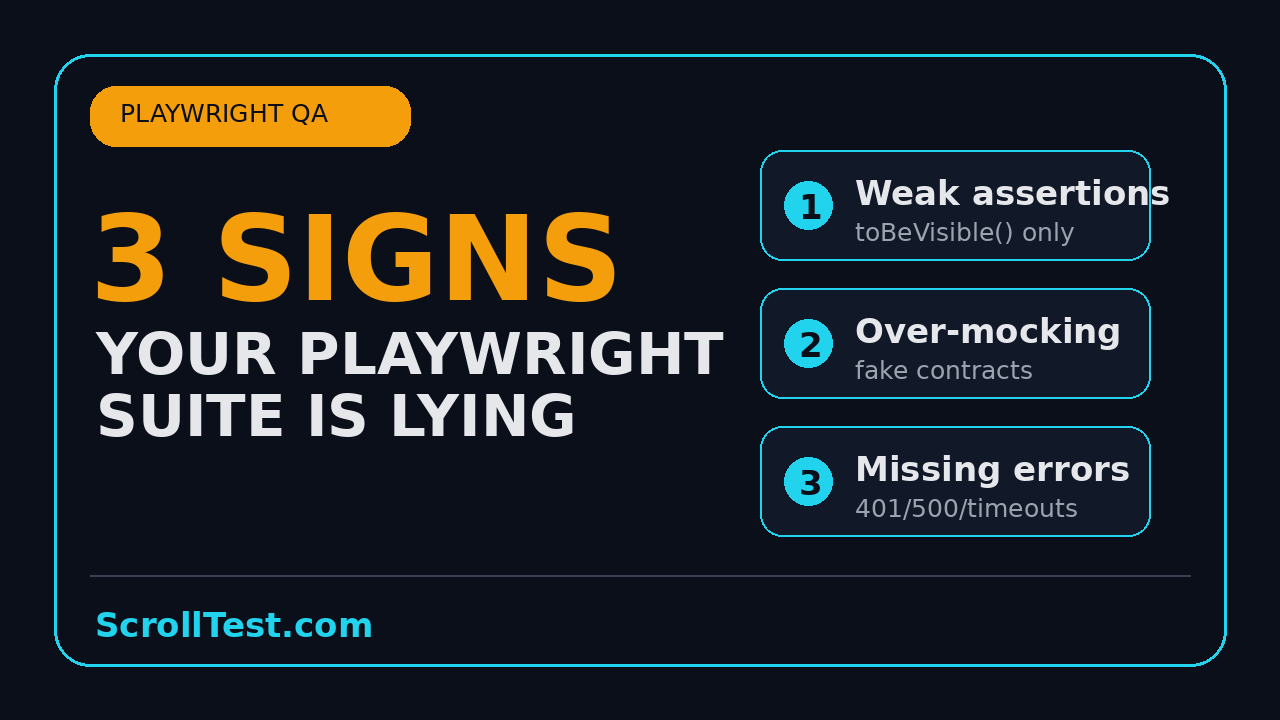
For this article, I use the topic from today’s queue: a short script about Playwright tests that pass while hiding weak assertions, over-mocking, and missing network coverage. I am turning it into a full QA playbook because these 3 signs show up in real suites, not only in short videos.
- Sign 1: The test asserts presence, not outcome.
- Sign 2: The mock is so complete that the real product disappears.
- Sign 3: The suite never checks network failures, timeouts, empty states, or 500 responses.
If you maintain a Playwright suite, search for these 3 signs before adding another 50 tests.
Sign 1: Weak Assertions Create Fake Confidence in Your Playwright Suite
The first sign of a Playwright suite lying is weak assertions. The test has steps. It has locators. It has a final expect. But the expect is too shallow to catch the bug that matters.
The weak assertion pattern
Here is a common example. The test submits a payment form and checks for a generic success banner.
import { test, expect } from '@playwright/test';

test('user can complete payment', async ({ page }) => {
  await page.goto('/checkout');
  await page.getByLabel('Card number').fill('4242424242424242');
  await page.getByRole('button', { name: 'Pay now' }).click();

  // Weak: a banner can appear even when the order was not created.
  await expect(page.getByText('Success')).toBeVisible();
});
This test can pass even if the order ID is missing, the amount is wrong, the receipt email is not queued, or the UI displays a stale success banner from a previous state. The assertion is not tied to the contract of the journey.
Replace presence checks with outcome checks
A stronger test checks observable outcomes. The exact outcome depends on the application, but payment flows usually have at least 3 signals: the URL changes, an order ID appears, and the API response confirms a new order.
import { test, expect } from '@playwright/test';

test('user can complete payment and sees a real order id', async ({ page }) => {
  await page.goto('/checkout');

  const orderResponse = page.waitForResponse(response =>
    response.url().includes('/api/orders') && response.status() === 201
  );

  await page.getByLabel('Card number').fill('4242424242424242');
  await page.getByRole('button', { name: 'Pay now' }).click();

  await expect(page).toHaveURL(/\/checkout\/success/);
  await expect(page.getByTestId('order-id')).toHaveText(/^ORD-[0-9]{6}$/);

  const response = await orderResponse;
  const body = await response.json();
  expect(body.total).toBe(4999);
  expect(body.currency).toBe('INR');
});
The second version is not longer for vanity. It checks 4 facts that matter. The route is correct. The order ID format is correct. The backend returned a created order. The amount and currency match the test fixture.
Use web-first assertions, but make them meaningful
Playwright’s docs recommend web-first assertions because they retry until the condition is met or the timeout expires. That is useful for modern UIs. But auto-retry does not fix a weak target. await expect(locator).toBeVisible() is strong only when visibility itself is the requirement.
Good Playwright assertions answer one of these questions:
- Did the user reach the correct state?
- Did the backend return the expected contract?
- Did the UI show the exact data the user cares about?
- Did the app reject invalid input with a useful message?
- Did the analytics or audit event fire with the correct payload?
For more examples on testing user-facing behavior instead of implementation detail, read ScrollTest’s guide on analytics event verification in Playwright. Analytics checks are a good forcing function because they make you define the event, payload, and trigger instead of only clicking buttons.
Sign 2: Over-Mocking Makes Your Playwright Suite Lying by Design
The second sign is over-mocking. Mocking is useful. I use it for third-party payments, rate-limited APIs, unstable dependencies, and rare edge cases. But if every API call is mocked, your test may no longer test the product.
Mock only the risk you intend to isolate
The official Playwright Mock APIs documentation shows how to intercept network calls with page.route(). That feature is powerful because it lets you control data. It is also dangerous because it can hide integration bugs.
test('dashboard shows paid plan', async ({ page }) => {
  await page.route('**/api/me', route =>
    route.fulfill({
      status: 200,
      contentType: 'application/json',
      body: JSON.stringify({ plan: 'PRO', seats: 5 })
    })
  );

  await page.goto('/dashboard');
  await expect(page.getByText('PRO plan')).toBeVisible();
});
This is acceptable if the goal is to test a UI branch. It is not enough if the release risk is contract drift between frontend and backend. If the backend changed plan to subscriptionTier, this test still passes because the mock preserves the old world.
Use contract fixtures with ownership
A better pattern is to treat mocks as contracts, not random JSON pasted into a spec. Put fixtures in versioned files. Review them with the API owner. Add a thin API contract test that validates the real endpoint shape before the UI test uses the fixture.
// tests/contracts/me.contract.spec.ts
import { test, expect } from '@playwright/test';

test('GET /api/me returns the dashboard contract', async ({ request }) => {
  const response = await request.get('/api/me');
  expect(response.status()).toBe(200);

  const body = await response.json();
  expect(body).toEqual(expect.objectContaining({
    plan: expect.stringMatching(/FREE|PRO|ENTERPRISE/),
    seats: expect.any(Number)
  }));
});
Now the UI mock has a safety net. If the backend contract changes, the contract spec fails. If the UI branch breaks, the UI spec fails. You get two clear signals instead of one fake green signal.
Run mixed-mode tests
For each critical journey, I like a 70-20-10 split:
- 70% mocked branch tests for fast coverage of UI states.
- 20% real API tests for contract and integration confidence.
- 10% full journey tests that hit the same path a user hits in staging.
The numbers are not a law. They are a review heuristic. If a suite has 100% mocked UI tests for login, checkout, entitlement, and reporting, the suite is probably optimized for speed while borrowing confidence from production.
If your team is moving from Selenium habits to Playwright, also read 5 anti-patterns teams carry from Selenium to Playwright. Over-mocking often pairs with another anti-pattern: testing CSS selectors instead of user intent.
Sign 3: Missing Network and Error-State Coverage Lets Bugs Ship
The third sign is missing network and error-state coverage. Happy-path tests are useful, but a product does not fail only on happy paths. Real users see 400, 401, 403, 429, 500, slow responses, partial data, empty lists, and broken images.
Playwright gives you the tools
The official Playwright Network documentation explains how to inspect, modify, and mock network traffic. That means there is no good excuse for a suite that never tests network failure. You can block a route, delay a response, return a 500, and verify the UI message.
test('shows a useful error when invoice API fails', async ({ page }) => {
  await page.route('**/api/invoices', route =>
    route.fulfill({
      status: 500,
      contentType: 'application/json',
      body: JSON.stringify({ message: 'Internal Server Error' })
    })
  );

  await page.goto('/billing');

  await expect(page.getByRole('alert')).toContainText('We could not load invoices');
  await expect(page.getByRole('button', { name: 'Retry' })).toBeVisible();
});
This test checks a real user promise: when billing data fails, the product explains the problem and gives the user a retry path. That is more valuable than another happy-path click test.
Cover 5 failure classes
I ask teams to add at least 5 network cases for every revenue or account-critical page:
- 401 or 403: the session expired or the user lacks permission.
- 404: the resource does not exist or was deleted.
- 429: the user hit a rate limit.
- 500: the server failed.
- Timeout or slow response: the request takes longer than the UI expects.
Do not add these cases everywhere on day 1. Start with the 10 pages that cost money or trust when broken: login, signup, checkout, billing, order history, search, profile, permissions, reports, and admin settings.
Assert recovery, not only the error
A weak error-state test checks that an error message appears. A stronger one checks recovery. Can the user retry? Does the loader stop? Is the primary action disabled until data returns? Does the app avoid duplicate submissions?
test('retry reloads invoices after a temporary failure', async ({ page }) => {
  let calls = 0;

  await page.route('**/api/invoices', route => {
    calls += 1;
    if (calls === 1) {
      return route.fulfill({ status: 500, body: '{}' });
    }
    return route.fulfill({
      status: 200,
      contentType: 'application/json',
      body: JSON.stringify([{ id: 'INV-1001', amount: 25000 }])
    });
  });

  await page.goto('/billing');
  await page.getByRole('button', { name: 'Retry' }).click();

  await expect(page.getByText('INV-1001')).toBeVisible();
  await expect(page.getByText('₹25,000')).toBeVisible();
});
This is where Playwright becomes more than a click runner. It becomes a failure simulator.
A 30-Minute Audit for a Playwright Suite Lying to You
You do not need a 3-week transformation to find the biggest gaps. You need a 30-minute audit with a spreadsheet, the test folder, and one engineer who knows the product risk.
Step 1: Sample 20 passing tests
Pick 20 tests that passed in the last CI run. Do not cherry-pick only the clean ones. Include login, checkout, permissions, reports, search, and any flaky spec the team keeps ignoring.
For each test, write 4 columns:
- Test name
- Primary user risk
- Final assertion
- Network or backend signal checked
If the risk column is empty, the test has no clear purpose. If the final assertion is only toBeVisible(), inspect whether visibility is enough. If the network column is empty for a data-heavy page, mark it as a gap.
Step 2: Score each test from 0 to 3
Use this simple scoring model:
- 0: clicks through UI but checks no meaningful outcome.
- 1: checks a visible state but not the business result.
- 2: checks UI outcome and at least one data signal.
- 3: checks happy path, contract, and one realistic failure state.
If the average score is below 2, your Playwright suite is more smoke test than regression suite. That is not a moral failure. It is a useful baseline.
Step 3: Add one missing assertion per high-risk test
Do not rewrite everything. Pick the top 5 tests and add one strong assertion to each. For example:
- Login: assert the user menu shows the correct account name and role.
- Checkout: assert the order API returns 201 and the receipt ID renders.
- Billing: assert the invoice amount and currency match the API response.
- Permissions: assert forbidden users cannot see the admin action.
- Search: assert empty results show the query and a useful recovery action.
This small repair often catches more real bugs than adding 20 new specs. Quality of assertion beats count of specs.
Turn the Audit Into a CI Release Gate
A test improvement that lives only in a spreadsheet dies quickly. Put the signal into CI. ScrollTest already has a practical guide on building a QA-first CI/CD pipeline. Use the same mindset for Playwright assertion quality.
Gate 1: Require tagged critical journeys
Tag your highest-risk specs with @critical. Run them on every pull request. Run the broader suite on merge or nightly. Keep the gate small enough that developers do not bypass it.
// playwright.config.ts
import { defineConfig } from '@playwright/test';

export default defineConfig({
  retries: process.env.CI ? 2 : 0,
  reporter: [['html'], ['junit', { outputFile: 'test-results/junit.xml' }]],
  use: {
    trace: 'retain-on-failure',
    screenshot: 'only-on-failure',
    video: 'retain-on-failure'
  },
  projects: [
    { name: 'chromium-critical', grep: /@critical/ },
    { name: 'chromium-full' }
  ]
});
The Playwright project has active releases, including v1.62.1 on GitHub, so keep your CI config explicit. A minor release can fix bugs, but it can also expose bad assumptions. Pin versions, read release notes, and upgrade on a controlled schedule.
Gate 2: Fail on missing test evidence for risky pages
You can add a lightweight review rule without writing a custom AST parser. For any pull request that touches checkout, billing, auth, or permissions, require the PR description to name the Playwright spec updated and the failure state covered.
A simple checklist works:
- Which user risk changed?
- Which Playwright spec covers it?
- What API or data contract does the test check?
- Which error state was added or confirmed?
Gate 3: Use traces as debugging evidence
Playwright traces are valuable when a test fails, but they are also useful during review. A trace shows what the user saw, which network requests fired, and where the test waited. If a trace proves the spec never touched the risky part of the page, the green result is not persuasive.
For feature flags specifically, pair this article with ScrollTest’s feature flag testing in Playwright. Flags are a common place where tests lie because the suite validates one branch and the production cohort sees another.
India Context: What SDETs Get Judged On
In India, many QA engineers still get introduced as Selenium or Playwright resources. That label gets you into the interview. It does not get you the senior offer. Senior SDET interviews at product companies often test whether you can explain risk, design a framework, debug flaky CI, and protect release quality.
The skill gap is not syntax
A manual tester can learn page.getByRole() syntax in a weekend. The harder part is knowing what to assert. Service-company projects often reward execution volume: more test cases, more scripts, more reports. Product companies care more about signal: did your suite catch the bug before the customer did?
For a mid-level SDET targeting ₹25-40 LPA roles, I would not lead with “I automated 500 test cases.” I would lead with evidence like this:
- Reduced checkout false greens by adding API response assertions.
- Added 12 network failure tests for billing and permissions.
- Moved critical Playwright tests into a PR gate under 8 minutes.
- Used traces to debug flaky retries instead of increasing timeouts blindly.
What I would show in an interview
If I had 10 minutes in an interview, I would show 3 files: one strong Playwright spec, one API contract spec, and one CI config. That demonstrates judgment. It also proves you understand where UI automation ends and release engineering starts.
The career angle is simple. Tools change. Playwright 1.62.1 is today’s version. Another version will come next month. But the ability to convert product risk into executable checks stays valuable.
How to practice this week
Take one existing passing test from your repo. Rewrite only the final 10 lines. Add one API wait, one stronger assertion, and one error-state variant. Then paste the before and after into your weekly learning notes. That exercise is better than watching 5 random tutorials.
Key Takeaways: Stop a Playwright Suite Lying Before Release
A Playwright suite lying usually has 3 visible symptoms: weak assertions, over-mocked data, and no failure-state coverage. Fix those before you add more specs.
- Green CI is not proof that the product works. It proves only that selected checks passed.
- Use Playwright web-first assertions, but aim them at real outcomes.
- Mock deliberately. Pair mocks with contract tests so they do not freeze old API shapes.
- Add network failure tests for 401, 403, 404, 429, 500, and slow responses on critical pages.
- Turn the audit into a CI rule, otherwise the suite will drift back to shallow checks.
My recommendation is direct: audit 20 passing tests today. If most of them cannot explain the user risk they reduce, your suite is giving comfort instead of evidence.
FAQ
Is Playwright better than Selenium for avoiding false green tests?
Playwright gives stronger defaults for modern web testing, including auto-waiting, web-first assertions, traces, and network control. But false green tests come from weak test design. A bad Playwright assertion can lie just as easily as a bad Selenium assertion.
Should I mock APIs in Playwright tests?
Yes, but not everywhere. Mock APIs when you want controlled UI branch coverage or need to isolate an unstable dependency. For critical contracts, add real API tests using Playwright’s request fixture so mocks do not hide backend changes.
How many error-state tests should a team add?
Start with 5 failure classes on the top 10 business-critical pages. Cover unauthorized access, missing resources, rate limits, server errors, and slow responses. That gives you a practical starting set of about 50 targeted checks.
What is the fastest way to improve an existing Playwright suite?
Sample 20 passing tests, score each one from 0 to 3, and improve the 5 weakest tests first. Add outcome assertions and network checks before writing new specs. This produces a visible quality jump without a framework rewrite.
Does this apply to API-only test automation?
Yes. API tests also lie when they assert only status codes. A 200 response is not enough. Assert schema, key business fields, permissions, idempotency, and error behavior.