Playwright API Mocking TypeScript: Day 33 Guide
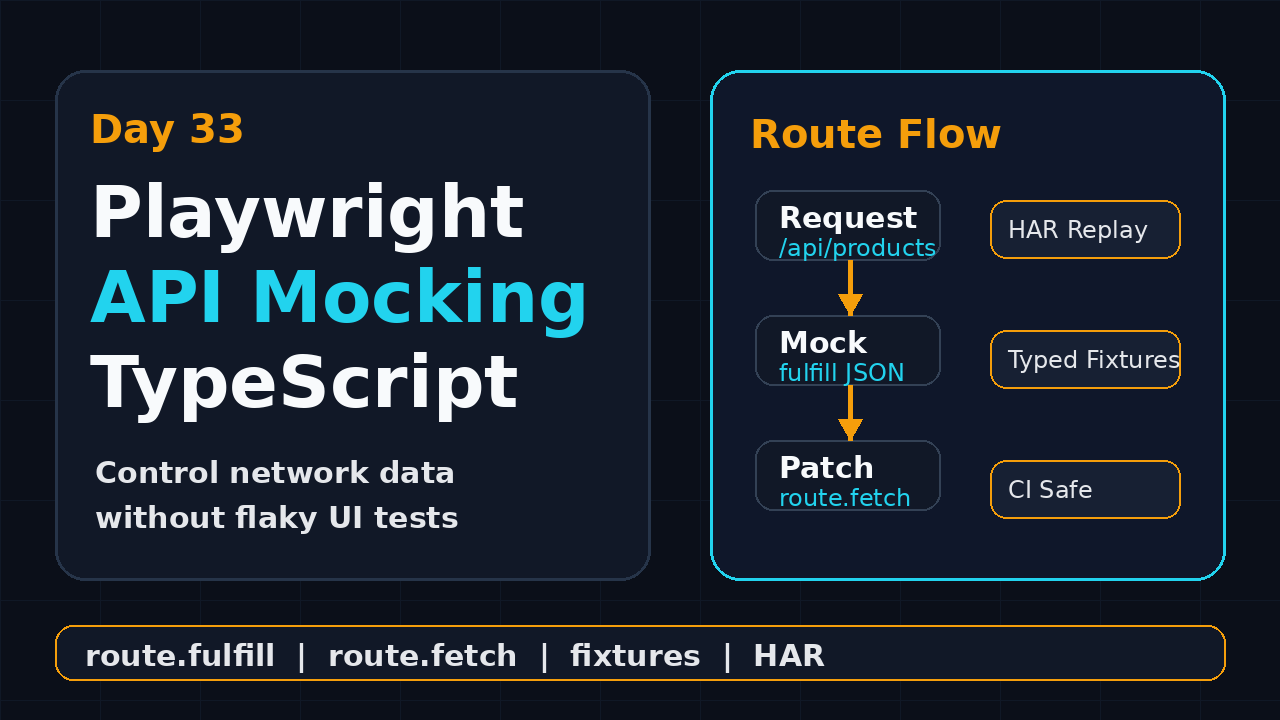
Playwright API mocking TypeScript is the skill that turns slow, fragile UI automation into tests you can trust in CI. On Day 33 of this series, I show the exact mocking patterns I use when the frontend is ready but the backend is noisy, rate-limited, or still changing.
This tutorial is practical. You will build mocks with page.route(), patch live responses with route.fetch(), move mocks into typed fixtures, record HAR files for stable demos, and debug the common failures that make network tests look random.
Table of Contents
- Why Playwright API Mocking Matters
- Project Setup for Day 33
- Your First route.fulfill Mock
- Patch a Real API Response
- Typed Mock Fixtures in TypeScript
- HAR Mocking for Stable Test Data
- Debugging Network Mocks
- CI Patterns and Common Pitfalls
- Key Takeaways
- FAQ
Contents
Why Playwright API Mocking Matters
Most UI tests fail for boring reasons. The page is fine, the selector is fine, but the test depends on an API that returns different data at 10 AM and 10:05 AM. That is not a UI automation problem. That is a test data control problem.
The official Playwright Mock APIs guide says Playwright can mock and modify HTTP and HTTPS traffic, including XHR and fetch requests. The Playwright Network guide also states that browser network traffic can be monitored, modified, and handled. That matters because a modern React or Angular page is often just a thin UI over several JSON calls.
The problem with real backends in UI tests
Real APIs are useful for end-to-end confidence, but they are expensive for every test. You inherit database state, queue delays, third-party dependency failures, and rate limits. If the API team ships a valid schema change, your UI suite can fail before your UI code changes.
I like to split Playwright tests into three buckets:
- Contract tests: Verify the API itself with
requestand schema checks. - Mocked UI tests: Verify that the page behaves correctly for controlled responses.
- Thin smoke tests: Hit the real integrated system for one or two critical journeys.
This split keeps the feedback loop fast without pretending integration does not matter. For API-only checks, use the official Playwright API testing guide. It explains APIRequestContext, direct server requests, setup state, and server-side assertions.
Why this matters for SDETs in India
In service companies like TCS or Infosys, many teams still run massive regression suites against shared QA environments. One unstable backend build can block 20 automation engineers for half a day. In product companies, the pressure is different: developers expect a pull request signal in minutes, not after a nightly suite.
If you are aiming for senior SDET roles around ₹25-40 LPA, this is the kind of ownership interviewers notice. They do not only ask whether you know Playwright syntax. They ask how you make tests deterministic when the system is messy.
What we build today
By the end, you will have a repeatable pattern for:
- Intercepting a REST call before page navigation.
- Returning a typed JSON response with
route.fulfill(). - Fetching the real response and changing only one field.
- Packaging mocks into reusable fixtures.
- Using HAR files when a demo or training environment must stay stable.
- Debugging URL mismatches, service workers, and response timing.
If you missed earlier foundation pieces, read the Playwright learning roadmap and the Playwright configuration TypeScript Day 32 guide. Today’s lesson assumes you already have Playwright Test installed and a working playwright.config.ts.
Project Setup for Day 33
Use a small app or any page that calls a JSON endpoint. For the examples, I use a fictional products API because the pattern stays the same for carts, users, orders, subscriptions, or feature flags.
Install and create folders
npm init playwright@latest
mkdir -p tests/mocks tests/fixtures tests/types
Keep mock data out of the test body once it grows beyond three lines. A test should read like a scenario, not like a JSON dump. This folder structure gives you a place for typed objects, fixtures, and reusable handlers.
Add TypeScript types for API data
// tests/types/product.ts
export type Product = {
  id: string;
  name: string;
  price: number;
  inStock: boolean;
  tags: string[];
};

export type ProductsResponse = {
  items: Product[];
  total: number;
};
Do not skip types. Untyped mocks become silent bugs. I have seen tests pass for weeks because the mock used isActive while the real API returned active. TypeScript will not replace contract testing, but it catches a large class of fake-data mistakes before CI.
Create one clean mock response
// tests/mocks/products.ts
import type { ProductsResponse } from '../types/product';

export const productsResponse: ProductsResponse = {
  items: [
    {
      id: 'p-101',
      name: 'Mechanical Keyboard',
      price: 7999,
      inStock: true,
      tags: ['electronics', 'work-from-home']
    },
    {
      id: 'p-102',
      name: 'USB-C Dock',
      price: 4999,
      inStock: false,
      tags: ['electronics', 'accessory']
    }
  ],
  total: 2
};
This is screenshot-friendly. If I record a video for The Testing Academy, the viewer can see exactly why the page displays one in-stock item and one out-of-stock item.
Your First Playwright API Mocking TypeScript route.fulfill Mock
The most direct Playwright API mocking TypeScript pattern is page.route() plus route.fulfill(). The route must be registered before the action that triggers the request. In most cases, that means before page.goto().
Mock the products endpoint
// tests/products.mocked.spec.ts
import { test, expect } from '@playwright/test';
import { productsResponse } from './mocks/products';

test('shows products from a mocked API response', async ({ page }) => {
  await page.route('**/api/products', async route => {
    await route.fulfill({
      status: 200,
      contentType: 'application/json',
      json: productsResponse
    });
  });

  await page.goto('/products');

  await expect(page.getByRole('heading', { name: 'Products' })).toBeVisible();
  await expect(page.getByText('Mechanical Keyboard')).toBeVisible();
  await expect(page.getByText('USB-C Dock')).toBeVisible();
  await expect(page.getByText('Out of stock')).toBeVisible();
});
The glob pattern **/api/products is intentionally broad. It works across localhost, staging, and preview deployments. If your endpoint has query strings, use **/api/products?* or inspect the actual request URL in Trace Viewer.
Screenshot description
For the article screenshot, capture the Playwright Trace Viewer network panel. The left side should show the test step page.goto('/products'). The network tab should show /api/products with a fulfilled response. The product page should display two product cards: Mechanical Keyboard and USB-C Dock.
Assert that the real API was not called
A mock is only useful if you know it was used. Add a small counter when the route is hit.
test('uses the mocked products route exactly once', async ({ page }) => {
  let hitCount = 0;

  await page.route('**/api/products', async route => {
    hitCount += 1;
    await route.fulfill({ json: productsResponse });
  });

  await page.goto('/products');

  await expect(page.getByText('Mechanical Keyboard')).toBeVisible();
  expect(hitCount).toBe(1);
});
This catches wrong URL patterns. If hitCount is 0, your UI called a different endpoint. If it is 2 or 3, your app might be refetching on focus, hydration, or retry.
Patch a Real API Response
Sometimes you do not want a fully fake API. You want the real backend, but you need to control one field. Playwright supports that with route.fetch(), which performs the request and lets you modify the response before the page receives it.
Patch one product to out of stock
import { test, expect } from '@playwright/test';
import type { ProductsResponse } from './types/product';

test('shows out of stock badge when backend marks item unavailable', async ({ page }) => {
  await page.route('**/api/products', async route => {
    const response = await route.fetch();
    const body = (await response.json()) as ProductsResponse;

    const patched: ProductsResponse = {
      ...body,
      items: body.items.map(item =>
        item.id === 'p-101' ? { ...item, inStock: false } : item
      )
    };

    await route.fulfill({
      response,
      json: patched
    });
  });

  await page.goto('/products');

  await expect(page.getByText('Mechanical Keyboard')).toBeVisible();
  await expect(page.locator('[data-testid="p-101-stock"]')).toHaveText('Out of stock');
});
This is my preferred pattern for edge cases that are hard to seed in the database. You keep the real headers and most of the real response, but you force one branch in the UI.
When to patch versus fully mock
Use full mocks when the scenario is UI-only: empty state, permission banner, one item in cart, validation error, feature flag off. Use patched real responses when the UI depends on backend defaults, pricing rules, or generated fields that are painful to copy into a fixture.
Here is the decision rule I use with teams:
- If the test validates layout, labels, and user interaction, mock the API.
- If the test validates integration between two services, hit the real API.
- If the test validates one rare UI branch, fetch the real response and patch the branch.
Source note
Playwright remains a high-activity project. The GitHub API for microsoft/playwright showed 93,417 stars during this run, and the npm downloads API for playwright reported 275,110,516 downloads for the last-month window ending 2026-07-23. I cite these only as adoption signals, not as proof that a tool fits every team.
Typed Mock Fixtures in TypeScript
Once you copy a route mock into three tests, stop and create a fixture. Copy-paste mocks become inconsistent fast. A fixture gives every test the same setup and lets you override only the data that changes.
Create a mock server fixture
// tests/fixtures/mockApi.ts
import { test as base } from '@playwright/test';
import type { Page } from '@playwright/test';
import type { ProductsResponse } from '../types/product';
import { productsResponse } from '../mocks/products';

type MockApi = {
  mockProducts: (overrides?: Partial<ProductsResponse>) => Promise<void>;
};

export const test = base.extend<MockApi>({
  mockProducts: async ({ page }, use) => {
    const mockProducts = async (overrides: Partial<ProductsResponse> = {}) => {
      const response: ProductsResponse = {
        ...productsResponse,
        ...overrides
      };

      await page.route('**/api/products', route =>
        route.fulfill({ status: 200, json: response })
      );
    };

    await use(mockProducts);
  }
});

export { expect } from '@playwright/test';
Use the fixture in tests
// tests/products.fixture.spec.ts
import { test, expect } from './fixtures/mockApi';

test('shows an empty products state', async ({ page, mockProducts }) => {
  await mockProducts({ items: [], total: 0 });

  await page.goto('/products');

  await expect(page.getByRole('heading', { name: 'No products found' })).toBeVisible();
  await expect(page.getByText('Try changing filters')).toBeVisible();
});
The test now focuses on the behavior. The route details are hidden, but still close enough that a new SDET can open the fixture and understand what is happening.
A stronger fixture with failure modes
type ProductScenario = 'success' | 'empty' | 'server-error' | 'slow';

async function mockProductScenario(page: Page, scenario: ProductScenario) {
  await page.route('**/api/products', async route => {
    if (scenario === 'server-error') {
      await route.fulfill({ status: 500, json: { message: 'Internal Server Error' } });
      return;
    }

    if (scenario === 'slow') {
      await new Promise(resolve => setTimeout(resolve, 1200));
      await route.fulfill({ json: productsResponse });
      return;
    }

    if (scenario === 'empty') {
      await route.fulfill({ json: { items: [], total: 0 } });
      return;
    }

    await route.fulfill({ json: productsResponse });
  });
}
This pattern is gold for frontend teams. They can verify loading states, retry buttons, toast messages, and empty states without asking backend engineers to create artificial data.
HAR Mocking for Stable Test Data
HAR mocking is useful when the API shape is large or the app calls many endpoints during startup. Instead of writing every route manually, you record a network session and replay it. The Playwright Mock APIs documentation covers mocking with HAR files, and it is a good fit for demos, training, and third-party APIs.
Record a HAR file
npx playwright open --save-har=tests/har/products.har http://localhost:3000/products
Click the scenario you want to preserve, then close the browser. Commit the HAR only if it does not contain secrets, tokens, customer data, or internal URLs that should not live in Git.
Replay HAR in a test
import { test, expect } from '@playwright/test';

test('loads products page from a recorded HAR', async ({ page }) => {
  await page.routeFromHAR('tests/har/products.har', {
    url: '**/api/**',
    update: false
  });

  await page.goto('/products');

  await expect(page.getByRole('heading', { name: 'Products' })).toBeVisible();
});
When HAR files become dangerous
HAR files are easy to record and hard to maintain. If the frontend adds a new endpoint, the replay can miss it. If the response contains dates, expired IDs, or user-specific data, the test can become misleading.
I use this checklist before approving HAR-based tests:
- No access tokens, cookies, or customer data in the HAR.
- The HAR is scoped to
**/api/**, not every asset on the page. - The test name says it is HAR-backed.
- The team knows when to refresh the HAR.
- Critical business flows still have at least one real integration smoke test.
Debugging Network Mocks
Network mocking fails in predictable ways. When a test ignores your mock, do not guess. Use request logging, Trace Viewer, and a strict URL pattern check.
Log requests during development
test('debug product calls', async ({ page }) => {
  page.on('request', request => {
    if (request.url().includes('/api/')) {
      console.log('API request:', request.method(), request.url());
    }
  });

  await page.route('**/api/products', route => route.fulfill({ json: productsResponse }));
  await page.goto('/products');
});
Run it once with npx playwright test --headed or inspect the trace with npx playwright show-trace trace.zip. You will usually find one of four issues: the URL has a query string, the app calls a versioned path, a service worker serves cached data, or the route was registered after navigation.
Common mistake: route registered too late
// Wrong: the page may call /api/products during page.goto.
await page.goto('/products');
await page.route('**/api/products', route => route.fulfill({ json: productsResponse }));

// Correct: register first, then navigate.
await page.route('**/api/products', route => route.fulfill({ json: productsResponse }));
await page.goto('/products');
Common mistake: service workers hide the request
If your app uses a service worker, a request may not reach the network layer you expect. For tests, create a context that blocks service workers when you need predictable network interception.
// playwright.config.ts
import { defineConfig } from '@playwright/test';

export default defineConfig({
  use: {
    serviceWorkers: 'block',
    trace: 'on-first-retry'
  }
});
Do this only when the service worker is not the feature under test. If you test offline behavior or cache behavior, keep it enabled and write separate assertions.
CI Patterns and Common Pitfalls
Playwright API mocking TypeScript tests should be boring in CI. If they are noisy locally or fail only on GitHub Actions, the problem is usually shared state, accidental real network access, or unrealistic fixtures.
Block unexpected external calls
One strict technique is to fail any API request that your test did not explicitly mock. Use this carefully because analytics, fonts, and monitoring calls can create noise. Scope it to your API domain.
test.beforeEach(async ({ page }) => {
  await page.route('**/api/**', async route => {
    throw new Error(`Unexpected API call: ${route.request().url()}`);
  });
});

test('product empty state is fully mocked', async ({ page }) => {
  await page.route('**/api/products', route =>
    route.fulfill({ json: { items: [], total: 0 } })
  );

  await page.goto('/products');
  await expect(page.getByText('No products found')).toBeVisible();
});
Order matters here. More specific route handlers should be registered before broad catch-all handlers in the pattern you standardize for your project. If your catch-all wins too early, your specific mock will never run.
Keep one real smoke test
Do not mock everything. A suite with 200 mocked UI tests and zero real flow checks can pass while production is broken. I keep one real smoke test for login, one real smoke test for the main business journey, and a few API contract tests for the highest-value endpoints.
For broader strategy, pair this lesson with the Playwright upgrade checklist. A clean config, stable dependencies, and explicit network mocks make upgrades less scary.
Common pitfalls I see
- Mocking after navigation: The request already left the browser.
- Over-broad URL globs: One mock accidentally handles three endpoints.
- Fake data drift: The mock no longer matches the real API contract.
- Too many HAR files: Nobody knows which recording is current.
- No trace on retry: CI failure gives no network evidence.
- Ignoring negative states: The happy path passes, but 500 and empty states are untested.
Key Takeaways
Playwright API mocking TypeScript is not a shortcut around testing the backend. It is a way to test frontend behavior with controlled inputs while keeping a smaller set of real integration checks.
- Register
page.route()before the page action that triggers the request. - Use
route.fulfill()for deterministic UI states. - Use
route.fetch()when you want the real response with a small patch. - Move repeated mocks into typed fixtures before copy-paste spreads.
- Use HAR files for stable demos, not as a dumping ground for every endpoint.
- Debug with Trace Viewer, request logs, and strict URL patterns.
The senior-level move is not writing a clever mock. It is deciding which tests should be mocked, which should hit the API directly, and which should run as real end-to-end smoke checks.
FAQ
Is Playwright API mocking TypeScript better than using a fake backend?
It depends on the test. Use Playwright route mocks when the scenario belongs to the browser test and you need control for one page. Use a fake backend when many clients need the same simulated service. Use real API tests when you validate server behavior.
Should I mock login APIs?
For most UI tests, use stored authentication state or API setup instead of clicking through login every time. Keep one real login smoke test. Mock login only when you need to test login UI error handling.
Can mocked tests replace contract tests?
No. Mocked UI tests can drift from the real API. Add contract checks with request, schema validation, or backend tests so your mock data stays honest.
Why does my route not intercept the request?
Check four things first: route registration happens before navigation, the URL pattern matches the real request, a service worker is not serving cached data, and the request is not made by a different browser context or popup.
What should I read next?
Read Testing Canvas and Chart Elements in Playwright if your app has custom visuals, and revisit Day 32 on configuration before applying these mocks across multiple projects.