Building an AI-Powered E2E Testing Framework with Playwright: Self-Healing, Failure Analysis, and Test Generation
A test automation engineer spent three weeks building an end-to-end test framework for a fintech application. Playwright for browser automation, TypeScript for type safety, Page Object Model for structure, and custom reporters for dashboards. The framework was elegant. 200 tests. 95% pass rate.
🤖 Learning AI-powered testing? Go hands-on with LLM, RAG, and AI-agent testing in the AI-Powered Testing Mastery course at The Testing Academy.
Then the frontend team redesigned the settings page. 47 tests broke — not because of bugs, but because button labels changed, form layouts shifted, and modal dialogs were replaced with inline editing. The engineer spent another week updating locators, adjusting wait conditions, and rewriting assertions.
Two months later, the checkout flow was redesigned. Another 60 broken tests. Another week of maintenance.
This maintenance death spiral is the fundamental problem that AI-powered E2E frameworks aim to solve — not by eliminating the need for test design, but by making tests resilient to the UI changes that consume most of a test engineer’s time.
Contents
What Makes an E2E Framework “AI-Powered”?
The term gets thrown around loosely. Let’s be specific about what AI actually does in a testing framework — and what it doesn’t do.
What AI can do well in E2E testing: Self-heal broken locators by finding alternative ways to identify elements. Generate test data that covers edge cases humans might miss. Analyze test failures to distinguish real bugs from test infrastructure issues. Suggest new test scenarios based on application changes.
What AI can’t do (yet): Replace human judgment about what matters to test. Understand business logic without being told. Design a test strategy from scratch. Guarantee correctness — AI-generated tests still need human review.
An AI-powered E2E framework is a traditional framework (Playwright, Cypress, Selenium) enhanced with AI capabilities at specific points in the testing lifecycle. It’s not a replacement for test engineering. It’s an amplifier.
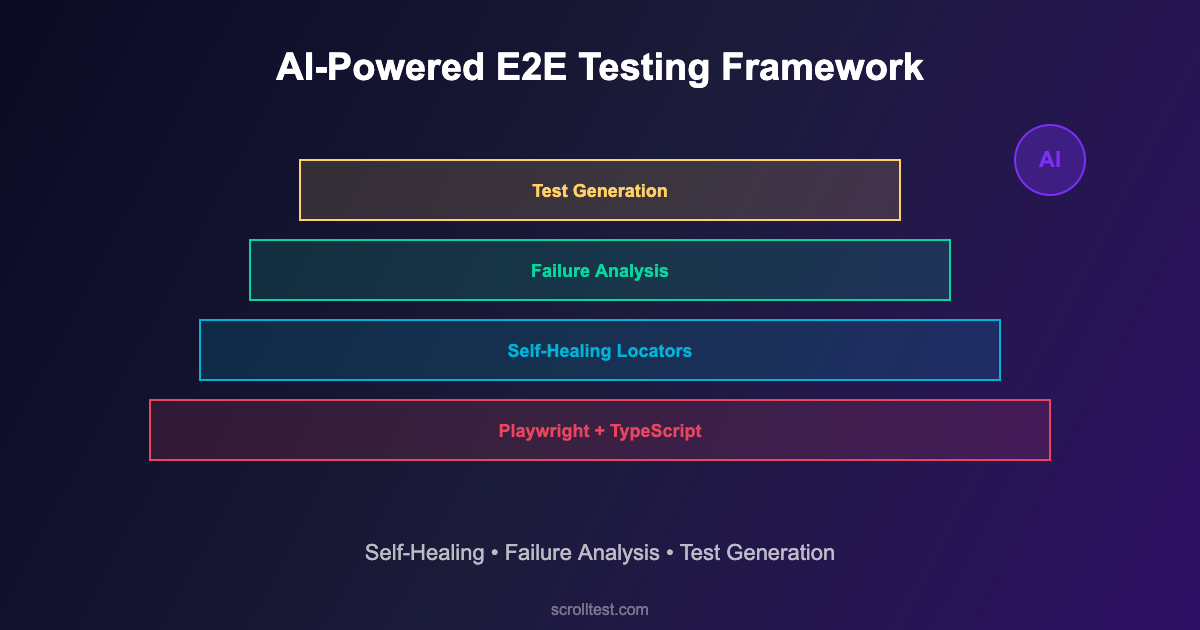
Architecture: Building an AI-Enhanced Playwright Framework
Here’s a practical architecture that integrates AI capabilities into a Playwright-based framework without requiring ML expertise.
Layer 1: Core Test Framework (Playwright + TypeScript)
// playwright.config.ts
import { defineConfig } from '@playwright/test';

export default defineConfig({
  testDir: './tests',
  timeout: 30000,
  retries: 1,
  use: {
    baseURL: process.env.BASE_URL || 'https://staging.example.com',
    screenshot: 'only-on-failure',
    trace: 'retain-on-failure',
    video: 'retain-on-failure',
  },
  reporter: [
    ['html'],
    ['./reporters/ai-analyzer.ts'],  // Custom AI failure analyzer
  ],
});

// Project structure
// tests/
// ├── e2e/
// │   ├── checkout.spec.ts
// │   ├── authentication.spec.ts
// │   └── dashboard.spec.ts
// ├── pages/
// │   ├── BasePage.ts          ← AI-enhanced base page
// │   ├── CheckoutPage.ts
// │   └── DashboardPage.ts
// ├── ai/
// │   ├── locator-healer.ts    ← Self-healing locators
// │   ├── test-generator.ts    ← AI test suggestions
// │   └── failure-analyzer.ts  ← Intelligent failure analysis
// └── fixtures/
//     ├── auth.fixture.ts
//     └── data.fixture.ts
Layer 2: Self-Healing Locators
The highest-value AI enhancement. When a locator fails, the self-healing layer attempts to find the element using alternative strategies before reporting a failure.
// ai/locator-healer.ts
import { Page, Locator } from '@playwright/test';

interface HealingStrategy {
  name: string;
  find: (page: Page, context: ElementContext) => Promise<Locator | null>;
}

interface ElementContext {
  originalLocator: string;
  tagName?: string;
  textContent?: string;
  ariaLabel?: string;
  testId?: string;
  nearbyText?: string;
}

export class LocatorHealer {
  private strategies: HealingStrategy[] = [
    {
      name: 'text-content',
      find: async (page, ctx) => {
        if (ctx.textContent) {
          const loc = page.getByText(ctx.textContent, { exact: true });
          if (await loc.count() === 1) return loc;
        }
        return null;
      }
    },
    {
      name: 'aria-label',
      find: async (page, ctx) => {
        if (ctx.ariaLabel) {
          const loc = page.getByLabel(ctx.ariaLabel);
          if (await loc.count() === 1) return loc;
        }
        return null;
      }
    },
    {
      name: 'role-based',
      find: async (page, ctx) => {
        if (ctx.textContent && ctx.tagName === 'button') {
          const loc = page.getByRole('button', { name: ctx.textContent });
          if (await loc.count() === 1) return loc;
        }
        return null;
      }
    },
    {
      name: 'test-id-fuzzy',
      find: async (page, ctx) => {
        if (ctx.testId) {
          // Try common test-id variations
          const variations = [
            ctx.testId,
            ctx.testId.replace(/-/g, '_'),
            ctx.testId.replace(/_/g, '-'),
            `btn-${ctx.testId}`,
            `${ctx.testId}-btn`,
          ];
          for (const v of variations) {
            const loc = page.locator(`[data-testid="${v}"]`);
            if (await loc.count() === 1) return loc;
          }
        }
        return null;
      }
    }
  ];

  async heal(page: Page, context: ElementContext): Promise<Locator | null> {
    for (const strategy of this.strategies) {
      const result = await strategy.find(page, context);
      if (result) {
        console.log(
          `[HEALED] "${context.originalLocator}" → `+
          `strategy: ${strategy.name}`
        );
        return result;
      }
    }
    return null;
  }
}
Layer 3: AI-Powered Failure Analysis
When tests fail, the AI analyzer categorizes failures to help engineers triage faster. It distinguishes between: real application bugs, test infrastructure issues (timing, environment), UI changes requiring test updates, and known flaky tests.
// ai/failure-analyzer.ts
interface FailureAnalysis {
  category: 'bug' | 'infrastructure' | 'ui-change' | 'flaky';
  confidence: number;
  explanation: string;
  suggestedAction: string;
}

export class FailureAnalyzer {
  private flakyHistory: Map<string, number[]> = new Map();

  analyze(testName: string, error: Error,
          screenshot?: Buffer): FailureAnalysis {
    // Check flaky history
    const history = this.flakyHistory.get(testName) || [];
    const recentFailRate = this.calculateRecentFailRate(history);

    if (recentFailRate > 0.2 && recentFailRate < 0.8) {
      return {
        category: 'flaky',
        confidence: 0.85,
        explanation: `Test has ${(recentFailRate*100).toFixed(0)}% failure rate over last 20 runs`,
        suggestedAction: 'Quarantine and investigate root cause'
      };
    }

    // Check for locator failures
    if (error.message.includes('locator resolved to') ||
        error.message.includes('waiting for selector')) {
      return {
        category: 'ui-change',
        confidence: 0.9,
        explanation: 'Element locator no longer matches any element',
        suggestedAction: 'Review recent UI changes and update locator'
      };
    }

    // Check for timeout/infrastructure issues
    if (error.message.includes('timeout') ||
        error.message.includes('net::ERR')) {
      return {
        category: 'infrastructure',
        confidence: 0.8,
        explanation: 'Network or timeout issue detected',
        suggestedAction: 'Check test environment health'
      };
    }

    // Default: likely a real bug
    return {
      category: 'bug',
      confidence: 0.7,
      explanation: 'Assertion failure on expected behavior',
      suggestedAction: 'Investigate application behavior'
    };
  }

  private calculateRecentFailRate(history: number[]): number {
    const recent = history.slice(-20);
    if (recent.length < 5) return 0;
    return recent.filter(r => r === 0).length / recent.length;
  }
}
Layer 4: AI-Assisted Test Generation
Use LLMs to suggest test scenarios based on page analysis. The generator crawls the application, identifies interactive elements, and suggests test cases that a human reviewer can approve, modify, or reject.
// ai/test-generator.ts
import { Page } from '@playwright/test';

interface TestSuggestion {
  name: string;
  description: string;
  steps: string[];
  priority: 'high' | 'medium' | 'low';
  type: 'happy-path' | 'edge-case' | 'error-handling';
}

export class TestGenerator {
  async analyzePageAndSuggest(page: Page): Promise<TestSuggestion[]> {
    // Gather page context
    const forms = await page.locator('form').all();
    const buttons = await page.locator('button, [role="button"]').all();
    const inputs = await page.locator('input, textarea, select').all();
    const links = await page.locator('a[href]').all();

    const suggestions: TestSuggestion[] = [];

    // For each form, suggest validation tests
    for (const form of forms) {
      const formInputs = await form.locator('input').all();

      suggestions.push({
        name: 'Submit form with all valid data',
        description: 'Verify form submission succeeds with valid inputs',
        steps: ['Fill all required fields', 'Click submit', 'Verify success'],
        priority: 'high',
        type: 'happy-path'
      });

      suggestions.push({
        name: 'Submit form with empty required fields',
        description: 'Verify form shows validation errors',
        steps: ['Leave required fields empty', 'Click submit',
                'Verify error messages appear'],
        priority: 'high',
        type: 'error-handling'
      });

      // Suggest edge case tests for each input
      for (const input of formInputs) {
        const type = await input.getAttribute('type');
        if (type === 'email') {
          suggestions.push({
            name: 'Submit form with invalid email format',
            description: 'Verify email validation rejects invalid formats',
            steps: ['Enter invalid email', 'Submit', 'Verify error'],
            priority: 'medium',
            type: 'edge-case'
          });
        }
      }
    }

    return suggestions;
  }
}
Putting It All Together: A Complete Test Example
// tests/e2e/checkout.spec.ts
import { test, expect } from '@playwright/test';
import { CheckoutPage } from '../pages/CheckoutPage';
import { FailureAnalyzer } from '../ai/failure-analyzer';

const analyzer = new FailureAnalyzer();

test.describe('Checkout Flow', () => {

  test('complete purchase with valid payment', async ({ page }) => {
    const checkout = new CheckoutPage(page);

    await checkout.goto();
    await checkout.addItem('Premium Plan');
    await checkout.fillPaymentDetails({
      cardNumber: '4111111111111111',
      expiry: '12/28',
      cvv: '123'
    });
    await checkout.submitOrder();

    // AI-enhanced assertion: checks both UI and API
    await checkout.verifyOrderConfirmation();

    // Verify via API that order was actually created
    const order = await checkout.getOrderViaAPI();
    expect(order.status).toBe('confirmed');
    expect(order.total).toBeGreaterThan(0);
  });

  test('handles payment decline gracefully', async ({ page }) => {
    const checkout = new CheckoutPage(page);

    await checkout.goto();
    await checkout.addItem('Premium Plan');
    await checkout.fillPaymentDetails({
      cardNumber: '4000000000000002', // Test decline card
      expiry: '12/28',
      cvv: '123'
    });
    await checkout.submitOrder();

    // Verify user-friendly error
    await expect(
      page.locator('[data-testid="payment-error"]')
    ).toContainText('Payment was declined');

    // Verify user can retry
    await expect(
      page.locator('[data-testid="retry-payment"]')
    ).toBeVisible();
  });
});
🚀 Build Real AI Testing Skills
Stop testing AI by guesswork. Learn DeepEval, RAG evaluation, and agent testing with guided projects.
What This Framework Won’t Do
AI-powered doesn’t mean magic-powered. This framework won’t write your entire test suite for you. AI-generated test suggestions need human review — they catch obvious patterns but miss business-specific nuances. The self-healer handles common locator changes but not major redesigns. The failure analyzer categorizes with 70-90% accuracy, not 100%.
The value proposition isn’t “replace test engineers.” It’s “make test engineers 2-3x more productive by automating the mechanical parts of the job.”
Getting Started
Week 1: Set up the core Playwright + TypeScript framework with Page Object Model structure. Write 10 tests for your most critical user flows.
Week 2: Add the self-healing locator layer. Implement the text-content, aria-label, and role-based strategies. Log all healing events.
Week 3: Implement the failure analyzer. Start categorizing test failures automatically. Build a dashboard showing bug vs. infrastructure vs. UI-change failure ratios.
Week 4: Add AI-assisted test generation. Run the page analyzer against your application. Review suggestions and implement the high-priority ones.
Frequently Asked Questions
Do I need an LLM API key for this?
Not for layers 1-3. The self-healing and failure analysis use pattern matching and heuristics. Layer 4 (test generation) can optionally use an LLM for more sophisticated suggestions, but the basic version works with rule-based analysis.
How does this compare to commercial tools like Testim or Mabl?
Commercial tools offer polished UIs, managed infrastructure, and pre-built AI features. This framework gives you full control, no vendor lock-in, and the ability to customize AI behavior to your specific application. Trade-off: more setup effort, more flexibility.
Can I add this to an existing test framework?
Yes. Each AI layer is independent. You can add self-healing locators to an existing Playwright project without touching the other layers. Start with the layer that addresses your biggest pain point.
The Bottom Line
The test engineer who spent weeks updating locators after UI redesigns wasn’t doing bad work. The framework design made that work inevitable. Every UI change triggered a maintenance cascade because the framework had no resilience, no intelligence, and no ability to adapt.
An AI-powered framework doesn’t eliminate maintenance. It reduces it dramatically by making tests resilient to common changes, by categorizing failures intelligently so engineers spend time on real bugs instead of false alarms, and by suggesting tests that humans might not think of.
Start with self-healing locators. That alone will cut your maintenance burden in half. Then add failure analysis. Then test generation. Each layer compounds the productivity gains of the previous one.
References
- Playwright Documentation — Core browser automation framework
- Playwright Locators Guide — Built-in locator strategies and best practices
- Playwright API Testing — Hybrid testing capabilities
- Healenium — Open-source self-healing framework for Selenium
- TypeScript Documentation — Type-safe test development
- Martin Fowler — Page Object Pattern — Test structure best practices
- GitHub Actions — CI/CD for automated test execution
- GitHub Copilot — AI pair programming for test code
- Google Testing Blog — Industry perspectives on test automation
- Ministry of Testing — Test automation community and resources
🎓 Become an AI-Powered QA Engineer
Join hundreds of SDETs mastering LLM, RAG, and agent testing. Lifetime access, hands-on labs, and a job-ready portfolio.