Selenium vs Playwright in 2026: Which One Should You Learn?
If you’re a tester or an SDET deciding where to spend your next six months, the Selenium vs Playwright question is no longer a matter of taste. The adoption numbers have swung hard in one direction, and the release cadence confirms it. I’ve watched teams on both sides of this decision, and the ones who ignore the data pay for it in flaky suites and missed hiring calls. In this guide I’ll show you the actual numbers (stars, downloads, and hiring demand), walk through where each framework genuinely wins, and give you a straight answer on which one to learn first in 2026.
Table of Contents
- The Data Doesn’t Lie: Stars, Downloads, and Momentum
- Where Selenium Still Wins
- Where Playwright Pulls Ahead
- The Hidden Cost of Sticking With Selenium
- Selenium 4.47 vs Playwright 1.62: What’s Actually New
- Which One Should You Learn First?
- India Context: What Hiring Managers Want
- A Realistic Migration Path
- Common Traps When Moving to Playwright
- Key Takeaways
- FAQ
Contents
The Data Doesn’t Lie: Stars, Downloads, and Momentum
Every “Selenium vs Playwright” debate I’ve sat through eventually comes down to feelings. So let me kill that first with numbers I pulled from the GitHub, npm, and PyPI APIs on August 21, 2026.
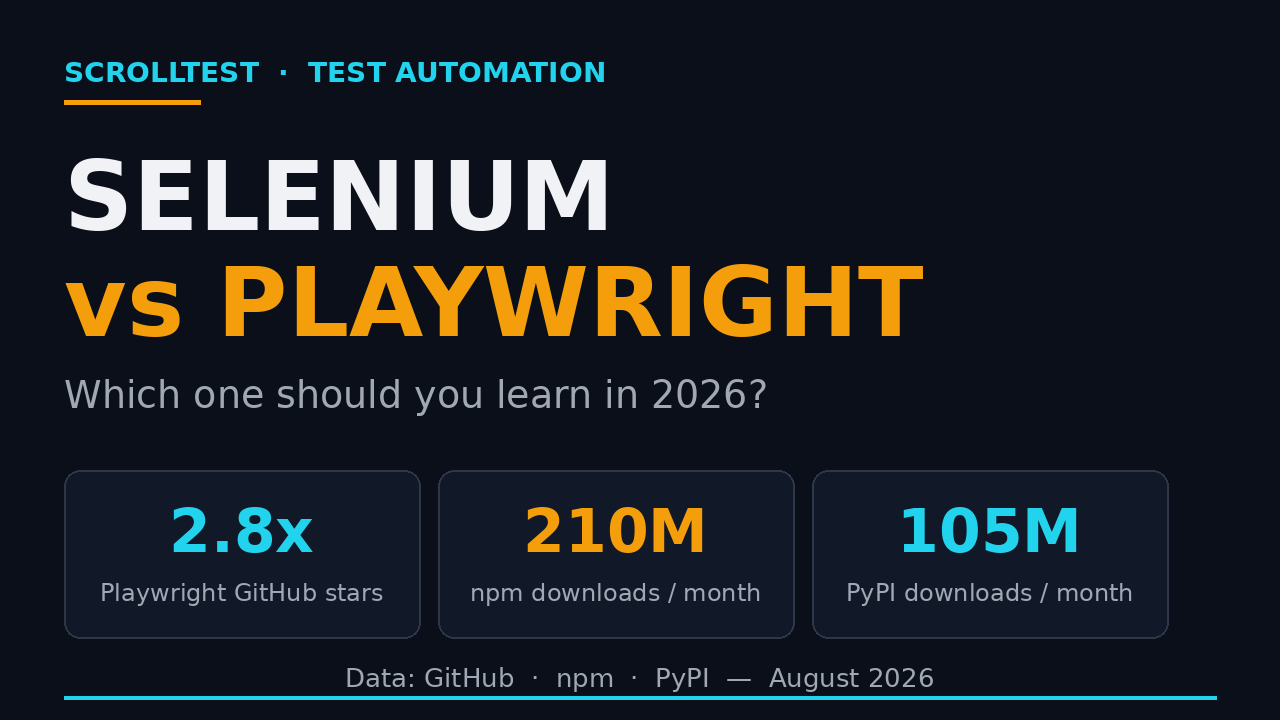
On GitHub, Selenium sits at roughly 34,400 stars. Playwright sits at roughly 94,900 stars. That’s nearly 2.8x the stars despite Selenium having a decade-long head start. Stars are a proxy for mindshare, and mindshare is a proxy for where the next generation of tutorials, tooling, and AI integrations land.
The download gap is wider. Over the last month, selenium-webdriver pulled about 8.2 million npm downloads while @playwright/test pulled about 210 million. On PyPI the same month, selenium recorded 57.3 million downloads and playwright recorded 105.2 million. Playwright hasn’t only won the JavaScript crowd; it has overtaken Selenium on Python too.
| Metric (last 30 days) | Selenium | Playwright |
|---|---|---|
| GitHub stars | ~34,400 | ~94,900 |
| npm downloads (main test package) | 8.2M (selenium-webdriver) | 210.6M (@playwright/test) |
| PyPI downloads | 57.3M | 105.2M |
| Latest release | 4.47.0 (Aug 10, 2026) | 1.62.1 (Jul 30, 2026) |
Two caveats keep this honest. First, Selenium’s npm footprint undercounts its real usage, because a huge share of Selenium runs through Maven, pip, and NuGet rather than npm. Second, downloads measure “installed and run,” not “preferred by humans,” and CI runners inflate every number. Even after discounting for that, the direction is unmistakable: Playwright is the framework the new automation work is being built on.
A little history sharpens the picture. Selenium launched in 2004 and defined the category. Playwright arrived in 2020 from Microsoft, built largely by people who had worked on Puppeteer and, before that, the Chrome DevTools automation team. Its pitch from day one was to take everything the browser vendors had learned about reliable automation and bake it into a real test runner. That’s why auto-waiting, tracing, and multi-browser support were there at launch rather than retrofitted years later.
None of this means Selenium is dead. It means the center of gravity has moved. What that means for a legacy suite and what it means for your career are two different questions, and I’ll keep them separate below.
Where Selenium Still Wins
I don’t want you to read this and nuke a working Selenium suite on Monday. There are real, defensible reasons teams still choose Selenium in 2026, and pretending otherwise would be dishonest.
- Language coverage. Selenium has first-class, mature bindings in Java, Python, C#, Ruby, and JavaScript. Playwright’s strongest story is TypeScript and JavaScript, with solid Python, Java, and .NET ports that still trail the TS feature set. If your team is a Java shop, Selenium is genuinely competitive, and the Java bindings have decades of hardening behind them.
- Legacy inertia and institutional knowledge. Fifteen years of Stack Overflow answers, company-specific helper libraries, and trained engineers don’t migrate in a sprint. That maturity is a moat, and it’s a legitimate one when a team has a working suite and a tight deadline.
- The W3C WebDriver standard. Selenium is the reference implementation of a browser-automation standard. That stability matters in regulated industries where audits, compliance, and long-term support windows trump raw developer speed.
- Grid at scale. Selenium Grid has years of production hardening behind it for distributed execution across a fleet of machines and browsers. Teams with existing grid infrastructure don’t throw that away lightly.
I also wrote a separate breakdown of what shipped in Selenium 4.47, because the project is far from stagnant. The team is pushing WebDriver BiDi hard and has a Selenium 5 charter in motion. Selenium’s problem isn’t talent; it’s that its biggest architectural bets arrived after Playwright already reset the market’s expectations for what a test runner should do.
Where Playwright Pulls Ahead
Playwright won on developer experience, and it compounded that lead every year. Here’s where the gap is concrete rather than aesthetic.
Auto-waiting removes a whole class of flakiness
In Selenium you write explicit waits, and if you get the timeout wrong, you get flakes. In Playwright, actions like click() and fill() wait for the element to be actionable before they act. The auto-wait model is the single biggest reason I see teams report fewer flakes after migrating.
// Playwright: no explicit wait needed
await page.click('button#submit');
await expect(page.locator('.toast')).toHaveText('Saved');
One tool for UI, API, and network
Playwright’s request fixture, route() interception, and tracing all live in the same test runner. You can mock an API, assert a response, and drive the UI in one file. In Selenium, network interception requires BiDi configuration that most teams still haven’t adopted. For a QA engineer, that means Playwright covers the “API testing plus UI testing” gap that Selenium leaves to separate tools like Rest Assured or Postman.
// Playwright: API call and UI assertion in one test
test('creates a user then checks the list', async ({ request, page }) => {
  const res = await request.post('/api/users', { data: { name: 'Ada' } });
  expect(res.ok()).toBeTruthy();
  await page.goto('/users');
  await expect(page.locator('text=Ada')).toBeVisible();
});
Built-in parallelism, retries, and trace viewer
Playwright Test ships with parallel workers, automatic retries, HTML reports, and a trace viewer that records every action, screenshot, and network call for failed tests. Selenium leaves test orchestration to you (TestNG, JUnit, pytest) and has no equivalent trace story out of the box. When a Playwright test fails, I open the trace and see exactly what the browser saw. When a Selenium test fails, I’m reading a stack trace and guessing.
Codegen and UI mode
Playwright’s codegen command records your browser clicks into a working script, and its UI mode gives you a visual, time-traveling debugger. These are onboarding accelerators Selenium simply doesn’t match. A manual tester can go from “I’ve never written automation” to a recorded script in an afternoon.
Multi-browser by default
Playwright launches Chromium, Firefox, and WebKit with the same API. Cross-browser coverage is the default, not a separate config project you bolt on later.
// Playwright: run the same spec across three engines
import { test } from '@playwright/test';

for (const browserName of ['chromium', 'firefox', 'webkit']) {
  test.describe(browserName, () => {
    test('loads the login page', async ({ browser }) => {
      const page = await browser.newPage();
      await page.goto('https://example.com');
    });
  });
}
For a deeper dive into squeezing speed out of Playwright, I covered parallel execution and sharding here.
The Hidden Cost of Sticking With Selenium
The cost of staying on Selenium isn’t the framework license; it’s free. The cost shows up in three quieter places, and it compounds.
- Maintenance burden. Explicit waits, hand-rolled reporting, and driver-management glue add up. Teams that “already have a Selenium framework” often spend a quarter of their automation hours just keeping the harness alive instead of writing new coverage.
- Flakiness tax. A flaky suite erodes trust until engineers stop reading the results. Once that happens, the ROI of the entire suite quietly goes negative, and nobody can point to the exact moment it happened.
- Talent pipeline. New grads and bootcamp testers are learning Playwright first. If your stack is Selenium-only, you’re hiring against the current instead of with it, and your best engineers start wondering whether they’re falling behind.
I’ve seen the cost up close. On one mid-sized suite, a team of three automation engineers was spending roughly eight to ten hours a week just triaging flaky runs and rebuilding the framework’s reporting layer. After moving the high-flake subset to Playwright, that triage time dropped by more than half, and the engineers started writing new coverage for the first time in two quarters. That reclaimed time is the real ROI of a migration, and it never shows up on a feature list.
This is also where AI enters. Self-healing selectors and AI-generated test steps are being built on Playwright’s architecture first, because its API surface is cleaner for agents to drive. I wrote about the broader shift in how AI fixes broken tests. The pattern favors tooling that’s easy for an agent to reason about, and in 2026 that tool is Playwright.
Selenium 4.47 vs Playwright 1.62: What’s Actually New
Let’s compare the two most recent releases head to head, because they tell you exactly where each project is investing its engineering effort.
Selenium 4.47.0 (released August 10, 2026) is a BiDi-first release. The changelog centers on a new transport layer for generated BiDi modules, subscription parameters for BiDi events in Java, and WebDriver BiDi support on Safari. The direction is clear: Selenium is modernizing its protocol layer and drawing a line toward a Selenium 5 charter. It’s the right move for the project’s long-term health, but it’s infrastructure work. Most of it is invisible to a tester writing a login script.
Playwright 1.62.1 (released July 30, 2026) is a bug-fix patch on top of 1.62, tightening TypeScript config resolution, accessibility snapshots, and page.evaluate() type-checking. The notable thing isn’t the patch itself; it’s that Playwright ships point releases this fast while its headline features (trace viewer, UI mode, codegen) are already mature. The project is polishing a modern product while Selenium rebuilds its foundation.
That contrast is the whole story. For a tester choosing a framework to learn, the second position is the safer bet in 2026. You want to learn on a tool that’s already modern, not one that’s mid-migration.
Which One Should You Learn First?
Here’s the framework I give engineers when they ask me the Selenium vs Playwright question directly. Match your situation to the row, and the answer is usually obvious.
| Your situation | Learn this first | Why |
|---|---|---|
| New to automation | Playwright | Auto-waiting and codegen get you to a running test fastest |
| JavaScript / TypeScript stack | Playwright | Best-in-class TS support and tooling |
| Java-heavy enterprise | Selenium | Mature Java bindings and legacy ecosystem |
| Targeting service companies | Selenium (then Playwright) | Client contracts still run on Java/Selenium stacks |
| Targeting product companies / startups | Playwright | Modern stacks, CI/CD, and AI-adjacent roles ask for it |
| Aiming to be an SDET | Both, Playwright first | Modern thinking first, legacy coverage second |
My honest default in 2026: start with Playwright. The job market is tilting toward it, the tooling is better, and the concepts transfer. Selenium knowledge still unlocks a large installed base, so treat it as the second skill, not the first. A tester who knows Playwright can pick up Selenium in a couple of weeks; the reverse path is slower because you also have to unlearn the explicit-wait habits.
India Context: What Hiring Managers Want
If you’re job-hunting in Bengaluru, Hyderabad, or Pune, the Selenium vs Playwright answer has a local flavor that the global download numbers don’t capture. Service companies (the TCS and Infosys tier) still list Selenium heavily because their client contracts run on legacy Java stacks. Product companies, startups, and anything AI-adjacent now ask for Playwright, often with TypeScript alongside it.
The salary data backs up the shift. I published a full SDET salary breakdown for India in 2026, and it spans roughly ₹4 LPA for freshers up to ₹33 LPA for leads. The premium roles, the ones crossing ₹25 LPA, consistently ask for Playwright, CI/CD, and API automation together. Selenium alone rarely commands that band anymore.
Open a typical product-company JD in 2026 and you’ll see Playwright, TypeScript, and CI/CD listed as core, with “Selenium a plus” tacked on at the end. Open a service-company JD and Selenium plus Java plus TestNG still leads. Both markets are real and both are hiring; they just pay differently and value different stacks.
My advice for Indian testers: don’t frame this as a loyalty test. Frame it as stacking. Playwright plus a solid API-testing foundation (REST Assured or Playwright’s request fixture) plus one CI tool is the fastest route into the product-company band. Keep Selenium in your back pocket for the service-company and enterprise JD flood, because that’s still a huge volume of openings even if the average salary is lower.
A Realistic Migration Path
If you’ve decided to move an existing Selenium suite toward Playwright, don’t do a big-bang rewrite. Here’s the sequence I’ve seen work without breaking the release cadence.
- Freeze new Selenium test creation. New features get Playwright specs. Old tests keep running so you never lose coverage mid-transition.
- Stand up Playwright in CI next to Selenium. Run both in parallel for a sprint so you build confidence in the new harness before cutting anything over.
- Port the highest-value, highest-flake tests first. Don’t migrate alphabetically; migrate by pain. The 20% of tests causing 80% of the flakes go first.
- Rebuild selectors as you port. Use
data-testidattributes instead of copying brittle XPath over. Porting is your one chance to fix bad locators for free. - Turn on tracing for failures. Playwright’s trace viewer becomes your debugging shortcut from day one.
- Retire the Selenium suite once coverage parity holds for two consecutive releases with fewer flaky failures.
- Keep a thin Selenium smoke layer if you have a legacy browser or enterprise environment Playwright can’t yet reach.
Here’s the smallest useful migration snippet: the same login check in Selenium (Java) and Playwright (TypeScript), so you can see the ergonomic gap directly.
// Selenium (Java)
WebDriverWait wait = new WebDriverWait(driver, Duration.ofSeconds(10));
wait.until(ExpectedConditions.elementToBeClickable(By.id("submit")));
driver.findElement(By.id("submit")).click();
// Playwright (TypeScript)
await page.click('#submit'); // waits, retries, and scrolls automaticallyCommon Traps When Moving to Playwright
Most migration pain I’ve seen comes from a handful of predictable mistakes, not from Playwright itself. Here are the traps and how to avoid them.
- Copying XPath instead of rebuilding selectors. If you port your old locators verbatim, you inherit every brittleness you were trying to escape. Rebuild with
data-testidand role-based selectors while you’re in there. - Porting every test, including the low-value ones. A migration is a chance to delete dead coverage. If a test hasn’t caught a bug in a year, don’t spend the effort moving it.
- Over-mocking the network. Playwright makes it easy to stub APIs, and teams sometimes stub so much that the test no longer verifies anything real. Mock what you must, but keep at least one end-to-end path honest.
- Skipping the trace viewer. The whole point of switching is better debugging. If you never open the trace, you’ve paid the migration cost and left the payoff on the table.
- Treating Playwright as “Selenium with a new API.” It isn’t. Auto-waiting, fixtures, and the request API change how you structure tests. Learn the idioms instead of forcing your old patterns into the new tool.
A typical mid-size suite of 300 to 500 tests takes one experienced engineer roughly four to six weeks to port at a sustainable pace while both frameworks run side by side. The teams that try to compress that into a weekend almost always reintroduce flakiness by rushing the selector work. Give the migration the same respect you’d give a feature release.
Key Takeaways
- Playwright leads Selenium on every adoption metric in 2026: roughly 2.8x the GitHub stars, ~26x the npm test-package downloads, and ~1.8x the PyPI downloads.
- Selenium is not dead. It still wins on Java coverage, legacy enterprise inertia, and the W3C WebDriver standard.
- Playwright wins on auto-waiting, built-in API testing, parallelism, retries, tracing, codegen, and multi-browser defaults, which are the things that actually reduce flaky suites.
- For most testers in 2026, learn Playwright first and Selenium second. The market and the tooling both point that way.
- In India, Selenium still dominates service-company JDs, but the ₹25 LPA-plus product roles ask for Playwright plus API and CI skills.
Bottom line: if you’re starting fresh in 2026, learn Playwright first. If you already run Selenium at work, keep it running and start porting the flaky parts. The Selenium vs Playwright debate is settled on the data; the only remaining question is your timeline.
FAQ
Is Selenium dead in 2026?
No. Selenium has a massive installed base, active development, and a Selenium 5 charter in progress. It’s declining in relative mindshare, not in absolute usefulness.
Can I use Selenium and Playwright together?
Yes. Teams routinely run Selenium for legacy coverage and Playwright for new features during a transition. They don’t conflict; they both just need a browser and a runner.
Which framework has better job prospects in India?
Playwright for product companies and higher salary bands; Selenium for the larger volume of service-company and enterprise Java roles. Learning both covers the full market.
Is Playwright harder to learn than Selenium?
For most people it’s easier, because auto-waiting removes the timing bugs that trip up beginners. If you don’t know JavaScript, the language itself is the main learning curve.
Should I migrate my existing Selenium suite to Playwright?
Migrate if flakiness or maintenance is eating your automation hours. Port the highest-flake tests first, run both in CI, and retire Selenium only after coverage parity holds.
Does Playwright replace Selenium for API testing too?
Yes, for many teams. Playwright’s request fixture handles API calls in the same runner as UI tests, which is why so many teams drop a separate API tool once they adopt it.
What about Cypress? Should I consider it instead?
Cypress is still JavaScript-only, runs in a single browser context, and lacks Playwright’s multi-browser and multi-tab support. For most QA teams in 2026, Playwright covers Cypress’s use cases and more, so I’d put it ahead of Cypress too.