Playwright 1.62 Upgrade Checklist for QA Teams
The Playwright 1.62 upgrade checklist is not just a version-bump note for package.json. This release changes component testing, retry behavior, screenshot formats, cancellation control, reporter hooks, browser versions, MCP packaging, and a few CI assumptions that can quietly break a stable test suite.
I treat every Playwright upgrade like a small release project. The package looks simple, but the blast radius covers browser binaries, traces, visual baselines, fixtures, Docker images, and the habits of every SDET who debugs failures at 2 AM.
Table of Contents
- Why Playwright 1.62 Matters
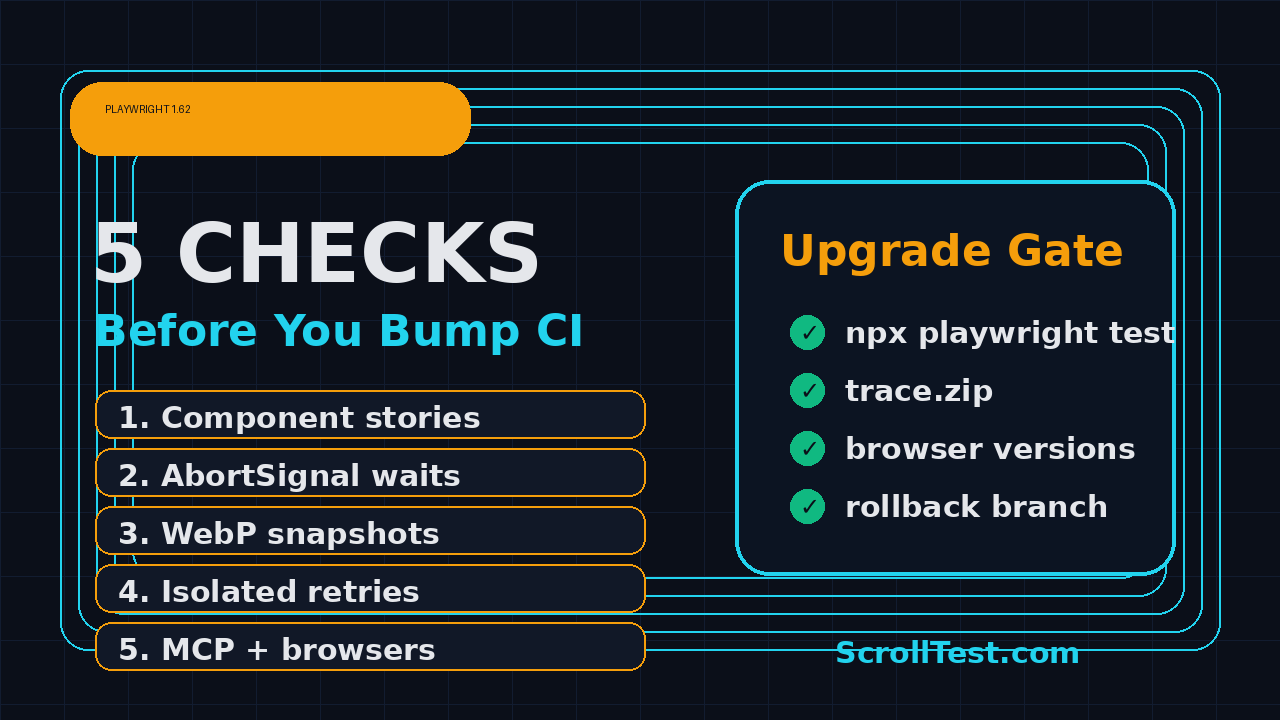
- The 5-Check Playwright 1.62 Upgrade Checklist
- Check 1: Component Testing Stories and Galleries
- Check 2: AbortSignal for Long Operations
- Check 3: WebP Screenshots and Visual Baselines
- Check 4: Isolated Retries and Failure Signals
- Check 5: CI, MCP, Browsers, and Debian 11
- How I Roll This Out With a QA Team
- Conclusion and Key Takeaways
- FAQ
Contents
Why Playwright 1.62 Matters
Microsoft published Playwright v1.62.0 on GitHub on 24 July 2026, and npm records @playwright/test 1.62.0 at version 1.62.0. The npm downloads API reported 199,962,685 downloads for @playwright/test in the 2026-07-01 to 2026-07-30 window, so this is not a niche tool update.
The GitHub API also shows the Microsoft Playwright repository with 93,776 stars and 6,186 forks at the time I checked it. Those numbers matter because a release this widely adopted gets copied into enterprise frameworks very quickly. A small change in a fixture, retry strategy, or screenshot path becomes a support ticket in dozens of teams.
What changed in plain English
The official Playwright release notes list five items I care about most as a QA lead: new component testing stories and galleries, AbortSignal support for most operations and assertions, WebP screenshot support, reporter preprocessing, and isolated retries. The same notes also mention browser versions: Chromium 151.0.7922.34, Firefox 153.0, WebKit 26.5, plus stable Chrome 151 and Edge 151.
That is enough surface area to justify a controlled rollout. If your suite only runs login and checkout, you can bump faster. If you own visual regression, component testing, CI sharding, mobile emulation, or trace review, I would not merge the bump on Friday evening.
Who should read this
This guide is for SDETs, QA automation engineers, QA managers, and frontend engineers who own Playwright in production CI. If you are preparing interview answers, the same checks also help you explain upgrade risk like a senior engineer instead of saying, “we just update npm packages.”
If you want related reading on patterns I see in real suites, keep these ScrollTest posts open: 5 Anti-Patterns Teams Carry From Selenium to Playwright, Playwright Trace Viewer for AI-Generated Tests, Feature Flag Testing in Playwright, and PromptFoo Regression Gates for Production Prompts.
The 5-Check Playwright 1.62 Upgrade Checklist
The Playwright 1.62 upgrade checklist I use has one rule: test the behavior that changed, not the marketing headline. Version numbers do not fail builds. Mismatched browser binaries, different retry timing, new screenshot encodings, and stale component-test helpers fail builds.
The short version
- Component fixtures: run every component spec that uses
mount(), providers, mocks, or story-like data. - Abort behavior: test long waits, flaky API waits, and custom timeout wrappers with
AbortController. - Visual baselines: decide whether WebP belongs in your snapshot strategy before it leaks into PRs.
- Retries: compare
retryStrategy: 'immediate'andretryStrategy: 'isolated'on known flaky tests. - CI image: confirm browser versions, Docker base image, Debian 11 usage, reporters, and MCP commands.
Preflight command set
I start with a clean branch and make the update visible in one commit. That makes rollback easy when a browser binary or snapshot format surprises the team.
git checkout -b chore/playwright-1-62-upgrade
npm view @playwright/test version
npm install -D @playwright/test@1.62.0
npx playwright install --with-deps
npx playwright --version
npx playwright test --list
For a PNPM or Yarn monorepo, I still keep the idea the same: one branch, one dependency change, one browser install step, one smoke run. If your CI caches ~/.cache/ms-playwright, clear that cache once in a controlled job so the new browser binaries do not mix with older artifacts.
The minimum PR evidence
Before I approve the PR, I want evidence from 3 layers: local smoke, CI smoke, and one full suite or nightly run. A screenshot of a green local run is not enough. I also want the exact Playwright version printed in CI logs because a cached lockfile can lie.
Check 1: Component Testing Stories and Galleries
Playwright 1.62 moves component testing toward a stories and galleries model, according to the release notes and Playwright component testing docs. In simple words, a story wraps one component scenario with props, mock data, and providers. A gallery page serves those stories, and the fixtures.mount() fixture mounts by story id.
Why QA teams should care
Most teams say component testing is a frontend concern until a flaky component spec blocks the release train. If you have a design system, payment widget, booking calendar, upload component, or dashboard chart, component tests often catch bugs before a full end-to-end journey does.
The risk is not that Playwright changed the idea of component testing. The risk is that your old wrapper patterns may assume direct component mounting, global providers, or hard-coded setup logic. When a new stories-and-galleries workflow arrives, your test helper may still pass locally but fail in CI because the gallery server, route, or mock data setup differs.
Test the mount contract
I create one upgrade spec that tests the 3 operations teams usually forget: mount, update, and unmount. This is not meant to replace your product tests. It is a contract test for the test framework itself.
import { test, expect } from '@playwright/experimental-ct-react';

test('component fixture survives mount, update, and unmount', async ({ mount }) => {
  const component = await mount('components/CheckoutButton/Default');
  await expect(component.getByRole('button', { name: /pay/i })).toBeVisible();

  await component.update({ disabled: true });
  await expect(component.getByRole('button', { name: /pay/i })).toBeDisabled();

  await component.unmount();
  await expect(component).toBeHidden();
});
Do not copy this blindly if your framework is Vue, Svelte, or a custom setup. Copy the intent: prove that your wrapper, providers, mock API layer, and cleanup work in 1.62.
Regression notes to add to the PR
- List every package using component tests, not only the main web app.
- Run at least one story with authenticated user context and one with empty data.
- Check whether your gallery server port conflicts with an existing CI service.
- Keep old visual snapshots until the first full run proves the new flow is stable.
In Indian product companies, I see this missed because frontend and QA own separate pipelines. The SDET on-call then inherits the failure. If your salary goal is ₹25-40 LPA, owning this cross-team upgrade work is exactly the kind of responsibility managers remember.
Check 2: AbortSignal for Long Operations
The second item in my Playwright 1.62 upgrade checklist is cancellation. The release notes say most operations and web-first assertions now accept a signal option that takes an AbortSignal. That gives you a cleaner way to cancel long-running clicks, navigations, waits, and assertions.
Where this helps
Timeouts tell you an operation ran too long. Abort signals let your test or helper actively stop work when another condition wins. That matters in checkout flows, search pages, slow third-party widgets, and API polling loops where one failure should stop a chain of waits.
Playwright still has default timeouts. The release notes explicitly say a signal does not disable the default timeout, and you must pass timeout: 0 if you want to disable it. I would avoid disabling timeouts in product suites unless you are writing a very controlled helper.
A practical cancellation helper
import { expect, Page } from '@playwright/test';

export async function clickWithBudget(page: Page, name: string, ms = 1500) {
  const controller = new AbortController();
  const timer = setTimeout(() => controller.abort(), ms);

  try {
    await page.getByRole('button', { name }).click({ signal: controller.signal });
    await expect(page.getByText('Saved')).toBeVisible({ signal: controller.signal });
  } finally {
    clearTimeout(timer);
  }
}
The first test I write is a negative test. Force the backend to delay, call the helper with a 100 millisecond budget, and assert that the failure message is readable. A cancellation feature that produces cryptic errors will slow your team down.
What to check before merging
- Custom wrappers around
page.waitForResponse(),locator.click(), andexpect(). - Polling utilities that mix Playwright timeouts with
Promise.race(). - Retry helpers that catch every error and accidentally hide abort failures.
- Reporters or loggers that group aborts as normal timeouts.
AbortSignal is a good feature, but it can make debugging worse if the team treats every abort as infrastructure noise. I label abort-related failures separately in reports for the first 2 weeks after the upgrade.
Check 3: WebP Screenshots and Visual Baselines
Playwright 1.62 adds WebP support for screenshot comparisons. The release notes say expect(page).toHaveScreenshot() and expect(locator).toHaveScreenshot() can store snapshots in WebP by giving the snapshot a .webp name. Standalone screenshots can also use WebP with a quality option.
Do not change formats by accident
Visual regression is sensitive because it creates hundreds of files, sometimes thousands. A single helper that changes homepage.png to homepage.webp can make a PR look like a product redesign. The feature is useful, but the policy must be explicit.
I recommend this rule: keep current PNG baselines for existing tests, use WebP only for new screenshot families, and document the reason in tests/visual/README.md. If the team wants smaller artifacts, run a dedicated experiment on one stable page before changing the whole suite.
Example visual policy
import { test, expect } from '@playwright/test';

test('pricing card layout remains stable', async ({ page }) => {
  await page.goto('/pricing');

  // Existing baseline stays PNG during the 1.62 rollout.
  await expect(page.getByTestId('pricing-card')).toHaveScreenshot('pricing-card.png');

  // New experimental baseline uses WebP only in the visual-lab project.
  test.skip(process.env.VISUAL_LAB !== 'true', 'WebP trial is opt-in');
  await expect(page).toHaveScreenshot('pricing-page.webp');
});
CI artifact checks
- Confirm your CI can upload and preview WebP files.
- Check any Slack, Teams, or GitHub comment bot that embeds screenshots.
- Verify diff tools support the format before developers need it during a hotfix.
- Keep retention rules separate for trace zips and visual artifacts.
If you publish visual evidence in bug reports, also check whether Jira or your internal defect tool previews WebP correctly. I have seen teams waste 30 minutes on “missing screenshots” when the file existed but the viewer did not render it.
Check 4: Isolated Retries and Failure Signals
Playwright 1.62 adds testConfig.retryStrategy. The default is immediate, where retries run as soon as a worker is free. The new isolated option runs retries at the end, one by one in a single worker, to reduce interference with the rest of the suite.
Why isolated retries are not a magic fix
Retries can hide product bugs, data collisions, and test design problems. Isolated retries reduce one class of noise: another worker changing shared state while the retry is running. They do not fix bad selectors, unstable APIs, stale feature flags, or a database shared across projects.
I like isolated retries for suites that hit shared staging environments. I do not enable them globally until I compare numbers for at least 3 CI runs. The question is not “does the build turn green?” The question is “do failures become easier to diagnose?”
Config experiment
import { defineConfig } from '@playwright/test';

export default defineConfig({
  retries: process.env.CI ? 2 : 0,
  retryStrategy: process.env.PW_ISOLATED_RETRIES === 'true' ? 'isolated' : 'immediate',
  reporter: [['html', { mergeFiles: true }], ['github']],
});
Run the same flaky bucket twice: once with PW_ISOLATED_RETRIES=false and once with PW_ISOLATED_RETRIES=true. Record total duration, retry count, top failure messages, and trace size. If the isolated run adds 12 minutes but only saves one flaky test, the tradeoff may not be worth it for PR validation.
Use Reporter.preprocess carefully
The release also adds Reporter.preprocess(), which can mark tests as skipped, excluded, fixed, or failing before onBegin(). This is powerful for release gates, quarantine lists, and feature-flag routing. It is also dangerous if the rules live only in a reporter that nobody reviews.
class ReleaseGateReporter {
  async preprocess({ suite, testRun }) {
    for (const test of suite.allTests()) {
      if (test.title.includes('@blocked-by-payment-freeze')) {
        testRun.skip(test);
      }
    }
  }
}
export default ReleaseGateReporter;
If you use this hook, add a summary line to CI that prints exactly how many tests were skipped, excluded, fixed, or forced to fail. Silent filtering is how test coverage rots.
Check 5: CI, MCP, Browsers, and Debian 11
The fifth check is the one that catches mature teams. Playwright 1.62 is not only a test runner update. The release notes say Playwright now bundles the Playwright MCP server and playwright-cli, runnable via npx playwright mcp and npx playwright cli. They also say Debian 11 is no longer supported.
Browser version gate
Print the runtime details in CI. I want the log to show the package version, browser versions, OS image, Node version, and project list. When a failure appears only on WebKit 26.5 or Chrome 151, those numbers shorten the debug loop.
node --version
npx playwright --version
npx playwright install --dry-run || true
npx playwright test --list --project=chromium | head -20
cat /etc/os-release
If your CI image is still Debian 11, plan the base image migration before the dependency bump. Do not ask junior SDETs to debug browser install errors caused by an unsupported operating system. Fix the platform first.
MCP and agent usage
The bundled MCP server matters because QA teams are starting to connect agents to browser automation. If you allow engineers to run npx playwright mcp, document what the agent can access: test environments, auth state, cookies, files, and network. Treat it like a tool server, not a toy.
For agent-led testing, I pair the upgrade with a smoke script: open the app, list 3 locators, capture a trace, and stop. Then I review the trace with the same discipline I describe in the ScrollTest guide on using Playwright Trace Viewer for AI-generated tests.
CI matrix I recommend
- PR smoke: Chromium only, 10-15 minutes, no visual baseline updates.
- Nightly: Chromium, Firefox, WebKit, full trace retention for failures.
- Visual lab: opt-in WebP experiments, approval required for baseline changes.
- Component lane: stories and galleries checks, providers, mocks, and cleanup.
- Agent lane: MCP smoke only, no production credentials, trace always attached.
For service companies like TCS, Infosys, Wipro, and Cognizant, this matrix may feel heavy. For product companies hiring senior SDETs in Bengaluru, Pune, Hyderabad, and remote roles, this is normal ownership. The difference shows up in interviews.
How I Roll This Out With a QA Team
A Playwright 1.62 upgrade is a good chance to show engineering maturity. I do not ask one automation engineer to “update Playwright and fix failures.” I split the work into owners and evidence.
Day-by-day rollout
- Day 1: create the dependency PR, update browser binaries, and run local smoke.
- Day 2: run CI smoke, component tests, and one known flaky bucket with both retry strategies.
- Day 3: run visual regression without changing formats, then trial WebP on one new baseline.
- Day 4: test MCP and CLI commands in a sandbox with no production secrets.
- Day 5: merge if evidence is clean, then watch the next 3 nightly builds.
The checklist is intentionally boring. Boring releases are good. Your business users do not care that you adopted AbortSignal or WebP. They care that checkout, onboarding, invoice download, and analytics events still work after the package bump.
PR template for the upgrade
## Playwright 1.62 upgrade evidence
- [ ] @playwright/test is pinned to 1.62.0
- [ ] Browser install ran in CI
- [ ] Component test gallery smoke passed
- [ ] AbortSignal helper test passed
- [ ] Visual snapshots stayed PNG unless explicitly approved
- [ ] Retry strategy comparison attached
- [ ] Debian 11 check completed
- [ ] MCP smoke ran in sandbox only
- [ ] Trace attached for every failing lane
Career angle for SDETs in India
Manual testers moving into automation often focus only on syntax: locators, assertions, fixtures, and commands. Senior SDETs are paid for judgment. In Indian hiring discussions, I regularly see ₹25-40 LPA expectations tied to ownership of CI stability, release gates, flakiness control, and cross-team debugging.
If you want to stand out, bring this upgrade story to your next interview. Explain how you validated component testing, visual baselines, retry behavior, browser binaries, and MCP exposure. That answer beats memorizing 20 Playwright locator questions.
Conclusion: Use This Playwright 1.62 Upgrade Checklist Before You Merge
The Playwright 1.62 upgrade checklist is simple: test changed behavior, print hard evidence in CI, and avoid surprise policy changes around screenshots, retries, and MCP. The release is strong, but strong tooling still needs disciplined rollout.
- Playwright 1.62.0 was published on 24 July 2026, and the npm API reported 199,962,685 monthly downloads for @playwright/test in the checked window.
- Component testing stories and galleries deserve a dedicated smoke because fixtures, providers, and mock data are easy to break.
- AbortSignal support is useful, but you must label abort failures clearly or they become new timeout noise.
- WebP screenshots should be an explicit visual policy, not an accidental file-extension change.
- Isolated retries, Reporter.preprocess(), browser versions, bundled MCP, and Debian 11 removal all belong in the upgrade PR evidence.
My recommendation is direct: bump to 1.62, but do it like a release owner. If your team cannot show the 5 checks above, the dependency PR is not ready.
FAQ
Should I upgrade to Playwright 1.62 immediately?
Upgrade quickly if your suite is small and you do not use component testing, visual regression, custom reporters, or old Debian images. For larger teams, run the 5-check rollout first and merge after one clean CI smoke plus one full run.
Does Playwright 1.62 require WebP screenshots?
No. WebP screenshot support is available, but you can keep existing PNG baselines. I recommend using WebP only in new or experimental visual suites until your tooling previews, diffs, and stores it correctly.
What is the biggest risk in the Playwright 1.62 upgrade?
For most QA teams, the biggest risk is not one headline feature. It is the combination of browser binaries, CI image support, component-test helpers, and retry behavior. That is why I prefer a checklist over a blind package bump.
Should I enable isolated retries by default?
Not on day 1. Run a comparison on a flaky bucket first. If isolated retries make failures easier to debug without adding too much CI time, then roll it into nightly or staging suites before PR gates.
How should QA teams treat the bundled Playwright MCP server?
Treat it like a controlled tool server. Run it in a sandbox, avoid production credentials, keep traces, and document what an agent can access. MCP is useful, but unmanaged browser access can create security and data problems.