
Day 11: Playwright Locators — Role, CSS, XPath, and VWO Login
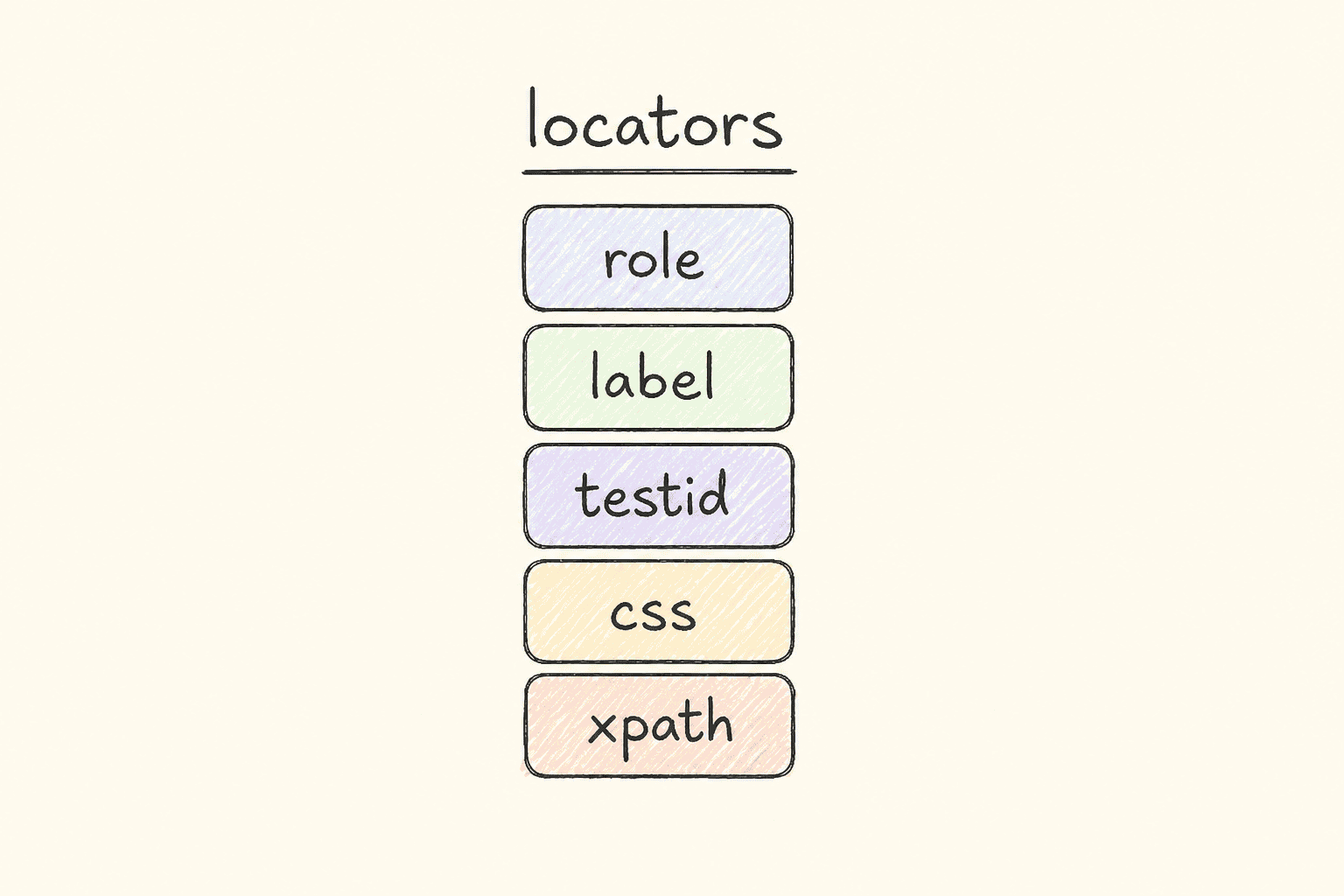
This is Day 11 of the 21-day JS to Playwright Framework series. One lesson a day. JavaScript first. TypeScript next. Playwright Test now.
Days 1–7 were the language. Day 8 was the object model. Day 9 typed that object. Day 10 installed Playwright, launched a context, and wrote the first specs from tests/01_Basics and tests/02_first_tests. Today we stop treating the page as a URL with a title. Today we find a field, type into it, click a button, and read an error.
I am Pramod Dutta. I teach SDETs in India for a living. The week I open locators, someone always pastes an XPath they copied from Chrome DevTools. It works on their laptop. It fails on CI because the div[4] moved. That is not a Playwright problem. That is a locator-priority problem.
This is not the existing 21-Day Playwright with TypeScript Challenge. That series starts later in the stack. This series started at console.log. Day 11 is the first day the spec has to *see* the page the way a user does.
All labs come from my public fundamentals repo: LearningPlaywrightFundamentals on branch main, folder tests/03_Locators_Commands. I fetched the module README, 219_Commands.spec.ts through 227_Cookie.spec.ts, and the local index.html fixture from raw GitHub. I quote those files. I will not invent a file that is not there.
Classroom spellings stay. The referer lab is 221_Reffer_Command.spec.ts — two f’s, as GitHub serves it. A comment in the VWO spec says Css Seecltor. I do not rename the file to make this post prettier.
If you want the video plus project path after you finish these 21 posts, the course is here: Playwright Automation Mastery. The series hub for every day lives here: JavaScript to TypeScript to Playwright Advanced Framework 21-Day Guide.
*Want to master this with real projects? Join the Playwright Automation Mastery course at The Testing Academy.*
Contents
What you will be able to do after Day 11
By the end of this post you can:
- Call
page.gotowith awaitUntilyou chose on purpose —commit,domcontentloaded,load, ornetworkidle— and say which one the default is. - Send a
refereron one navigation, and send aRefererheader for an entire browser context. - Create a locator *before* you act on it, and explain why that line does not search the DOM yet (lazy, strict, auto-wait).
- Prefer
getByRolefor a link or a button with an accessible name. - Fall back to CSS (
#id, child combinators,first()/nth()/last()) when the a11y tree is thin. - Treat
xpath=as a last resort, not a default, even though the classroom has a VWO XPath lab. - Type like a human with
pressSequentially, thengoBackthrough history. - Read cookies from a context and add a cookie with
name,value,domain, andpath. - Run the VWO login lab against
https://app.vwo.com/#login, fill bad credentials, and assert the exact error string the spec expects. - Open the local
index.htmlfixture and see why role and label beat a missing id.
That is the skill. Not the selector. The skill is picking the locator a designer cannot break by wrapping one more <div>.
The labs we are actually using
Clone the fundamentals repo and stay on main:
git clone https://github.com/PramodDutta/LearningPlaywrightFundamentals.git
cd LearningPlaywrightFundamentals
git checkout main
Module 03 lives at tests/03_Locators_Commands/. The module README lists every file I use today. Those files, as GitHub serves them:
README.md— module index, run commands, the note that several specs need network access219_Commands.spec.ts—page.gotowithwaitUntilmodes220_GotoCommands.spec.ts— defaultgoto, URL assertion, per-navigationreferer221_Reffer_Command.spec.ts— context-levelRefererheader (filename isRefferonmain)222_Automation.vwo.com.spec.ts— CSS id locators on the VWO login page223_Xpath.spec.ts— same VWO login with one XPath username field224_GetRole.spec.ts—getByRoleon the CURA demo site225_CSS_Locators.spec.ts— CSS child selectors plusfirst(),nth(),last(), and a loop226_PressSequentially.spec.ts— sequential typing,waitForTimeout,goBack227_Cookie.spec.ts—context.cookies()andcontext.addCookies()index.html— local login-page fixture for locator practice
I am not opening tests/04_Session_Storage today. That is Day 12. I am not inventing a getByTestId spec that this folder does not have. getByTestId is in the priority diagram because Playwright’s own locator guide puts it there. The file that *exists* for user-facing locators in this module is 224_GetRole.spec.ts.
Run the whole module, from the README:
npx playwright test tests/03_Locators_CommandsOne lesson file:
npx playwright test tests/03_Locators_Commands/224_GetRole.spec.tsHeaded, so you can watch the cursor:
npx playwright test tests/03_Locators_Commands --headedPublic demo sites need network. 219 uses https://app.com/pageN placeholders — those URLs are classroom shapes, not a live product. I will say that again when we open the file.
Why locators are the first framework decision
Day 10 gave you page. Day 11 asks what page is allowed to touch.
A bad locator is a time bomb. I have reviewed suites where every click is page.locator("xpath=//div[3]/div[1]/input[2]"). The author is proud they did not need an id. Then a designer adds a banner. Index 3 becomes 4. Fifty tests fail. The product did not break. The locator did.
Playwright does three things that Selenium-era muscle memory fights:
- Lazy.
page.locator("#login-username")does not search the DOM. It stores a query. The search happens when youfill,click,textContent, orexpect. - Strict. If the locator resolves to two elements, Playwright throws. Selenium clicked the first and smiled. Strict mode is a gift. Two matches means your selector is a lie.
- Auto-wait.
click()waits for attached, visible, stable, enabled, and receiving events. You do not writesleep(3000)to “let the button appear” — unless the classroom lab still has awaitForTimeout, which two files today do. I will point at those lines. I will not pretend they are the production habit.
The VWO specs in this folder even title the test "locators are lazy, strict, and auto-wait". That string is copied across 222, 223, 224, 225, 226, and 227. Classroom copy-paste. The title is still the lesson.
Locator priority — write this on the wall
Playwright’s own guide and this series agree. The diagram at the top of this post is the rule I want in every PR:
getByRole— button, link, textbox, heading, checkbox, plus the accessible name a user already sees.getByLabel— the<label>text next to a field.getByTestId—data-testidwhen the page has no accessible name and you own the markup.- CSS —
#id,.class, child combinators,nth(). Use when the id is stable and the a11y tree is empty. - XPath — last resort. Attribute axes are better than index axes. Still last.
This folder does not contain a getByLabel spec or a getByTestId spec. I am not inventing those files. Lab 224 is the role habit. Labs 222 and 225 are the CSS habit. Lab 223 is the XPath fallback, and I teach it as a fallback even though the filename is a first-class lab.
If you remember one sentence from Day 11: if a tester can find the control by role and name, Playwright should too.
*Want the locator priority drilled on a live VWO plus CURA project, not a blog tab? The Playwright Automation Mastery course is the classroom version of this path.*
Lab 219 — goto is a contract, not a URL
File: tests/03_Locators_Commands/219_Commands.spec.ts.
Navigation is the first command in every spec. Most people write await page.goto(url) and move on. Playwright still has to decide *when* the promise resolves. That decision is waitUntil.
The file, as it sits on main:
import { test, expect } from '@playwright/test';

test("goto with different waitUntil options", async ({ page }) => {

  await page.goto("https://app.com/page1", { waitUntil: "commit" });
  console.log("commit: server responded");

  // Wait for HTML to be parsed
  await page.goto("https://app.com/page2", { waitUntil: "domcontentloaded" });
  console.log("domcontentloaded: HTML parsed");

  // DEFAULT — wait for everything (images, CSS, scripts)
  await page.goto("https://app.com/page3", { waitUntil: "load" });
  console.log("load: all resources loaded");

  // SLOWEST — wait for all network activity to stop
  await page.goto("https://app.com/page4", { waitUntil: "networkidle" });
  console.log("networkidle: no requests for 500ms");

});
Four modes. Four comments. I keep the comments because they are the lecture.
waitUntil | What “navigated” means | When I use it |
|---|---|---|
commit | The server responded. Navigation committed. HTML may not be parsed. | Rare. You need the response, not the UI. |
domcontentloaded | The HTML is parsed. Scripts and images may still be in flight. | Fast pages where the form is in the first HTML. |
load | The load event fired — images, CSS, scripts that block load. | Default. Lab 220 says so out loud. |
networkidle | No network connections for 500 ms. | SPAs that keep polling. Also the slowest, and the one that flakes when a websocket never idles. |
The URLs are https://app.com/page1 through page4. Those are placeholders. They are not a product I run in class. If you execute 219 against the public internet, you are testing whether app.com still answers, not whether waitUntil works. Read the file as a menu of options. Use a real base URL from your own playwright.config.ts when you copy the pattern.
expect is imported and unused. Classroom leftover. I do not invent an assertion to “finish” the file.
Why this belongs in a locator day: a locator that auto-waits still needs the document to exist. commit plus fill on a missing input is a timeout, not a smart wait. Match the navigation contract to the moment the control is in the tree.
Lab 220 — default goto, then one referer
File: tests/03_Locators_Commands/220_GotoCommands.spec.ts.
Two tests. First, the default:
test("simple goto — uses load by default", async ({ page }) => {
  // No waitUntil specified — defaults to "load"
  await page.goto("https://example.com");

  let title = await page.title();
  console.log("Title:", title);

  await expect(page).toHaveURL("https://example.com/");
  console.log("URL verified ✅");
});
example.com is a real, stable page. toHaveURL("https://example.com/") includes the trailing slash. Playwright’s URL assertion is exact unless you pass a regex. I have failed interviews for people who asserted https://example.com and lost to the slash. Read the string in the file.
Second test, a per-navigation referer:
test("navigate with custom referer", async ({ page }) => {
  // Tell the server "user came from Google"
  await page.goto("https://app.com/landing", {
    referer: "https://google.com/search?q=testing+academy"
  });

  console.log("Page loaded with Google as referer");
  console.log("URL:", page.url());
});
referer here is an option on goto, lowercase, one navigation. The landing URL is again app.com — placeholder. The idea is the one you will reuse: some marketing pages change hero copy based on the Referer header. A test that always arrives “from nowhere” never sees that hero.
Option vs header: lab 220 sets referer on one goto. Lab 221 sets it on the context so every request carries it. Do not mix them up in a code review.
Lab 221 — Reffer is the filename, Referer is the header
File: tests/03_Locators_Commands/221_Reffer_Command.spec.ts.
I did not typo the heading. The file on main is 221_Reffer_Command.spec.ts. Two f’s. I use that name.
import { test } from "@playwright/test";

test("set referer for entire context", async ({ browser }) => {
    let context = await browser.newContext({
        extraHTTPHeaders: {
            "Referer": "https://thetestingacademy.com"
        }
    });

    let page = await context.newPage();
    await page.goto("https://app.vwo.com/#login");
    console.log("Page 1 — partner referer included");

    await page.goto("https://katalon-demo-cura.herokuapp.com/profile.php#login");
    console.log("Page 2 — partner referer included");
});
Day 10 taught browser → context → page. This lab uses that hierarchy for a reason. extraHTTPHeaders lives on the context. Every navigation from this page — VWO login, then CURA profile — sends Referer: https://thetestingacademy.com.
This is the first time today we open VWO and CURA. We will come back to both with locators. Here we only prove the header rides along.
Cleanup: the test never calls context.close(). Playwright Test still tears the context down at the end of the test when you created it from the browser fixture. I still close contexts in a framework. I am not adding a close() that this file does not have.
No expect in this file. The import is only test. The assertion is a console.log. That is the classroom. Tomorrow’s storage labs will start asserting dashboards. Today we watch the header.
Locators are lazy — the sentence every VWO spec repeats
Before I open 222, I want the three words in the test title to mean something.
Lazy. This line does not talk to the browser:
let usernameField = page.locator("#login-username");You can create that locator on a blank page. Playwright stores { css: "#login-username" }. The query runs when you fill. That is why you can declare locators in a constructor (Day 16 POM) before goto. The handle is a query, not a WebElement from 2014.
Strict. Two #login-username nodes and fill throws. You do not silently type into the first. If the page has two, your selector is wrong or the page is wrong. Fix the selector or use .first() on purpose, the way lab 225 does when the match is a *collection*.
Auto-wait. fill waits until the input is actionable. You do not waitForSelector then fill as two steps unless you have a reason. The reason is rarely “I used Selenium last year.”
Keep those three in your head. The VWO labs are the demo.
The local fixture — index.html has no ids on purpose
File: tests/03_Locators_Commands/index.html.
The module README calls this a “local login-page fixture for locator practice.” It is a static VWO-shaped form. I fetched the raw HTML. I will not invent id="login-username" on it.
What the body actually contains:
- An
h1:Welcome to the app.vwo.com : Login - A
<label>Username</label>then<input type="email" placeholder="admin@admin.com"> - A
<label>Password</label>then<input type="password" placeholder="Enter password"> - A link
.forgotwith textForgot Password? - A checkbox with a sibling
<span>Remember me</span>(the checkbox has no accessible name of its own) - A
<button type="submit">Sign in</button>
There is no id. There is no name. There is no data-testid. The <label> tags do not use for and they do not wrap the inputs. That is the honest fixture.
So what works on this page?
page.getByRole("button", { name: "Sign in" })— yes. Rolebutton, name from the text.page.getByRole("link", { name: "Forgot Password?" })— yes.page.getByRole("heading", { name: /Welcome to the app.vwo.com/ })— yes.page.getByPlaceholder("admin@admin.com")— yes. Placeholder is in the markup.page.getByLabel("Username")— maybe not. Playwright’s label engine wantsfor/id, a wrapping label, oraria-labelledby/aria-label. A sibling<label>with noforis a visual label, not an accessible name. I do not invent a passinggetByLabelspec for a fixture that does not associate the label.page.locator("#login-username")— no. That id is on the *live* VWO app, not this file.
This is why I put index.html next to the VWO labs. The live app has ids. The fixture has roles and placeholders. A locator strategy that only knows #id cannot practice on the fixture. A locator strategy that starts at getByRole can.
Serve it however you already serve static files in this repo. I am not inventing a npx serve script that the module README does not list. The README’s run commands target the .spec.ts files, and those specs hit live URLs. The HTML is the classroom prop for “what would you write if there was no id.”
Lab 222 — VWO login with CSS ids
File: tests/03_Locators_Commands/222_Automation.vwo.com.spec.ts.
This is the lab I run on a projector.
import { test, expect } from "@playwright/test";

test("locators are lazy, strict, and auto-wait", async ({ page }) => {
  await page.goto("https://app.vwo.com/#login");

  // Rule 2 - Css Seecltor
  // id -> #
  // class -> .

  // Create locators — nothing happens yet (lazy)
  let usernameField = page.locator("#login-username");
  let passwordField = page.locator("#login-password");
  let loginButton = page.locator("#js-login-btn");

  // NOW Playwright finds the element and acts (auto-wait)
  await usernameField.fill("admin");
  await passwordField.fill("pass123");
  await loginButton.click();

  console.log("All actions completed ✅");

  let error_message = page.locator('#js-notification-box-msg');
  // error_message.getByText()
  await expect(error_message).toContainText("Your email, password, IP address or location did not match");
});
I leave Css Seecltor in the comment. That is the file.
What the spec actually does:
- Navigate to
https://app.vwo.com/#login. Hash route. The login form is a client-rendered view. DefaultwaitUntil: "load"plus locator auto-wait is enough for these ids in the classroom. If VWO’s bundle gets heavier, this is wheredomcontentloadedvsloadfrom lab 219 stops being academic. - Declare three locators. No search yet.
fill("admin")/fill("pass123")/click(). Bad credentials on purpose. We are testing the error path, not stealing a session.- Assert the notification box contains the exact classroom string:
Your email, password, IP address or location did not match.
error_message.getByText() is commented out. I do not uncomment it. toContainText on the locator is the assertion the file runs.
CSS rules the comment teaches:
id→#login-usernameclass→.plus the class name (not used in the live locators here)
Why CSS is allowed here: VWO’s login ids have been stable in this course for years. #js-login-btn is a contract. When an id is a public, durable name, CSS is honest. When an id is input_37_a8f, CSS is a coin flip. Role still wins if the button says “Sign in” in the a11y tree.
A production rewrite I would make *in a different file, later in this series*, is a LoginPage with readonly locators. Day 16. I will not invent LoginPage.ts inside module 03. This spec is inline on purpose.
Network: this test hits the real VWO login. No credentials that work. The assertion is the error. If VWO changes the copy, the spec fails. That is a product-copy contract, not a flake. Update the string when the product updates the string. Do not toContainText("not match") to get a green tick.
Lab 223 — XPath on the same login, last resort
File: tests/03_Locators_Commands/223_Xpath.spec.ts.
Same test title. Same VWO URL. Same password CSS. Same button CSS. Same error assertion. One line changes.
// let usernameField = page.locator("#login-username");

let usernameField = page.locator("xpath=//input[@data-qa='hocewoqisi']")
The CSS username line is commented out. The replacement is an XPath that targets data-qa='hocewoqisi'. That attribute is a QA hook on the live page. The xpath= prefix tells Playwright the string is XPath, not CSS.
I teach this file as a warning, not a style guide.
Why it is in the repo: you will meet pages with no role, no label, no id, and a data-qa attribute. XPath can reach that attribute. CSS can too — input[data-qa="hocewoqisi"] is a CSS attribute selector. The classroom chose XPath so you see the xpath= prefix once.
Why it is last resort:
//div[3]//input[2]dies when the layout changes. Lab 223 is not that bad — it uses an attribute, not an index — but the *habit* of opening DevTools → Copy XPath produces the index kind.- XPath is a different language in the same string slot. Reviewers miss typos. CSS reviewers are more common on a frontend team.
- Playwright’s getBy* engines retry and pierce better with roles than with a raw XPath you copied at 1 AM.
If I have data-qa, I prefer CSS attribute or, better, ask the team to expose data-testid and use getByTestId. I do not have a getByTestId file in this folder. I am saying the priority, not inventing the spec.
The rest of 223 is a carbon copy of 222. Password stays #login-password. Button stays #js-login-btn. That is the tell: even the XPath lesson only XPath’d one field. The author did not believe XPath enough to use it three times. Neither should you.
Lab 224 — getByRole is the default I want in your PR
File: tests/03_Locators_Commands/224_GetRole.spec.ts.
Shortest spec in the module. Most important habit.
import { test, expect } from "@playwright/test";

test("locators are lazy, strict, and auto-wait", async ({ page }) => {
  await page.goto("https://katalon-demo-cura.herokuapp.com/");

  await page.getByRole("link", { name: 'Make Appointment', disabled: false }).click();
});
CURA Healthcare is a public demo. The landing page has a link whose accessible name is Make Appointment. Role link. Not disabled.
getByRole("link", { name: "Make Appointment" }) is how a screen-reader user finds that control. If the designer wraps the text in a <span> or changes the CSS class, the role and the name stay. If they change the visible text, the test fails — and it should, because the product copy changed.
disabled: false is an option in the file. It filters out a disabled link with the same name. CURA’s landing link is enabled. The option documents that roles have states.
expect is imported and unused. No URL assertion after the click. In class I watch the navigation to the login hash. I am not inventing toHaveURL(/#login/) in this post and calling it part of 224.
Map this back to index.html:
await page.getByRole("button", { name: "Sign in" }).click();
await page.getByRole("link", { name: "Forgot Password?" }).click();
Those two lines are not in a spec in this folder. They are the role-first reading of the fixture. I am not adding a new file. I am showing why 224 is the habit you take to every other page.
Roles you will use this week: button, link, textbox, checkbox, heading, img, dialog. Name is the accessible name, not the CSS class. Exact match is the default; pass { name: /partial/i } when the product adds a trailing icon character. 224 uses an exact string.
Lab 225 — CSS collections, first / nth / last
File: tests/03_Locators_Commands/225_CSS_Locators.spec.ts.
Role locators shine on *one* control. Lists need a collection. This lab is the collection.
await page.goto("https://awesomeqa.com/css/");

const allSpans = page.locator("div.first > span");
const count = await allSpans.count();

console.log(count);

const span1 = await allSpans.first().textContent();
const span2 = await allSpans.nth(1).textContent(); // "Span 2"
const span3 = await allSpans.nth(2).textContent(); // "Span 3!"
const span5 = await allSpans.nth(4).textContent(); // "Span 5!"
const lastSpan = await allSpans.last().textContent(); // "Span 7!"
div.first > span is a child combinator. Direct span children of div.first. > is not a descendant. A nested span inside another wrapper would not match. That is the CSS lesson.
Then the locator API for lists:
| Call | Meaning | Zero-based? |
|---|---|---|
count() | How many matches right now | — |
first() | Index 0 | yes |
nth(1) | Second match | yes. nth is 0-based. |
nth(4) | Fifth match | comment in the file says "Span 5!" |
last() | Final match | comment says "Span 7!" |
nth(1) is the second element. I have failed PRs that treated nth(1) as “the first.” Selenium’s nth-of-type(1) is 1-based CSS. Playwright’s nth(1) is 0-based. Say it out loud in the review.
The file then has this line, exactly:
page.locator().click();Empty locator. No await. I do not invent a selector to make it compile in your head. It is in the classroom file. If you run 225 and this line throws, that is the file, not a surprise I hid. I am not editing GitHub from this blog.
Then the loop — Day 4 arrays, Day 7 async, now on a locator:
for (let i = 0; i < count; i++) {
  let span_ith = await allSpans.nth(i).textContent();
  console.log(span_ith);
}
count was captured earlier. If the DOM changes mid-loop, you iterate a stale number. For this static demo page that is fine. For a