
Day 3: JavaScript Control Flow — if/else, Switch, and Real Test Branches
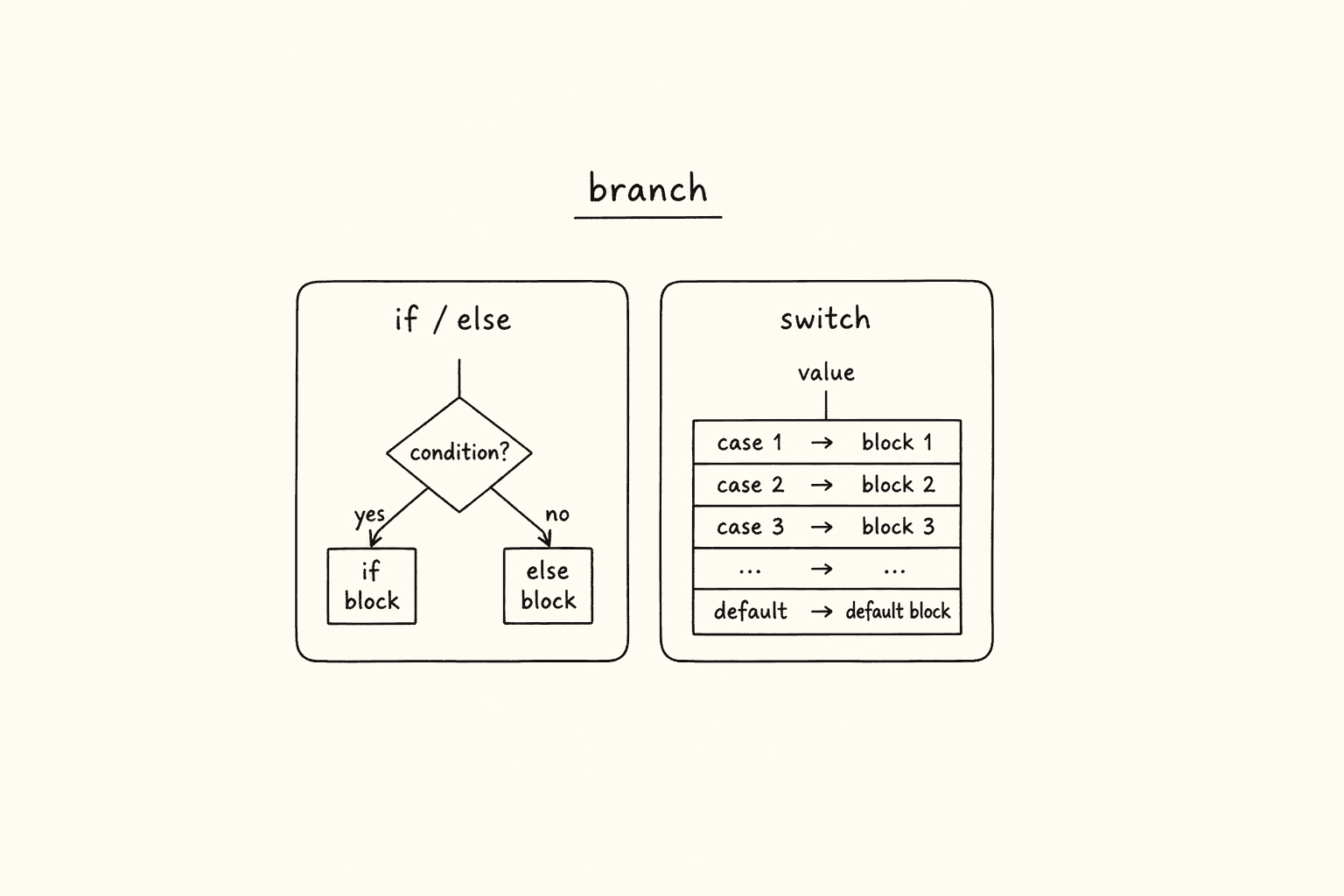
<!– DIAGRAM_PROMPT Compact Excalidraw-style diagram, landscape 16:9, white background, thin black strokes, muted teal / amber / gray fills only. No 3D. No shadows. No stock photos. Small enough to sit above the fold as one blog figure.
Title (hand-lettered, 18px): “if / else vs switch — pick the branch your test needs”
LEFT CARD — title “if / else if / else”:
- Diamond: status === 200
- Yes arrow → teal box “assert OK body”
- No arrow → diamond status === 401
- Yes → amber box “re-auth / skip”
- No → gray box “fail loud with status”
Footer of left card (tiny): “Use for ranges, AND/OR, nested roles”
RIGHT CARD — title “switch (value)”:
- Rounded box “statusCode”
- Stacked cases: 200 / 201 / 204 grouped “success”
- 401 / 403 grouped “auth”
- 404 “not found”
- default “unknown — fail loud”
Footer of right card (tiny): “Use for discrete codes, browsers, env names”
BOTTOM RULE (one line): “Ranges + nested roles → if/else. Discrete values → switch + break + default.” –>
This is Day 3 of the 21-day JS to Playwright Framework series. One lesson a day. JavaScript first. TypeScript next. Playwright after that. A production framework by Day 21.
On Day 1 we put values in boxes — let, const, hoisting. On Day 2 we compared those values — operators, == versus ===. Today the script starts to decide.
A test that cannot decide is not a test. It is a recording. Real suites branch on HTTP status, on process.env.ENV, on browserName, on whether the user is a viewer or an admin. That is control flow. If you skip this day, every later Playwright helper you write will be a pile of happy-path console.log statements that collapse the first time staging returns 401.
The labs are not invented. They live in my LearningPlaywrightBatch repo:
chapter_05_Statements/—33_Statement.jsthrough41_IQ.jschapter_06_Switch_Statements/—42_Switch.jsthrough52_User_Input.js
Open those files. Run them with node. Then come back here and I will map every branch to a Playwright decision you will write for the rest of this series.
*Want to master this with real projects? Join the Playwright Automation Mastery course at The Testing Academy.*
Contents
What you will be able to do after Day 3
By the end of this post you can:
- Write a clean
if / else if / elsechain and explain why order matters. - Nest a role check inside a login check the way
app.vwo.comactually works. - Branch on an API status code without the
==trap from Day 2. - Use
switchwithbreak,default, and grouped cases. - Spot the interview bugs: missing
break, duplicatecase,"5"versus5,0versusfalse, empty array is truthy. - Pick
if/elseorswitchon purpose when the input is a status, an env name, or a browser.
That is the skill. Not the syntax. The skill is choosing the right branch and failing loud when no branch matches.
A statement is a decision, not a sentence
JavaScript is a sequence of statements. An expression produces a value. A statement *does* something with that value — declare, assign, return, or take a branch.
let age = 20;          // statement: create a binding
age > 18               // expression: produces true or false
if (age > 18) { ... }  // statement: choose a path
In a Playwright spec the same split shows up every five lines:
const status = response.status();          // statement
status === 200                             // expression
if (status === 200) {                      // statement — now the test decides
  await expect(response).toBeOK();
}
If you treat every line as “just code,” you will put side effects inside conditions and forget the else. Testers who write production suites treat the condition as a contract: this path is success, that path is auth, that path is “I do not know this status — fail and show me the body.”
Lab 33 — the smallest useful branch
File: chapter_05_Statements/33_Statement.js
let age = 20;

if (age > 18) {
  console.log("Yes, Goa");
} else {
  console.log("Go home!");
}
This is the whole idea. One condition. Two worlds. Age is greater than 18, or it is not. There is no third road in this lab, and that is the point: start with a binary gate before you invent a ladder.
How I use the same shape in a test. Feature flags, adult-only flows, “is this environment allowed to hit production data”:
const env = process.env.ENV ?? "local";

if (env === "prod") {
  test.skip(true, "Do not run destructive cart tests on prod");
} else {
  // staging / local — proceed
}
Same skeleton as Goa versus home. The condition is a boolean. The braces stay. The else is written even when it only logs, because six months later someone will add a third environment and they need a place to hang it.
Rules I enforce in code review:
- Always wrap the body in
{ }. We will see why in lab 39. - Prefer
===inside the condition. Day 2 is not optional. - Name the boolean so the
ifreads like English:if (isAdult),if (isProd),if (isLoggedIn).
Lab 34 — else if is a ladder, not a pile of ifs
File: chapter_05_Statements/34_If_else_If.js
let score = 78;

if (score >= 90) {
  console.log("Grade: A — Excellent");
} else if (score >= 80) {
  console.log("Grade: B — Good");
} else if (score >= 70) {
  console.log("Grade: C — Average");
} else if (score >= 60) {
  console.log("Grade: D — Below Average");
} else {
  console.log("Grade: F — Fail");
}
Score 78 prints Grade: C — Average. Walk it:
78 >= 90? No.78 >= 80? No.78 >= 70? Yes. Stop. The rest of the ladder is dead.
Order is the test. If I put score >= 70 first, every 95 becomes a C. I see this exact bug when people grade HTTP statuses as ranges:
// WRONG — 201 is "created", but 200-range check must come in the right order
if (status >= 200) {
  // this also swallows 404 if you are sloppy later
}
The Playwright version of a grade ladder is severity, pass rate, or retry budget:
function gradeRun(passRate) {
  if (passRate >= 0.99) return "release";
  else if (passRate >= 0.95) return "warn";
  else if (passRate >= 0.80) return "block-hotfix";
  else return "block-release";
}
Same lab. Different nouns. The else at the bottom is the fail-loud default. Never let an ungraded score fall through as undefined.
Lab 35 — nested if is how real products work
File: chapter_05_Statements/35_REAL_LIVE_Example.js
This is the first lab that looks like a product, not a textbook. I use app.vwo.com in class: viewer, editor, admin.
let isLoggedIn = true;
let userRole = "editor";
// app.vwo.com -> viewer, editor or admin ->
// viwer = limited view
// editor can edit and view
// admin can do all the things

if (isLoggedIn) {
  if (userRole === "admin") {
    console.log("admin can do all the things");
  } else if (userRole === "editor") {
    console.log("Welcome Editor — Edit access granted.");
  } else if (userRole === "viewer") {
    console.log("Welcome Viewer — Read-only access.");
  } else {
    console.log("No idea which role you are !");
  }
} else {
  console.log("You are not logged in!!");
}
Two questions, in this order:
- Are you in the building? (
isLoggedIn) - Which badge are you wearing? (
userRole)
You do not ask about the badge if the person is standing on the street. That is why the role ladder is nested. A flat if (userRole === "admin") without the login gate will “pass” an admin assertion on a logged-out session if the default role string happens to be hanging around from the previous test. I have failed that review comment more times than I can count.
Playwright mapping — same nest, real locators later in the series:
test("editor can open the campaign editor", async ({ page }) => {
  const isLoggedIn = await page.getByRole("button", { name: "Logout" }).isVisible();

  if (!isLoggedIn) {
    throw new Error("Precondition failed: user is not logged in");
  }

  const role = process.env.USER_ROLE ?? "viewer";

  if (role === "admin" || role === "editor") {
    await expect(page.getByRole("button", { name: "Edit" })).toBeVisible();
  } else if (role === "viewer") {
    await expect(page.getByRole("button", { name: "Edit" })).toHaveCount(0);
  } else {
    throw new Error(`Unknown USER_ROLE: ${role}`);
  }
});
Notice the last else. Lab 35 already has it: "No idea which role you are !". That sentence is more valuable than the happy path. Unknown role is a data bug. Fail. Do not pretend they are a viewer.
Lab 36 — API status branching, and the Day 2 landmine
File: chapter_05_Statements/36_API_IF_ELSE.js
let statusCode = 200; // APIs are working fine

if (statusCode == 200) {
  console.log("Working fine!");
} else if (statusCode == "404") {
  console.log("not found!");
} else {
  console.log("Not mathcing status code!");
}
I leave this file in the batch on purpose. It is a trap.
statusCodeis the number200.- The 404 branch compares against the string
"404". - The operator is
==, not===.
If someone later writes statusCode = "200" from a header or a CSV, == 200 still passes. If they write statusCode = 404 as a number, == "404" also passes because == coerces. Your test is green. Your mental model is a lie.
Playwright’s APIResponse.status() returns a number. Keep it a number. Compare with ===.
import { test, expect } from "@playwright/test";

test("Restful Booker ping branches on status", async ({ request }) => {
  const response = await request.get("https://restful-booker.herokuapp.com/ping");
  const statusCode = response.status();

  if (statusCode === 201) {
    // ping is created
  } else if (statusCode === 200) {
    // some stacks return 200
  } else if (statusCode === 404) {
    throw new Error("Ping route missing — environment is wrong");
  } else {
    throw new Error(`Unexpected ping status: ${statusCode} body=${await response.text()}`);
  }
});
Three habits from this lab:
===only.- Do not quote a status unless the API literally returned a string — and then convert it with
Number(status)once, up front. - The final
elsemust include the actual status (and ideally the body)."Not matching"without the number is how juniors waste an hour.
We will do a cleaner switch version of this same idea in lab 45.
Lab 37 — interview: what is truthy inside if ()
File: chapter_05_Statements/37_IQ_IF_ESLE.js — yes, the filename is IF_ESLE. The batch is a classroom, not a linter.
// true
if ("hello") console.log("String is truthy"); // "hello" = truthy
if (42) console.log("Number is truthy");
if ({}) console.log("Empty object is truthy!");
if ([]) console.log("Empty array is truthy!");

// false results
if ("") console.log("Won't print"); // "" -> falsy result
if (null) console.log("Won't print");
if (undefined) console.log("Won't print");
if (NaN) console.log("Won't print");
if (0) console.log("Won't print");
Memorize the six falsy values. Write them on a sticky note if you have to:
false, 0, "", null, undefined, NaN.
Everything else is truthy. Including []. Including {}. Including "false". Including "0".
This destroys automation in three places I keep seeing:
1. Empty locator lists. page.locator(".row").all() returning [] is truthy. if (rows) will not tell you the table is empty. Use rows.length === 0.
2. Status 0. A failed request in some clients gives status = 0. if (status) is false, so you skip both the success branch and the “we got a status” branch. Check status === 0 explicitly.
3. Empty error text. if (errorMessage) is a decent “do we have a string” check. if (errorMessage !== "") is clearer. I want the next reader to know I meant “non-empty string,” not “any truthy junk.”
Playwright assertion style — do not reinvent boolean checks the runner already has:
await expect(page.getByRole("row")).toHaveCount(0); // empty table
await expect(response).toBeOK();                    // 200–299
expect(response.status(), "auth failed").toBe(401);
toBeOK() is an if (status >= 200 && status < 300) that the framework already wrote for you. Use it. Write your own if when the product has a *custom* contract — “create must be 201, not 200.”
Lab 38 — AND, OR, and the locked account
File: chapter_05_Statements/38_Logical_Op_IF_ELSE.js
let username = "Dev";
let password = "secure123";
let isAccountLocked = true;

if ((username === "Dev" && password === "secure123") && !isAccountLocked) {
  console.log("Allowed to enter");
} else {
  console.log("not allwed to enter");
}
Credentials match. Account is locked. Output: not allwed to enter.
This is the login precondition every banking app in this series will need. Username and password are not enough. You also need !isAccountLocked, isEmailVerified, isMfaComplete. One && chain. One else.
In Playwright I still keep the chain, but I name the pieces so the failure is readable:
const credentialsOk = username === "Dev" && password === "secure123";
const canEnter = credentialsOk && !isAccountLocked;

if (!canEnter) {
  throw new Error(
    `Login blocked. credentialsOk=${credentialsOk} locked=${isAccountLocked}`
  );
}
Do not write if (a && b && c && d && e) with no names. When it fails on CI at 2 a.m., you want the log to say *which* boolean flipped.
Short-circuit reminder from Day 2: && stops at the first falsy. || stops at the first truthy. That is why process.env.BASE_URL || "http://localhost:3000" works — and why process.env.RETRIES || 2 is dangerous if retries can be 0. Use ?? when 0 is a real value. We will lean on that again on Day 17 when we write the config layer.
Lab 39 — the missing-brace interview
File: chapter_05_Statements/39_IQ.js
let x = 10;
if (x > 5)
  console.log("x is big");
This runs. x is big prints. Interviewers then add a second line:
if (x > 5)
  console.log("x is big");
  console.log("this always runs"); // NOT inside the if
Only the first statement belongs to the if. The second is a sibling. In a test that looks like this:
if (status === 200)
  console.log("ok");
  await expect(body.id).toBeDefined(); // always runs, even on 500
you get a false failure or a false pass depending on what body is. Always use braces. I do not care that the language allows you to skip them. Classroom lab 39 exists so you fail this question once, in training, not in a release suite.
Lab 40 — the empty helper is the real lesson
File: chapter_05_Statements/40_REAL_IF_ELSE.js
This is the entire file:
// function validateForm(email, password) {
// return true;
// }
I am not going to pretend there are 40 more lines in GitHub. The file is a stub. That is the teaching moment.
Beginners extract validateForm, hard-code return true, and then write 15 Playwright tests on top of a helper that never rejects a bad email. The suite is green. Production accepts "not-an-email". The helper lied.
Finish the function. Do not leave it commented. A honest first version:
function validateForm(email, password) {
  if (typeof email !== "string" || !email.includes("@")) {
    return false;
  }
  if (typeof password !== "string" || password.length < 8) {
    return false;
  }
  return true;
}
Then drive it from a Playwright form test later in the series:
if (!validateForm(email, password)) {
  await expect(page.getByText("Invalid credentials")).toBeVisible();
} else {
  await expect(page).toHaveURL(/dashboard/);
}
The branch belongs to the product rule, not to “the function exists.” If the helper cannot say no, delete it.
Lab 41 — three interview cases in one file
File: chapter_05_Statements/41_IQ.js
if ([]) {
  console.log("True!");
}
// case 1
let response;
if (response) {

}
// case 2
if (response !== null) {

}

if (true) {

} else if (false) {

}
// else{
// }
Unpack it the way I do in class.
Empty array. [] is truthy. Printed: True!. We already covered this in lab 37. If you are checking “did the API return rows?”, check Array.isArray(response) && response.length > 0.
Case 1 — if (response). response is declared, never assigned. It is undefined. The body does not run. This is the “I forgot to await the API” bug. In Playwright: let response; if (response) after a failed goto looks the same. Always assign from await request.get(...) before you branch.
Case 2 — if (response !== null). undefined !== null is true. So this body does run, even though nobody set response. That is why I hate != null used as a sloppy “is it there?” check when you have not decided whether the empty state is null or undefined. Pick one. In this series, missing API body is undefined until parse, null only if the server sent JSON null. Compare with === against the one you mean.
Dead else if (false). If the first branch is if (true), the else if is unreachable. Interviewers ask “can I put code there?” You can. It will never run. Same as a Playwright if (true) { test.skip() } else { /* your actual test */ } — congratulations, you never test.
The commented else at the bottom of the file is another nudge: write the else, even if you think the if is exhaustive. Exhaustive ifs rot the week a new status appears.
When the value is discrete, stop stacking else if — use switch
if / else if is perfect for ranges (score >= 90) and compound booleans (isLoggedIn && role === "admin"). It gets ugly when the input is one of a known list: day number, HTTP status, browser name, env name.
That is chapter 06.
JavaScript switch compares with strict equality (===). Remember that. Labs 50 and 51 exist only to burn it in.
Lab 42 — switch with break, the happy path
File: chapter_06_Switch_Statements/42_Switch.js
// 0 - Sunday, 1 - Monday, 2 - Tue.....
let day = 2;
switch (day) {
  case 0:
    console.log("Sunday — Rest Day");
    let a = 10;
    let b = 30;
    console.log(a + b);
    break;
  case 1:
    console.log("Monday — Sprint Planning");
    break;
  case 2:
    console.log("Tuesday — Development");
    break;
  case 3:
    console.log("Wednesday — Code Review");
    break;
  case 4:
    console.log("Thursday — Testing");
    break;
  case 5:
    console.log("Friday — Deployment & Retro");
    break;
  case 6:
    console.log("Saturday — Rest Day");
    break;
  default:
    console.log("Invalid day value");
}
day = 2 prints Tuesday — Development and stops. break is the stop sign.
Playwright already thinks in days and slots when you schedule a nightly vs a smoke. More useful: map a numeric job index or a cron day to a suite tag.
const day = new Date().getDay(); // 0–6, same convention as the lab
switch (day) {
  case 1:
    process.env.GREP = "@smoke";
    break;
  case 5:
    process.env.GREP = "@deploy-smoke";
    break;
  case 0:
  case 6:
    process.env.GREP = "@weekend-canary";
    break;
  default:
    process.env.GREP = "@regression";
}
case 0 in the lab also shows you can run multiple statements inside a case — let a, let b, a log. Those let bindings are scoped to the whole switch block, which is why a second let a in another case can throw "Identifier has already been declared". If two cases need their own locals, wrap each case body in { } extra braces. Interviewers love that one. We will see a cousin in lab 49.
Lab 43 — the file is named “with Break” and it has no break
File: chapter_06_Switch_Statements/43_Switch_with_Break.js
let day = 2;
switch (day) {
  case 0:
    console.log("Sunday — Rest Day");
  case 1:
    console.log("Monday — Sprint Planning");
  case 2:
    console.log("Tuesday — Development");
  case 3:
    console.log("Wednesday — Code Review");
  case 4:
    console.log("Thursday — Testing");
  case 5:
    console.log("Friday — Deployment & Retro");
  case 6:
    console.log("Saturday — Rest Day");
  default:
    console.log("Invalid day value");
}
day is 2. Without break, JavaScript falls through. Output:
Tuesday — Development
Wednesday — Code Review
Thursday — Testing
Friday — Deployment & Retro
Saturday — Rest Day
Invalid day value
Read that last line again. Even default runs. Your “invalid day” log fires on a perfectly valid Tuesday.
This is the most common switch bug in SDET interviews and in production status mappers. You think you handled 200. You forgot break. Suddenly every 200 also “handles” 401, 404, and default, and the last assignment wins. Tests pass for the wrong reason.
Fall-through is only a feature when you group cases on purpose. That is lab 46. Until then, every case ends with break or return.
Lab 44 — default is for the value you did not plan
File: chapter_06_Switch_Statements/44_Switch_with_Default.js
Same week map, but let day = 10. There is no tenth day. default prints Invalid day value.
default is not optional in a test suite. An unknown env, an unknown browser, an unknown status — those are setup bugs. I want CI red, not a silent skip.
switch (process.env.ENV) {
  case "local":
    baseURL = "http://localhost:3000";
    break;
  case "staging":
    baseURL = "https://stg.thetestingacademy.com";
    break;
  default:
    throw new Error(`ENV must be local|staging, got ${process.env.ENV}`);
}
No case "prod" yet? Good. Default throws. That is how you keep a junior from exporting ENV=prod and wiping a catalog on Friday evening.
Lab 45 — switch on a real API status
File: chapter_06_Switch_Statements/45_Switch_REAL_EXAMPLE.js
// You are working API Validation
// response Code - 200, 404, 401, 403.....404

let responseCode = 404;

switch (responseCode) {
  case 200:
    console.log("200 Ok");
    break;
  case 404:
    console.log("404 Not found!");
    break;
  default:
    console.log("Not status code match");
}
This is lab 36, rewritten the way I want it in a framework. Discrete codes. Strict match. Default for everything else.
In Playwright I almost always group the success family and the auth family. That is the next lab’s idea, applied to HTTP:
async function assertApiBranch(response) {
  const code = response.status();
  switch (code) {
    case 200:
    case 201:
    case 204:
      return response;
    case 401:
    case 403:
      throw new Error(`Auth branch: ${code}`);
    case 404:
      throw new Error("Resource not found");
    default:
      throw new Error(`Unmapped status ${code}: ${await response.text()}`);
  }
}
We will grow this into ApiHelper on Day 19 against Restful Booker. Today, just get the branch right.
Do not switch (String(code)) “to be safe.” Pick a type. response.status() is a number. Keep the cases as numbers.
Lab 46 — grouped cases, the browser one you will copy
File: