Day 10: First Playwright Tests — Install, Annotations, Browser Context, and Pages
This is Day 10 of the 21-day JS to Playwright Framework series. One lesson a day. JavaScript first. TypeScript next. Playwright Test today.
Days 1–7 were the language. Day 8 was a JavaScript BasePage and a LoginPage that extends it. Day 9 typed that Page Object so a wrong selector is a compile error. That Page type was a promise. Today we keep it.
I am Pramod Dutta. I teach SDETs in India for a living. The week I introduce Playwright, someone always asks: “Can I skip install and start with locators?” No. If you do not know who creates the page fixture, you will treat two tabs as two users, leak cookies across roles, and commit a test.only that silently deletes the rest of the suite on every laptop that pulls your branch.
This is not the existing 21-Day Playwright with TypeScript Challenge. That series also starts with npx playwright test. This series earned that command. We started at console.log. We walked hoisting, promises, a POM, interfaces, enums, and generics. Today the .spec.ts file is real.
The classroom labs today come from my public fundamentals repo: LearningPlaywrightFundamentals on branch main. I fetched tests/01_Basics and tests/02_first_tests from raw GitHub. I quote those files. I will not invent a file that is not there.
One file is empty. tests/01_Basics/Util.ts is 0 bytes on main. I skip the body and I say so. Several names are spelled the classroom way: Lab210_Test_Annoations.spec.ts (Annoations), 213_Multile_Context.spec.ts (Multile). I use those names.
The batch repo still matters. Day 9 ended on chapter_23_Playwright_Fundamentals. I fetched chapter_23_Playwright_Fundamentals/tests/example.spec.ts from LearningPlaywrightBatch. That is the scaffold first spec from the JS/TS track. The numbered labs 209–218 live in Fundamentals. Both files are quoted below. I do not invent a third install folder.
Two watch-outs I will not hide.
Lab 210 has a live test.only. The file on main focuses one test. If you run that spec, the other annotations in the same file do not run. If CI collects the file with forbidOnly on, the build fails. That is the lesson, not a footnote.
Labs 212, 213, and 214 are library-style scripts, not Playwright Test. They import chromium from playwright, define an async function, and call it. There is no test(), no expect(), no HTML report row. npx playwright test will not treat them as specs the way 209, 211, and 215–218 are specs. The module README still lists them as lesson files. I teach them as the manual model, and I say they are not @playwright/test.
If you want the video plus project path after you finish these 21 posts, the course is here: Playwright Automation Mastery. The series hub for every day lives here: JavaScript to TypeScript to Playwright Advanced Framework 21-Day Guide.
*Want to master this with real projects? Join the Playwright Automation Mastery course at The Testing Academy.*
Contents
What you will be able to do after Day 10
By the end of this post you can:
- Clone LearningPlaywrightFundamentals on main and follow the two Quick Start commands in the root README.
- Read the committed config well enough to name forbidOnly, headed Chromium, Full HD, and artifacts on.
- Write the first fixture test: the page fixture, page.goto, and expect(page).toHaveTitle.
- Name every annotation in Lab 210: skip, only, fail, slow, and a conditional skip on browserName. Explain why a live test.only is dangerous on a shared branch.
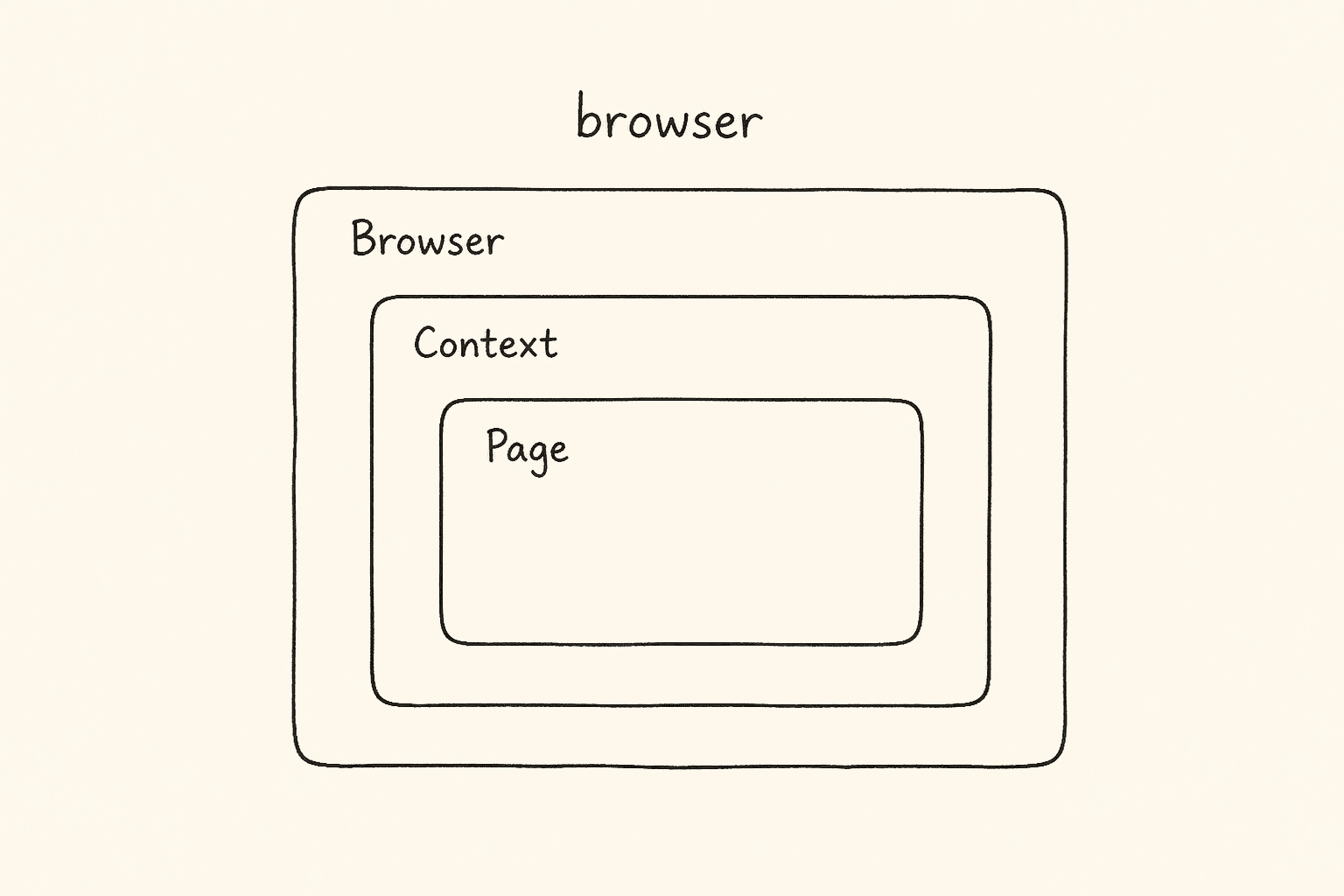
- Draw Browser, Context, and Page and say which object is expensive, which is a user, and which is a tab.
- Tell a reviewer that Labs 212-214 are library scripts, not Playwright Test specs.
- Open two contexts for two users, and two pages in one context for two tabs that share cookies.
- Use the page fixture for isolation, the browser fixture when you need a second context, newContext options for a French desktop and an iPhone-shaped session, and test.use when a whole describe should share those options.
That is the skill. Not the syntax. The skill is knowing who created your page, whose cookies it carries, and what you just hid from the rest of the suite with test.only.
The labs we are actually using
Clone the fundamentals repo and stay on main. That is where labs 209 through 218 live.
git clone https://github.com/PramodDutta/LearningPlaywrightFundamentals.git
cd LearningPlaywrightFundamentals
git checkout main
Root package.json on main has @playwright/test at ^1.59.1, plus @types/node, allure-playwright, dotenv, and @faker-js/faker. Root playwright.config.ts is Chromium only (Firefox, WebKit, and mobile projects are commented), headless false, viewport 1920×1080, trace / video / screenshot all on, forbidOnly gated on the CI environment variable. You need Node LTS.
Those two Quick Start commands in the Fundamentals root README are the lockfile install and the browser binary download. I am not inventing a third installer. We will run individual labs, not the whole tree, because Lab 210 currently focuses one test.
The batch repo is the companion from Days 1-9. chapter_23_Playwright_Fundamentals/package.json also pins @playwright/test ^1.59.1. Its tests/example.spec.ts is the two-test scaffold I quote after setup. I fetched that file. I did not invent a chapter 23 config body — that fetch timed out, so I will not guess. The Fundamentals config is the one I quote.
Module 01 — Basics (tests/01_Basics/)
- Lab209.spec.ts
- Lab210_Test_Annoations.spec.ts (Annoations on GitHub)
- Util.ts — present and empty (0 bytes). I will not invent a helper for it.
- README.md
Module 02 — First tests (tests/02_first_tests/)
- 211_First_Running_Test.spec.ts
- 212_Browser_Context_Pages.spec.ts
- 213_Multile_Context.spec.ts (Multile on GitHub)
- 214_Multiple_Pages.spec.ts
- 215_TEST_PW.spec.ts
- 216_Manual_Context.spec.ts
- 217_Manual_Context_Options.spec.ts
- 218_Context_Reuse.spec.ts
- README.md
The module README run command writes tests/02_First_tests with a capital F. The folder on main is tests/02_first_tests. I stay with the path GitHub actually serves. If a command 404s, check the casing before you invent a second folder.
Companion from the batch repo
- chapter_23_Playwright_Fundamentals/tests/example.spec.ts
Those are the files. Folder READMEs are indexes, not extra labs. I am not treating the Fundamentals root README mermaid charts as a lab. If a notebook mentioned Lab210_Test_Annotations.spec.ts or 213_Multiple_Context.spec.ts, that name is not on main. We stay with what GitHub actually serves.
Why the page fixture comes before locators
Playwright is a Node library plus a test runner. Your spec is TypeScript that Node executes. test(), expect(), page.goto(), a custom context, a test.use() block — all of that sits on top of the same engine you met in Days 1-9. I have interviewed enough SDETs to see the pattern. Someone can write page.locator(‘#username’).fill(‘admin’) and still cannot explain who created page. They treat two page fixtures as two tabs of the same user. They treat two tabs as two users. They copy a headed chromium.launch into a spec and wonder why the HTML report is empty. They leave test.only in a file named Lab210_Test_Annoations.spec.ts and break a pipeline they have never read. Day 10 is the fix. You set up the runner. You run the first title assert. You feel every annotation, including the dangerous one. You launch a browser by hand so you can see the three layers. Then you go back to the fixture and notice Playwright was doing that work for you.
Tomorrow (Day 11) we go to tests/03_Locators_Commands — goto options, CSS, XPath, getByRole. Today we only take the files in modules 01 and 02. A locator without a page is a string. A page without a context is a leak.
How this repo actually sets Playwright up
I do this check in every new batch before anyone opens an editor. Install the current Node LTS. After install on Windows, close and reopen the terminal. Git Bash or PowerShell both work. On a Mac with Apple Silicon you want arm64. On Linux, use a current LTS. Then clone Fundamentals, stay on main, and run the two commands the root README prints. The lockfile install plus the browser download. Faker, Allure, and dotenv are for later days. Today you need @playwright/test at ^1.59.1. The extra browser binaries sit on disk until a later lab uncomments them.
The scripts block is small and honest: go runs go.sh, test runs the runner, test:headed adds –headed, test:ui opens UI mode, report opens the HTML report, report:tta opens the custom TTA report. go.sh is a stage-commit-push helper. We do not run it today. We are writing a draft post, not pushing a repo.
What playwright.config.ts is already doing for you
I fetched the Fundamentals playwright.config.ts from raw GitHub. I am quoting the decisions that change how today’s labs behave. I am not inventing a second config. testDir is ./ and testMatch includes tests/**/*.spec.ts plus TTACartProject/tests/**/*.spec.ts. fullyParallel is true. forbidOnly is !!process.env.CI. retries are 2 on CI and 0 locally. workers are 1 on CI. The reporter array is HTML plus ./utils/CustomTTAReporter.ts. Allure is in a comment. use.trace, use.video, and use.screenshot are all on. headless is false. viewport is 1920×1080. projects is a single chromium project that spreads Desktop Chrome then overrides viewport to Full HD. Firefox, WebKit, Pixel 5, iPhone 12, Edge, and branded Chrome are commented.
Read that the way an SDET reads a contract. Labs 209, 210, 211, 215-218 match testMatch. Labs 212-214 also end in .spec.ts. That naming is the classroom trap. A .spec.ts file that never calls test() is still on disk as a lesson file. Whether the runner reports it as an empty spec or a loadable module depends on what the file exports. I will not invent a runner transcript I did not execute. I will say what the source does: 212-214 call run(), multiUserTest(), and multiTabTest(). They do not call test().
forbidOnly: !!process.env.CI is the line that makes Lab 210 a CI incident. Locally, CI is usually unset, so forbidOnly is false, and test.only is allowed. On GitHub Actions, CI is set, forbidOnly is true, and a focused test fails the build on purpose. The comment above that line in the file is: Fail the build on CI if you accidentally left test.only in the source code. That comment is about Lab 210 whether or not the author was thinking of it.
headless false means you will see a window. The module 02 README says the same thing for the library scripts that launch Chromium headed. Do not be surprised. This repo is a classroom. Watching the browser is the point. trace, video, and screenshot are on for every test. That is expensive. It is also why a failed first test is teachable. Day 20 of this series is CLI, codegen, trace, UI mode. Today you only need to know the files are being written. projects is Chromium. Firefox and WebKit are comments. Lab 210 still writes test.skip(browserName === ‘firefox’, …). On this config that condition is never true, because Firefox is not a project. The annotation is still the right shape. I will not pretend we ran it on Firefox. dotenv is commented at the top of the config. Allure is commented in the reporter array. I do not enable them today. Those are later labs.
The batch scaffold — chapter_23 example.spec.ts
Day 9 promised this file. Here it is, fetched from LearningPlaywrightBatch main, path chapter_23_Playwright_Fundamentals/tests/example.spec.ts. This is the spec a blank Playwright init would have given you. I use it as the hello world. I do not treat it as a numbered fundamentals lab.
import { test, expect } from '@playwright/test';

test('has title', async ({ page }) => {
  await page.goto('https://playwright.dev/');
  await expect(page).toHaveTitle(/Playwright/);
});
test('get started link', async ({ page }) => {
await page.goto('https://playwright.dev/');
await page.getByRole('link', { name: 'Get started' }).click();
await expect(page.getByRole('heading', { name: 'Installation' })).toBeVisible();
});Three things I want you to see before Lab 209. One: import { test, expect } from ‘@playwright/test’. Not from playwright. That import is the difference between a spec and a library script. Remember it when we open Lab 212. Two: async ({ page }). The curly braces are destructuring. Playwright created a browser, a context, and a page, then handed you the page. You did not call chromium.launch. You did not call newContext. You did not call newPage. You also did not close anything. The runner closes the context when the test ends. Isolation is the default.
Three: the second test already uses getByRole. That is a Day 11 locator. I am not teaching the locator family today. I am pointing at the file that exists so you see the scaffold is one day ahead of Lab 209. Lab 209 stays on goto and toHaveTitle. That is the correct classroom order: title first, role second. toHaveTitle(/Playwright/) is a regex. toHaveTitle(“Login – VWO”) in Lab 209 is an exact string. Both are page assertions. Regex is contains this. String is equals this. If VWO adds a suffix to the title, 209 fails and the regex version of the same idea would not. I keep the exact string because that is the file.
Lab 209 — the first real title test
tests/01_Basics/Lab209.spec.ts is the first numbered spec in the fundamentals repo. The module README says it navigates to https://app.vwo.com and verifies the login page title. The file:
import { test, expect } from '@playwright/test';

test('Verify the title of the app.vwo.com', async ({ page }) => {
  await page.goto("https://app.vwo.com");
  await expect(page).toHaveTitle("Login - VWO");
});
That is the whole lab. I will not add a locator to make it look senior. Run it from the Fundamentals root: npx playwright test tests/01_Basics/Lab209.spec.ts What happens, in order, without you writing it: the runner reads playwright.config.ts; starts a Chromium project at 1920×1080, headed; creates one browser context with fresh cookies; creates one page; calls your function with { page }; page.goto issues the navigation; expect(page).toHaveTitle(“Login – VWO”) auto-retries until the title matches or the expect timeout fires; the context is closed. The next test, if there were one, would not see this session. If the title is wrong, you do not get a silent pass. You get a failed expect, a screenshot, a video, and a trace, because this config records all three on every test. Open the HTML report after the run. I am not inventing a trace walkthrough today.
Why VWO and not playwright.dev? Because this is a Testing Academy classroom. app.vwo.com is the login we will type into for the rest of the fundamentals track. Lab 209 only asks for the title so the first green tick is one assertion. Lab 211 adds an image. Later labs add username, password, and error text. We do not jump. The test name is ‘Verify the title of the app.vwo.com’. That is a requirement sentence, not a file name. Keep names as sentences. When the HTML report lists fifty tests, Verify the title is readable. test1 is not. page is typed. Day 9 is why page.goto(123) is a red squiggle. You earned that error. Do not switch the file to JavaScript to make the squiggle go away.
Lab 210 — annotations, and the live test.only I will not hide
Filename on main: Lab210_Test_Annoations.spec.ts. The word is Annoations. I am not renaming it in this post. The module README is explicit: it currently includes test.only, so running this file focuses only that test. The inventory for this series said the same thing. The file I fetched matches both.
import { test, expect } from '@playwright/test';

test('has title', async ({ page }) => {
  await page.goto('https://playwright.dev/');
  await expect(page).toHaveTitle(/Playwright/);
});

test.skip('skipped test', async ({ page }) => {
  // This test is skipped
});
test.only('focused test', async ({ page }) => {
  // Only this test runs
});
test.fail('expected to fail', async ({ page }) => {
// Test is expected to fail
});
test.slow('slow test', async ({ page }) => {
// Has extended timeout
});
test('conditional', async ({ page, browserName }) => {
test.skip(browserName === 'firefox', 'Not supported in Firefox');
});Read it as a catalogue, then as a landmine.
What each annotation means in this file
test(‘has title’, …) is a normal test. Same shape as chapter 23. It would navigate to playwright.dev and assert the title. It does not run while test.only is in the same file.
test.skip(‘skipped test’, …) is an unconditional skip. The body is empty. Playwright lists it as skipped. Use this when a test is not relevant in this run — a feature you turned off, a vendor page you do not own this sprint. The reason belongs in the title or a comment. This lab leaves the body empty on purpose. It is a shape, not a product test. test.only(‘focused test’, …) is the focused test. The body is empty. It is still the only test that runs in this file. That is the danger. An empty focused test is a green tick that hid five other tests.
test.fail(‘expected to fail’, …) marks the test as expected to fail. If the body throws or an expect fails, the runner treats that as a pass of the annotation. If the body unexpectedly passes, the runner fails you — you said it would fail and it did not. This is the TDD red phase, or a contract that is not shipped. The body here is empty, so I will not invent a pass/fail transcript I did not run. test.slow(‘slow test’, …) triples the default timeout for that test. Use it for a heavy dashboard, not for a title check. The body is empty. The annotation is the lesson.
test(‘conditional’, …) takes browserName from the fixture set. Inside the test it calls test.skip(browserName === ‘firefox’, ‘Not supported in Firefox’). That is a conditional skip. The condition is evaluated at runtime. On this repo’s config, browserName is chromium, so this test is not skipped. If someone uncomments the Firefox project later, this test skips on that project and still runs on Chromium. That is the right use.
Why a live test.only is dangerous
I have reviewed this failure more times than I want to count. You are debugging Lab 210. You add test.only so the runner does not waste thirty seconds on the others. You get your answer. You commit. You push. Your teammate pulls. They run the 01_Basics folder. They see one test. They think the module is one test. They do not notice has title, skipped test, expected to fail, slow test, and conditional never ran. Worse: they run the whole tests/ tree. Playwright focuses every file that contains .only. The rest of the suite goes dark. You fixed a title and deleted coverage. Worse again: CI has forbidOnly gated on the CI environment variable. The pipeline fails with a focused-test error. That is the kind outcome. The unkind outcome is a pipeline that does not set CI the way Playwright expects, forbidOnly stays false, and the focused test is the only test CI ever runs. Green build. Empty net. The file on main still has test.only. I am not editing GitHub from this post. I am teaching you to see it. When you clone this repo for learning, run Lab 210 knowing it will focus. When you copy the annotation catalogue into your own suite, delete .only before the commit. The config comment is there because someone, at some point, did not.
test.only is a local debug switch. It is not a way to select a test in source control. Selection belongs on the command line: a path, a -g grep, a project name. The command line dies with the terminal. The .only lives in git.
I will say this once more, because the watch-out is the point of Lab 210: this file on main has a live test.only. That is dangerous. Do not copy that line into a shared branch and call it a demo.
Util.ts is empty and I will not invent a helper
tests/01_Basics/Util.ts is in the tree. I fetched it. The body is empty. The module README calls it an empty utility placeholder for future basics-module helpers. I skip the body. I do not write a login() helper and claim it is Util.ts. Day 8 and Day 9 already gave you a Page Object shape. Fundamentals will give you LoginPage.ts in module 20. Today there is no helper file to quote. If your editor shows Util.ts as a tab, close it. It will not teach you context.
Lab 211 — first running test, still a fixture
tests/02_first_tests/211_First_Running_Test.spec.ts is Lab 209 plus one locator. The file’s own comments list the four classroom bullets: test structure, basic assertions, navigation, element interaction.
import { test, expect } from '@playwright/test';

test('Verify our first TC', async ({ page }) => {
  await page.goto('https://app.vwo.com');
  await expect(page).toHaveTitle('Login - VWO');
  const img_vwo = page.locator('img');
  await expect(img_vwo).toBeVisible();
});
page.locator(‘img’) is a CSS locator for an img. That is already a Day 11 conversation. I mention it only because the file has it. toBeVisible() is a locator assertion. It auto-retries. If VWO’s login hero image is slow, the expect waits. If there are multiple img nodes and the action is strict, you can get a strict-mode error. I will not invent a .first() that is not in this file. Day 11 has first / nth / last in Lab 225. The title string matches Lab 209: Login – VWO. Same app. Same assertion. The new line is the image. That is how a classroom grows a spec — one expect at a time, not a rewrite. Run it with the path that exists: tests/02_first_tests/211_First_Running_Test.spec.ts. The module README writes tests/02_First_tests in the example command. The directory is 02_first_tests. Use the path that exists.
You still have not launched a browser yourself. Playwright still created browser, context, and page. Labs 212-214 exist to show you that stack without the fixture. Then 215-218 put the fixture back, this time with you holding the browser object.
Browser, context, and page — the model before the scripts
The Fundamentals root README calls this the golden rule: one Browser, many Contexts, many Pages. I am restating it in classroom words, then proving it with the files.
Browser is the process. chromium.launch() is the expensive call. You launch it once per worker, or you let the runner launch it. Cookies do not live here. Users do not live here. The engine lives here.
Context is the user. browser.newContext() is a fresh profile: cookies, localStorage, sessionStorage, viewport, locale, timezone, geolocation, permissions. Two contexts on one browser are two people on two incognito windows that happen to share a Chrome binary. Admin does not see Viewer’s cookie. Page is the tab. context.newPage() is cheap. Two pages in one context share cookies. Tab 2 of a logged-in admin is still admin. That is why Lab 214 can open #login and #dashboard on one context and talk about shared cookies. Whether those two VWO hashes actually show a dashboard without a login is a product question. The isolation model is the lesson.
| Object | Cost | Isolation | Use |
|---|---|---|---|
| Browser | Heavy | None | Launch once |
| Context | Cheap | Full session | One per user or per test |
| Page | Cheap | Shares the context | Tabs of that user |
The page fixture hides all three. That is a gift and a trap. The gift: every test starts clean. The trap: you never see the close order, so you never learn it. Labs 212-214 exist so you see the close order. Then we tell you they are not tests.
Lab 212 — library script: launch, context, page, reverse cleanup
tests/02_first_tests/212_Browser_Context_Pages.spec.ts is the first file I will not call a Playwright Test. It does not import @playwright/test. It imports the library: chromium, Browser, BrowserContext, Page from playwright.
import { chromium, Browser, BrowserContext, Page } from 'playwright';

async function run() {
  let browser: Browser = await chromium.launch({ headless: false });
  let context: BrowserContext = await browser.newContext();
  let page: Page = await context.newPage();
  await page.goto("https://example.com");
  console.log("Title:", await page.title());
  await page.close();
  await context.close();
  await browser.close();
}
run();
This is a library-style script, not a Playwright Test. There is no test(). There is no expect(). There is no fixture. run() is invoked at load time. A headed Chromium window opens, hits example.com, prints the title, and closes in reverse: page, context, browser. Why reverse? Because a page belongs to a context, and a context belongs to a browser. Close from the leaf up. The fixture runner does this for you. Here you see the order.
Why example.com and not VWO? Because this lab is the hierarchy, not the product. page.title() is the library read. expect(page).toHaveTitle is the test assertion. Different imports, different jobs. I will not invent an HTML report row for a file that never called test().
Lab 213 — library script: two contexts, two users
Filename on main: 213_Multile_Context.spec.ts. Multile. I keep it.
import { chromium } from "playwright";

async function multiUserTest() {
  let browser = await chromium.launch({ headless: false });
  let adminContext = await browser.newContext();
  let adminPage = await adminContext.newPage();
  await adminPage.goto("https://app.vwo.com/login");
  console.log("Admin: on login page");
  let viewerContext = await browser.newContext();
  let viewerPage = await viewerContext.newPage();
  await viewerPage.goto("https://app.vwo.com/login");
  console.log("Viewer: on login page");
  await adminContext.close();
  await viewerContext.close();
  await browser.close();
}
multiUserTest();
This is also a library-style script, not a Playwright Test. Same import. Same async function. Same call at the bottom. Same headed launch. The new idea is the second newContext(). Admin and Viewer are two sessions. They do not share cookies. If Admin logged in — this file does not log in, it only goes to /login — Viewer would still be anonymous. That is the whole point of a context. One browser. Two contexts. Two pages. Cleanup closes both contexts, then the browser. Closing a context closes its pages. The function is named multiUserTest. The word Test is in the name. The runner still does not see a test(). Naming is not an API.
import { chromium } from "playwright";
async function multiTabTest() {
  let browser = await chromium.launch({ headless: false });
  let context = await browser.newContext();
  let page1 = await context.newPage();
  await page1.goto("https://app.vwo.com/#login");
  console.log("Tab 1: Dashboard");
  let page2 = await context.newPage();
  await page2.goto("https://app.vwo.com/#dashboard");
  console.log("Tab 2: Settings");
}
multiTabTest();
Third library-style script. Not a Playwright Test. I am repeating the sentence because the watch-out asked me not to hide it. One context. Two pages. The comment on page2 is the lesson: same context, shares cookies with Tab 1. I will not hide the classroom leftovers. The console line for Tab 1 says Tab 1: Dashboard after a goto to /#login. The console line for Tab 2 says Tab 2: Settings after a goto to /#dashboard. Those strings are labels in console.log. They are not assertions. There is no page.close, no context.close, no browser.close. Lab 212 taught reverse cleanup. Lab 214 does not clean up. I do not invent a cleanup block and pretend it is in 214.
| File | Import | Users | Tabs | Cleanup on main |
|---|---|---|---|---|
| 212 | playwright | 1 context | 1 page | page, context, browser |
| 213 | playwright | 2 contexts | 1 page each | both contexts, browser |
| 214 | playwright | 1 context | 2 pages | none in the file |
None of the three call test() or expect().
Lab 215 — the fixture is isolation
Now we are back in Playwright Test.
import { test, expect } from "@playwright/test";

test("login test", async ({ page }) => {
  await page.goto("https://app.vwo.com/login");
  await page.fill("#username", "admin");
  await page.fill("#password", "pass123");
  await page.click("#login-btn");
  await expect(page).toHaveURL("/dashboard");
});
test("another test", async ({ page }) => {
// This gets a FRESH page in a FRESH context
await page.goto("https://app.com/signup");
await expect(page).toHaveTitle("Sign Up");
});The comments in the file are the lesson. Test 1’s page is not test 2’s page. Test 2 does not see #username filled. Playwright created a new context for test 2. That is the default that Labs 212-214 made expensive to write by hand. page.fill and page.click are the older convenience API. Day 11 will prefer locators. I stay with the file. I will not hide what this file actually targets. fill(“#username”, “admin”) and click(“#login-btn”) are classroom selectors and classroom credentials. I am not asserting those ids exist on production VWO today. Test 2 goes to https://app.com/signup. That is a placeholder host. I do not replace it with a real signup page and claim the file changed. Cookie reuse is storageState in a later module. Do not reach for a shared context today just because you saw Lab 218’s title Context_Reuse. 218 reuses settings, not cookies.
Lab 216 — browser fixture, two contexts, now it is a test
import { test, expect } from "@playwright/test";

test("two users interact", async ({ browser }) => {
  let adminContext = await browser.newContext();
  let adminPage = await adminContext.newPage();
  let guestContext = await browser.newContext();
  let guestPage = await guestContext.newPage();
  await adminPage.goto("https://app.vwo.com/#login");
  await guestPage.goto("https://app.vwo.com/#dashboard/home");
  await adminContext.close();
  await guestContext.close();
});
This is Lab 213 rewritten as Playwright Test. The import is @playwright/test. The fixture is { browser }, not { page }. When you ask for browser, Playwright gives you the launched browser and does not hand you a default page. You create what you need. You close what you create. You do not close the browser — the runner owns that. expect is imported and unused. I say that. I do not add an expect and pretend it is in the lab. Close both contexts. If you leak a context in a long file, you leak a profile.
Lab 217 — context options, desktop France and an iPhone-shaped session
test('context with options', async ({ browser }) => {
  const context = await browser.newContext({
    viewport: { width: 1920, height: 1080 },
    locale: 'fr-FR',
    timezoneId: 'Europe/Paris',
    geolocation: { latitude: 48.8566, longitude: 2.3522 },
    permissions: ['geolocation'],
  });
  const page = await context.newPage();
  await page.goto('https://app.vwo.com/#login');
  await context.close();
});
test('mobile context', async ({ browser }) => {
const iPhone = {
viewport: { width: 375, height: 667 },
userAgent: 'Mozilla/5.0 (iPhone; CPU iPhone OS 14_0 like Mac OS X)',
deviceScaleFactor: 2,
isMobile: true,
hasTouch: true,
};
const context = await browser.newContext(iPhone);
const page = await context.newPage();
await page.goto("https://app.vwo.com/#login");
await context.close();
});expect is imported and unused again. The lesson is the argument to newContext. First test: a Full HD French desktop in Paris, with geolocation permission granted. You did not click a browser prompt. You granted it in the context. Second test: an object named iPhone with a 375×667 viewport. This is not devices[‘iPhone 12’] from @playwright/test. Those device descriptors are commented in playwright.config.ts. This lab builds a similar shape by hand. I will not replace the object with devices[‘iPhone 12’] and claim the file did that.
import { test } from '@playwright/test';

test.describe('Shared context tests', () => {
  test.use({
    viewport: { width: 1280, height: 720 },
    locale: 'en-US',
  });
  test('test 1', async ({ page }) => {
    await page.goto('https://app.vwo.com/#login');
  });
  test('test 2', async ({ page }) => {
    await page.goto('https://app.vwo.com/#login');
  });
});
The file comment is Reusing Context Across Tests. Read that carefully. test.use() applies options to the tests in this describe. Both tests get a 1280×720 en-US context. Both tests still get a fresh context. Test 2 does not inherit test 1’s cookies. The reused thing is the settings object, not the session. I will not let the filename 218_Context_Reuse.spec.ts convince you to share storage. Session reuse is storageState in module 04, Day 12 of this series. Today, reuse means do not copy viewport and locale into every newContext call.
How the two modules fit together
The 01 README introduces the page fixture, toHaveTitle, and annotations. The 02 README introduces the browser model and shows both fixtures and manual control. That pairing is the Day 10 syllabus.
| File | Runner | Walk away with |
|---|---|---|
| 209 | Playwright Test | First title assert on VWO |
| 210 | Playwright Test | Annotation catalogue, live test.only |
| Util.ts | nothing | Empty placeholder |
| 211 | Playwright Test | Title plus img visible |
| 212 | library script | Three layers, reverse cleanup |
| 213 | library script | Two users, two contexts |
| 214 | library script | Two tabs, leftover logs, no cleanup |
| 215 | Playwright Test | Fixture isolation, classroom login |
| 216 | Playwright Test | { browser } plus two contexts |
| 217 | Playwright Test | Context options, hand-built iPhone object |
| 218 | Playwright Test | test.use for settings, not cookies |
I am not printing a runner command for 212-214 as if they were specs you grade in the HTML report. If you want to see them move, open them and read. The README still lists them as lesson files. The source still does not call test(). If you run the whole tests/01_Basics folder, Lab 210’s .only focuses that file. Do not use the folder command as your I ran everything proof while 210 is in this state.
Connecting Day 9 types to today’s objects
You already have the words. Lab 212 just imported them. Page is the page fixture. Day 9 said a POM constructor will take page: Page. We still do not invent that constructor file. Module 20 has LoginPage.ts. That is Day 16. BrowserContext is what browser.newContext() returns. Browser is what { browser } is.
Recap — what Day 10 actually installed in your head
- Setup is the two Quick Start commands on LearningPlaywrightFundamentals main. @playwright/test is ^1.59.1.
- playwright.config.ts is headed Chromium, Full HD, traces/video/screenshots on, forbidOnly on CI. Firefox projects are comments.
- chapter_23 example.spec.ts is the batch scaffold: title regex plus a getByRole sneak peek. Useful. Not a numbered 209-series lab.
- Lab 209 is the first VWO title test. page fixture. Exact title Login – VWO.
- Lab 210 is skip / only / fail / slow / conditional skip. Filename Annoations. Live test.only. Dangerous. CI forbidOnly exists because of this class of mistake.
- Util.ts is 0 bytes. No helper invented.
- Lab 211 is 209 plus page.locator(‘img’) and toBeVisible().
- Labs 212-214 import playwright, not @playwright/test. Library-style scripts, not Playwright Test. 212 closes in reverse. 213 is two users. 214 is two tabs, leftover console labels, no cleanup. Filenames Multile stay.
- Lab 215 is fixture isolation. Classroom VWO login. Placeholder app.com/signup.
- Lab 216 is { browser } and two contexts as a real test.
- Lab 217 is context options and a hand-built iPhone-shaped object, not devices[‘iPhone 12’].
- Lab 218 is test.use({ viewport, locale }). Settings reuse. Not cookie reuse.
- Module README path 02_First_tests does not match folder 02_first_tests. Use the disk name.
Tomorrow we stop talking about who owns the page and start talking about how to find a node on it.
FAQ
How do I set up Playwright for this series?
Clone LearningPlaywrightFundamentals, check out main, and follow the two Quick Start commands in the root README. Node LTS. package.json pins @playwright/test ^1.59.1. The batch folder chapter_23_Playwright_Fundamentals is a smaller companion package with the same runner version.
What is the difference between the page fixture and chromium.launch?
The page fixture means the runner created a browser, a context, and a page, then closes the context after the test. chromium.launch is the library API you call yourself. Labs 212-214 use the library API and are not Playwright Test specs.
Why is test.only in Lab 210 dangerous?
Because the file on main currently has test.only(‘focused test’, …). Running that file focuses the empty test and skips the rest of the catalogue in that file. Running the folder can hide Lab 209 from a careless command. On CI, forbidOnly is enabled when the CI environment variable is set, so a focused test should fail the build. If it does not, you shipped a suite that only ran one test. test.only is a local debug switch. It is not a commit.
Are Labs 212, 213, and 214 Playwright tests?
No. They are library-style scripts. They import chromium from playwright, define run / multiUserTest / multiTabTest, and invoke the function. No test(), no expect(), no fixture teardown except what they write.
What is a Playwright browser context?
A context is an isolated profile on a browser: cookies, storage, viewport, locale, timezone, geolocation, permissions. One browser can host many contexts. Two contexts are two users. Two pages in one context are two tabs of one user. Labs 212-218 exist to make that sentence physical.
When should I use two contexts versus two pages?
Two contexts when the users must not share a session — admin and viewer, Lab 213 and Lab 216. Two pages when the tabs must share a session — login tab and dashboard tab, Lab 214. If you use two { page } fixtures in two tests, you already have two contexts.
No. Lab 218’s test.use({ viewport, locale }) shares settings. Each test still gets a fresh context. Cookie reuse is storageState in a later module.
Why does this repo run headed with traces on?
Because playwright.config.ts sets headless false and trace / video / screenshot to on. It is a classroom config. You watch the window. You keep artifacts. It is slower than a headless CI default. The same file sets retries 2 and workers 1 only when CI is set.
What is Day 11 of this series?
Locators. tests/03_Locators_Commands in the same Fundamentals repo: goto waitUntil options, referer, CSS, XPath, getByRole, first / nth / last, pressSequentially, cookies. The getByRole line in chapter 23’s example spec is the teaser, not the lesson.
<script type=”application/ld+json”> { “@context”: “https://schema.org”, “@type”: “FAQPage”, “mainEntity”: [ { “@type”: “Question”, “name”: “Why is test.only in Lab 210 dangerous?”, “acceptedAnswer”: { “@type”: “Answer”, “text”: “Lab210_Test_Annoations.spec.ts on main contains a live test.only. Running that file focuses the empty test and skips the other annotations. On CI, forbidOnly should fail the build. Do not commit test.only.” } }, { “@type”: “Question”, “name”: “Are Labs 212, 213, and 214 Playwright tests?”, “acceptedAnswer”: { “@type”: “Answer”, “text”: “No. They are library-style scripts that import chromium from playwright and call run(), multiUserTest(), or multiTabTest(). They do not use test() or expect().” } }, { “@type”: “Question”, “name”: “What is a Playwright browser context?”, “acceptedAnswer”: { “@type”: “Answer”, “text”: “A browser context is an isolated session — cookies, storage, viewport, locale, timezone, geolocation. Two contexts are two users. Two pages in one context are two tabs that share cookies.” } }, { “@type”: “Question”, “name”: “What is next after Day 10 of the JS to Playwright Framework series?”, “acceptedAnswer”: { “@type”: “Answer”, “text”: “Day 11 is locators from tests/03_Locators_Commands: goto options, CSS, XPath, getByRole, first/nth/last, pressSequentially, and cookies.” } } ] } </script>
Tomorrow — Day 11: locators
A page without a locator is a title check. Tomorrow we find a node.
Day 11 of this series takes tests/03_Locators_Commands from the same LearningPlaywrightFundamentals repo — goto waitUntil, referer headers, CSS on VWO, XPath, getByRole, first / nth / last, pressSequentially, and cookies. You will stop writing page.fill(‘#username’) as a mystery string and start choosing a locator family on purpose. The Browser to Context to Page model from today does not change. The click finally has an address.
Series hub (bookmark this): JavaScript to TypeScript to Playwright Advanced Framework — 21-Day Guide.
Master Playwright end to end
If you want these labs as a live classroom — with VWO login, a typed page object, Restful Booker generics, and the framework we assemble on Day 21 — join Playwright Automation Mastery at The Testing Academy. Lifetime access. Real projects. A job-ready suite, not a folder of chromium.launch scripts you forgot to close.
*This is Day 10 of 21. Draft only. Not published.*